Marketing
How AI Actually Builds Slide Layouts (And Why Branding Breaks)
Wondering why your AI-generated slides look off-brand? Here's exactly how AI builds slide layouts under the hood, and why branding breaks without the right setup.


Decktopus Content Team
You asked AI to build your presentation. It came back with clean structure, logical flow, and decent visuals. But something’s off. The font isn’t right. The spacing feels generic. The colors are close but not yours. It looks professional, just not your professional.
This isn’t a fluke. It’s how most AI slide systems work by default. And once you understand what’s actually happening under the hood, the branding issues start making a lot more sense - and they become much easier to fix.
Already frustrated with off-brand slides? See how Decktopus makes brand compliance automatic from slide one.
What Actually Happens When AI Builds a Slide
Most people assume AI “designs” slides the way a human designer would: starting from your brand, building around it, making intentional visual decisions. That’s not what’s happening.
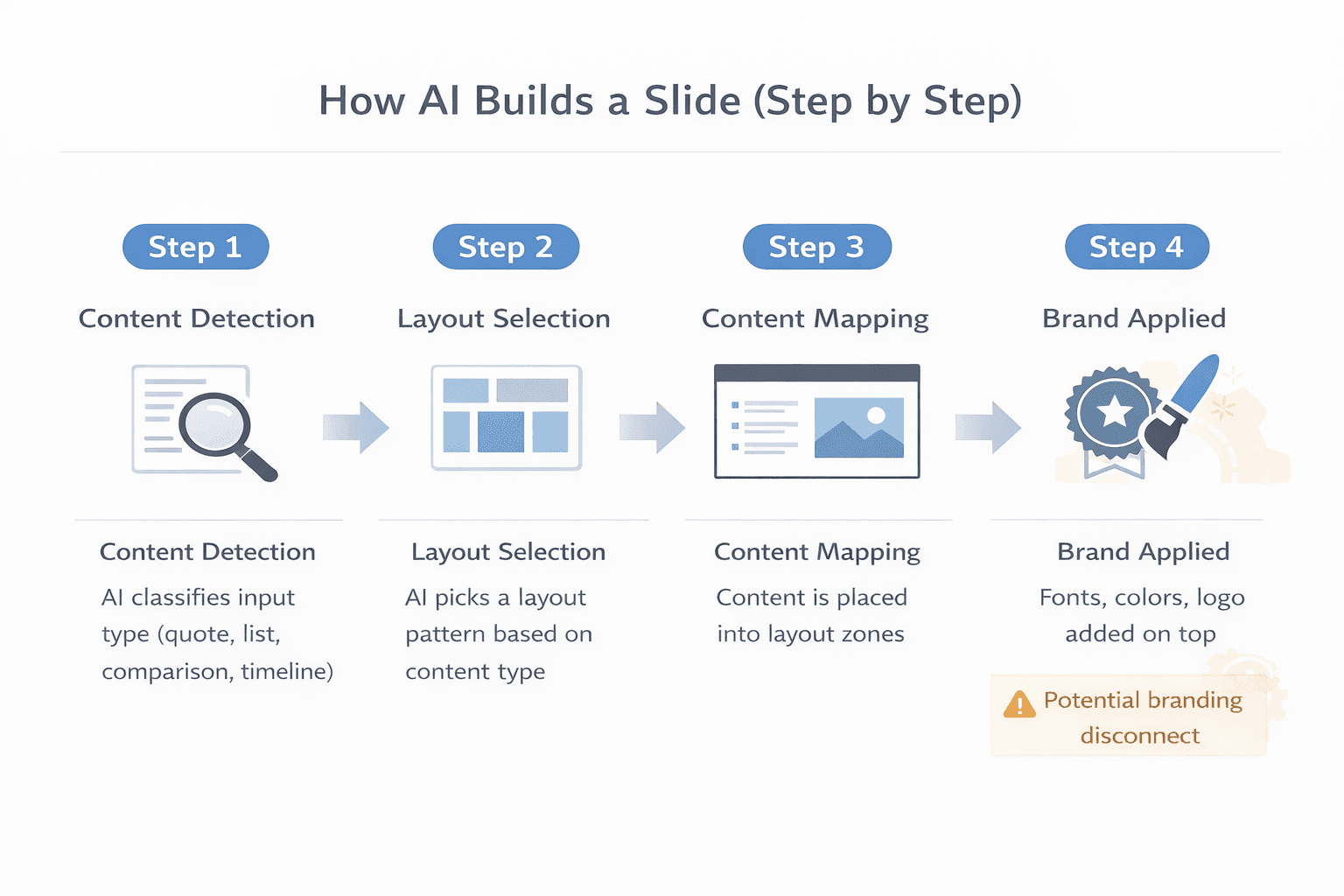
When you type a prompt into an AI presentation tool, the system works through a sequence that most users never see.
First, it classifies your content. Is this a quote slide? A feature list? A comparison? A timeline? The AI detects the content type before it touches any design decision. This classification step determines everything that comes next.
Second, it selects a layout from a pre-built library based on that content type. Left-aligned text with an image for a feature list. Two columns for a comparison. Centered layout for a quote. The AI picks the pattern that matches the content category.
Third, it maps your content into that layout’s fixed zones. Then, if a brand kit is uploaded, it applies your fonts, colors, and logo on top of the layout that’s already been built.
That last part is where the problem lives. The “design” is really a content-to-template assignment with brand applied afterward. The AI is not creating visual hierarchy from your brand up. It’s filling slots first, then retrofitting your brand onto the result.
This matters because the template library is the foundation of every slide you get. If those templates were built around neutral, generic design principles - which most of them are - then your brand is always fighting against the defaults rather than built into them.
The Logic AI Uses to Arrange Content
AI layout logic is trained on patterns. It has processed thousands of presentations and learned which layouts tend to appear with which content types. Title slide? Big headline, subtext below, background image. Data slide? Chart on the left, annotation on the right. Team slide? Photo grid, names underneath.
This pattern recognition is genuinely useful. It explains why AI-generated slides often look visually competent out of the box. The structure is familiar because it was learned from real-world use.
But here’s where the ai slide layout problem starts: those patterns were trained on general-purpose presentations, not on your brand. The AI knows what a typical slide looks like. It does not know what an on-brand slide for your company looks like unless you’ve explicitly defined that and the tool is built to enforce it.
When you feed in your prompt, the AI optimizes for visual clarity and content fit, not brand accuracy. It picks the layout that best suits the content volume and type. Your brand guidelines are not part of that decision unless they’ve been configured into the system.
For a closer look at the difference between template selection and brand-aware generation, check out Does AI Design Slides From Scratch or Use Templates?
Ready to see what brand-aware AI slide generation actually looks like? Try Decktopus AI and set your brand kit before you generate your first deck.
Why Branding Breaks During Generation
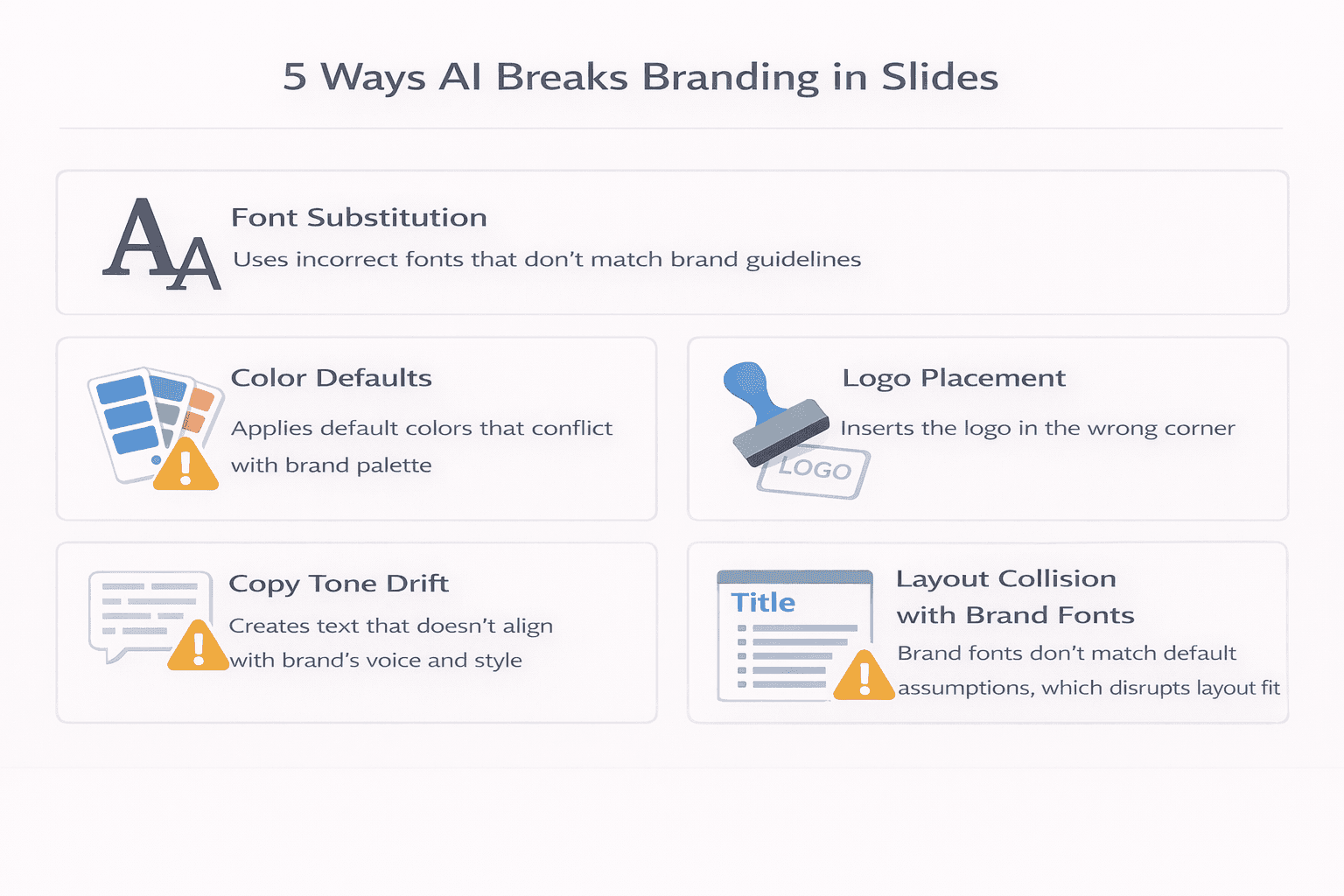
There are four specific points where ai slide design issues cause branding to break down most often.
Font substitution. If the tool doesn’t have your brand font loaded, it substitutes the closest available match. The substitution happens silently across the whole deck. Often across every deck your team ever generates, until someone notices.
Color defaults. AI applies color based on the selected theme or style, not your brand palette, unless your palette has been uploaded and locked in. If someone picks a “corporate blue” style, they get that tool’s version of blue, not your brand’s specific hex value.
Logo placement inconsistency. Most AI tools treat logo placement as a template decision, not a brand rule. If the selected layout doesn’t include a logo zone, your logo doesn’t appear. If it does include one but in the wrong position or wrong size, the AI won’t override it. Your logo ends up wherever the template puts it.
Copy tone drift. Your brand has a voice. Generic AI writes to a neutral, corporate middle. If the tool hasn’t been configured with your tone guidelines, the copy it produces will sound like it belongs to no company in particular, which is its own kind of off-brand.
Layout collision with brand fonts. This one catches people off guard. The AI builds its layout assuming generic font metrics, typically something close to Arial or a system sans-serif. When your brand font is wider, taller, or has different letter spacing, it physically breaks the layout the AI constructed. Text overflows. Line breaks fall in wrong places. Headlines that looked balanced with the default font now crowd the slide or leave awkward gaps. The AI didn’t build the layout for your font. It built it on its own.
None of these are bugs. They’re what happens when a general-purpose AI encounters brand requirements it hasn’t been given. All four are solvable, but only with the right tool setup.
What Brand-Aware AI Generation Actually Looks Like
The difference between a generic AI tool and a brand-aware one comes down to where brand rules live in the system.
In generic tools, brand application is the user’s job. You generate the deck, then you fix the fonts, swap the colors, upload the logo, rewrite the copy. The AI handled structure. Brand compliance is manual labor.
In a brand-aware system, brand rules are configured at the account level before any generation happens. Every slide the AI produces starts from those constraints automatically.
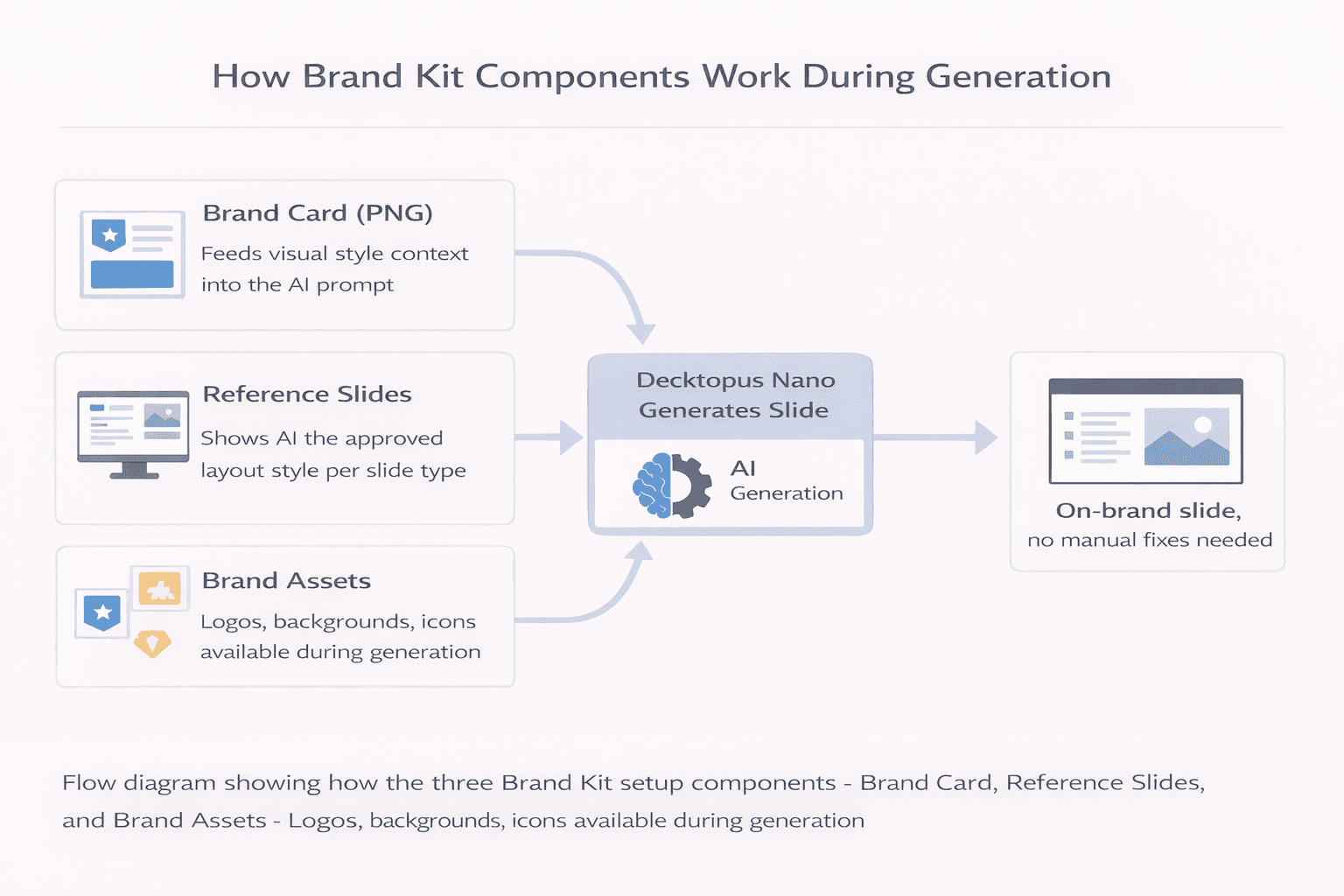
Decktopus Nano is built around this second approach. The Brand Kit system includes three components that work together to enforce visual identity at the generation level.
Brand Card: A visual reference image (PNG format) that represents the brand for AI prompts. The AI uses this during generation to understand the visual style it’s working within, not just the individual assets.
Reference Slides: Curated example slides by type - title slide, content slide, chart slide, quote slide, team slide, closing slide. These aren’t templates users pick from. They’re admin-managed examples of the AI references to match style during generation. Every output is guided by approved examples, not generic defaults.
Brand Assets: Logos, background images, and icons uploaded at the brand level. These are available in the prompt area as drag-and-drop assets and carry through across all presentations in the workspace.
When a user selects their brand style during generation, the AI applies fonts, colors, logo placement, and visual style from the Brand Kit automatically. There’s no separate compliance check because the AI only generates on-brand slides to begin with.
For teams with large existing slide libraries, Decktopus also supports uploading presentations of 100 or more slides and using AI to auto-classify them into reference categories. Users review and confirm the groupings, creating a complete brand reference library in minutes rather than hours.
This is what separates brand-aware generation from brand-after-the-fact correction. The brand travels with the prompt, not with the person.
Practical Fixes While You’re In the Weeds
If you’re not switching tools right now but still dealing with layout issues, there are three things you can do to reduce the damage.
Define your most-used slide types. The more specific the layout context you give an AI, the more reliably it builds. If you regularly create feature slides, comparison tables, team intros, and closing slides, create branded reference versions of each. When the AI has an approved example to work from rather than guessing a layout category, outputs land closer to your standard.
Lock your core layout elements. If your tool supports it, lock header placement, logo positioning, and slide margins so users can update content without breaking the underlying structure. Branding breaks most often when someone edits content and inadvertently shifts elements that weren’t anchored. Locking those elements keeps the layout intact even when copy changes.
Test your brand font against every layout type. Because AI builds layouts using generic font metrics, your brand font needs to be tested across the full range of slide types you use, not just title slides. Check content slides, data slides, and quote slides specifically. These are where font width differences cause the most visible collisions. If you spot overflow or crowding, adjust padding or font sizing at the brand kit level rather than fixing it manually per slide.
These help. But they’re workarounds. The underlying issue - branding applied after layout rather than built into it - doesn’t fully go away until the tool is doing both at the same time.
How to Tell If Your AI Tool Respects Your Brand
Before you commit to any AI presentation platform, five things worth checking.
Can you upload a full brand kit? Look for the ability to upload specific hex codes, custom fonts, logos, and reference slides - not just preset color themes. If the tool only lets you select from built-in palettes, it’s template-based, not brand-aware.
Are brand settings account-level or per deck? If you have to apply your brand every time you start a new presentation, brand consistency depends on human memory. Account-level brand settings mean the AI pulls from your kit automatically every time.
Does the tool use reference slides for generation? This is a meaningful differentiator. Tools that use your approved slide examples as AI guidance produce outputs that match your actual visual style, not just your raw assets. Assets tell the AI what colors and fonts to use. Reference slides show how they should look together.
Is logo placement consistent across slide types? Create a test deck and check where the logo lands on a title slide, a content slide, and a data slide. If the position shifts between slide types, logo placement isn’t enforced at the brand level.
What does a non-designer produce with just a prompt? Test it. If the output is on-brand without any manual adjustments, the tool is working as a brand-aware system. If it looks generic and needs corrections, brand enforcement isn’t real.
For the full picture on what strong AI presentation branding requires end to end, can AI generate presentations using your company logo, colors, and tone covers exactly that.
You can also see how teams structure this at scale in how to build a team presentation system with AI.
Want to stop manually fixing every deck? Set up your brand kit in Decktopus and let the AI generate on-brand slides from the first prompt.
Conclusion
AI slide layout logic isn’t broken. It’s designed for the general case, not your specific brand. The tool optimizes for visual competence, not brand accuracy, unless it’s been built to do both at once.
The fix isn’t manually correcting every deck after the fact. That doesn’t scale, and it still depends on people catching errors. The real fix is a system where brand rules are enforced before the first slide is ever generated - through uploaded fonts, exact color values, reference slides the AI actually uses, and logo rules that don’t vary by template.
Quick checklist before you decide on a tool:
Understand that AI detects content type, selects a layout, then retrofits your brand - it doesn’t design from your brand up
Know the five ways branding typically breaks: font substitution, color defaults, logo placement, copy tone, layout collision with brand fonts
If you’re stuck with a current tool: define slide types, lock core layout elements, test your brand font across all slide types
Choose tools where brand settings are account-level, not per deck
Look for reference slide support, not just raw asset uploads
Test with a non-designer using only a prompt before committing
FAQ
Why does AI change my brand fonts in presentations?
Most AI tools don’t have your brand fonts installed by default. When the tool encounters content, it picks from its own font library. The fix is a platform that lets you upload and lock your specific brand fonts at the account level so they’re applied automatically to every generated slide.
Can AI actually follow my brand guidelines for slide layouts?
Yes, if the tool is built for it. Generic tools use pre-built template libraries with no brand rules attached. Brand-aware tools like Decktopus Nano let you upload reference slides by type - title, content, chart, team - and the AI uses those examples to guide every generation. Layout, spacing, and style all reflect your approved standards rather than generic defaults.
What is the difference between uploading brand assets and using reference slides? Brand assets tell the AI what elements to use - your logo, your colors, your fonts. Reference slides show the AI how those elements should be arranged together on a real slide. Both are necessary for accurate brand compliance. Assets without reference slides often result in technically correct but visually mismatched outputs.
Why do AI-generated slides look generic even when the content is good?
Because the AI was trained on general-purpose presentations, not your brand. Without brand rules configured in the system, the AI defaults to patterns that look broadly professional but carry no identity. Tone, visual hierarchy, and structural preferences all need to be explicitly set up.
Can I fix AI branding issues without switching tools?
You can partially fix them manually, but it doesn’t scale. Every deck requires a review pass, which means brand compliance still depends on individual effort and attention. The more sustainable solution is moving to a platform where the brand is enforced at generation, not corrected afterward.
Related posts

How AI Voice Agents Help Sales Teams Prepare and Deliver Better Presentations
Learn how AI voice agents help sales teams turn call insights into focused slides, stronger delivery, and more confident customer presentations at every stage.
Marketing

Instagram Carousel Size & Dimensions Guide (2026)
Instagram carousel size in 2026: exact dimensions for square, portrait, and landscape, plus file limits and safe zones, verified across sources.
Marketing

LinkedIn Carousel Size, Dimensions & Format Guide 2026
LinkedIn carousel size in 2026: exact dimensions, file limits, aspect ratios, and formatting rules so your slides never get cropped.
Marketing