Templates & How-to
Does AI Design Slides From Scratch or Use Templates?
Wondering if AI creates slides from scratch or uses templates? Here's how AI actually builds slide layouts and how you can guide it to stay on brand.


Decktopus Content Team
You open a deck generated by AI and ask: “Did it actually design this? Or did it just slap content into a template?”
That question is more common than you think. And the answer isn’t as simple as yes or no.
Most people assume AI either magically invents slide layouts on the fly, or just copies content into a fixed template with no real intelligence involved. In reality, the truth sits somewhere in the middle. And understanding it is key to controlling your brand in AI-generated decks.
What People Think AI Is Doing (The Myths)
Let’s clear up the two most common assumptions.

Myth 1: AI designs like a human
People imagine AI drawing boxes, testing layout balance, and deciding where logos or headlines go, the way a designer would in Figma. That’s not how it works. No AI presentation tool designs with human judgment, creativity, or strategic intent.
Myth 2: AI just fills in templates
Others assume AI tools are fancy PowerPoints. Pick a layout, drop in your content, done. No intelligence involved.
Both assumptions lead to frustration. Either the AI feels too rigid or too random. Neither expectation is accurate.
What AI Actually Does When It Builds Slides
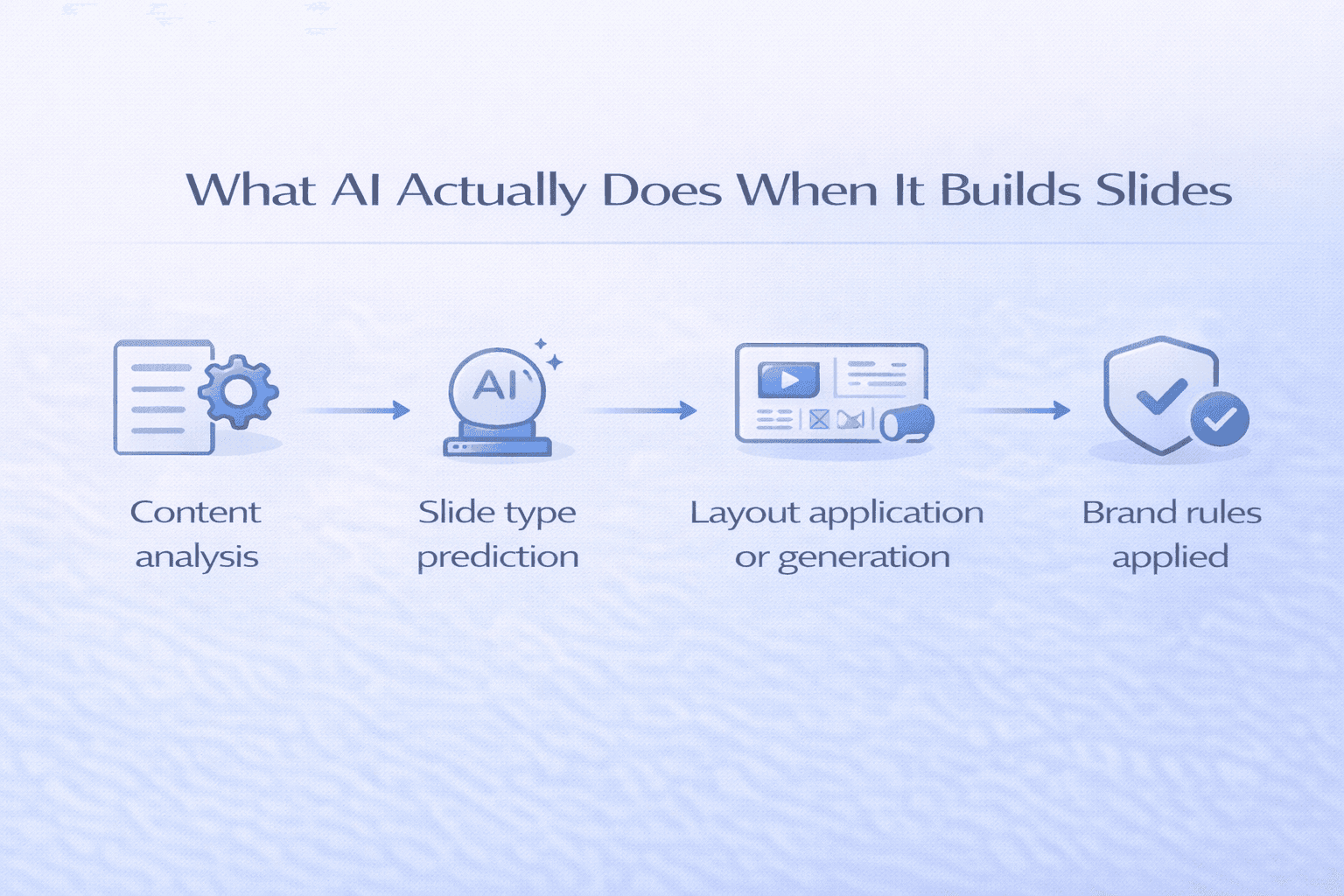
AI-driven presentation tools like Decktopus operate using template logic, content mapping, and layout generation models. Here’s what actually happens:
Content analysis The AI reviews your input and identifies what types of content are needed: headline, intro, stats, benefits, testimonial, CTA. It’s reading intent, not just words.
Slide type prediction It chooses the most relevant slide structures based on context. An intro slide, a team slide, and a data slide all get treated differently because they serve different purposes.
Layout application or generation In some tools, AI selects a layout from a prebuilt design system. In others, like Decktopus, it applies layout logic dynamically, adjusting placement based on content length, brand settings, and visual emphasis.
Brand rules applied throughout If you’ve set up a brand kit, the AI applies your fonts, colors, and logos at every step. If not, it defaults to general styles that may or may not match your identity.
The AI isn’t designing pixel by pixel. It’s composing layouts using smart systems built on template logic and content awareness.
Templates vs. Generation: The Real Spectrum
Think of templates and generation as two ends of a spectrum, not as opposites.
Traditional templates (Canva, PowerPoint) Pre-built and static. You pick a layout and edit content. Easy to use, easy to break brand rules. No intelligence in layout selection. What you see is what you get, regardless of what your content actually needs.
AI layout generation (Decktopus) Dynamic and content-aware. Slide structure adapts to your input. Content gets auto-distributed across headlines, bullets, and visuals. Follows layout logic and brand rules, not rigid fixed structures.
Decktopus, for example, uses AI to determine what kind of slide is needed (quote, chart, feature breakdown), how content should be positioned, and which layout works best within your brand rules. It also uses reference slides from your own branded presentations to guide every generation. When you upload existing decks (even 100+ slides), AI automatically categorizes them by type. From that point forward, the AI generates new slides by matching the style of your approved examples, not by guessing or defaulting to generic layouts.
So while it’s technically not from scratch, it also isn’t static. It’s structured design logic built around your brand.
When AI Design Helps and When It Backfires
AI slide generation isn’t always the right answer. Knowing when to use it and when to step back saves time and protects quality.
When AI design is helpful:
Creating first-draft decks quickly. Teams with no access to designers. Rapid iteration on layout and content ideas. High-volume presentation creation where speed matters. Distributed teams that need consistent output without centralized design oversight.
When AI design can backfire:
Complex visual storytelling like product demos or motion graphics. Exact positioning requirements where pixel-level precision matters. Highly polished pitch decks where human creative judgment adds real value. Presentations for audiences where generic-looking slides would undermine credibility.
In these cases, starting with AI and then refining manually, or handing off to a designer for final polish, is the right approach. AI handles the structure. Humans handle the nuance.
Think of it like GPS: the AI knows the roads, but you set the destination and speed limits.
How to Influence Slide Layouts
You’re not at the mercy of the AI. You can guide it to better outputs.
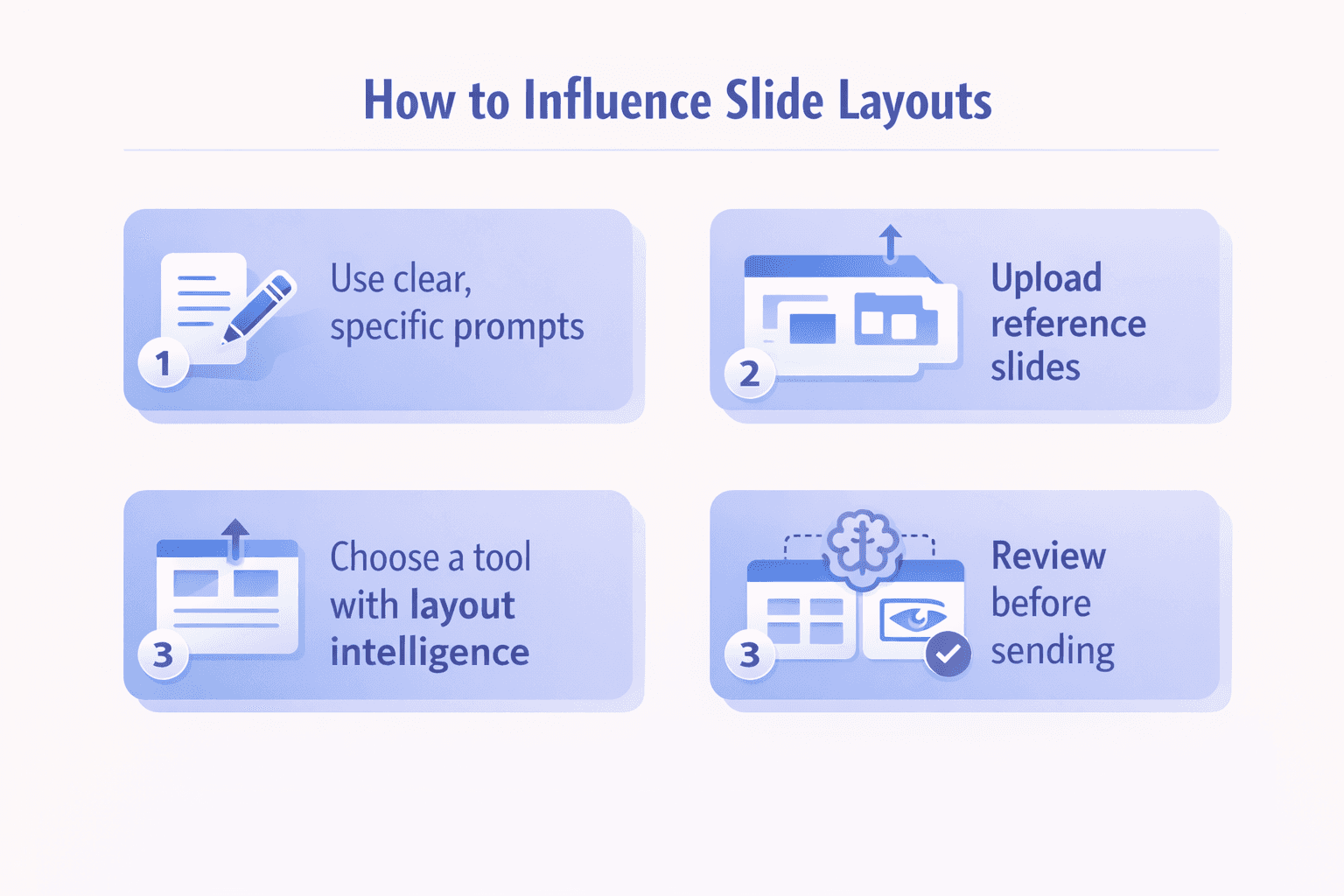
Use clear, specific prompts
“Create a slide comparing 3 product tiers side by side” works significantly better than “show our product.” The more specific your instruction, the more the AI can match it. Vague prompts produce generic layouts. Specific prompts produce layouts that respond to your actual content needs.
Define brand rules explicitly
Fonts, colors, spacing, logo placement, image usage. The more completely you define your brand rules, the less the AI has to guess. If you’re implementing brand rules across your organization, automating brand guideline enforcement ensures consistency without constant manual oversight.
Upload reference slides
If your tool supports reference-based generation, upload examples of your actual branded presentations. The AI learns your visual vocabulary from real examples, not from generic design conventions. In Decktopus, reference slides guide generation for every slide type (title, content, chart, quote, team, closing), so new slides match your approved style by default.
Choose a tool with layout intelligence
Not all AI presentation tools apply layout logic the same way. Template selection tools give you speed but limited brand control. Reference-based tools give you speed and brand consistency. Know which approach your tool uses before expecting it to produce brand-consistent output.
Review before sending
AI gets better with better inputs, but it’s not perfect. Always review output before it reaches a client or prospect. Decktopus version history means you can restore any past version for free if something doesn’t look right, so reviewing and iterating is fast and low-risk.
What This Means for Your Brand
The way AI generates slides determines how well it can maintain your brand identity.
Template-based tools require your brand to adapt to their design system. If your visual identity doesn’t match available templates, you’re stuck compromising or customizing manually.
Composition-based tools can apply brand rules to layout assembly. Better than templates, but still limited by the AI’s default aesthetic sense.
Reference-based tools eliminate the friction. The AI generates slides from your brand’s own visual patterns. The result is presentations that feel genuinely yours because they were built from your visual language, not adapted from someone else’s design conventions.
This is why reference slides matter so much in platforms like Decktopus. When you provide title slides, content slides, chart slides, quote slides, team slides, and closing slides from your existing presentations, you’re giving the AI a complete visual vocabulary to work from. Every new slide it generates speaks that vocabulary. Understanding how AI uses your company logo, colors, and tone helps you set up brand kits correctly from the start.
Bottom Line: It’s Not Templates vs. AI. It’s Both.
AI doesn’t design like a human. But it also doesn’t blindly fill in templates.
It uses rules-based logic and content recognition to generate layouts that feel custom, even though they’re built on proven structures. The sophistication of that logic varies significantly between tools.
If you want control and speed, choose a tool that blends generation with brand safety. Upload your brand kit. Provide reference slides for every slide type. Guide the AI with specific prompts. And always review before sending.
The best AI presentation tools aren’t replacing design judgment. They’re making brand-consistent design available to everyone on your team, not just the designers.
What If You Already Have a Deck? Beautify Takes a Third Path
The whole "from scratch vs. templates" debate assumes you are starting a new presentation. But what if you already have a deck that just needs an upgrade?
Rebuilding a working presentation from scratch wastes hours. Applying a template to it flattens the content into a generic shell. Neither option is a good use of your time.
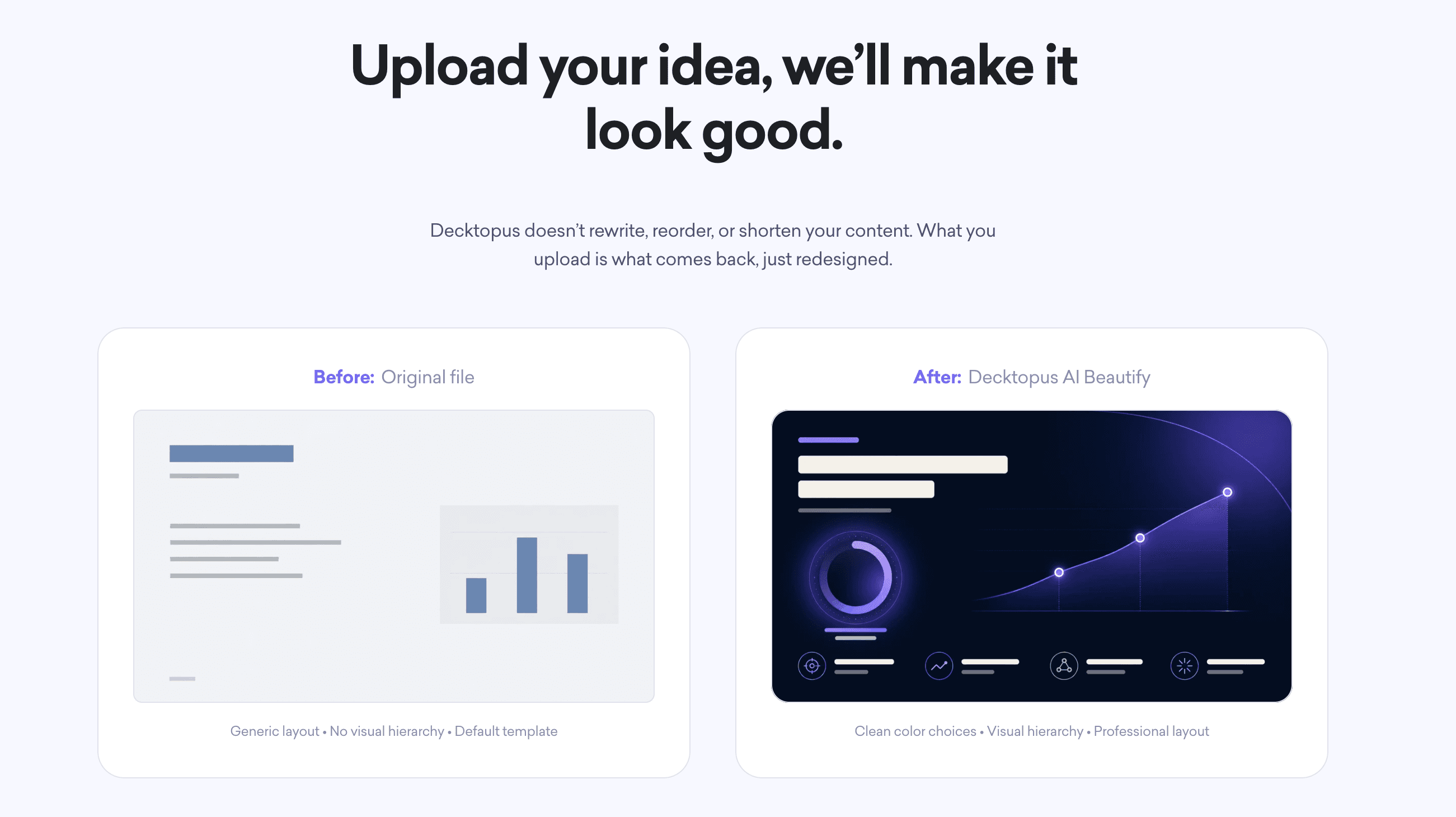
Beautify is Decktopus AI's third path. Upload your existing PowerPoint or Google Slides file, and Beautify redesigns every slide in place. Your content stays. The design gets rebuilt around your brand rules and layout intelligence.
How Beautify Handles Existing Decks
Beautify uses the same reference-based layout logic described above, but applied to slides that already exist. Instead of generating layouts from your topic description, it analyzes each of your existing slides and rebuilds them with:
Consistent typography across the whole deck
A 2-3 color palette applied uniformly
Clean layouts that match your brand
Proper visual hierarchy on every slide
Purposeful visuals instead of generic stock imagery
Your text, data, and structural intent stay intact. What changes is how it looks.
The Two Beautify Options
Beautify gives you two ways to work with existing content:
Option | What It Does | When to Use |
|---|---|---|
Redesign | Rebuilds each slide's layout, typography, and color system while preserving your content | When your content is solid but the design needs a full upgrade |
Use as a Resource | Uses your existing slides as source material and generates a new, structured deck around them | When the content itself needs restructuring, not just a design refresh |
Both apply your brand automatically. Paste your homepage URL and Beautify pulls your logo, colors, and fonts so the redesigned deck matches your brand identity by default.
Try Beautify with Decktopus AI →
When Beautify Beats "From Scratch"
If you already have working slides, Beautify is almost always the faster path. You keep the strategic thinking you already did on the content. AI handles the design work you would have spent hours on manually.
For a full walkthrough on the Beautify workflow, see our guide on how to beautify your presentation slides with AI. For visual proof of what changes, our post on slide design ideas with before-and-after examples shows the transformation in real decks.
Have an outdated deck sitting on your desktop? Redesign it with Beautify in one click.
FAQ
Does AI design slides completely from scratch?
No. AI composes layouts using rules-based logic and content awareness, not pixel-level design. It blends structure with content recognition to produce layouts that feel custom while being built on proven design systems. The sophistication of this process varies significantly between tools.
Are AI slides just fancy templates?
Not in advanced tools. Static template tools pick a layout and populate it with your content. AI layout generation tools like Decktopus adapt slide structure to content type and length, apply brand rules throughout, and in reference-based systems, learn from your actual branded presentations to generate slides that match your visual style.
Can I control how AI lays out slides?
Yes. Use specific prompts that describe what you need. Upload complete brand kits with fonts, colors, and logos. Provide reference slides showing your approved visual style. Choose a tool with layout intelligence that enforces brand rules automatically. The more clearly you define your requirements, the more precisely the AI can match them.
Can AI redesign a deck I already have, or does it only build new ones?
Yes. Beautify (Decktopus AI's redesign feature) takes any existing PowerPoint or Google Slides file and rebuilds every slide with consistent typography, brand colors, and cleaner layouts. Your content stays intact. Two options: Redesign (full visual upgrade with content preserved) or Use as a Resource (restructure the deck using your existing slides as source material). Try Beautify.
Related posts

How to Build Confidence When Speaking in Public (2026 Guide)
The science behind speaking confidence, the CONFIDENT framework, and the AI practice method that turns nervous presenters into calm, credible speakers.
Templates & How-to

How to Practice Public Speaking Alone (With and Without AI)
The 4 rehearsal methods that actually build public speaking skill, why mirror practice fails, and how AI simulates a real audience for structured feedback.
Templates & How-to

How to Give a TED Talk: Delivery Tips from the Best Speakers (2026)
A structured breakdown of what makes TED talks land, the delivery framework used by top speakers, and the AI practice method that closes the gap.
Templates & How-to