Business & Strategy
Can AI Really Follow Brand Guidelines Like Fonts, Colors, and Logos?
Can AI actually follow your brand guidelines for fonts, colors, and logos? Here's an honest breakdown of what AI can and can't do, and what to look for in a tool that gets it right.


Decktopus Content Team
You've built a brand system that took real effort. The font pairing is intentional. The color palette has exact hex values. Logo placement rules are written down. And then you generate a presentation with AI and get back slides that look like they belong to a completely different company.
So the question is fair: can AI actually follow brand guidelines? The honest answer is yes, but only under specific conditions that most teams don't know to check for. This article breaks down what those conditions are, where most tools fall short, and what real ai branding accuracy looks like when the system is set up properly.
Want to skip straight to the solution? See how AI can generate presentations using your company logo, colors, and tone.
What "Following Brand Guidelines" Actually Means for AI
Brand guidelines are a document. AI doesn't read documents the way a human designer does. So when people ask whether AI can follow brand guidelines, they're really asking something more specific: can the AI system be configured with your brand's rules in a way that enforces them automatically during slide generation?
That's a different question, and the answer depends entirely on the tool you're using.
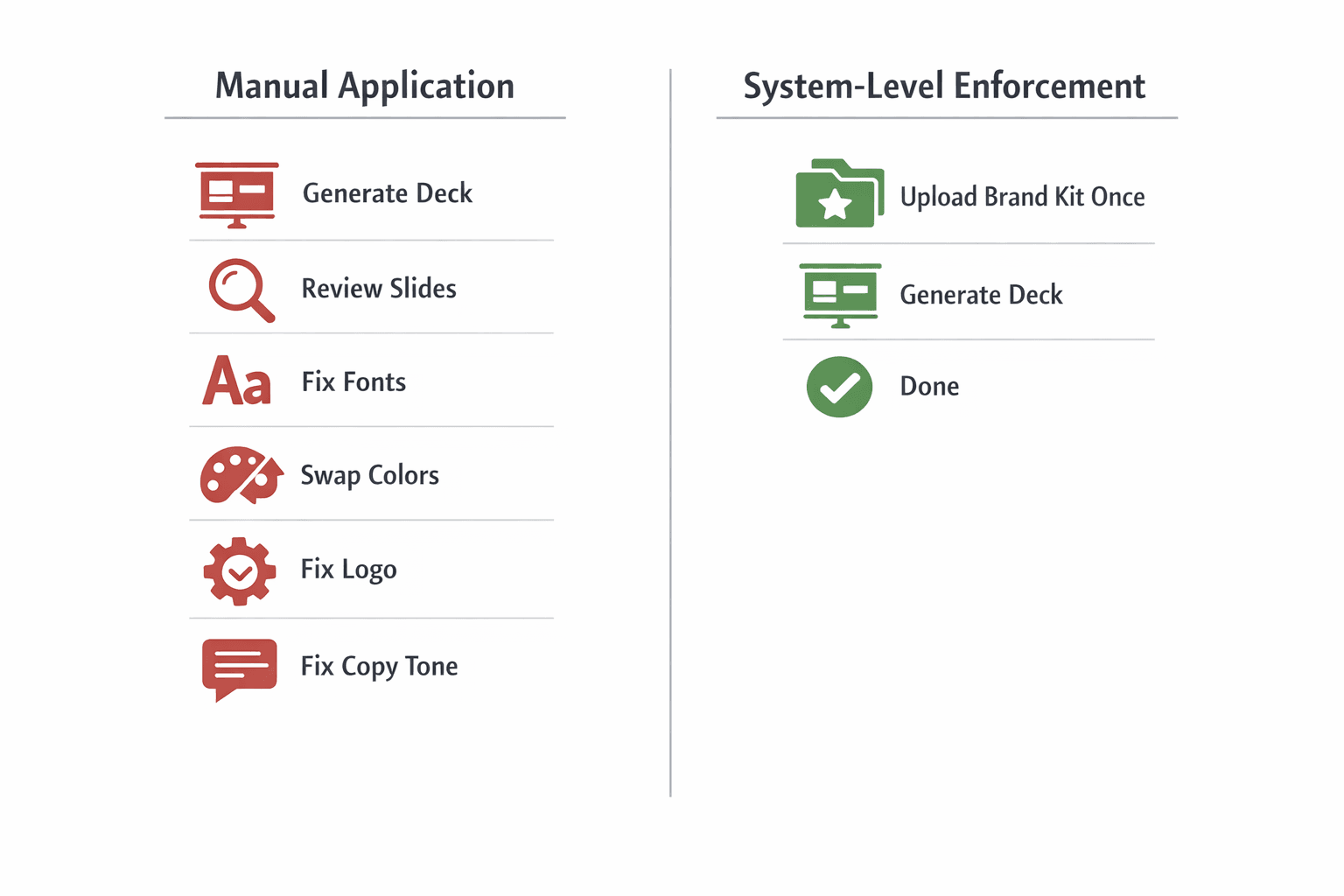
There are two broad approaches. The first is manual application. You generate a deck, then you or someone on your team goes through and applies the correct fonts, swaps the colors, uploads the logo, and adjusts the copy tone. The AI handled structure and content. Brand compliance is still a human job done after the fact.
The second approach is ai brand guidelines enforcement at the system level. Your brand assets are uploaded once and locked into the platform. Every time the AI generates slides, it pulls from those locked assets automatically. Brand compliance is built into the generation, not corrected afterward.
Most tools on the market are closer to the first approach. That's the source of most brand frustration with AI presentations. The AI isn't failing. It's just never been given your brand to work with in a way the system can actually use.
Fonts: Can AI Use Your Exact Typeface?
Yes, but only if you have uploaded your brand fonts to the platform and the platform is built to use them during generation.
Here is what typically goes wrong. Most AI tools come with a pre-loaded font library. When the AI generates a slide, it selects a font from that library based on the theme or style chosen. If your brand font is not in that library, it does not get used. The AI substitutes whatever is available that looks closest. That substitution happens silently across every slide in the deck, and then across every deck your team generates until someone notices.
There is also a layout problem that comes with font substitution. The AI builds its layouts assuming generic font metrics, typically something close to a system sans-serif. When your brand font has different width, height, or letter spacing, it physically interacts with the layout differently. Text overflows. Line breaks fall in the wrong places. A headline that looks balanced with the default font suddenly crowds the slide or leaves awkward gaps with yours.
The fix is a platform that allows custom font uploads at the account or workspace level, not just per deck. When your brand fonts are stored as part of a brand kit, every generated presentation uses them by default. No one has to remember to set the font. No one can accidentally ship a deck in the wrong typeface.
Want to see how font enforcement works in practice? Try Decktopus AI and upload your brand kit before generating your first deck.
Colors: More Than Just "Close Enough"
Color is where the gap between brand-aware and brand-compliant becomes most visible to anyone who knows the brand well.
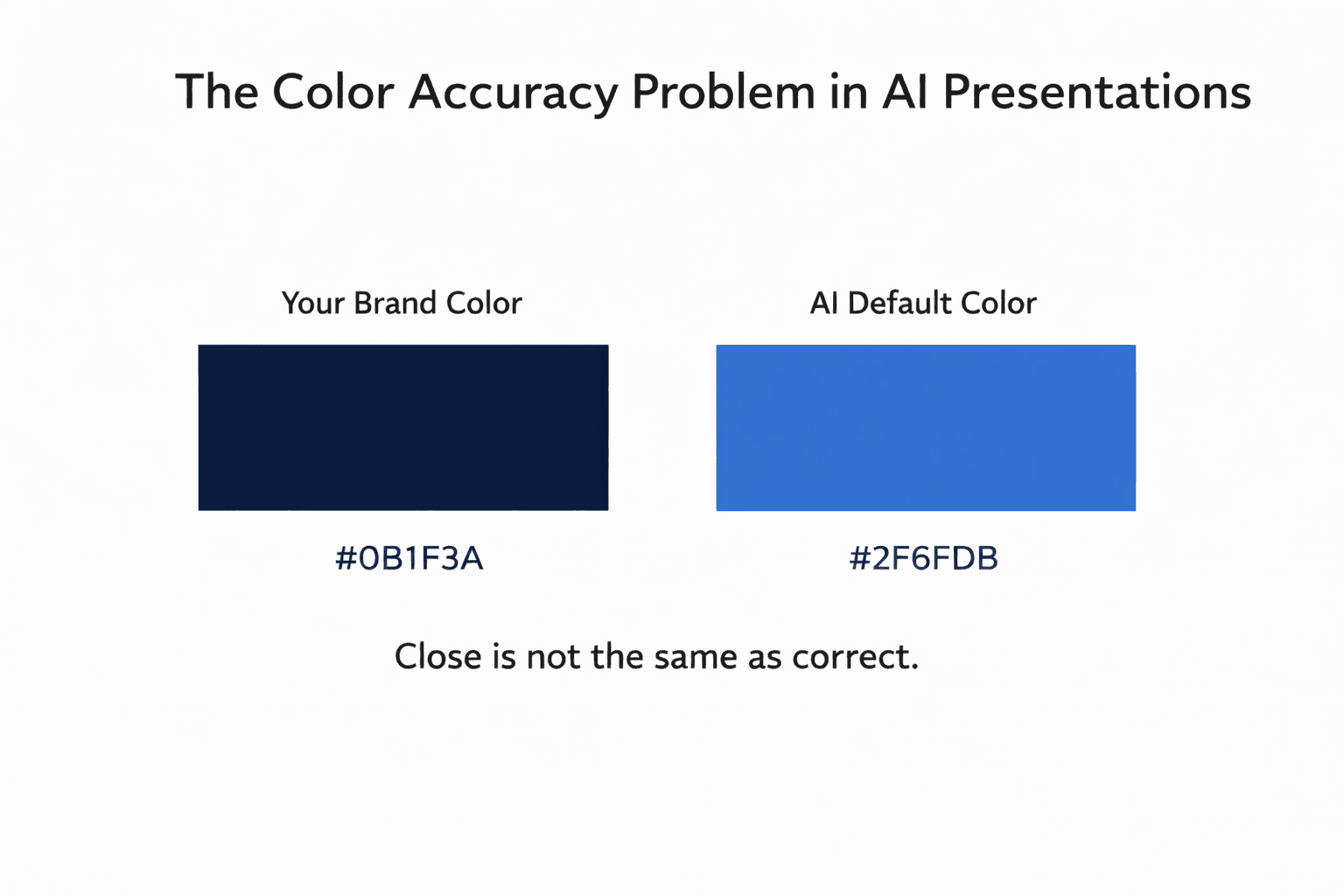
When an AI tool applies a blue to your slides, it is applying its version of blue based on the selected theme. Not your brand's specific shade. Not your approved hex code. If your brand blue is #1A3B5C and the AI's "corporate blue" style uses #2563EB, the slides look similar at a glance but fall apart the moment they appear next to official brand materials.
This matters more than it sounds. Consistent color is one of the most immediate signals of brand professionalism. A client-facing deck with a slightly wrong primary color is a small inconsistency that quietly erodes credibility, especially when it happens across every deck every person on your team generates.
The solution is uploading your exact hex values as part of a brand kit and having the platform lock them in during generation. Good brand-aware tools don't let users override the brand palette with free-form color selections. The approved colors are the only options the AI works with.
For a detailed look at how color rules fit into a full brand automation system, how to make presentations follow brand guidelines automatically covers the complete setup.
Logos: Placement, Size, and Consistency
Logo handling is one of the most inconsistent areas across AI presentation tools and often the most immediately visible failure.
The core issue is that most AI tools treat logo placement as a template decision, not a brand rule. If the selected layout includes a logo zone in the bottom-right corner at a set size, that is where your logo lands. If the layout does not include a logo zone at all, your logo simply does not appear on that slide. The AI is filling template slots. It is not making brand decisions about your logo.
This creates three common problems. First, logo absence: slides get generated without a logo because the chosen layout had no dedicated zone for it. Second, logo drift: different layouts across the same deck place the logo in different positions, so it shifts from slide to slide. Third, logo scaling: layouts resize logos to fit their zone, which can push the logo below your brand's minimum size requirement or distort its proportions.
A properly configured brand-aware tool makes logo placement an account-level rule, not a template variable. Position, size, and clear space are defined once in the brand kit. Every layout the AI generates respects those settings. Your logo does not move, shrink, or disappear based on which layout type the AI selected.
Tone: The Brand Guideline Most AI Tools Ignore
Fonts, colors, and logos are visible. Tone is the brand guideline that's hardest to see but easiest to feel when it's wrong.
Your brand has a voice. Maybe it is direct and confident. Maybe it is warm and educational. Maybe it avoids jargon by design. Generic AI writes to a neutral corporate middle. The output is grammatically correct and professionally worded, but it sounds like it belongs to no company in particular. When a sales deck or client proposal goes out sounding generic, that is a brand consistency failure even if the colors and fonts are perfect.
Real tone compliance requires the AI to be guided by examples of your brand's actual writing style. This is where reference slides matter beyond just visual layout. When the AI has approved, on-brand slide content as examples, it generates a copy that is more likely to match your voice as well as your visual identity.
For teams managing tone consistency across multiple departments, how to build a team presentation system with AI shows how to structure brand rules so the whole team stays on voice, not just on palette.
How Brand-Aware AI Generation Actually Works
The difference between generic AI and brand-aware AI comes down to where brand rules enter the process.
In a generic tool, brand application happens after generation. The AI builds a deck, then you apply your brand on top. The layout was never designed with your brand in mind. You are retrofitting identity onto something built without it.
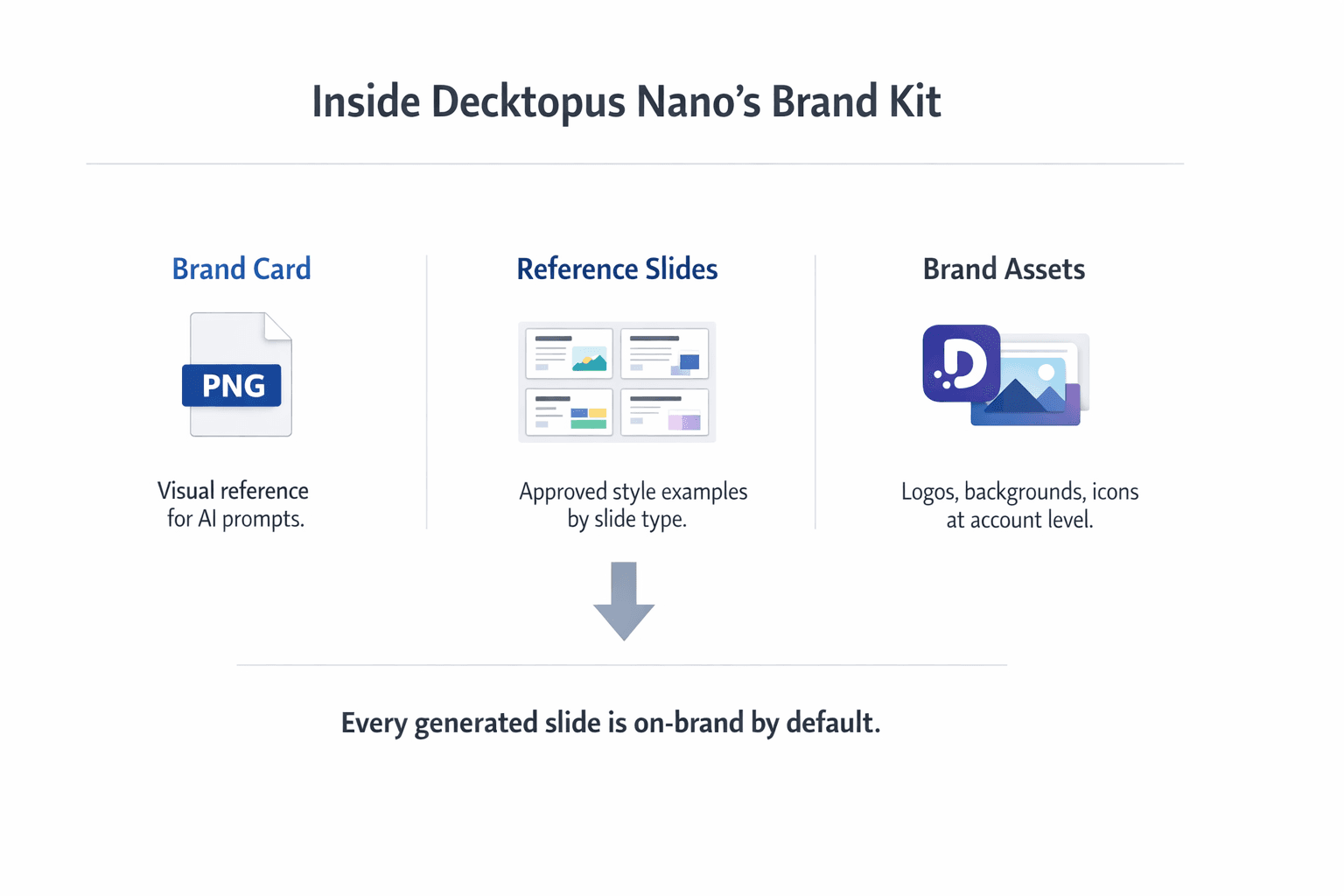
In a brand-aware system, brand rules are part of the generation itself. Decktopus Nano is built around this approach through its Brand Kit system, which works across three components.
Brand Kit (logos, colors, fonts, reference slides) is stored at the account level. Colors are exact hex values, not theme approximations. Fonts are the actual brand typefaces, uploaded directly. Reference slides are curated examples by slide type covering title slides, content slides, chart slides, quote slides, team slides, and closing slides. These are admin-managed and used to guide AI generation. They show the AI what approved outputs actually look like, rather than leaving it to guess from assets alone.
The Brand Card is a separate PNG visual that represents the brand identity and is used specifically as a reference in AI prompts. It gives the generation process a visual context for the brand's overall style, not just its individual assets.
Brand Assets include logos, background images, and icons stored at the account level and available as drag-and-drop elements during editing.
When a user selects their brand style at generation, the AI applies everything automatically. No correction step after the fact. The output starts on-brand because the generation was constrained to on-brand options from the beginning.
For teams with large existing slide libraries, Decktopus also supports uploading decks of 100 or more slides and using AI to auto-classify them by slide type. Users review and confirm the groupings, building a full reference library in minutes rather than hours.
How to Evaluate Any AI Tool for Brand Compliance
Before committing to an AI presentation platform, five things are worth checking directly.
Can you upload a full brand kit?
Look for the ability to upload exact hex codes, your actual brand fonts, logos, and reference slides. If the tool only offers preset color themes and a font dropdown, it is template-based, not brand-aware.
Are brand settings at the account level or per deck?
If you have to apply your brand every time you start a new presentation, brand compliance depends on individual memory. Account-level brand settings mean the AI uses your kit every time, automatically.
Does the tool use reference slides during generation?
This is one of the most meaningful differentiators. Uploading a logo and a color palette tells the AI what assets to use. Providing reference slides by slide type shows it how those assets should look together on a real slide. Both are needed for accurate, consistent outputs.
Is logo placement consistent across slide types?
Create a test deck and check where the logo appears on a title slide, a content slide, and a data slide. If the position shifts between types, logo placement is not enforced at the brand level.
What does a non-designer produce with just a prompt?
If someone with no design background generates a presentation and it comes out on-brand without any manual adjustments, the tool is doing real brand-aware generation. If it needs corrections, the enforcement is not real.
For a broader look at what strong AI presentation branding actually requires end to end, can AI generate presentations using your company logo, colors, and tone covers the full picture.
You can also see how this plays out across the wider feature set in the guide to the best AI presentation tool for business.
Ready to test it yourself? Set up your brand kit in Decktopus and generate your first on-brand deck without touching a single design setting manually.
AI can follow brand guidelines for fonts, colors, logos, and tone. But only if the tool was built to enforce them during generation, not after.
The distinction that matters is whether brand rules live at the system level or the user level. System-level enforcement means every generated deck starts on-brand by default. User-level enforcement means every deck needs a manual review pass before it is safe to share. For teams creating presentations at volume, that difference compounds fast.
Quick checklist when evaluating a tool:
Full brand kit upload including fonts, exact hex colors, logos, and reference slides
Account-level brand settings, not per-deck application
Reference slides used during generation, not just assets attached after
Consistent logo placement across all slide types
Non-designer prompt test produces on-brand output without corrections
FAQ
Can AI really follow my brand fonts and colors automatically?
Yes, if the tool supports a full brand kit upload at the account level. That means uploading your actual brand fonts rather than selecting from a preset menu, and entering exact hex color values rather than choosing a color theme. When stored at the account level, the AI applies them to every generated slide without any manual input.
Why does my logo keep appearing in the wrong place on AI-generated slides?
Because most AI tools treat logo placement as a template decision rather than a brand rule. If the selected layout does not have a dedicated logo zone, or puts it in a position that conflicts with your guidelines, the AI follows the template. A brand-aware tool makes logo position and size an account-level setting that overrides template defaults.
What is the difference between uploading brand assets and using reference slides?
Brand assets tell the AI what elements to use: your logo, your colors, your fonts. Reference slides show the AI how those elements should look together on a real slide. You need both for accurate brand compliance. Assets without reference slides often produce outputs that use the right raw materials but assemble them in ways that still feel off-brand.
Does AI follow brand guidelines for copy tone as well?
Not by default. Generic AI writes in a neutral corporate voice. For tone compliance, the tool needs approved on-brand copy examples, typically through reference slides with real brand writing included. Tools that support this as part of the brand kit setup produce copy that is noticeably closer to your actual brand voice.
Is it worth switching tools just for brand compliance?
If your team generates presentations regularly and accuracy matters for client-facing or marketing materials, yes. The time spent manually correcting fonts, colors, logos, and copy tone across every deck adds up fast. A tool that enforces brand at the generation level pays for itself in review time alone, before accounting for the consistency improvement across everything your team produces.
Related posts

How to Improve Communication Skills at Work (2026 Practical Guide)
The 5 workplace communication skills that matter most, the CLEAR framework, and the AI practice method that turns weak communicators into strong ones.
Business & Strategy

Job Interview Sample Questions: How to Practice Your Answers (2026)
The 20 most common interview questions, the STAR framework for answers, and the AI practice method that turns rehearsed responses into confident ones.
Business & Strategy

How to Negotiate a Raise: The Script, Practice Method & Tips That Actually Work
A step-by-step script for negotiating a raise, common mistakes to avoid, and the AI practice method that turns a nervous ask into a confident one.
Business & Strategy