Sales & Proposals
Why Off-Brand Sales Decks Kill Trust (And How Teams Fix It)
Off-brand sales decks do more damage than most teams realize. Here's why brand inconsistency costs you deals and how sales teams fix it without slowing down.


Decktopus Content Team
Your sales rep spent two hours preparing for a call. They know the product. They know the prospect. They walk in confidence. Then they open the deck and something is off. The logo looks stretched. The font is different from what’s on the website. One slide has a color that belongs to a campaign from two years ago.
The prospect may not say anything. But they noticed. And that small inconsistency just made your company look less put-together than it is.
Off-brand sales decks do not just look bad. They create doubt at exactly the moment you need confidence. This article breaks down why that matters more than most sales teams realize, and how teams that fix it actually do it.
For a full look at how AI can generate presentations that stay on-brand automatically, see can AI generate presentations using your company logo, colors, and tone.
What Off-Brand Actually Means in a Sales Context
Off-brand does not just mean ugly. A slide can look clean and professional and still be off-brand. Off-brand means inconsistent with the visual and verbal identity your company has built.
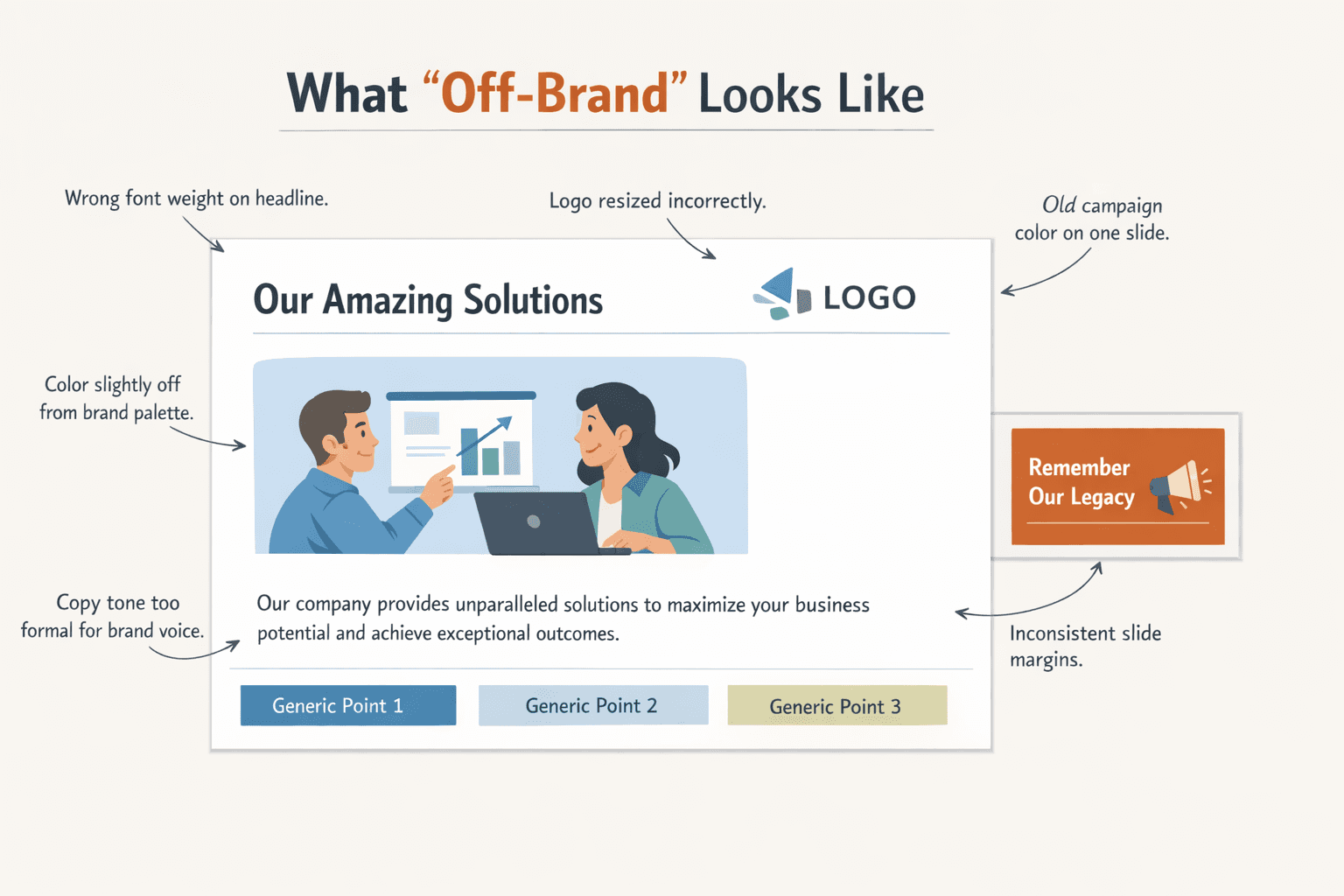
In a sales deck that means the wrong font weight on a headline. A blue that is close to your brand blue but not quite it. A logo that has been resized without maintaining proportions. Copy that sounds formal and corporate when your brand voice is conversational and direct. A slide structure that does not match the templates your marketing team spent months developing.
Individually, each of these feels minor. Together, they add up to a presentation that sends a subtle but clear signal: this company does not have its act together.
That signal lands hardest in sales presentation branding because the sales deck is often the first time a prospect sees your brand in a formal, extended context. Your website gave them a first impression. Your deck is supposed to confirm it. When the deck contradicts the impression, even slightly, it introduces friction at exactly the wrong moment.
How Brand Inconsistency Damages Trust in the Sales Process
Trust in a sales process is built through consistency. When everything a prospect sees from your company feels coherent, it signals that your company is organized, reliable, and professional. When things feel inconsistent, even in small ways, the opposite signal gets sent.
Here is how that plays out in practice.
It creates cognitive dissonance between your other brand touchpoints. Your ads, your website, and your sales deck should all feel like one company. When they do not, it confuses buyers at a subconscious level. They cannot always articulate what is wrong, but the positioning feels weaker because the signals are not reinforcing each other.
It undermines the credibility of the content. A prospect who notices that your deck does not match your website may start to wonder what else does not add up. It is a small thing that triggers a larger doubt. They are not necessarily thinking “this company is unreliable.” They are thinking “something feels slightly off,” and that feeling sits in the room for the rest of the conversation.
It shifts attention away from your message. When a slide looks wrong, people notice the slide instead of hearing what the rep is saying. A misplaced logo, a color that clashes with the rest of the deck, a font that does not belong: these are small visual distractions that pull focus at the exact moment you want the prospect thinking about your solution.
It suggests the sales team is working independently of the rest of the company. A prospect who has done their homework on your brand will notice when the deck does not match what they have already seen. That disconnect implies that different parts of your company are not aligned, which is not a confidence-building signal in a sales context.
It erodes the premium positioning of your product. If your product is positioned as polished, reliable, and professional, a rough-looking deck undercuts that positioning before a word is spoken. People buy confidence. Inconsistent slides sales materials make it harder to project it.
Why Sales Decks Go Off-Brand in the First Place
The problem is almost never intentional. Sales decks go off-brand for the same reasons any presentation does: the system does not enforce brand rules, so individuals make decisions they should not have to make.
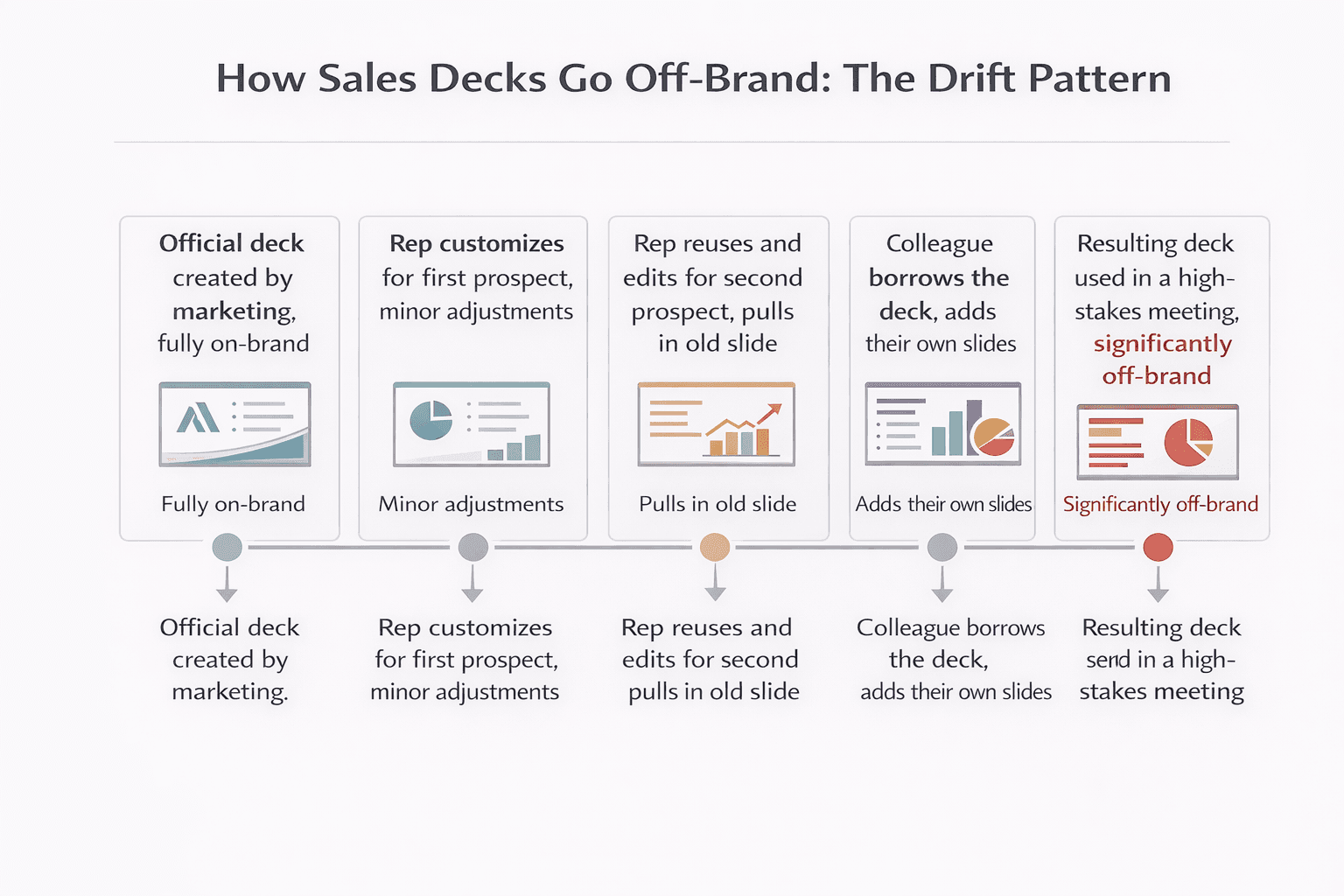
Reps build their own versions. Marketing creates an official deck. Reps customize it for each prospect, adding slides, pulling in content from old decks, and gradually introducing off-brand elements. By the third or fourth iteration, the deck barely resembles the original.
Templates are hard to find so people improvise. The official template is buried in a shared drive somewhere. The rep is on a deadline. They grab whatever they used last time, or they start from scratch in a tool they are comfortable with, and the result reflects their instincts rather than the brand.
The deck gets updated by multiple people with different tools. One slide was built in Google Slides. Another was exported from a Canva template. A third was screenshotted from a product demo. Each source has slightly different font rendering, color interpretation, and margin defaults. The final deck is a patchwork.
Nobody owns brand enforcement in the sales process. Marketing owns the brand. Sales owns the pipeline. The handoff between them is where brand consistency most often breaks down. Marketing produces the assets. Sales adapts them. Without a system that enforces brand rules at the adaptation stage, the rules get eroded one rep at a time.
Design becomes a bottleneck so reps go around it. When every customized deck needs to go through marketing or design for a brand check, turnaround slows down. Reps facing a call in two hours do not wait. They build something themselves using whatever they have available, and the result reflects their instincts rather than the brand. The bottleneck that was supposed to protect brand quality ends up creating the off-brand problem it was meant to prevent.
What a Brand-Consistent Sales Deck Actually Looks Like
Brand consistency in a sales deck is not about making every slide identical. It is about making every slide feel like it came from the same company, regardless of who built it or how much it was customized for a specific prospect.
A brand-consistent sales deck has:
Visual coherence across all slide types. The title slide, the problem slide, the solution slide, the case study slide, the pricing slide: all of them use the same fonts, the same color values, the same logo placement, and the same spacing rules. No slide looks like it came from a different deck. For a practical look at what good visual structure requires, how to create a beautiful and appealing presentation covers the design fundamentals worth locking in before anything gets handed to a rep.
Copy that matches the brand voice. If your brand is direct and conversational, every slide should read that way, including the slides the rep wrote themselves. If your brand avoids jargon, the deck avoids jargon. The writing style is as consistent as the visual style.
A structure that reflects the brand’s way of telling a story. Some brands lead with the problem. Some lead with the outcome. Some are data-heavy and some are narrative-driven. Whatever your brand’s presentation logic is, the sales deck should follow it, not the personal preference of whoever last edited the file.
Customization that does not break the brand. The best sales decks allow reps to customize prospect-specific content, company name, industry, specific pain points, without touching the visual or structural brand rules. The customizable parts and the locked parts are clearly separated.
How Teams Fix the Off-Brand Problem
Teams that consistently produce on-brand sales decks are not doing it through more careful people. They are doing it through better systems.
Marketing builds modular, locked templates. Instead of one monolithic deck, marketing creates a library of slide modules: intro slides, problem slides, solution slides, social proof slides, pricing slides, closing slides. Each module is fully on-brand and locked at the design level. Reps assemble the deck they need from approved modules. They can choose which modules to include, but they cannot change the design of any of them. For a full breakdown of how to structure this kind of system across a team, how to build a team presentation system with AI covers roles, workflows, and approval steps in detail.
Brand kit setup happens at the tool level, not the file level. When fonts, colors, and logos are stored in the presentation tool at the account level, they apply automatically to every new deck created in that account. Reps do not set brand rules per deck. The tool applies them by default. There is no decision for the rep to get wrong.
A slide library replaces the shared drive. Instead of a folder of old decks that reps browse for slides to reuse, teams build a curated slide library of approved, on-brand slides organized by type and use case. Reps pull from the library. The library only contains approved slides. Reusing a slide from the library is the same as using an approved asset.
Generation is brand-scoped. When AI is used to generate new slides or entire decks, the generation happens within the brand kit constraints. The AI does not have access to off-brand options because the brand kit is the only context it is working within.
Review the system quarterly, not individual decks manually. Once the brand kit and slide library are set up correctly, the review burden shifts from per-deck checks to periodic system audits. Every quarter, check that reference slides still reflect the current brand, that color values and font files are up to date, and that the slide library only contains approved content. Spot-check a sample of recently generated decks for brand accuracy. This approach scales. Manually reviewing every deck before it goes out does not.
For a full look at how to build this kind of automated brand compliance into a presentation workflow, how to make presentations follow brand guidelines automatically covers the system design in detail.
How AI Helps Sales Teams Stay On-Brand at Speed
Speed is the real constraint in sales deck creation. Reps need decks fast, often before a call that is hours away. That time pressure is exactly what causes shortcuts and off-brand decisions. If staying on-brand requires slowing down, most reps will prioritize speed.
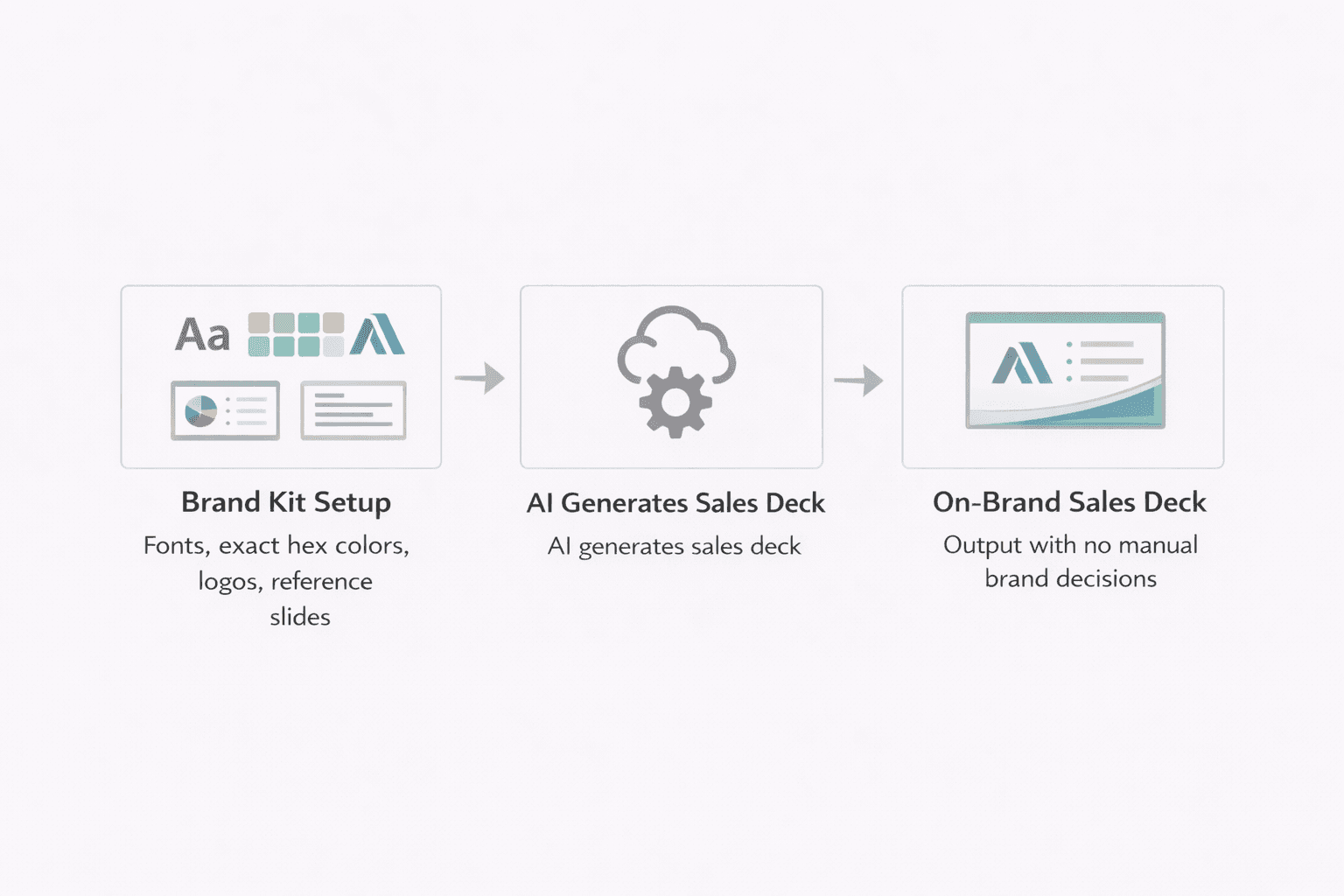
AI changes that equation. When AI generates slides within brand kit constraints, a rep can go from prompt to complete deck in minutes without making a single brand decision. The fonts are correct because they are locked in the kit. The colors are correct because the hex values are stored at the account level. The logo is in the right place because placement is a brand rule, not a template variable. For a broader look at how AI presentation tools compare for business use, the best AI presentation tool for business covers the key features worth evaluating.
Decktopus handles this through its Brand Kit system. Fonts, colors, logos, and reference slides are stored at the account level. When a rep generates a deck, they select the brand style at the start and the AI generates every slide within those constraints. The output is on-brand by default, not by effort.
Reference slides in the kit cover the slide types a sales team uses most: title slides, solution slides, case study slides, closing slides. The AI uses these as style guidance, so outputs match the company’s visual standard rather than a generic template. The rep does not need to review every slide for brand accuracy. The system handled it during generation.
For sales teams working with version history, Decktopus also allows restoring any past version of a slide for free, without regeneration costs, so reps can recover an earlier version if an edit goes off-brand without losing work.
Ready to build sales decks that stay on-brand without slowing your team down? Try Decktopus AI and set up your brand kit before generating your next deck.
How Decktopus Handles Sales Deck Branding
Decktopus is designed around the specific tension sales teams face: brand accuracy at the speed reps actually need.
The Brand Kit system stores logos, exact hex color values, uploaded font files, and reference slides at the account level. When a rep starts a new deck, they select their brand style and the AI generates every slide within those constraints automatically. No font decisions. No color choices. No logo placement to remember. The output is on-brand from slide one because the generation was limited to on-brand options.
Reference slides in the kit cover the slide types sales teams use most and are admin-managed, meaning only brand leads or marketing can update them. This ensures the AI always generates against approved visual standards, not whatever the last person to edit a reference slide decided looked good.
The slide library gives reps a curated set of proven slides to pull from. Slides can be starred from past presentations, saved from regenerations, or added by admins from the organization library. Reps assemble decks from approved components rather than building from scratch or reusing old files. The result is faster deck creation and less brand drift.
Version history is built in at the slide level. Every regeneration creates a new version. Reps can restore any previous version for free without regeneration cost, so editing is low-risk. If a content change breaks the layout or something looks off, going back is a single action.
For teams managing multiple brands or product lines, separate brand kits are fully isolated. Switching between brands means selecting a different kit, and assets from one kit are not accessible when working in another. This matters for companies with sub-brands as much as it does for agencies.
For a detailed look at how the full system works across a team, how to build a team presentation system with AI covers roles, approval workflows, and how to structure generation at scale.
Conclusion
The fix is not more brand training or stricter review processes. It is a system where brand rules are applied automatically, where reps can customize content without touching design, and where AI generates within brand constraints rather than requiring manual brand application after the fact.
When the system handles brand consistency, reps can focus on what they are actually there to do: understand the prospect, tell the right story, and close the deal.
Quick checklist for fixing off-brand sales decks:
Store brand fonts, exact hex values, logos, and reference slides at the account level in your presentation tool
Build a modular slide library of approved, locked slide types reps can assemble from
Separate customizable content fields from locked design elements in every template
Use AI generation within brand kit constraints so every new deck starts on-brand
Replace the shared drive of old decks with a curated, approved slide library
FAQ
Why do sales decks so often end up off-brand?
Because brand rules are applied manually in most workflows. Reps customize templates, reuse old slides, and build decks under time pressure. Without a system that enforces brand rules automatically, each customization is an opportunity for brand drift. The more people touching the deck and the faster they are working, the worse the drift gets.
Does brand consistency in a sales deck actually affect whether you win a deal?
Not always directly, but it affects the confidence the prospect feels in your company. A polished, consistent deck signals that your company is organized and professional. An inconsistent deck introduces small doubts at exactly the moment you need to be building trust. In competitive deals where everything else is close, presentation quality can be a tiebreaker.
How do you let reps customize a deck without going off-brand?
By separating the locked and unlocked elements. Design elements like fonts, colors, logo placement, and slide margins are locked at the brand level. Content fields like the prospect’s company name, industry context, specific pain points, and case study selection are editable. Reps customize content. The system protects design.
What is the fastest way to get sales decks on-brand if they currently are not?
Start with the brand kit. Upload the correct fonts, enter exact hex values, store the correct logo files with placement rules, and create reference slides for each slide type the sales team uses most. Once the kit is set up in a brand-aware tool, every deck generated from that point forward starts on-brand automatically. Old decks can be rebuilt from the reference library over time.
Can AI generate sales decks that are actually on-brand without manual fixes?
Yes, if the tool is configured correctly. The AI needs a brand kit with exact color values, uploaded fonts, logo files, and reference slides to work from. When those are in place, the AI generates slides within those constraints by default. The output is on-brand because the generation was limited to on-brand options from the start, not because someone reviewed it afterward.
Related posts

Struggling to Find New Clients? 5 Proven Tips to Turn Prospecting Into Growth
Struggling to find new clients? Discover 5 proven tips, from proposals to paid ads, to build a steady pipeline of new business.
Sales & Proposals

Cracking the Code: Mastering B2B Sales Strategies & Techniques
Discover the essential guide to mastering B2B sales strategies and techniques, uncovering the secrets behind successful business-to-business selling. Explore the B2B sales process, optimize your team's performance, and elevate your approach to selling products for businesses.
Sales & Proposals

Mastering Proposals: Exploring the Best Business Proposal Tools and Software Solutions
Discover the best business proposal tools, including PandaDoc and Proposable, to streamline your proposal process and win more clients.
Sales & Proposals