AI & Tools
What Are the Best Presentation Tools for Brand-Consistent Slides?
Looking for the best presentation tools for brand-consistent slides? Explore criteria-based comparisons across AI tools, template platforms, and enterprise systems to find the perfect fit for your brand.


Decktopus Content Team
The best tool isn't the flashiest. It's the one that keeps your brand intact.
You don't just need slick slide transitions or AI-generated bullet points. If your teams are building presentations that don't follow your brand's logo, fonts, colors, or tone, they're eroding trust and likely losing deals in the process.
This guide doesn't rank tools by hype. Instead, it breaks down the different approaches to branding in presentation tools, so you can choose based on how your organization works and how much control you need.
Whether you're a brand manager, sales leader, or agency, brand consistency isn't optional anymore. It's the new standard for trust, clarity, and scale.
Why Brand Consistency Matters in Presentation Tools
You've seen it before:
Sales decks in the wrong shade of blue. Product slides using outdated logos. Partner presentations with rogue fonts and visuals.
Each of these slips chips away at brand equity, especially in high-stakes moments like investor pitches, enterprise sales, or onboarding key clients.
Every off-brand slide is a missed opportunity to reinforce trust.
And the more decentralized your team, the more likely branding gets lost. That's why your presentation tool must enforce consistency, not just enable creativity.
What "Brand-Consistent" Really Means
Let's define this clearly.
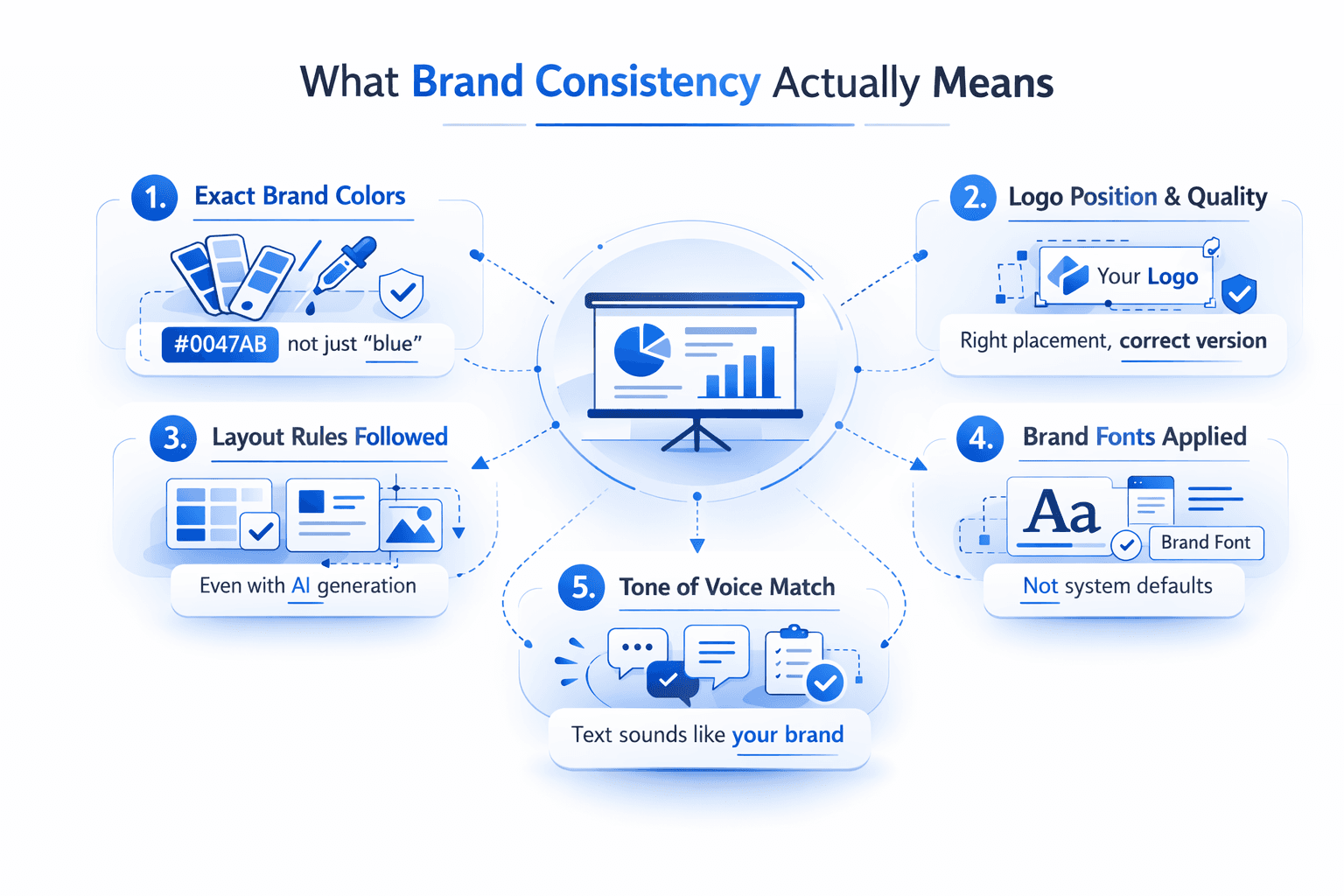
A brand-consistent presentation tool does more than allow customization. It actively ensures every deck:
Uses your exact brand colors (e.g., #0047AB, not just "blue")
Embeds your logo in the right position and quality
Applies your brand fonts, not system defaults
Matches your tone of voice across text and headings
Follows approved layout rules, even when generated by AI
This includes locked templates, brand kits or style guides, AI outputs that respect your rules, team permissions, and version control.
Brand consistency equals visual, tonal, and structural alignment across all slides.
Branding Criteria for Evaluating Tools
Before you compare tools, compare capabilities. Use these key questions to evaluate whether a platform truly supports brand consistency:
1. Does it support a brand kit upload?
Look for tools that let you define logo files, brand fonts (upload or select), and color palettes with hex codes.
2. Can you lock or enforce branding?
Are templates editable by everyone? Can you restrict color and font changes?
3. Is there support for tone of voice?
Can AI match how your brand sounds? Does it allow prompt training or tone settings?
4. What about user permissions?
Can admins control who edits what? Are roles or approval workflows available?
5. Does the tool fit your team structure?
Solopreneurs may prefer flexible tools. Enterprises need governance and scale. Agencies need multi-brand support.
Use these criteria to narrow your list before comparing features.
Tool Approaches to Brand Consistency
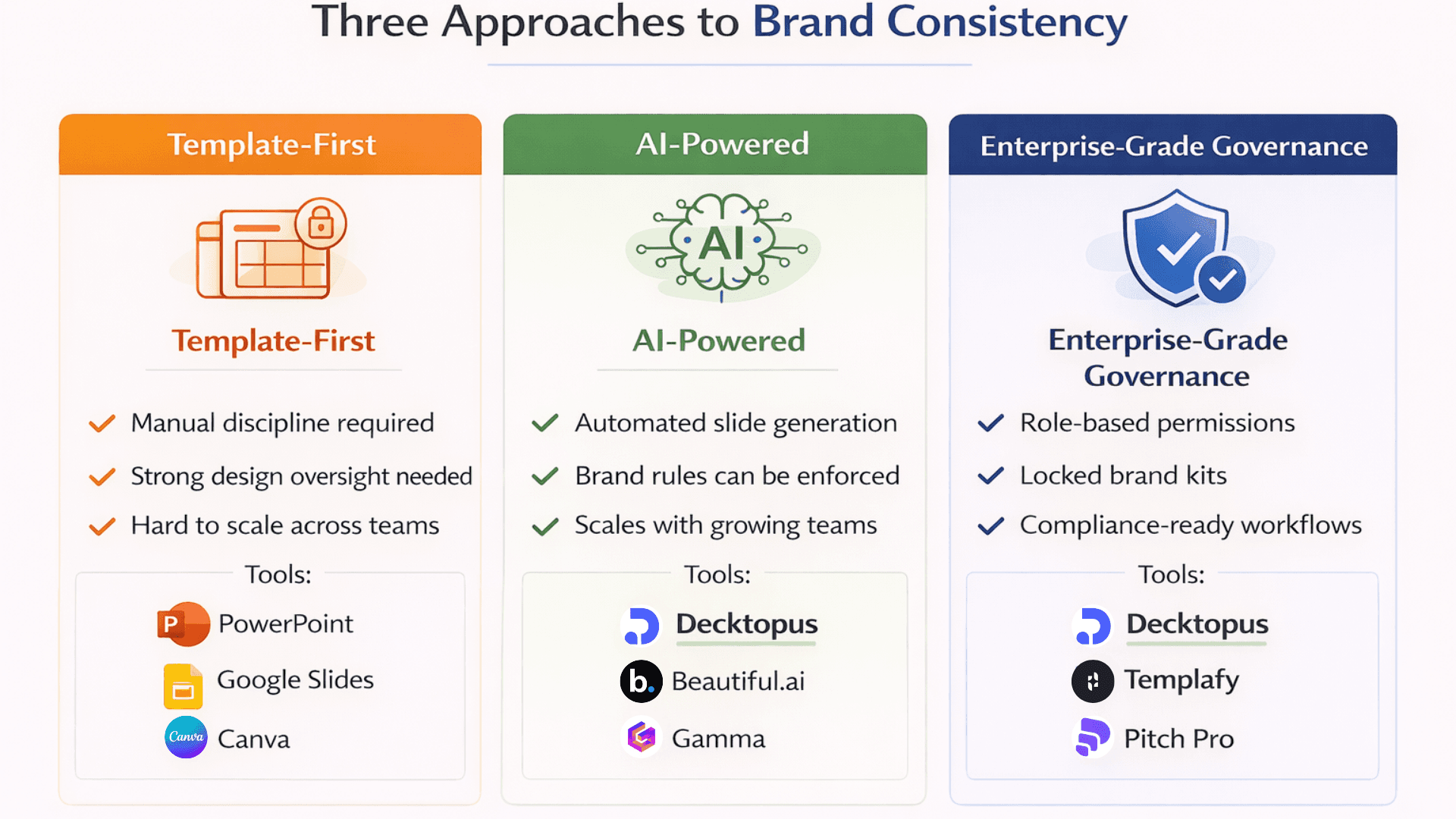
Let's explore the three dominant approaches presentation tools take toward enforcing brand identity and where Decktopus fits in.
Approach 1: Template-First Platforms (Traditional + Manual Control)
These tools give you powerful design flexibility but rely heavily on manual discipline to keep branding intact. They're ideal for teams with strong design skills and strict governance.
Tools in this group:
Microsoft PowerPoint - With Slide Master and brand template locking. Requires IT setup and ongoing maintenance. Strong control if properly configured, but users can still break templates if permissions aren't locked.
Google Slides - Easier for collaboration, but weak enforcement. Good for startups and small teams where everyone knows the brand guidelines. Scales poorly without dedicated design oversight.
Canva Pro - Offers brand kits and template locking, but users can override easily. Great for marketing teams with design skills. Less suitable for distributed teams without design experience.
Risks with template-first tools:
Users can easily break branding. No AI support for tone or content structure. Hard to scale across large teams without constant design review.
These tools are "brand-aware" but not "brand-enforcing."
Approach 2: AI-Powered Presentation Tools (Brand-Smart by Design)
This is where Decktopus and its peers shine. These platforms leverage AI to automate slide creation, and some let you define brand rules so the AI doesn't go rogue.
Decktopus: Built for Brand Consistency First
Decktopus takes a fundamentally different approach. Instead of treating branding as a feature you enable, it's the foundation everything else is built on.
Brand Kit System
Create your brand card (PNG visual representation showing your complete visual identity), reference slides by type (title, content, chart, quote, team, closing), and brand assets (logos, backgrounds, icons). The AI uses these references when generating every presentation, not as suggestions but as requirements.
AI Auto-Classification
When you upload an existing branded presentation (even 100+ slides), Decktopus AI automatically groups slides into categories. You review and confirm, building a complete reference library in minutes instead of manually sorting and tagging slides for hours. This becomes the foundation for all future AI generations.
Reference Slides Guide Every Generation
Unlike tools that just apply your logo and colors, Decktopus learns your actual visual style. Reference slides are admin-managed examples for each slide type. The AI studies these and generates new slides that match their layout, spacing, and visual treatment. When someone asks for a "product demo slide," the AI references your uploaded product demo examples and matches that exact style. Reference slides guide generation but can't be inserted directly as slides, ensuring every output is fresh but on-brand.
Multi-Brand Support
Create separate brand kits for each client or sub-brand. Switch between them before generating presentations. Each kit stays completely isolated with no cross-contamination of fonts, colors, or logos. This is essential for agencies where accidentally using Client A's logo in Client B's deck destroys trust instantly.
Version History & Recovery
Unlimited version history for every slide. Restore any past version for free with no regeneration cost. Version history follows the slide even if you move it to a different position in the presentation. This safety net lets teams experiment with layouts and messaging without fear of losing the brand-compliant version.
Prompt-Based Editing with Brand Constraints
Edit slides using natural language ("Make title bigger", "Change to blue") while the AI maintains brand compliance automatically. Every edit respects your brand kit. You don't need to specify "Make title bigger using Montserrat Bold 36pt in navy #1A3B5C" because the AI already knows your brand rules.
Archive System for Brand Protection
No direct delete. Slides move to Archive first where they remain recoverable with version history preserved. This prevents accidental brand asset loss and maintains a complete audit trail of presentation evolution.
Best for: Growing teams that need automation and consistency. Marketers who want to scale brand-compliant decks without design bottlenecks. Sales organizations with distributed reps building on-brand materials. Agencies managing multiple client brands where contamination risk is high.
Other AI-Powered Options:
Beautiful.ai - Smart layouts with basic brand control. Auto-adjusts designs for balance and hierarchy. Better for consistent aesthetics than strict brand compliance. Lacks custom font upload and reference slide systems.
Gamma - AI writing plus slides, but limited font locking.
Not all AI tools enforce branding. Decktopus was built specifically for it.
Approach 3: Enterprise-Grade Systems (Governance & Brand Locks)
These platforms prioritize compliance and scalability across large organizations. Decktopus fits here too. Its role-based permissions, brand kit locking, archive system, and multi-brand isolation meet enterprise-level governance needs without the heavy IT setup traditional enterprise tools require.
Tools in this group:
Decktopus - Enterprise-ready brand governance with AI automation. Role-based access, locked brand kits, version history, archive protection, and multi-brand isolation. Lower setup overhead than legacy enterprise tools, comparable control.
Templafy - is a document automation tool focused on enterprise-level brand governance. It includes role-based access, brand asset libraries, analytics and approval flows. Requires heavy setup and dedicated IT resources, making it more suited for large organizations.
Pitch Pro - offers collaboration features with template management and brand locking capabilities. It sits between enterprise-level control and team flexibility, though it comes with a steeper learning curve compared to simpler tools.
Features to expect:
Role-based access control with granular permissions
Centralized brand asset libraries with version control
Usage analytics and approval workflows for compliance
Integration with existing enterprise systems
How Decktopus Solves Brand Consistency Differently
Most presentation tools treat branding as a feature you enable. Decktopus treats it as the foundation everything else is built on.
Traditional approach: Create slides, then apply branding, then fix what breaks.
Decktopus approach: Define brand rules once, AI enforces them automatically in every generation.
Here's what that means in practice:
Brand Card System
Create a brand card for your complete visual identity (fonts, colors, logos together). AI uses this as a reference for every slide it creates. This isn't just a logo upload. It's a complete visual snapshot of your brand that guides aesthetic decisions.
Reference Slide Library
Admin-managed examples for title slides, content slides, charts, quotes, team intros, and closing slides. When someone asks for a "product demo slide," the AI matches the style of your uploaded product demo references. Layout, spacing, image-to-text ratio, visual hierarchy all match your approved examples.
Automatic Categorization
Upload 100+ slides from existing presentations. AI sorts them by type (title, content, chart, quote, team, closing). You confirm the categories. Now you have a complete brand reference library in under 10 minutes. This process that would take hours manually happens in minutes with AI assistance.
Locked by Default
Brand colors, fonts, and logo placement are enforced automatically. Non-admin users can't override them even if they try. This isn't about restricting creativity. It's about making the default option the correct option. Teams create freely within brand boundaries.
Multi-Brand Isolation
Each brand kit is completely separate. Fonts from Client A can't appear in Client B's dropdown. Colors from one brand don't pollute another brand's palette. Logos stay with their respective brands. This architectural isolation prevents contamination at the system level, not just through user discipline.
Archive System with Brand Protection
No direct delete button. Slides move to Archive first where they remain recoverable with version history preserved. This prevents accidental brand asset loss and maintains a complete audit trail. Archived slides keep their version history, so you can recover not just the slide but any past version of it.
This is why teams using Decktopus report 90% reduction in time spent fixing off-brand slides compared to their previous tools. The enforcement happens automatically, not through manual review and correction.
Tool Comparison Framework: Branding vs Flexibility
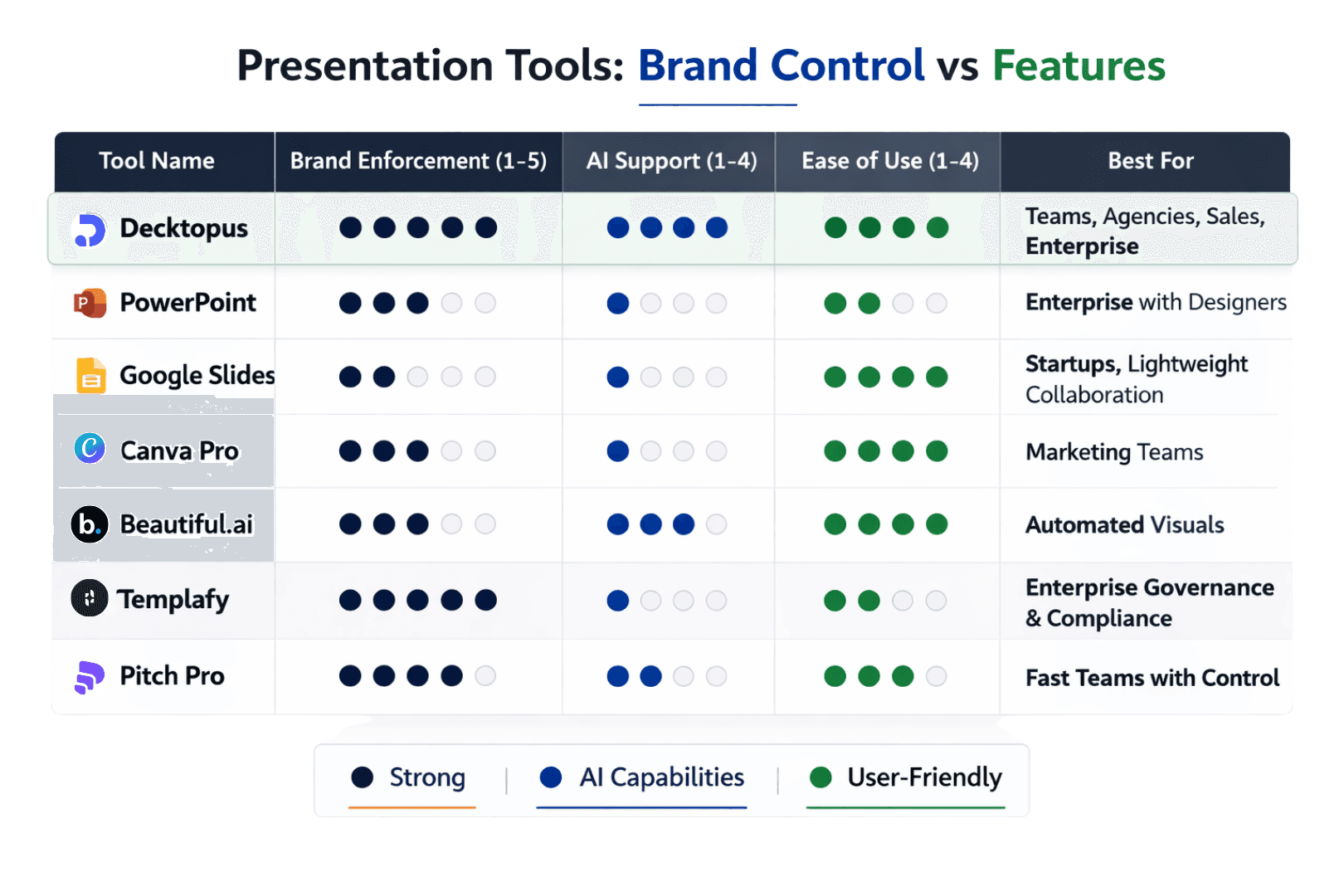
Not all tools strike the same balance between brand enforcement and creative freedom. Here's a side-by-side to help you assess where each tool fits your needs:
Why Decktopus scores high across all categories:
Unlike template-first tools that require manual discipline or AI tools that treat branding as optional, Decktopus was built specifically for brand-consistent AI generation. The Brand Kit System, reference slide library, and automatic categorization mean brand enforcement happens by default, not as an add-on feature.
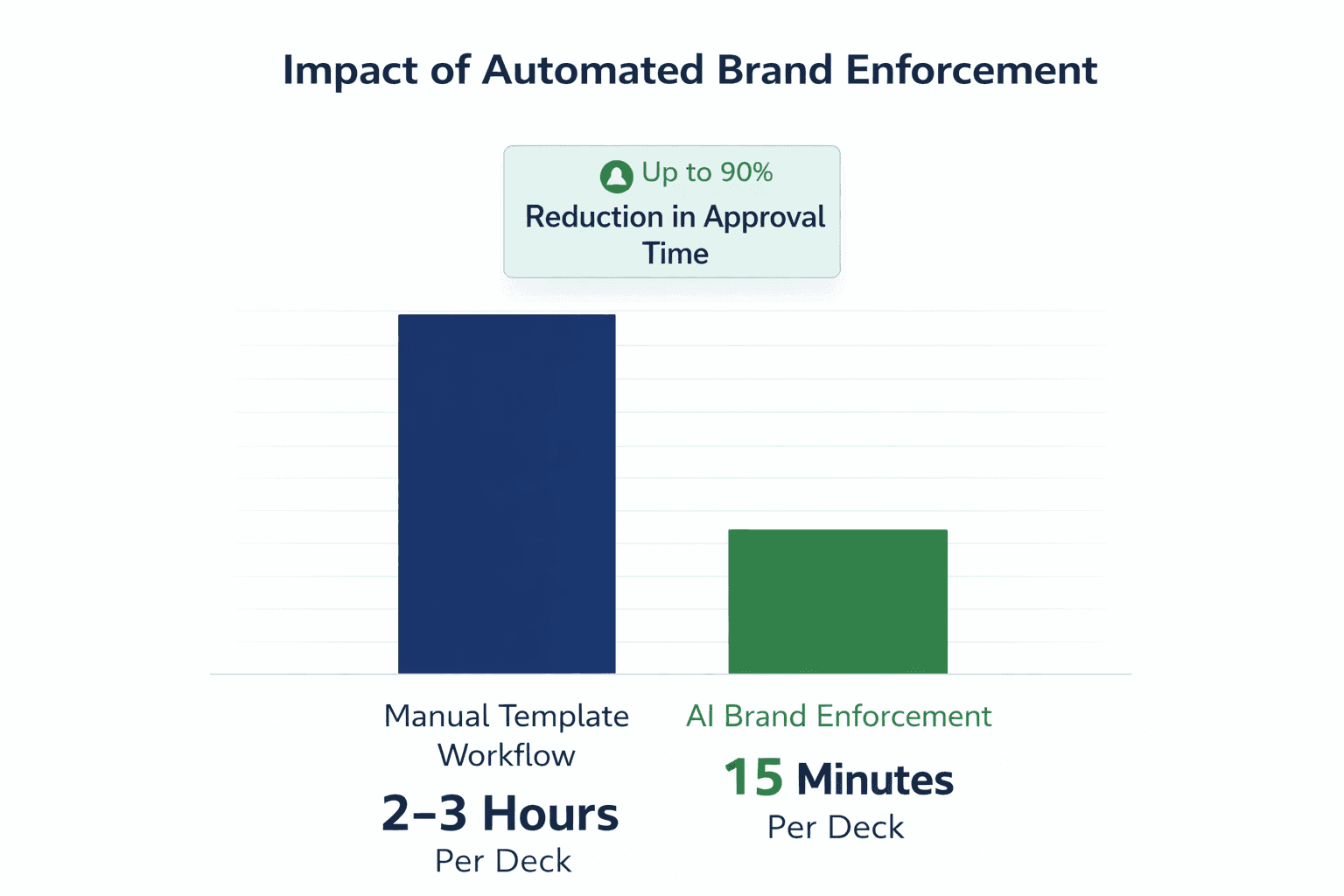
For teams creating more than 10 presentations per month, this automation typically saves 15-20 hours compared to manual brand fixing. Sales teams report 90% reduction in deck approval time. Marketing teams eliminate design review bottlenecks. Agencies prevent cross-brand contamination completely.
The combination of maximum brand enforcement (5/5) with strong AI support (4/4) and ease of use (4/4) is rare. Most tools sacrifice one for the others. Decktopus delivers all three because brand rules are enforced at the system level, not through user discipline.
Use Cases: Which Tools Fit Which Teams?
If you're a marketer launching new campaigns
→ Decktopus or Canva Pro
Automate slide creation with brand-safe templates and visuals. Generate campaign decks in minutes, not hours. Decktopus's AI auto-categorization means you can upload your existing campaign materials, and the AI learns your campaign visual style for future generations. Canva works well if your brand is flexible and your team has design skills.
If you manage a distributed sales team
→ Decktopus
Sales reps generate custom pitch decks in minutes using your locked brand kit. The AI applies your reference slides automatically, so every deck matches your approved style without design review. Version history means reps can iterate quickly, restoring previous versions if an edit doesn't work. Prompt-based editing lets reps say "Make title bigger" without needing to know font names or sizes. No designer bottleneck, zero off-brand slides reaching prospects.
For sales teams, the ROI is immediate. One sales leader reported: "We cut deck approval time by 90% after switching to Decktopus. Reps create custom decks for every prospect, but marketing doesn't review anymore because off-brand slides are impossible."
If you're in a large enterprise with strict brand rules
→ Decktopus with locked templates
Decktopus gives enterprise teams automated brand enforcement without relying on manual template discipline. For organizations needing deep IT integration and approval workflows, PowerPoint paired with Templafy is still an option.
If you're an agency with multiple clients
→ Decktopus (multi-brand support)
Create a separate brand kit for each client with their fonts, colors, logos, and reference slides. Switch brand kits before starting work. Each kit is completely isolated, preventing the nightmare of accidentally using Client A's logo in Client B's deck.
The isolation happens at the architecture level. When you select Client A's brand kit, only Client A's fonts appear in the font dropdown. Only Client A's colors appear in the color picker. Only Client A's logos are available. There's no "oops, I grabbed the wrong asset" because wrong assets aren't accessible.
Generate client-ready presentations in minutes while maintaining perfect brand compliance for each client. The archive system preserves work without risk of permanent deletion, important when client relationships span years.
If you're a startup with evolving brand guidelines
→ Google Slides or Canva
Keep things flexible while your brand identity solidifies. Low cost, easy collaboration, simple enough for non-designers. Graduate to more rigid enforcement tools like Decktopus as your brand matures and team grows. Early-stage startups benefit more from speed than strict enforcement.
If you're a creative team that needs brand boundaries
→ Decktopus
Get creative freedom within brand guardrails. Decktopus AI helps generate unique layouts while respecting color palettes, fonts, and logo placement. Experiment safely without breaking brand rules. Version history means you can try bold ideas knowing you can restore the safe version instantly.
Match the tool to your workflow first, not just features. A tool that's too open or too rigid will break down in real-world use.
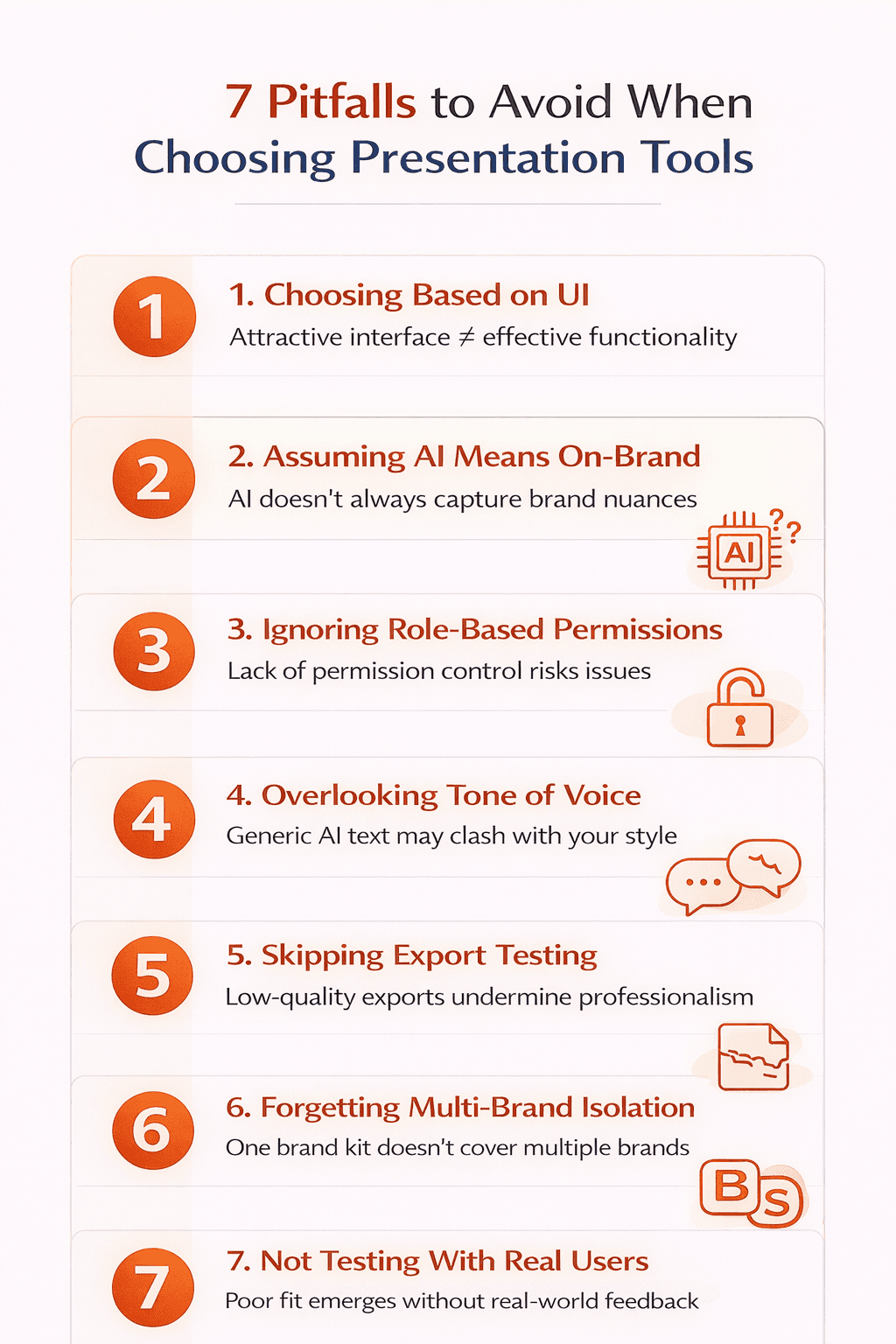
Common Pitfalls When Evaluating Tools
1. Choosing based on UI, not branding control
A pretty interface doesn't guarantee brand consistency. Some of the most aesthetically pleasing tools offer the weakest brand enforcement. Test how easily someone can break your brand guidelines, not how nice the dashboard looks. Can a non-admin user change fonts? Override colors? Remove the logo? If yes, the UI doesn't matter.
2. Assuming "AI" equals on-brand
Many AI tools still default to generic templates unless guided. AI is a feature, not a guarantee of brand compliance. Look for tools where AI respects brand rules by default, not tools where you fight the AI to maintain consistency. Ask: Does the AI use my brand kit as requirements or suggestions?
3. Forgetting about permissions
If anyone can change fonts and colors, the brand won't hold. Without role-based access or locked settings, even the best brand kit becomes optional. Test whether non-admin users can override brand settings. In Decktopus, admins upload brand kits and non-admins use them. In other tools, everyone has equal access to break branding.
4. Underestimating tone mismatch
Visuals may be right, but voice matters just as much, especially in sales decks. A presentation can have perfect colors and fonts but still feel off-brand if the writing doesn't match your company's voice. Look for tools that support tone guidelines, not just visual assets. Can you train the AI on your brand's voice? Does it support tone parameters?
5. Ignoring export quality
Your slides might look perfect in the tool but break when exported to PDF or PPTX. Custom fonts disappear. Colors shift. Layouts change. Always test exports before committing to a platform. Upload your brand fonts, create a test deck, export to PDF and PPTX, and verify everything survived the export intact.
6. Overlooking multi-brand needs
If you're an agency or manage sub-brands, can the tool handle multiple brand kits without mixing them? Many tools that work fine for single brands become nightmares when managing multiple client identities. Test brand switching. Create Brand A, create a deck, switch to Brand B, create another deck. Then check: Can you accidentally access Brand A's assets while working on Brand B? If yes, contamination is inevitable.
7. Not testing with real users
Don't just test yourself. Have three non-designers on your team create presentations. Then review: Are they all on-brand? Did users struggle? Did they find workarounds to break branding? Real-world usage reveals issues that admin testing misses.
What Features Actually Matter (And What Doesn't)
What matters:
Brand kit storage that persists across all presentations. Custom font upload capability (TTF, OTF files), not just web-safe options. Color locking so users can't pick random colors outside your palette. Logo placement rules that are enforced, not suggested. Multi-brand support if you work with multiple clients. Version history and undo without regeneration costs. Role-based permissions for team governance. Reference slide systems that teach AI your visual style.
What doesn't matter as much as you think:
Number of templates (10 usable templates beats 1,000 generic ones). Animation effects and transitions (rarely impact brand consistency). Third-party integrations (nice to have, not essential for branding). Social media auto-posting (separate concern from brand compliance). Number of stock photos (you should use your own branded imagery anyway). Presentation analytics (useful but unrelated to brand enforcement).
Focus on enforcement mechanisms, not feature counts.
How to Test a Tool for Brand Consistency
Don't trust marketing claims. Run this test:
Step 1: Set up your complete brand kit (fonts, colors, logos, reference slides if supported)
Step 2: Have three different people on your team create three different presentations on different topics
Step 3: Export all three to PDF and PPTX
Step 4: Place them side by side and ask: Would someone immediately recognize these as the same brand?
If yes, the tool works. If not, it doesn't matter how many AI features it has.
Also check:
Can users override your brand settings? (They shouldn't be able to.) Do custom fonts export correctly? (No font substitution warnings.) Does the color palette stay locked? (No custom color picker access.) Can someone accidentally delete or change the brand kit? (Only admins should have access.) Is there a version history if someone breaks something? (Free undo without regeneration.) For multi-brand setups, can assets leak between brands? (Complete isolation required.)
This 15-minute test reveals more than hours of reading documentation.
Match Your Tool to Your Brand Goals
There's no one-size-fits-all tool because not every team has the same brand maturity, workflow, or compliance needs.
What matters most is this: Choose a presentation tool that doesn't just let you customize. Choose one that helps you enforce and scale your brand identity.
If you're focused on speed and scale without sacrificing visual integrity, Decktopus strikes this balance. AI automation generates slides in seconds. Brand Kit System ensures every output matches your visual identity. Reference slides teach the AI your exact style. Multi-brand support handles client work without contamination. Version history provides safety nets for experimentation.
Teams report dramatic time savings. One marketing director said: "We went from 2-3 hours per deck with constant design reviews to 15 minutes per deck with zero reviews. Decktopus enforces our brand automatically, so we trust the output."
If your organization is large and compliance-heavy, Decktopus handles enterprise governance with significantly less setup time than Templafy or Pitch Pro. For teams where brand violations have legal implications and require deep IT infrastructure, Templafy remains an option but most enterprise teams find Decktopus covers their needs without the overhead.
If you're relying on PowerPoint or Google Slides alone, make sure you've put strong governance in place. Locked templates, user training, regular brand audits, and dedicated design oversight. These tools can work but require significant manual effort. Calculate the cost of designer time spent reviewing and fixing decks versus the cost of a purpose-built tool.
For agencies juggling multiple client brands, multi-brand support isn't optional. It's the difference between efficient workflows and constant anxiety about mixing client assets. Decktopus handles this with separate brand kits that switch cleanly.
For more on how AI tools specifically handle branding without breaking your guidelines, see Can AI Generate Presentations Using My Company Logo, Colors, and Tone?
And for step-by-step implementation guidance, check out How Can I Make Presentations That Follow Brand Guidelines Automatically?
Want to see how Decktopus enforces brand consistency automatically?
Decktopus lets you upload your complete brand kit, locks your visual identity across all AI-generated slides, and scales across teams without sacrificing control. The Brand Kit System, reference slide library, and AI auto-categorization work together to prevent off-brand slides before they're created, not after.
Try creating your first branded presentation and see how automation and brand consistency work together without compromise.
For teams tired of manually fixing off-brand slides, learn more about AI-powered presentations that respect your brand from the start, not as an afterthought.
FAQ: Choosing the Right Branded Presentation Tool
What makes a presentation tool "brand-consistent"?
A brand-consistent presentation tool enforces your visual identity automatically. It stores your fonts, colors, and logos, then ensures every presentation uses them correctly. True brand consistency means the tool prevents off-brand slides, not just allows on-brand customization. Look for tools with brand kit storage, custom font upload support (TTF, OTF files), color hierarchy enforcement, layout locking, reference slide systems, and multi-brand support if you work with multiple clients.
Is Decktopus good for brand consistency?
Yes. Decktopus was built for brand control from the ground up. Unlike tools that treat branding as a feature, Decktopus treats it as the foundation. You upload your brand kit (brand card, reference slides, logos, fonts, colors), and the AI enforces these rules in every deck it generates. The platform doesn't let users override brand settings unless they have admin permissions. When you upload existing branded presentations, AI automatically categorizes slides by type, creating a reference library that guides all future generations. This means consistency without constant manual oversight. Teams report 90% reduction in time spent fixing off-brand slides.
Can AI-generated decks stay on-brand?
Yes, if the tool allows proper branding inputs and restricts overrides. Decktopus, Tome, and Beautiful.ai support this to varying degrees. The key difference is whether the AI treats your brand kit as suggestions or requirements. Decktopus locks brand rules by default. The AI can't generate slides with fonts outside your brand kit or colors outside your palette. Other AI tools generate slides first, then let you apply branding as an afterthought, which defeats the purpose. Test by asking: Can the AI use fonts I didn't approve of? If yes, brand consistency isn't guaranteed.
What if my team uses Google Slides or PowerPoint?
Use locked templates and train team members on branding basics. Create a master template with your brand fonts, colors, and layouts. Lock as many elements as possible through Slide Master (PowerPoint) or master slides (Google). Distribute the template to your team and make it the official starting point for all presentations. Consider pairing with a platform like Decktopus for better enforcement if your team is large. For smaller teams, regular brand audits help catch violations before they reach clients. However, these solutions require ongoing manual effort compared to purpose-built tools.
Which tool is best for agencies with multiple clients?
Decktopus and Canva Pro support multiple brand kits and let you switch between them, making them ideal for agency workflows. Decktopus keeps each brand kit completely isolated at the system level. When you select Client A's brand kit, only Client A's fonts appear in dropdowns, only Client A's colors in the palette, only Client A's logos in assets. There's no "wrong asset" to accidentally grab because wrong assets aren't accessible. You can name brand kits clearly (ClientName_2025), switch before starting work, and review the first slide to confirm the right brand is active. This architectural isolation prevents the nightmare scenario of Client A's logo appearing in Client B's deck.
How can I control who edits brand settings?
Look for tools with permission settings, user roles, or admin locks, especially in enterprise-grade tools like Pitch and Templafy. Decktopus supports role-based access where admins upload and lock brand kits while team members generate presentations using those locked settings. Non-admin users can create slides and edit content but can't change fonts, colors, logo placement, or reference slides. This prevents well-intentioned but brand-breaking modifications. Test this: Create a non-admin user account and try to change brand colors. You shouldn't be able to.
Do free tools support brand consistency?
Free tools like Google Slides and PowerPoint can support basic brand consistency if you invest significant time creating locked templates and training users. However, they lack automated enforcement, multi-brand support, version control, and advanced brand controls like reference slide systems. For teams larger than five people or agencies managing multiple brands, paid tools with dedicated brand features typically pay for themselves within 60 days through time saved on manual fixes. Calculate: hours spent reviewing and fixing off-brand slides × designer hourly rate × number of presentations per month. Compare that to tool cost.
What's the difference between brand templates and brand enforcement?
Templates provide pre-designed layouts you can customize. Brand enforcement locks your brand rules so they can't be broken. Templates are helpful but don't prevent users from changing fonts, swapping colors, or ignoring guidelines. They're suggestions, not requirements. Brand enforcement makes violations impossible, not just discouraged. The best tools combine both: templates built on enforced brand rules. Decktopus reference slides work this way. The AI generates new slides based on reference examples, but those references exist within locked brand parameters.
How do reference slides work in Decktopus?
Reference slides are admin-uploaded examples for each slide type (title, content, chart, quote, team, closing). When you ask Decktopus AI to generate a "product demo slide," it studies your uploaded product demo reference slides and matches their layout, spacing, image-to-text ratio, and visual hierarchy. Reference slides can't be inserted directly as slides. They only guide generation, ensuring new slides match your approved visual style. This is different from templates because the AI adapts the reference style to new content rather than forcing content into rigid templates.
Related posts

8 AI Startups That Nailed Their Branding with a .AI Domain
Artificial intelligence continues to reshape the way we live and work. As an essential tool now powering a great number of industries, it’s no surprise that AI is driving a new era of search, too.
AI & Tools

5 Best AI Audio Enhancement Tools in 2026
AI Audio Enhancement Tools: Elevating Your Sound Experience
AI & Tools

AI Checker 2026: Unveiling the Latest in AI Detection Technology - ChatGPT, GPT-3, and Beyond
Explore the power of AI content checkers with our comprehensive guide. Discover how these intelligent tools enhance accuracy and efficiency in various applications. Stay ahead in 2026 with insights on the latest advancements and practical tips for leveraging AI checkers and chatgpt detectors effectively.
AI & Tools