AI & Tools
9 Best AI Writers for Content Creation: Tools, Comparison, and Workflow Framework
Compare the 9 best AI writers for content creation. Includes feature tables, a 6-step writing workflow, and how to turn AI content into presentations.

Decktopus Content Team
What Is an AI Writer?
How AI Writers Work
9 Best AI Writers for Content Creation
AI Writer Comparison: Key Features at a Glance
The 6-Step AI Writing Workflow Framework
AI Writers vs. Human Writers: Where Each Excels
Common Mistakes to Avoid
How to Build Your Content Strategy Deck with Decktopus AI
FAQ
Conclusion
Stay Connected
What Is an AI Writer?

An AI writer is a software tool that uses large language models to generate, edit, and optimize written content. The main benefit is speed. Tasks that take a human writer hours, like drafting a blog post or product description, can be completed in minutes.
According to a 2024 McKinsey report, 65% of organizations now regularly use generative AI in at least one business function, nearly double the rate from the previous year. Content creation and marketing are among the top use cases driving that adoption.
AI writers handle a range of tasks, from drafting full articles and email copy to summarizing research and rewriting paragraphs for clarity. They do not replace human judgment, but they remove much of the repetitive work that slows content teams down.
This guide reviews nine of the best AI writing tools available today, compares their strengths, and includes a practical framework for integrating AI writing into your content workflow.
How AI Writers Work
Most AI writers are built on large language models (LLMs) trained on vast datasets of text from books, websites, and articles. When you provide a prompt, the model predicts the most likely sequence of words based on that training data.
The output quality depends heavily on the prompt you give it. A vague instruction like "write about marketing" produces generic content. A specific prompt like "write a 300-word introduction about email segmentation for SaaS companies" produces something much more useful.
Modern AI writers go beyond simple text generation. They can adjust tone, follow brand guidelines, optimize for SEO keywords, and even generate content in over 100 languages. Some tools include built-in editing features that check grammar, readability, and plagiarism.
The most effective approach treats AI writers as drafting assistants rather than finished-content machines. Human review, fact-checking, and strategic editing remain essential for producing content that builds trust with readers.
9 Best AI Writers for Content Creation
1. ChatGPT (OpenAI)
ChatGPT is the most widely used AI writing tool, built on OpenAI's GPT models. It handles blog posts, emails, scripts, social media copy, and creative writing through a conversational interface.
Its strength is versatility. You can ask it to brainstorm ideas, draft content, rewrite paragraphs in a different tone, or summarize long documents. The paid version (ChatGPT Plus) includes access to the latest models, web browsing, and third-party app integrations like Decktopus AI for turning content into presentations.
2. Claude (Anthropic)
Claude excels at long-form content and nuanced writing tasks. It has a large context window, which makes it effective for working with lengthy documents, research papers, and detailed briefs.
Claude is also available as an AI coding tool (Claude Code) that connects to services like Decktopus AI via MCP Server, allowing technical teams to generate presentations programmatically.
3. Jasper
Jasper is built specifically for marketing teams. It includes templates for blog posts, ad copy, product descriptions, and social media content. Its brand voice feature lets teams define tone and style rules so every piece of content stays on brand.
Jasper also integrates with SEO tools like Surfer SEO, making it a popular choice for content marketers focused on search rankings.
4. Copy.ai
Copy.ai focuses on short-form marketing content. It is particularly strong for writing email subject lines, ad headlines, product descriptions, and social media posts.
The platform includes workflow automation features that let teams build repeatable content pipelines, from research to draft to final review.
5. Writesonic
Writesonic combines AI writing with SEO optimization. It generates blog posts, landing page copy, and product descriptions while suggesting keywords and structure improvements.
Its Article Writer feature can produce long-form blog posts from a topic and keywords in a single step, which saves time for solo content creators.
6. Grammarly
Grammarly started as a grammar checker but has expanded into AI-assisted writing. Its generative AI features can rewrite paragraphs, adjust tone, and suggest ways to make writing clearer and more concise.
It works as a browser extension and integrates with most text editors, making it easy to use across email, documents, and social media platforms.
7. Rytr
Rytr is a budget-friendly AI writer that covers the basics well. It supports over 30 use cases, including blog sections, email copy, and product descriptions, with a simple interface.
Its free tier is generous enough for individual bloggers and freelancers who need occasional AI assistance without a large monthly cost.
8. Notion AI
Notion AI is built directly into the Notion workspace. It can summarize meeting notes, draft content, brainstorm ideas, and extract action items from documents, all without leaving the tool you already use for project management.
This integration makes it especially useful for teams that already run their content planning and documentation in Notion.
9. QuillBot
QuillBot specializes in paraphrasing and rewriting. It offers multiple rewriting modes (fluency, formal, creative, and others) and includes a grammar checker, summarizer, and citation generator.
Students and academic writers find it particularly useful for rewording research without losing the original meaning.
AI Writer Comparison: Key Features at a Glance
Feature Comparison Table
Tool | Best For | SEO Built-In | Free Tier |
|---|---|---|---|
ChatGPT | Versatile writing and brainstorming | No (manual) | Yes |
Claude | Long-form and nuanced content | No (manual) | Yes |
Jasper | Marketing teams and brand voice | Yes (Surfer integration) | Trial only |
Copy.ai | Short-form marketing copy | No | Yes |
Writesonic | SEO blog posts | Yes | Yes |
Grammarly | Editing and tone adjustment | No | Yes |
Rytr | Budget-friendly basics | Basic | Yes |
Notion AI | Workspace-integrated writing | No | Limited |
QuillBot | Paraphrasing and academic writing | No | Yes |
AI Writer Use Cases by Content Type
Content Type | Best Tool | Why |
|---|---|---|
Long-form blog posts | ChatGPT, Claude, Writesonic | Strong at structured, detailed drafts |
Ad copy and headlines | Copy.ai, Jasper | Built for short, punchy marketing text |
Academic paraphrasing | QuillBot | Multiple rewriting modes for precision |
Email campaigns | Jasper, Copy.ai | Templates and brand voice controls |
Presentations from AI content | Decktopus AI | Turns AI-written text into designed decks |
The 6-Step AI Writing Workflow Framework
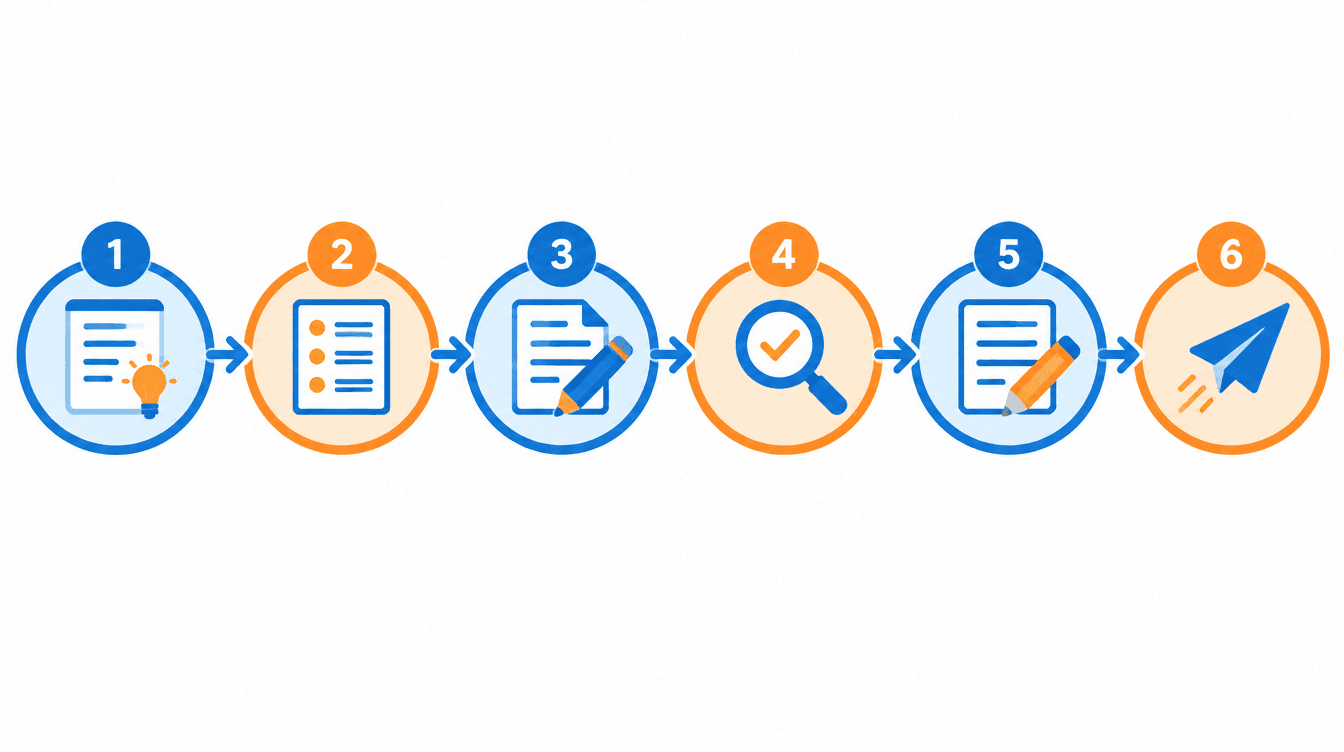
Follow this framework to get the most out of any AI writing tool without sacrificing quality.
1. Define the brief. Start with a clear content brief that includes your target audience, primary keyword, word count target, and desired tone. The more specific the brief, the better the AI output.
2. Generate a structured outline. Ask the AI to produce a detailed outline before drafting. Review and edit the outline so the structure matches your content strategy.
3. Draft section by section. Generate content one section at a time rather than asking for the entire article at once. This gives you more control over depth and direction.
4. Fact-check and verify. AI writers can generate plausible-sounding but incorrect information. Verify every statistic, quote, and claim against a reliable source before publishing.
5. Edit for voice and flow. AI drafts often sound generic. Edit for your brand's tone, remove repetitive phrasing, and ensure the content reads naturally from one section to the next.
6. Optimize and publish. Run the final draft through an SEO check, add internal links, and format for readability (short paragraphs, clear headings, bullet points where appropriate). Then publish and track performance.
AI Writers vs. Human Writers: Where Each Excels
Dimension | AI Writer | Human Writer |
|---|---|---|
Speed | Produces drafts in seconds | Takes hours to days |
Consistency | Uniform tone across high volume | Natural variation, harder to scale |
Creativity | Recombines patterns from training data | Original ideas and lived experience |
Fact accuracy | Can hallucinate or fabricate details | Verifies sources during research |
Brand voice | Needs explicit prompting | Develops naturally over time |
Cost at scale | Low marginal cost per piece | Linear cost increase with volume |
The strongest content strategies use both. AI handles the first draft, research summaries, and repetitive formats. Humans handle strategy, fact-checking, brand voice, and the creative decisions that make content memorable.
Common Mistakes to Avoid
Publishing AI-generated content without human review is the most common mistake. AI writers produce plausible text, but they can include inaccurate statistics, outdated information, or awkward phrasing that damages credibility.
Relying on a single prompt for an entire article rarely works well. Break the work into sections and refine each one individually for better results.
Ignoring SEO after the draft is another frequent error. AI-generated text often needs manual optimization for target keywords, internal links, and meta descriptions.
Using AI content without adding original perspective makes your content interchangeable with everyone else using the same tools. Add your own examples, data, and expert framing to differentiate.
Skipping the fact-check step is dangerous. AI writers can confidently state incorrect numbers or attribute quotes to the wrong source. Verify every claim before publishing.
How to Build Your Content Strategy Deck with Decktopus AI
AI writers help you create the content. But at some point, that content strategy needs to be presented, whether to a client, a leadership team, or stakeholders reviewing your editorial plan. Decktopus AI turns your AI-written research and strategy documents into polished presentation decks in minutes.
Why Decktopus AI Is Built for Content Teams
AI Presentation Generation builds a full deck from a short prompt or an uploaded document. Paste your AI-written content brief and Decktopus AI creates a structured presentation around it, complete with design and layout.
The Style Editor keeps every deck on brand. Import your brand directly from your company website URL to automatically extract colors, fonts, and logo. Or select from your saved brands and styles, or create a new style by choosing a base (Minimal, Bold, Dark, or Let AI pick) and confirming your preferences.
Edit with AI lets you refine slides using natural language. Type instructions like "make the content calendar section more visual" or "add a comparison of AI writing tools." AI optimizes your prompt and shows a preview before applying. For images, describe what you want, upload your own, or search the Unsplash and Freepik stock library.
The AI Carousel Maker turns your AI-written blog posts into card-by-card carousels optimized for LinkedIn and Instagram. This is a natural next step when you want to repurpose long-form content for social media.
ChatGPT Integration means you can create a Decktopus deck without leaving ChatGPT. Tag @Decktopus AI in any conversation and describe the presentation you need. The MCP Server connects Decktopus to Claude Code, Cursor, and similar AI tools for programmatic deck creation.
Once your deck is shared, the Email Gate collects viewer emails before they can access the link. That turns a content strategy presentation into a lead generation tool.
Deck Analytics shows who opened the link, how long they stayed, and which slides held their attention. The Viewers tab displays each viewer's location, device, and browser. The Slides tab shows an attention heatmap and a slide funnel that flags the biggest drop-off point.
The Loop AI Delivery Coach prepares you for presenting your content strategy. It guides you through four stages: The Profiler gathers context about your audience and goals. The Architect builds a narrative framework with speaking notes. The Red Team simulates audience questions. The Mirror lets you rehearse and produces a Readiness Score (0 to 100) covering pacing, filler words, energy, and content coverage.
Decktopus AI vs. Traditional Slide Tools
Feature | Traditional Slide Software | Decktopus AI |
|---|---|---|
Deck creation | Manual, slide by slide | Generated from a prompt or uploaded document |
Brand matching | Manual template setup | Automatic brand import from URL, saved styles library |
Content repurposing | Copy-paste into slides manually | AI Carousel Maker for social media cards |
Viewer tracking | No built-in analytics | Deck Analytics with heatmap and slide funnel |
Lead capture | Not available | Email Gate on the share link |
Delivery practice | Not available | Loop AI with 4 coaching stages and Readiness Score |
LLM integration | Not available | ChatGPT app and MCP Server |
Who This Section Is For
This workflow fits content and marketing roles directly:
Marketers presenting content strategies and editorial calendars to stakeholders
Agencies pitching content plans and AI-driven workflows to clients
Founders sharing content marketing results with investors
Webinar hosts presenting AI writing best practices to an audience
Step-by-Step Workflow
Describe your topic. Type something like "AI content strategy for our Q4 blog calendar." Or upload a content brief, editorial plan, or research document via the paperclip icon.
If you have an older strategy deck, Beautify can help. Use as a Resource extracts key points and builds a new deck (a prompt describing the focus is required), or Redesign keeps your existing content and gives it a new look.
Choose your style next. The style selection screen shows your saved brands and styles. Select one to move straight to the next step. Or import a new brand from your company URL, or create a new style by picking a base (Minimal, Bold, Dark, or Let AI pick) and confirming your preferences.
Review the AI-generated outline before committing to full slide generation. Each slide appears as a separate card you can edit, reorder, duplicate, or delete. Your selected style is visible above the outline with an Adjust button.
Generate the full presentation once the outline looks right. Decktopus AI produces content, layout, and design together.
Refine with Edit with AI by typing prompts like "add a slide comparing AI writing tools" or "make the ROI section more data-driven." Preview every change before it applies. Use Edit Text for quick manual tweaks without AI prompts.
Add images by generating them from a description, uploading your own, or pulling from the Unsplash and Freepik stock library.
Rehearse with the Loop AI Delivery Coach before presenting to stakeholders. The four coaching stages prepare your narrative, anticipate tough questions, and score your rehearsal.
Export to PDF, PPT, or PNG (Standard or Compressed quality). Share a live link that updates automatically with any edits. Enable the email gate to collect viewer emails. Track engagement with Deck Analytics. Business plan users can connect a Custom Domain for a branded link experience.
Get started with Decktopus AI and turn your AI-written content into a presentation your team can actually use.
FAQ
What is an AI writer?
An AI writer is a software tool powered by large language models that generates, edits, and optimizes written content based on prompts you provide.
Are AI writers accurate?
AI writers produce plausible text quickly, but they can generate incorrect facts or statistics. Human fact-checking is essential before publishing any AI-generated content.
Can AI writers replace human writers?
No. AI writers handle drafting and repetitive tasks well, but strategy, brand voice, original perspective, and fact verification still require human judgment.
Which AI writer is best for blog posts?
ChatGPT, Claude, and Writesonic are strong options for long-form blog content. The best choice depends on whether you prioritize versatility, nuance, or built-in SEO features.
How much do AI writers cost?
Pricing varies widely. Many tools offer free tiers with limited usage. Paid plans typically range from $10 to $50 per month for individual users, with team plans costing more.
Can AI writers optimize content for SEO?
Some AI writers include built-in SEO features like keyword suggestions and content scoring. Others require pairing with a separate SEO tool for full optimization.
What is the best way to prompt an AI writer?
Be specific. Include your target audience, desired tone, word count, and key points to cover. Break large tasks into smaller prompts for better results.
Can AI writers generate content in multiple languages?
Yes. Most major AI writers support dozens of languages. Quality varies by language, with English typically producing the strongest results.
How do I turn AI-written content into a presentation?
Decktopus AI can generate a presentation directly from your AI-written text or content brief. Upload the document or describe the topic and it produces a designed deck.
Is AI-generated content good for SEO?
AI-generated content can rank well when it is factually accurate, well-structured, and provides genuine value. Search engines evaluate content quality, not how it was produced.
Do AI writers work for academic writing?
Tools like QuillBot and Grammarly help with paraphrasing, grammar, and citations. However, academic integrity policies at most institutions require disclosure of AI tool usage.
Can AI writers maintain brand voice?
Some tools (like Jasper) include brand voice settings. With others, you need to specify tone and style in your prompts and edit the output to match your brand guidelines.
What is the difference between an AI writer and an AI presentation maker?
AI writers generate text content like articles and emails. AI presentation makers like Decktopus AI generate complete visual slide decks from text prompts, with design and layout included.
How do I check if AI content is original?
Use plagiarism detection tools like Copyscape or Turnitin alongside the AI writer to verify that generated content does not duplicate existing published material.
Can I use AI writers and Decktopus AI together?
Yes. Use an AI writer to draft your content, then upload it to Decktopus AI to generate a branded presentation. The ChatGPT integration also connects both workflows in one conversation.
Conclusion
AI writers have moved from novelty to necessity for content teams working at scale. The nine tools reviewed here cover the full spectrum, from general-purpose assistants like ChatGPT and Claude to specialized platforms like Jasper for marketing and QuillBot for academic rewriting.
The key to using AI writers effectively is treating them as drafting partners, not finished-content machines. Define a clear brief, generate in sections, fact-check everything, and edit for your brand's voice before publishing.
When your AI-written content needs to become a presentation, Decktopus AI bridges the gap. Upload your brief, generate a branded deck, rehearse with the Loop AI Delivery Coach, and track engagement with Deck Analytics. Get started with Decktopus AI.
Stay Connected
Follow Decktopus AI for more content creation and presentation tips:
Related posts

8 AI Startups That Nailed Their Branding with a .AI Domain
Artificial intelligence continues to reshape the way we live and work. As an essential tool now powering a great number of industries, it’s no surprise that AI is driving a new era of search, too.
AI & Tools

5 Best AI Audio Enhancement Tools in 2026
AI Audio Enhancement Tools: Elevating Your Sound Experience
AI & Tools

AI Checker 2026: Unveiling the Latest in AI Detection Technology - ChatGPT, GPT-3, and Beyond
Explore the power of AI content checkers with our comprehensive guide. Discover how these intelligent tools enhance accuracy and efficiency in various applications. Stay ahead in 2026 with insights on the latest advancements and practical tips for leveraging AI checkers and chatgpt detectors effectively.
AI & Tools