Marketing
Which AI Presentation Tools Support Custom Brand Fonts and Colors?
Not all AI presentation tools support custom brand fonts and colors. Here's what to look for, what most tools get wrong, and which platforms actually enforce your brand assets during generation.


Decktopus Content Team
You’ve got a brand. It has specific fonts, exact color values, and a logo that needs to appear in the right place every time. You’ve decided to use AI to speed up presentation creation. But after generating your first few decks, something keeps feeling off. The fonts are close but not yours. The blue is a shade away from correct. The logo ends up wherever the template feels like putting it.
The problem is not AI in general. The problem is that most AI presentation tools were built to look professional on default settings, not to enforce your specific brand. Custom brand fonts and colors are an afterthought in many platforms, not a core design constraint.
This article breaks down what real brand support actually looks like in an AI presentation tool, what to check before committing to one, and how the tools that get it right actually work.
For a full breakdown of what brand-consistent AI generation requires, see can AI generate presentations using your company logo, colors, and tone.
Why Most AI Tools Fall Short on Brand Fonts and Colors
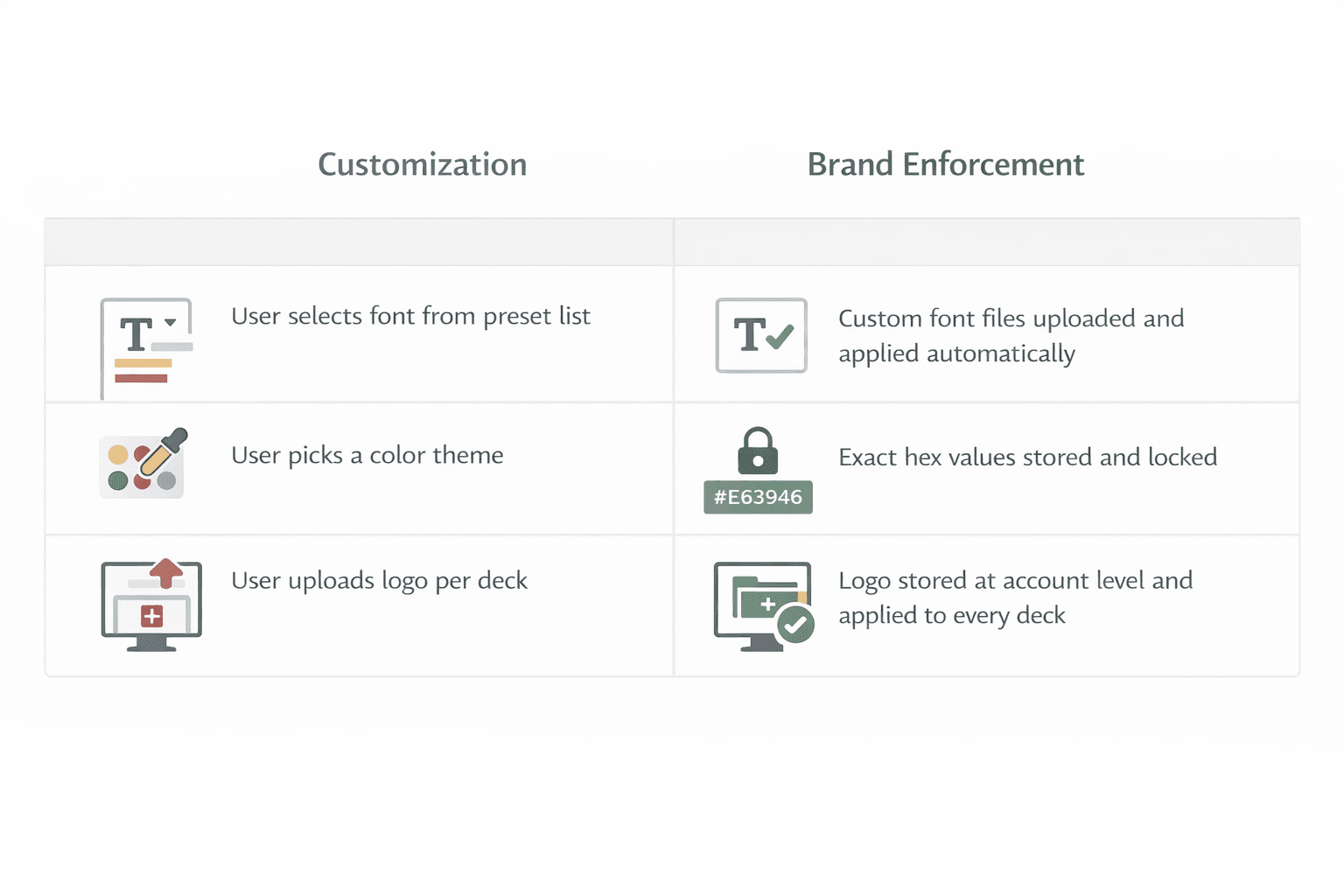
The gap between “supports branding” and “enforces your brand” is wider than most product pages make it sound.
Almost every AI presentation tool will tell you it supports custom branding. What that often means in practice is that you can select from a curated list of fonts, pick a color theme, and upload a logo. That is customization. It is not brand enforcement.
Here is the difference. Customization means a user can adjust settings to get closer to their brand. Enforcement means the system applies your exact brand assets automatically, every time, across every generated slide, without relying on anyone to remember the right settings.
For a solo user building their own decks, customization might be enough. For a team where multiple people generate presentations with different levels of design knowledge, customization is a liability. Every person who has to manually apply brand settings is a point of failure.
The tools that genuinely support custom brand fonts and colors do not just allow users to set them. They store them at the account level and apply them automatically at generation. The distinction matters a lot in practice.
What Custom Font Support Actually Looks Like
Font support in AI presentation tools exists on a spectrum. Understanding where a tool sits on that spectrum tells you a lot about how seriously it treats brand compliance.
Preset font selection is the most basic level. The tool offers a dropdown of available fonts, you pick the one that looks closest to your brand font, and that gets applied. If your brand font is not in the list, you compromise. This is standard in most consumer-facing AI slide tools.
Font upload without enforcement is a step up. You can upload your brand font file and it becomes available as an option. But you have to select it manually when starting each new presentation, and other users on your team can ignore it or forget it exists.
Font upload with account-level enforcement is what brand-aware tools do. Your brand fonts are uploaded once at the workspace or account level in standard formats like TTF or OTF. Every time the AI generates slides in that workspace, those fonts are applied by default. Users do not choose the font. The system uses your brand font because that is what the brand kit says to use.
There is also a layout consideration that often gets overlooked. AI tools build their layouts around generic font metrics. When you apply a brand font that is wider, taller, or has different letter spacing than the default, it interacts with the layout differently. Text overflows. Spacing breaks. A tool that genuinely supports custom fonts ai presentations accounts for this by building or adjusting layouts around your font, not around an assumed generic default.
What Custom Color Support Actually Looks Like
Color support has the same spectrum problem as fonts, and the failure mode is just as common.
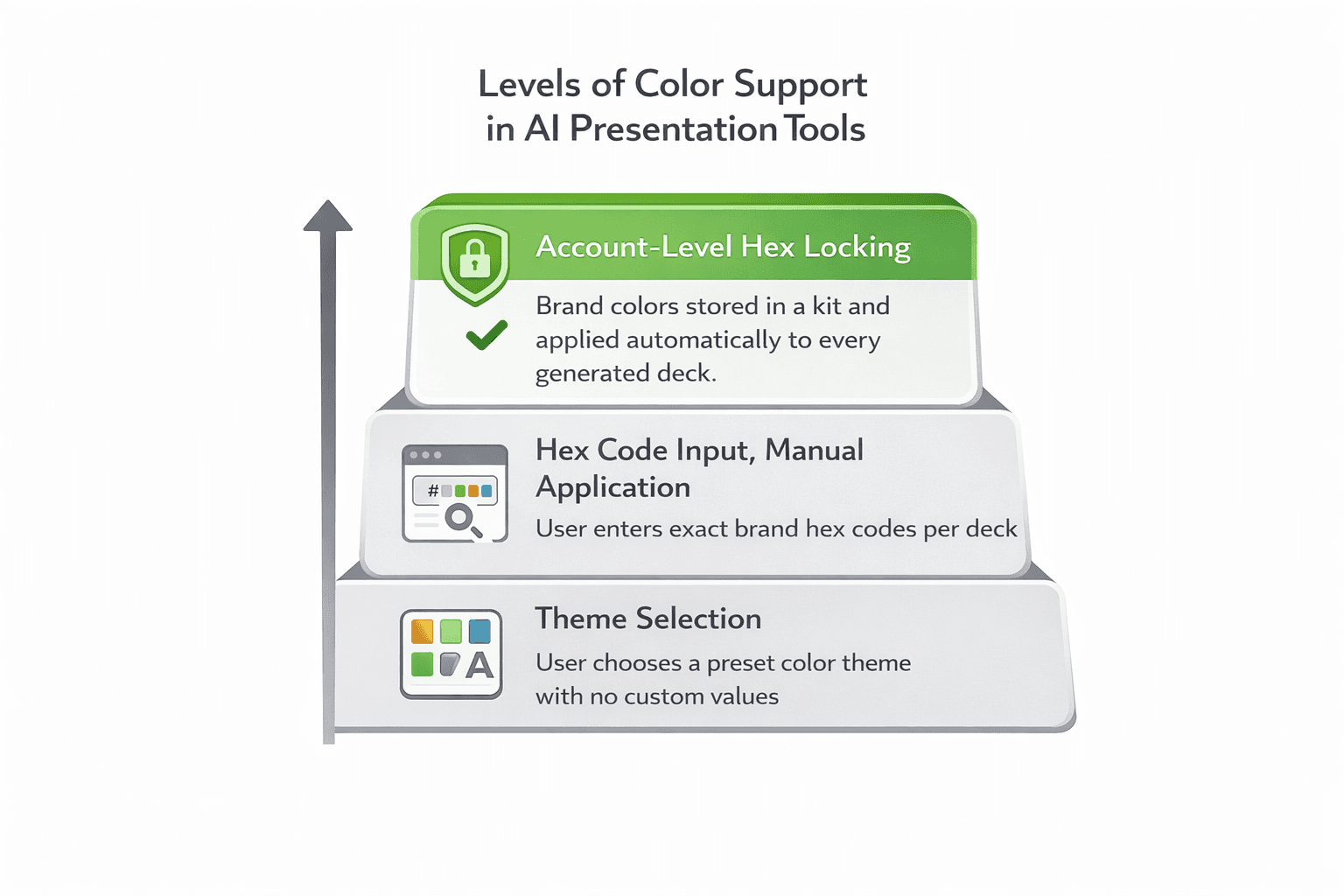
Theme selection is the baseline. You pick a pre-built color theme labeled “professional blue” or “minimalist neutral.” The colors are someone else’s version of those descriptions, not your brand’s exact values.
Hex code input with manual application lets you enter your specific color values, which is better. But if those values live in per-deck settings rather than account-level brand settings, every new presentation starts from the tool’s defaults. Someone has to enter the hex codes again, or copy from a previous deck, every single time.
Hex code input with account-level locking is the standard that actually protects brand accuracy. Your exact color values are stored as part of the brand kit. They apply to every generated presentation automatically. Nobody enters hex codes per deck. Nobody approximates from memory. The system uses your colors because they are the only colors available in your brand kit.
One more thing worth checking: whether the tool lets users override brand colors during generation or editing. Some tools store your brand palette but leave a “custom color” option open, which means anyone on the team can still introduce off-brand colors into a slide. A tool with real brand colors AI slides enforcement removes or restricts that option when a brand kit is active.
What to Look for Beyond Fonts and Colors
Fonts and colors get the most attention in brand discussions, but they are only two elements of a complete brand system. Before choosing an AI presentation tool, it is worth checking how it handles the rest.
Logo management. Can you upload your logo at the account level? Does the tool support multiple logo versions, such as a primary logo, a light version for dark backgrounds, a dark version for light backgrounds, and a favicon? Brands regularly need to switch between versions depending on slide background. If the tool only stores one logo file, someone is manually swapping versions every time the background changes. Is logo placement a brand kit setting or a per-template decision? If placement varies by template, your logo will drift across slide types within the same deck.
Reference slides. This is a meaningful differentiator that most tools do not offer. Rather than just storing your raw assets, a tool can let you upload approved slide examples by type: how a title slide should look, how a content slide should be structured, how a chart slide should be laid out. The AI uses these as style guidance during generation, producing outputs that match your actual visual standard rather than just your assets in isolation.
Multi-brand support. If you manage more than one brand, whether you are an agency or a company with product sub-brands, the tool needs to support completely separate brand kits with no crossover between them. Single-brand tools that get adapted for multi-brand use through workarounds tend to break down.
Admin controls. Who can edit the brand kit? Who can override brand settings? If everyone on a team has equal access to brand settings, the kit is only as reliable as the least careful person on the team.
For a broader look at how these criteria apply across the landscape of available tools, what are the best presentation tools for brand-consistent slides compares them across these dimensions.
See how Decktopus handles all of this in one system. Try it here.
How Decktopus Handles Brand Fonts and Colors
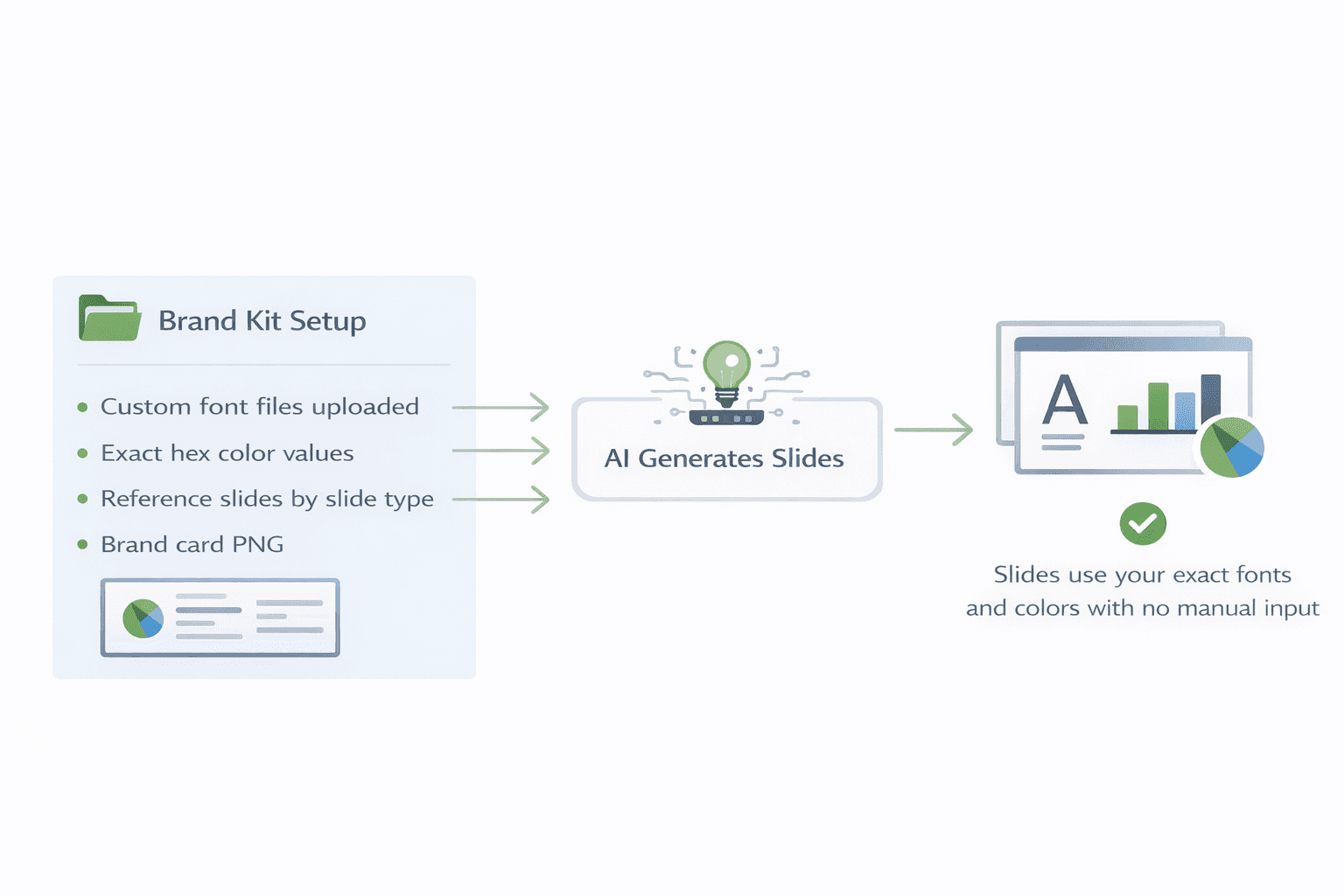
Decktopus is built around a Brand Kit system that stores and applies brand assets at the account level. Here is how fonts and colors specifically work within that system.
Fonts. Brand fonts are uploaded directly to the Brand Kit. This is not a selection from a preset font library. You upload your actual brand font files, and those fonts become the typefaces the AI uses when generating any presentation within that brand kit. No user needs to select the font. No user can accidentally generate slides in the wrong typeface.
Colors. Exact hex values are stored in the Brand Kit as the brand’s color palette. When the AI generates slides, it applies those values specifically, not approximations based on a named theme. The palette is part of the kit, which means it is applied automatically every time and is not dependent on individual users entering the right values per session.
Reference slides. Beyond fonts and colors, Decktopus Nano supports uploading reference slides by slide type: title, content, chart, quote, team, closing. These are admin-managed and used to guide AI generation. They show the AI how your brand assets should look together in an actual slide, which produces outputs that feel on-brand rather than just technically compliant.
Brand Card. A separate PNG visual representation of the brand is used as a reference in AI prompts. This gives the generation process a visual context for the brand’s overall aesthetic, in addition to the individual asset rules in the kit.
Multi-brand support. Agencies or companies managing multiple brands can maintain completely separate brand kits. Each kit is isolated. Switching between brands means selecting a different kit, and the assets from one kit are not accessible when working in another.
For teams with large existing slide libraries, Decktopus also supports uploading presentations of 100 or more slides with AI auto-classification by slide type, making it practical to build a full reference library for an existing brand quickly.
How to Evaluate Any Tool Before You Commit
Use this checklist when assessing any AI presentation platform for brand font and color support.
Fonts:
Can you upload your own font files, or only select from a preset list?
Are uploaded fonts stored at the account level or per deck?
Does the tool account for font metric differences when building layouts?
Colors:
Can you input exact hex values?
Are those values stored at the account level or entered per deck?
Can users override brand colors during editing, or is the palette locked when a brand kit is active?
Beyond fonts and colors:
Can you upload reference slides by slide type?
Is logo placement a brand-level rule or a template-level variable?
Does the tool support multiple separate brand kits?
Who has permission to edit brand kit settings?
The non-designer test: Have someone with no design background generate a five-slide deck using only a text prompt. Check whether the output uses your correct fonts, exact colors, and proper logo placement without any manual adjustment. If it does, the tool is doing real brand enforcement. If it needs corrections, you are back to manual brand application after the fact.
How the Main AI Presentation Tools Compare on Brand Support
If you are actively evaluating tools, here is how the main options stack up across the features that matter most for brand compliance. These are honest assessments, not rankings.
Decktopus is built around the Brand Kit system covered in this article. Custom font files uploaded at the account level, exact hex values stored and locked, logo placement enforced as a brand rule, reference slides used to guide AI generation by slide type, and full multi-brand kit support with isolation between kits. Brand rules apply at generation, not after.
Beautiful.ai has smart layout features that adapt to content length and type. Its Pro plan includes brand kit functionality covering fonts and colors. Brand enforcement is less granular than a dedicated brand kit system, and tone and voice guidance is limited. Good for teams that want visually strong outputs and can accept moderate brand control.
Canva Pro allows you to upload brand assets including fonts, colors, and logos, and templates can be locked to prevent structural edits. The platform is highly flexible, which is its strength for creative work and its weakness for brand enforcement. That flexibility makes it easy for users to introduce off-brand elements. Canva is not AI-native in the same way, with design being primarily manual or semi-assisted.
Pitch has strong team collaboration features and shared slide libraries that make it practical for teams building from consistent templates. Font and color support is included. AI-assisted features are still developing compared to the other tools here.
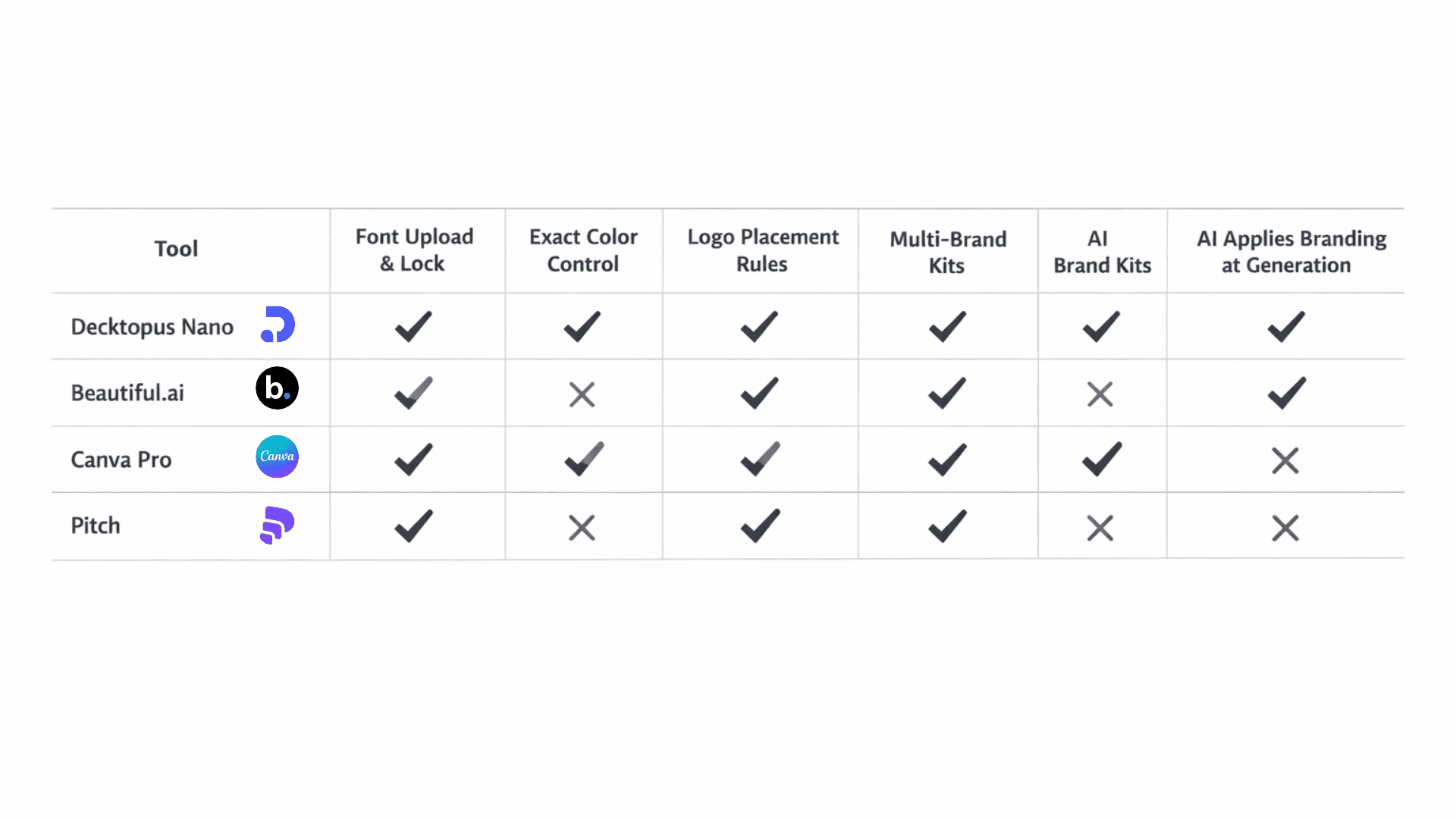
The right tool depends on your team’s specific needs. If brand accuracy is a hard requirement and multiple people are generating presentations, account-level enforcement matters more than the number of layout options. If you are a solo user or a small team with light brand requirements, the distinction between enforcement and customization is less critical.
Most AI presentation tools support some version of custom fonts and colors. Very few enforce them the way a brand system actually requires.
The gap is in where brand rules live and how they get applied. Per-deck settings mean compliance depends on individual users getting it right every time. Account-level brand kits mean compliance is automatic, consistent, and does not require anyone to remember anything.
If your team creates presentations regularly and brand accuracy matters for what gets sent externally, the account-level approach is the only one that scales.
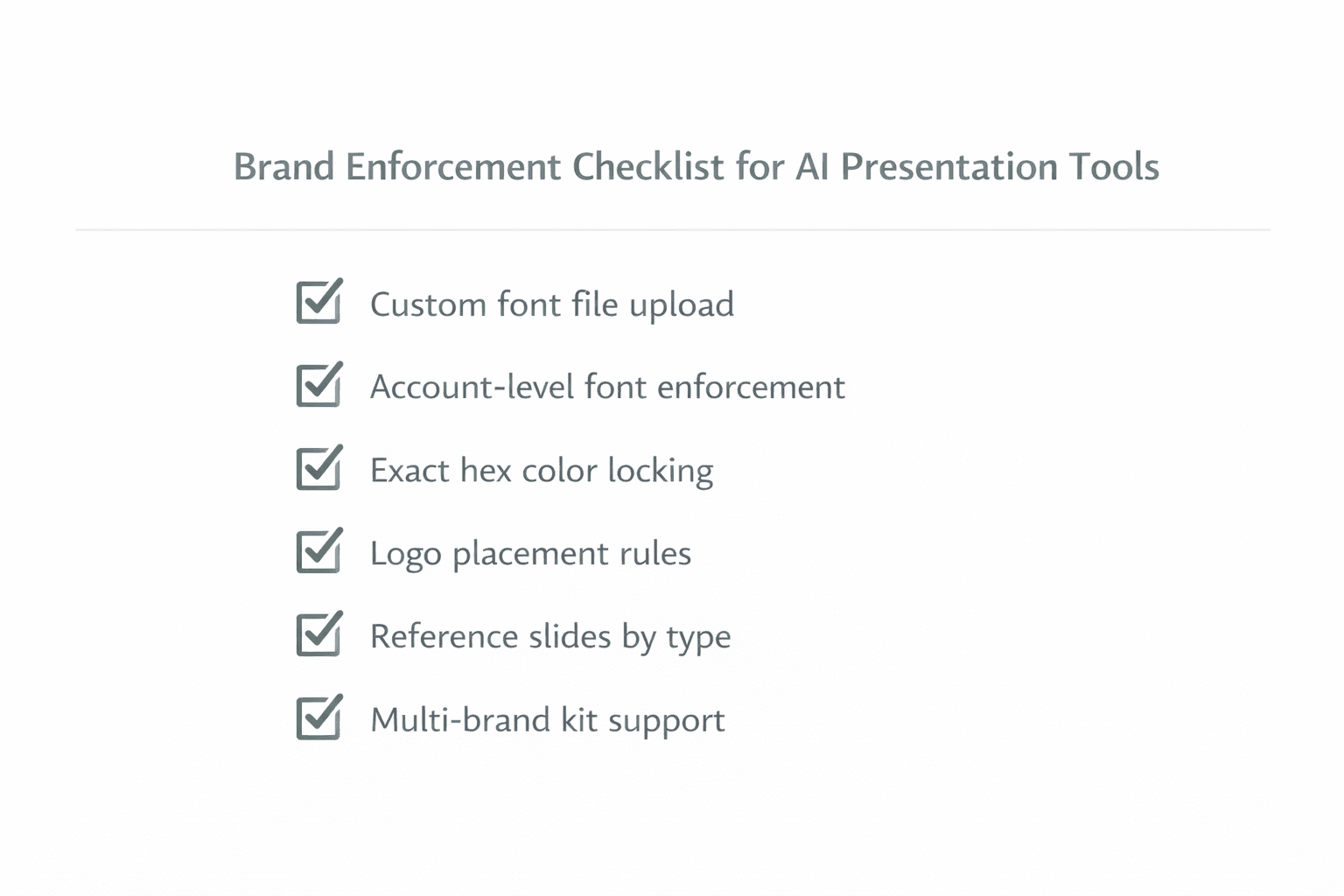
Quick checklist when evaluating a tool:
Custom font upload, not just preset font selection
Exact hex values stored at account level, not entered per deck
Brand colors locked during generation, not overridable by individual users
Reference slides supported for style guidance beyond raw assets
Logo placement enforced as a brand rule, not a template variable
Multi-brand kit support if you manage more than one brand
FAQ
Can AI presentation tools use my exact brand font, not just something similar?
Yes, if the tool supports custom font file uploads at the account level. Tools that only offer preset font menus will substitute the closest available match. Tools that let you upload font files directly use your actual typeface in every generated slide.
Why do AI-generated slides use the wrong colors even when I’ve set my brand colors?
Usually because the color settings are applied at the deck level, not the account level. When a new presentation is started, the tool defaults back to its built-in theme colors. The fix is a platform where your exact hex values are stored in a brand kit and applied automatically without any per-deck input.
What is the difference between a color theme and a brand color palette?
A color theme is a pre-built set of colors the tool provides, labeled by style such as “professional” or “modern.” A brand color palette is your specific color values, entered as exact hex codes. Themes approximate. Palettes are exact. For client-facing or marketing presentations, exact values are what matter.
Do AI tools that support custom fonts handle layout differently for different font sizes?
Most do not by default. The AI builds layouts around generic font assumptions. When your brand font has different metrics than those assumptions, layouts can break. A well-configured brand-aware tool addresses this through reference slides that show the AI how layouts should actually look with your specific font applied.
Can one AI presentation tool support multiple different brand kits for different clients or products?
Some can. Decktopus supports completely separate brand kits with full isolation between them. Other tools may allow multiple saved color themes but share font settings across all of them, which is not true multi-brand support. If you manage multiple brands, check specifically whether kits are fully isolated or just partially configurable.
Related posts

How AI Voice Agents Help Sales Teams Prepare and Deliver Better Presentations
Learn how AI voice agents help sales teams turn call insights into focused slides, stronger delivery, and more confident customer presentations at every stage.
Marketing

Instagram Carousel Size & Dimensions Guide (2026)
Instagram carousel size in 2026: exact dimensions for square, portrait, and landscape, plus file limits and safe zones, verified across sources.
Marketing

LinkedIn Carousel Size, Dimensions & Format Guide 2026
LinkedIn carousel size in 2026: exact dimensions, file limits, aspect ratios, and formatting rules so your slides never get cropped.
Marketing