Marketing
How Agencies Avoid Mixing Client Brands in AI-Generated Slides
Brand mixing is one of the most damaging mistakes an agency can make in client deliverables. Here's how agencies prevent it in AI-generated presentations through system design.


Decktopus Content Team
Brand mixing is the kind of mistake that happens quietly. Nobody sits down intending to put Client A’s logo in Client B’s deck. It happens because someone grabbed the nearest file, reused a recent template, or worked fast under a deadline and forgot to swap out one element.
In a manual workflow, brand mixing is a risk. In an AI workflow where multiple people are generating slides simultaneously across multiple client accounts, it becomes a near-certainty unless the system is designed to prevent it.
This article covers how agencies that manage client brand presentations at scale actually prevent cross-contamination in AI-generated slides, and why the answer is structural rather than behavioral.
For a full look at how agencies set up separate brand kits per client, see how agencies create client presentations with different brand kits.
Why Brand Mixing Happens in AI Workflows Specifically
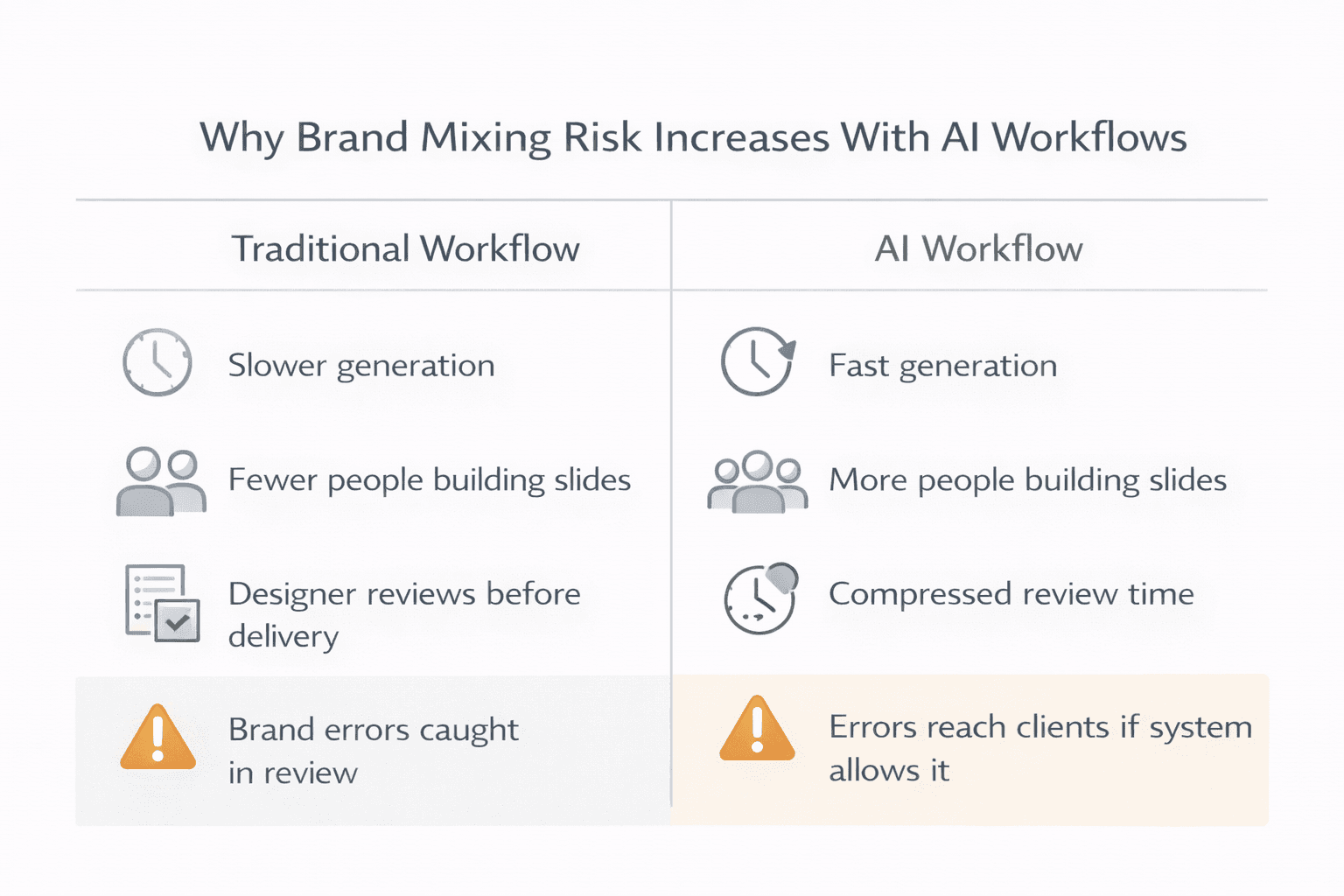
In a traditional design workflow, brand mixing usually happens through file management errors. Someone opens the wrong template, copies from the wrong deck, or pulls an asset from the wrong folder. These are catchable mistakes because the output goes through a designer before it reaches a client.
AI workflows change the equation in two ways. First, generation is fast. A deck that used to take hours to build can be generated in minutes. That speed compresses the time available for review and makes people less likely to check carefully before sharing. Second, AI workflows are often less centralized. More people on the team are generating presentations, not just designers. Account managers, strategists, and junior staff are all producing client-facing decks. Each additional person generating slides is an additional point where the wrong brand kit could be selected or the wrong assets could appear.
The combination of speed and decentralization is what makes brand mixing a systems problem in ai agency workflow slides, not just a human error problem. Telling people to be more careful does not fix it. Designing a system where the wrong brand cannot be applied does.
The Structural Fix: Brand Isolation at the System Level
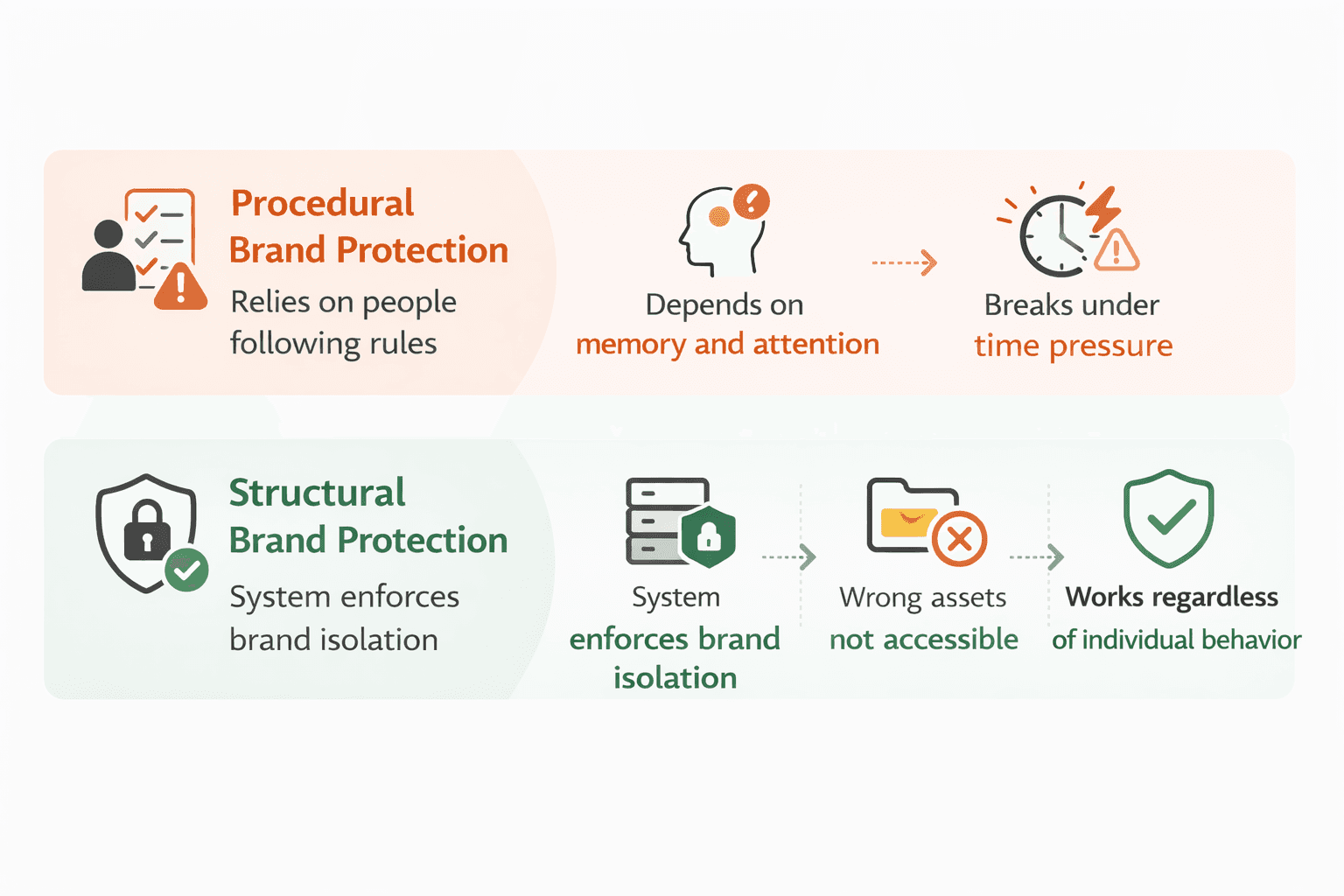
The only reliable way to prevent brand mixing is to make it structurally impossible, not just procedurally unlikely.
Procedural prevention relies on people following rules. Use the right template. Check the brand kit. Review before sending. These rules work until someone is under time pressure, distracted, or just new to the team. Procedures degrade under load.
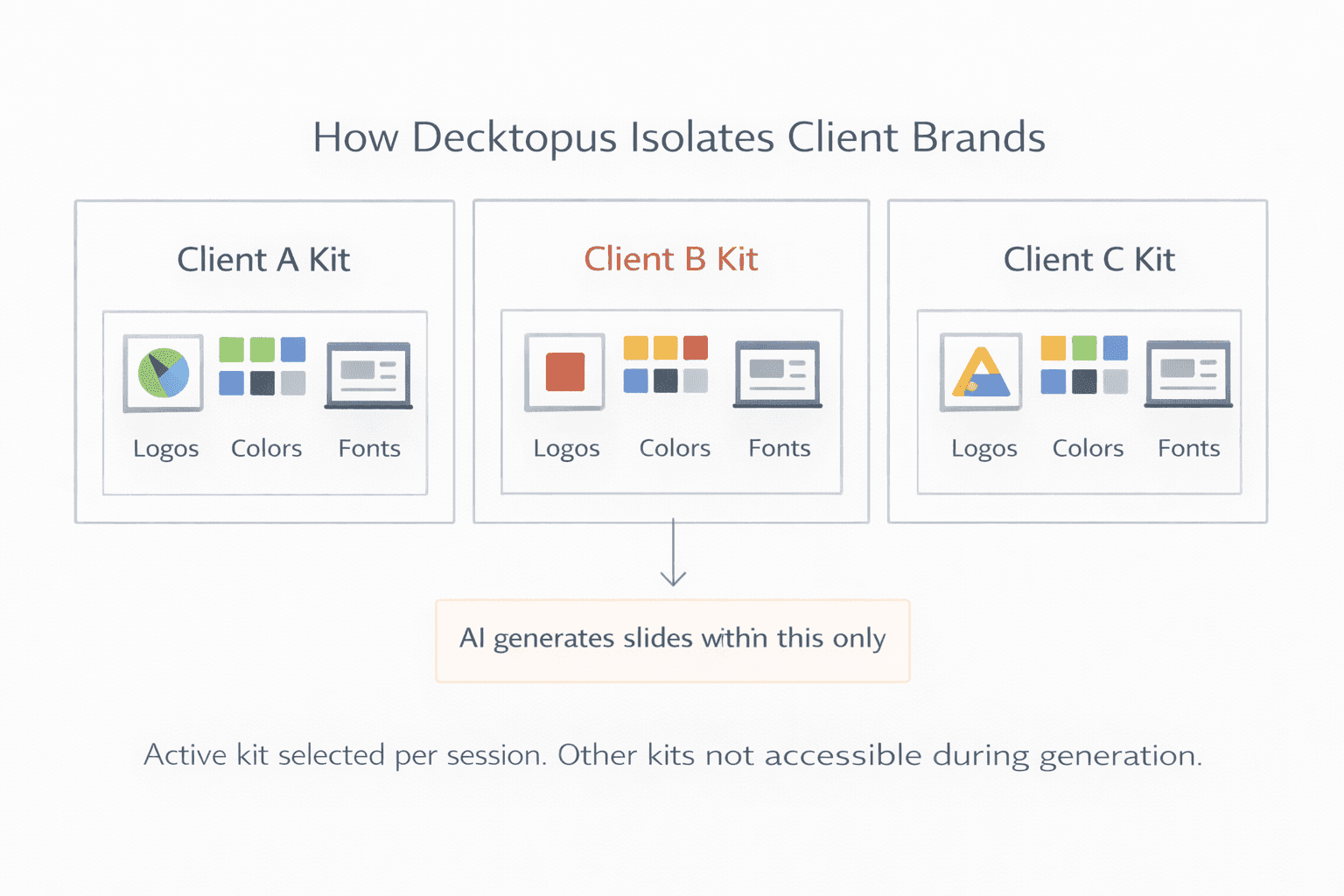
Structural prevention means the system itself does not allow cross-brand contamination. When Client A’s brand kit is active, Client B’s assets are not accessible. The AI generates only within the constraints of the selected kit. There is no open field where someone could accidentally introduce an off-brand color or drag in the wrong logo.
This requires a tool that treats brand kits as isolated environments, not just labeled folders. The distinction matters. A labeled folder is still one folder. Someone can open the wrong one. An isolated brand kit environment is scoped per session. When you select Client A’s kit, that is the only brand the system knows about until you switch.
For agencies that have not yet structured their workflow this way, how agencies create client presentations with different brand kits covers the full setup process including naming conventions, reference slide libraries, and kit testing before rollout.
Access Controls: Who Can Touch What
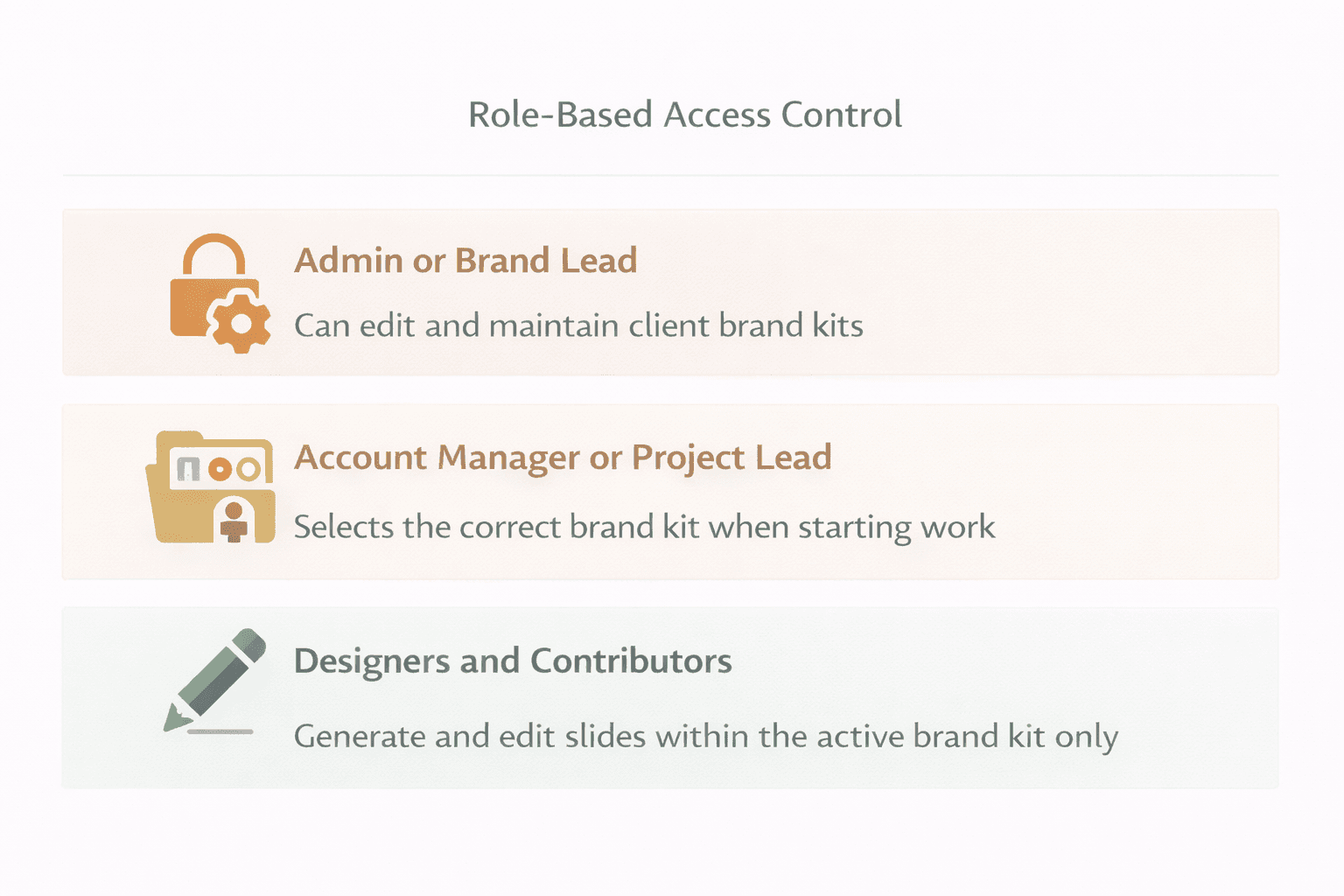
System-level brand isolation handles one dimension of the problem. Access controls handle the other.
Even in a tool with isolated brand kits, two things can still go wrong. First, the wrong kit can be selected at the start of a session if anyone on the team can select any kit freely. Second, brand kits can be edited by people who should not be editing them, introducing errors at the source.
Access controls that prevent these problems look like this.
Kit editing is restricted to admins or brand leads. The people responsible for maintaining each client’s brand kit are the only ones who can modify it. No one generating slides can accidentally change a color value or replace a logo. Kit integrity is protected at the role level.
Kit selection is guided or restricted by project. Ideally, when a team member opens a new presentation for a client, the correct brand kit is either pre-selected based on the project context or clearly labeled to make the right choice obvious. Some tools allow admins to associate kits with specific workspaces or projects so the right kit is the default, not a choice the user has to make correctly every time.
Generation and editing permissions are scoped. Team members generating slides for a client can work within that client’s kit but cannot pull in assets from other kits. The session is brand-scoped, not just brand-labeled.
This role structure reduces the number of decisions any individual has to make correctly and removes the most dangerous permissions from the people most likely to be working quickly under pressure.
Workflow Checkpoints That Catch Problems Early
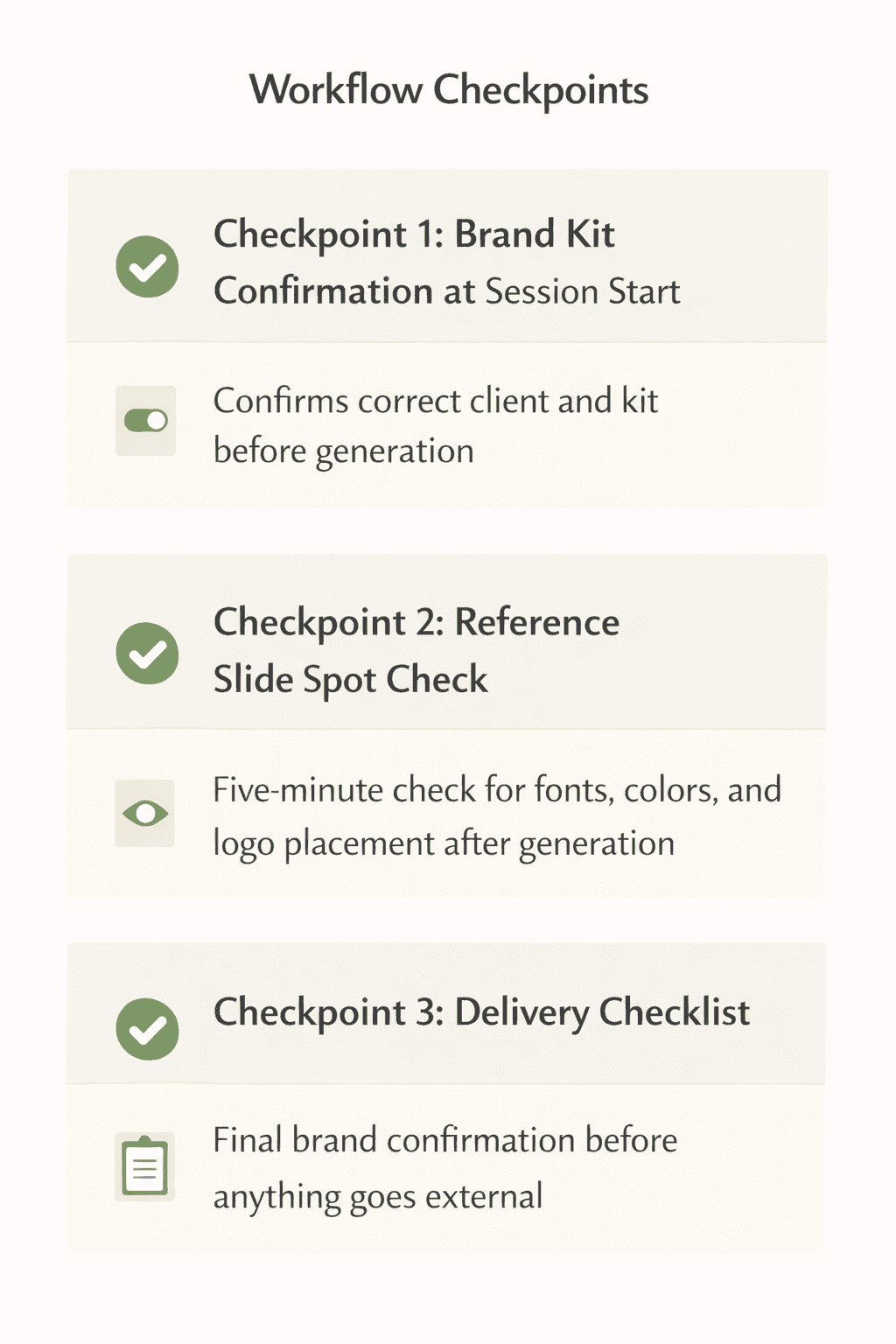
Structural isolation and access controls are the primary defense. Workflow checkpoints are the secondary one for anything that slips through.
The most effective checkpoints are lightweight and happen close to the point of generation, not at the end of the process.
Kit confirmation at session start. Before generating a deck, the user confirms which client they are working on and which brand kit is active. This takes five seconds and catches the most common error: a user who left a previous client’s kit selected from their last session.
Reference slide spot check after generation. When a deck is generated, someone compares one or two slides against the client’s reference slides or brand snapshot guide. This is not a full design review. It is a five-minute check that confirms the right fonts, colors, and logo version were applied. If something is off, it is caught before the deck is shared internally or sent to the client.
A delivery checklist before anything goes external. A short checklist attached to the delivery step: correct client name in the file, correct brand kit confirmed, logo version checked (primary, light, or dark as appropriate for the background), color spot check done. This step should take under ten minutes and sits between the generated output and the client’s inbox.
These checkpoints work because they are fast and specific. They are not asking anyone to review the whole deck for design quality. They are asking for confirmation of a small number of brand-critical elements that are easy to check and easy to get wrong without looking.
How Decktopus Prevents Cross-Contamination
Decktopus is built around a Brand Kit system that handles brand isolation at the account level. Each client has a completely separate brand kit containing their logos, exact hex color values, uploaded brand fonts, and reference slides by slide type.
When a user selects a brand kit to generate a presentation, only that kit’s assets are available during that session. The fonts, colors, logos, and reference slides from other client kits are not accessible. This is structural isolation, not folder organization.
The reference slides in each kit are admin-managed. They cover the slide types the client commonly uses: title slides, content slides, chart slides, quote slides, team slides, and closing slides. When the AI generates a deck, it uses those reference slides as style guidance. The output reflects the client’s specific visual standard, not just their raw assets in isolation.
The Brand Card, a PNG visual representation of the brand, is also stored per client and used as a reference in AI prompts. It gives the generation process a visual context for the brand’s overall style, which further reduces the chance of outputs that technically use the right assets but feel visually inconsistent.
For larger agencies onboarding a new client with an extensive existing slide library, Decktopus supports uploading presentations of 100 or more slides with AI auto-classification by slide type. This makes it practical to build a complete reference library quickly rather than creating reference slides from scratch.
For a broader look at how to structure brand compliance across a full presentation workflow, how to make presentations follow brand guidelines automatically covers the system design end to end.
What to Do When a Brand Mix Does Happen
Even with good systems, a brand mix can occasionally get through. How an agency handles it matters almost as much as how it tries to prevent it.
Catch it before the client does. The earlier a mix is caught, the less damage it does. An internal reviewer catching a wrong logo before delivery is a near-zero-cost fix. A client catching their competitor’s color palette in a deck is a relationship problem.
Fix at the kit level, not the slide level. If a brand mix happens because something was wrong in the brand kit itself, such as an outdated logo file or an incorrect color value, fix it in the kit before regenerating. Fixing it only in the current deck means the same error will appear in the next deck generated from the same kit.
Do a sweep of recent deliverables. If a kit had an error in it, any deck generated from that kit during the period of the error may be affected. Check recent deliverables for that client and any others that may have been cross-contaminated before sending corrections.
Update the delivery checklist. If a brand mix got through a checkpoint, the checklist needs a new item. Every error that reaches a client is evidence that the existing process has a gap. Close the gap at the process level so the same error cannot happen again.
Be transparent with the client if it reaches them. Trying to quietly correct something a client has already seen usually makes it worse. A straightforward acknowledgment, a fast correction, and a brief explanation of what changed in the process to prevent it recurring is almost always the right call.
Ready to set up brand isolation for your client accounts? Start with Decktopus and build a separate brand kit for each client today.
Brand mixing in agency AI workflows is not primarily an attention problem. It is a systems problem. The agencies that prevent it reliably are not the ones with the most careful team members. They are the ones that designed a workflow where the wrong brand cannot be applied because the system does not allow it.
Structural brand isolation, role-based access controls, and lightweight workflow checkpoints are the three layers that make this work. Each layer catches what the previous one misses. Together they make brand mixing rare enough that when it does happen, it is an edge case rather than a recurring issue.
Quick checklist for agencies building this system:
Separate brand kit per client with full asset isolation at the system level
Kit editing restricted to brand leads or admins
Kit selection confirmed at the start of every session
Reference slide spot check after generation, before internal sharing
Delivery checklist covering logo version, color, and brand kit confirmation before anything goes external
Fix errors at the kit level, not just the slide level, so they do not recur
FAQ
How do agencies prevent the wrong client logo from appearing in a presentation?
The most reliable method is using a tool with structurally isolated brand kits, where each client’s assets are stored in a separate environment and only the active kit’s assets are accessible during a session. This removes the possibility of accidentally dragging in the wrong logo rather than relying on someone to notice and correct the error.
Can AI presentation tools be configured to only use approved client assets?
Yes. Tools like Decktopus store client assets in isolated brand kits and constrain AI generation to the active kit. Fonts, colors, logos, and reference slides from other client kits are not accessible during a session. The AI generates within the boundaries of the selected brand, not from a shared asset pool.
What is the fastest way to check whether a generated deck has the right client branding?
A reference slide spot check. Compare two or three slides from the generated deck against the client’s reference slides or brand snapshot guide. Check logo placement and version, font accuracy, and color values. This takes five minutes and catches the most common brand errors before the deck is shared.
How should an agency handle it when a brand mix reaches a client?
Acknowledge it directly, correct it fast, and explain what process change will prevent it from happening again. Attempting to quietly fix something a client has already seen typically erodes more trust than the original error. A transparent response with a clear process improvement is almost always better received.
Does having more clients increase the risk of brand mixing in AI workflows?
Yes, without system-level isolation in place. More clients means more kits to manage, more people generating slides, and more opportunities for the wrong kit to be selected or the wrong assets to appear. The solution is not limiting client volume but ensuring the tool treats each brand kit as a fully isolated environment rather than a labeled folder in a shared space.
Related posts

How AI Voice Agents Help Sales Teams Prepare and Deliver Better Presentations
Learn how AI voice agents help sales teams turn call insights into focused slides, stronger delivery, and more confident customer presentations at every stage.
Marketing

Instagram Carousel Size & Dimensions Guide (2026)
Instagram carousel size in 2026: exact dimensions for square, portrait, and landscape, plus file limits and safe zones, verified across sources.
Marketing

LinkedIn Carousel Size, Dimensions & Format Guide 2026
LinkedIn carousel size in 2026: exact dimensions, file limits, aspect ratios, and formatting rules so your slides never get cropped.
Marketing