AI & Tools
Decktopus AI vs Genspark : Which AI presentation tool is better?
Decktopus AI vs Genspark — compare branding, speed, pricing, and slide features to pick the best AI presentation maker for your needs in 2026.


Alara Akçasız
The presentation software market has reached an estimated $9.65 billion in 2026, growing at over 17% year-over-year as AI-powered tools rapidly replace manual slide creation across industries. Two platforms making waves this year are Decktopus AI and Genspark — both promising to turn a simple prompt into a polished deck, but taking fundamentally different approaches to get there.
In this detailed comparison, we’ll examine how Decktopus AI and Genspark stack up across branding, design quality, speed, delivery support, pricing, and overall presentation workflow. Whether you’re a marketer building campaign decks, a consultant preparing client deliverables, or a student putting together a project presentation, this guide will help you choose the right tool.
What is Decktopus?
Decktopus is an AI-first online presentation maker purpose-built for the complete presentation workflow: content generation, design automation, brand application, delivery coaching, and analytics — all inside one unified platform. As our guide to the best AI presentation tools for business in 2026 explains, Decktopus is engineered to take you from topic to finished, branded, presentation-ready deck in minutes — with no design skills or brand setup required.
How Decktopus Works: Core Features
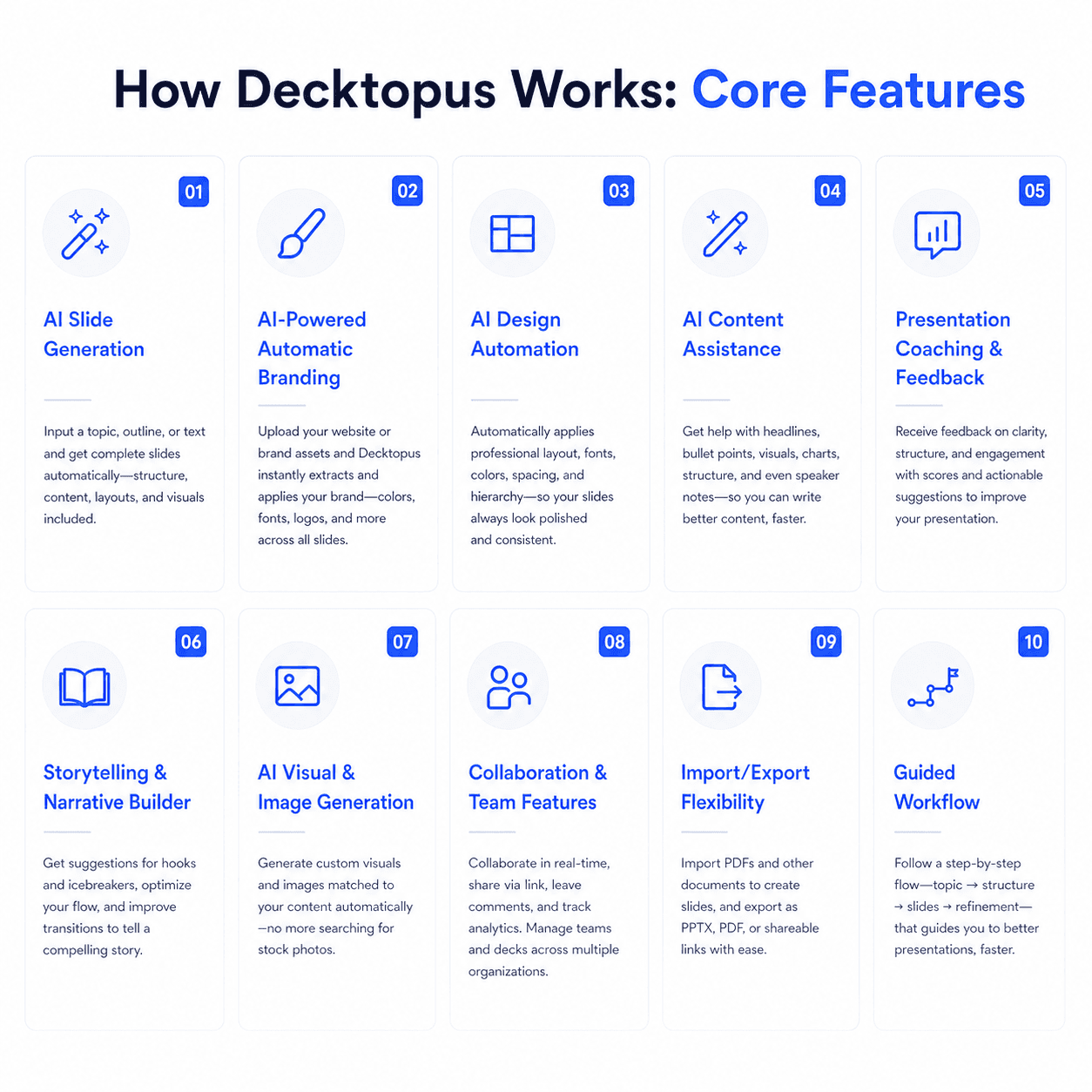
1. AI Slide Generation
Describe your topic, set your audience and purpose, and Decktopus instantly produces a complete deck — structured slides, titles, body copy, and contextual images — in the standard 16:9 slide format professionals use everywhere. You can also upload documents and have the AI transform them into presentation-ready slides.
2. AI-Powered Automatic Branding
Upload your website URL or brand assets, and Decktopus’s AI automatically extracts your brand identity — colors, fonts, logos, and design elements — and applies them consistently across your entire presentation instantly and automatically. For teams with more complex needs, Decktopus offers enterprise custom branding support including advanced brand kit creation, custom color palettes and typography systems, logo variations, brand-specific slide templates, and dedicated support for brand consistency across teams.
3. AI Design Automation
Every layout, visual balance, image placement, and typographic hierarchy is managed by Decktopus AI automatically. Every slide looks professionally composed regardless of the user’s design background, with no manual formatting required.
4. AI Content Assistance
Decktopus generates full slide copy, narrative structure, and bullet content based on your topic, audience, and goals. Any section can be regenerated or modified through prompt-based editing.
5. Presentation Coaching & Feedback
Decktopus includes built-in delivery coaching. Practice your presentation and receive real-time feedback before walking into the room. As covered in our blog on how AI tools are changing the way teams learn and communicate, the ability to prepare for delivery is a fundamental shift in how professionals approach presenting.
6. Storytelling & Narrative Builder
Decktopus considers your presentation purpose — pitch, training, proposal, report — and builds a logical narrative arc across the full deck, not just individual slides.
7. AI Visual & Image Generation
Generate contextually relevant images and graphics directly inside your presentation using generative AI. As explored in our guide to the best AI image generators of 2026, Decktopus’s AI image feature automatically selects and inserts visuals aligned with your slide content.
8. Zapier Integration
Decktopus connects via Zapier to thousands of tools, enabling teams to automate presentation workflows and embed presentations into broader business processes.
9. Import/Export Flexibility
Convert PDFs into editable presentations with Decktopus’s PDF to PPT tool. Export to PDF or PPT, or present directly from the browser.
10. Guided Workflow
A step-by-step creation flow makes Decktopus immediately productive for non-designers and first-time users — no learning curve around complex design menus or manual brand configuration.
AI Carousel Maker
Generate card-by-card LinkedIn and Instagram carousels from a topic or existing file — auto-branded from your website URL, exportable as PDF, PPT, or PNG. Genspark has no carousel output.
12. AI Delivery Coach (Loop): Practice high-stakes presentations inside Decktopus with Loop — a four-stage AI coaching system. A Profiler agent gathers context about your audience and goals, an Architect builds your narrative arc and speaking notes, a Red Team simulates tough audience questions with real-time feedback, and a Mirror tracks rehearsal metrics (pacing, filler words, energy) to produce a Readiness Score. Sessions persist across rehearsals so each run is faster and more personalized. Genspark has no delivery coaching features.
13. Beautify (Upload & Redesign): Upload an existing presentation file and choose between two paths — Redesign keeps your text and structure while applying a fresh visual design, or Use as a Resource extracts key points and builds an entirely new deck around them. Pick a visual style from a website URL, reuse a previous style, or let AI generate one, then fine-tune in the editor with all standard AI tools. Genspark has no upload-and-redesign workflow.
Advantages of Using Decktopus
Automatic Brand Intelligence — Upload your website URL and get instant brand-consistent presentations. Enterprise branding support is available for advanced needs. Genspark lets you upload a PPTX template for brand matching, but Decktopus goes further by extracting your brand directly from your website URL — zero template prep required.
Presentation-Focused Platform with Delivery Coaching — Decktopus is purpose-built for presentations. Every feature is optimized for creating, rehearsing, and delivering great decks — unlike Genspark, which spreads its focus across slides, docs, sheets, images, video, code, and more.
Faster Time to Presentation-Ready Output — Decktopus produces complete, branded presentations in under a minute. Genspark’s generation process takes approximately 4–5 minutes, with some reviews reporting even longer for complex decks.
All-in-One Presentation Workflow — Content generation, design, branding, image creation, coaching, analytics, and Zapier automation — all in one place. No switching between tools.
— Slide-by-slide tracking of recipient engagement after sharing. Know exactly which slides resonate and which get skipped — a feature Genspark doesn’t offer.
Delivery Preparation Built In — Built-in presentation coaching is unique in the category. Genspark has no equivalent for rehearsing or improving your delivery.
No Design Skills Required — With Brand Automatically Applied — Removes both the design barrier and the brand consistency barrier simultaneously.
Zapier-Powered Workflow Automation — Connects to thousands of tools for automated presentation workflows. Genspark has no Zapier or comparable third-party automation integration.
Beginner-Friendly Familiar Slide Interface — Standard slide-based interface that professionals already know. No agent-mode complexity or multi-tool workspace to navigate.
Consistent, Structured Narrative Output — AI builds cohesive story structure, not just template filling.
Considerations When Using Decktopus
Presentation-only tool — doesn’t cover other content formats like documents, spreadsheets, images, or video that Genspark handles as part of its all-in-one workspace
Internet connection required — cloud-only, no offline access or desktop app
Credit-based AI usage — AI features consume monthly credits; review Decktopus pricing tiers
No built-in fact-checking — Decktopus relies on its AI model’s knowledge rather than offering a dedicated fact-check button like Genspark does
Who’s Decktopus For?
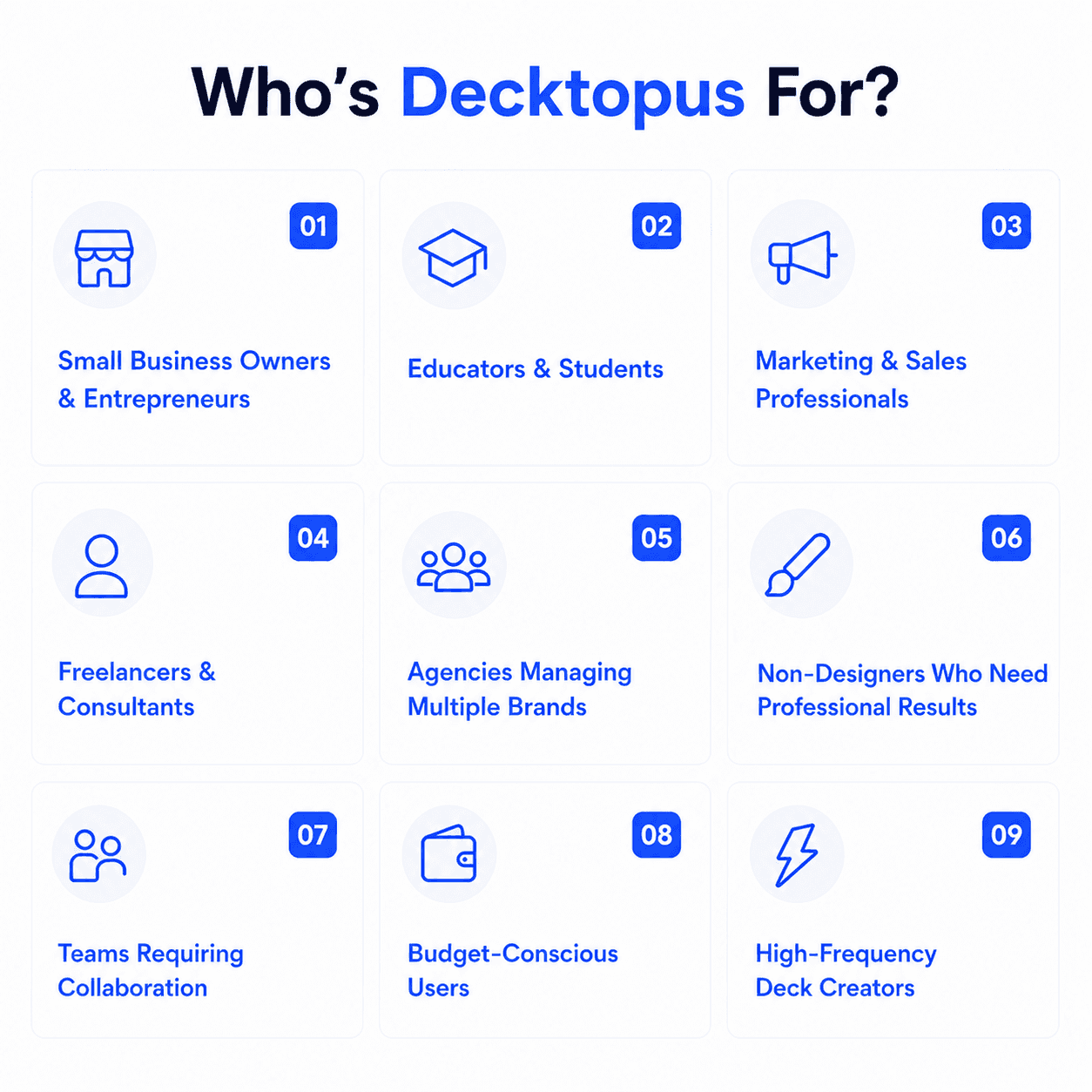
Small Business Owners & Entrepreneurs — Fast, on-brand presentations from your website URL. Guide to building presentations.
Educators & Students — Quick, structured deck creation with no design skills needed. AI tools for students guide.
Marketing & Sales Professionals — On-brand materials at scale with analytics and Zapier integration.
Freelancers & Consultants — Manage multiple client brands effortlessly with URL-based brand extraction.
Agencies Managing Multiple Brands — On-brand decks for 10+ clients with zero manual setup per client.
Non-Designers Who Need Professional Results — Describe your topic, get a great-looking presentation.
Teams Requiring Brand Consistency with Analytics — Brand tools and viewer tracking across the team. Building a team presentation system.
High-Frequency Deck Creators — More decks = more time saved with auto branding and AI. See pricing.
Businesses Without Formal Brand Guidelines — Website URL extraction creates an instant brand system from scratch.
Professionals Who Present Live — Delivery coaching for creating and delivering with confidence.
When Decktopus Might Not Be the Right Fit
If you need a unified AI workspace that handles documents, spreadsheets, images, video, and code alongside presentations, Genspark’s all-in-one platform may serve you better.
If built-in fact-checking with source validation is critical for your presentations — for example, research-heavy academic or consulting decks — Genspark’s one-click Fact Check feature is a genuine differentiator.
If you want a “Guide Mode” consultation process where the AI asks detailed questions about audience, tone, and structure before generating slides, Genspark offers a more structured pre-generation workflow.
If you need slides generated in 19 languages natively, Genspark supports a broader range of generation languages out of the box.
User Reviews and Real-World Feedback
Decktopus earns consistently strong ratings across major review platforms. Read verified user reviews on G2 and Capterra.
Here’s what real users are saying:
“Automatic branding saved us hours of manual brand application — every deck now matches our website perfectly without any setup.”
“I didn’t know preparing a presentation could be this fast and fun. We use it for everything: meetings, demos, pitches.”
“Every presentation now matches our website perfectly. We stopped worrying about brand consistency the day we switched.”
“As an agency managing multiple client brands, this is the only tool that lets us create on-brand decks for each client at speed.”
“The delivery coaching is something I haven’t seen anywhere else — it genuinely helped me prepare for a major investor pitch.”
“The Zapier integration fits right into our workflow. What used to take hours now happens automatically.”
“Clean, modern templates that are easily changed with one click. It has everything you need for a professional presentation.”
What is Genspark?
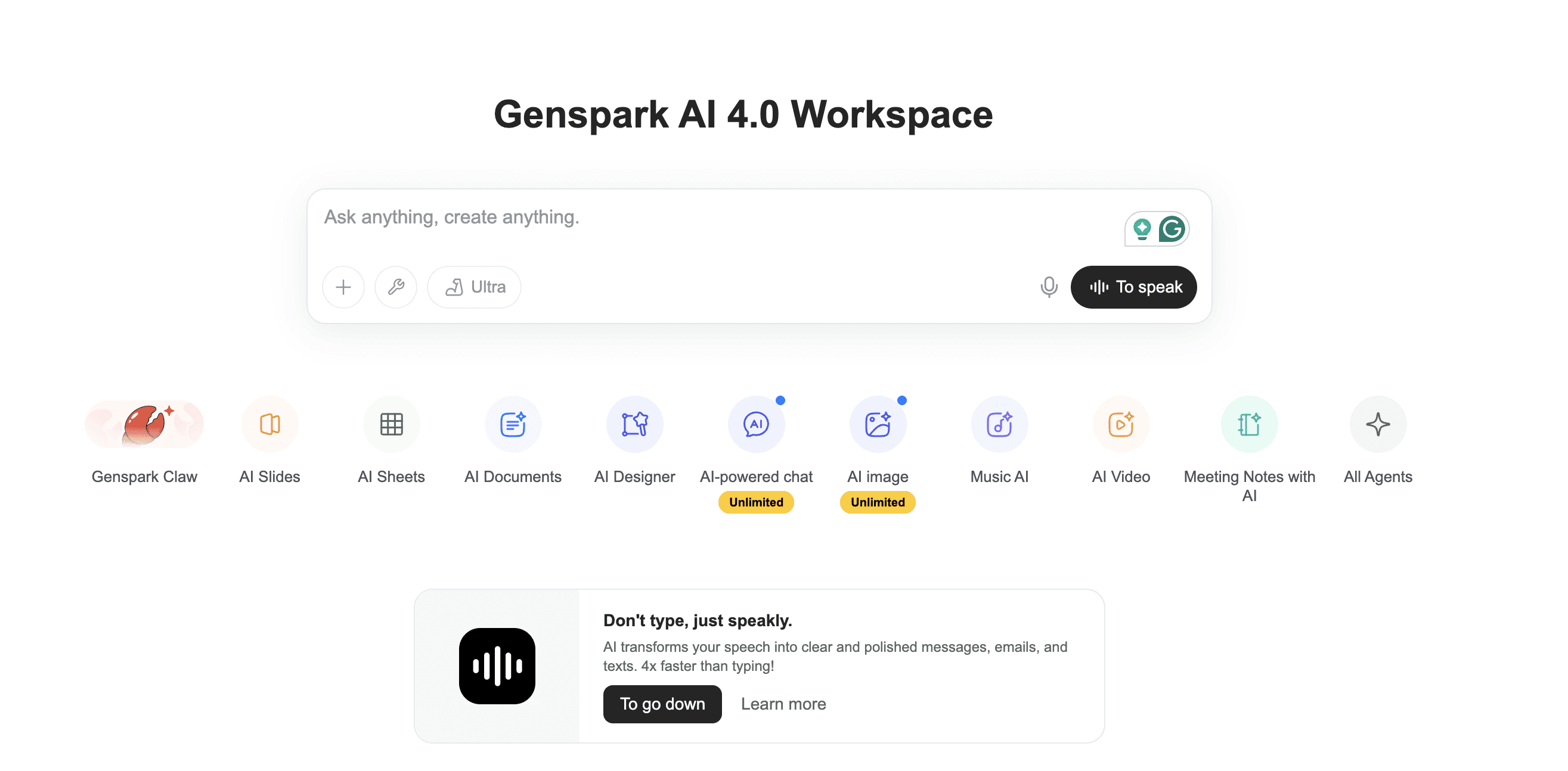
Genspark is an all-in-one AI workspace that bundles slide creation, document generation, spreadsheets, image and video generation, a code-based web developer, and AI-powered research into a single platform. For presentations specifically, it takes a content-structure-first approach — breaking your topic into logical sections before generating slides with sourced data, charts, and visuals. It also offers a built-in Fact Check feature that validates claims against web sources, and a Guide Mode that walks you through a consultation before generating anything.
However, because Genspark is a broad AI workspace rather than a dedicated presentation tool, independent reviews consistently note that its template selection feels limited, generation times are slower than competitors, and manual editing options within the platform can be restrictive — often requiring export to PowerPoint or Google Slides for final polishing.
Genspark’s 2026 Features
AI Slide Generation — Enter a topic or upload documents (PDF, Word, Excel, PPTX) to generate structured slide decks
Guide Mode — A structured consultation where the AI asks about audience, tone, slide count, and purpose before generating
Fact Check — One-click fact verification that validates data and statistics against web sources, flagging unsupported claims
Advanced Edit — Manual editing of text, colors, images, tables, and layout within the platform (though some reviewers report limited manual editing capabilities)
Custom Templates (My Templates) — Save presentations as reusable templates or upload your own PPTX files for brand consistency
Multi-Language Generation — Create slides in 19 languages including English, Chinese, Japanese, Korean, Spanish, French, and German
Live Web Research — AI pulls real-time data from the web during generation for sourced content
Multi-Agent System — Genspark uses multiple AI models (including GPT, Claude, and Gemini) that fact-check each other before delivering output
AI Docs, Sheets, Images, Video — Additional creation tools beyond slides for documents, spreadsheets, images, and video
Export to PPTX, PDF, Google Slides — Export or present directly from the browser
AI Developer — Build and deploy websites and web apps within the same workspace
Who’s Genspark For?
Researchers and academics who need fact-checked, source-validated presentations with data accuracy as the top priority
Content creators and marketers who want one workspace for slides, documents, images, and video without switching tools
Students on a budget who can leverage the free tier’s daily credits for occasional presentations
Non-English speakers who need presentations generated natively in one of 19 supported languages
Users who value pre-generation consultation and prefer the Guide Mode approach to producing tailored decks
What Are the Main Differences?
Branding and Brand Consistency
Decktopus offers the most advanced branding automation in the presentation category. Paste your website URL, and Decktopus extracts your complete brand identity — colors, fonts, logos, and design language — and applies it across every slide instantly. No templates to prepare, no brand kits to configure. For agencies and freelancers managing multiple client brands, switching is as simple as entering a different URL.
Genspark supports brand consistency through PPTX template upload — you can save your own template in “My Templates” and apply it to future presentations. This works if you already have a polished template, but it means you need that template to exist first. Genspark has no URL-based brand extraction, so every new brand requires manual template creation upfront.
Platform Focus
Decktopus is a purpose-built presentation platform. Every feature — from the guided workflow to delivery coaching to This focus means fewer distractions and deeper optimization for presentation quality.
Genspark is a broad AI workspace where slides are one of many creation tools alongside docs, sheets, images, video, and a web developer. This breadth is powerful if you need a single platform for varied content types, but it means the slide-making experience shares attention with many other features. Independent reviews note that Genspark’s templates feel less polished and generation takes longer than dedicated presentation tools.
Speed and Generation Workflow
Decktopus prioritizes speed and simplicity. Enter your topic, and a complete, branded, professionally designed deck is ready in under a minute. For professionals who create presentations frequently — pitches, reports, training decks — this speed advantage adds up quickly.
Genspark offers two modes: a fast default mode and a more thorough Guide Mode. Even in the fast mode, generation takes around 4–5 minutes because Genspark researches the web, builds an outline for approval, and then generates each slide with sourced content. Guide Mode adds even more time with its five-phase consultation (Strategy, Substance, Structure, Design, Build). The trade-off is deeper content, but at the cost of significant wait time.
Post-Delivery and Feedback
Decktopus includes built-in presentation coaching where you can practice your delivery and receive real-time feedback — a feature unique in the category. After sharing, you can track viewer engagement slide-by-slide to understand how your audience interacted with the deck.
Genspark has no delivery coaching or practice features. It also has no The workflow ends at the export — once you download your PPTX or PDF, there’s no feedback loop.
Unique Features Comparison
Decktopus Unique Features:
URL-based automatic brand extraction (no template needed)
Built-in presentation coaching and delivery feedback
Zapier integration connecting 8,000+ apps
Guided step-by-step workflow for non-designers
Storytelling and narrative arc builder
Genspark Unique Features:
Built-in Fact Check with source validation
Guide Mode (five-phase pre-generation consultation)
Multi-agent system using GPT, Claude, and Gemini simultaneously
19-language slide generation
All-in-one workspace (docs, sheets, images, video, code)
AI Developer for website building
Pricing and Value
Decktopus offers transparent, predictable pricing designed specifically for presentation users. Plans include a free tier, with paid options scaling based on AI credits and team features. See the full pricing breakdown. The credit system is straightforward — you know exactly what you’re paying for.
Genspark uses a credit-based model across three tiers: Free (100 daily credits), Plus ($24.99/month for 10,000 monthly credits), and Pro ($249.99/month for 125,000 monthly credits). The free tier is generous enough for occasional use, but the daily cap limits productivity for regular users. Importantly, Genspark requires a paid plan to export presentations — you can generate slides for free but can’t download them without upgrading. The pricing structure is also noted by reviewers as lacking transparency, since details aren’t visible until after sign-up.
Quick Comparison: Which One Fits You?
Choose Decktopus if you…
Create presentations frequently and need speed
Want automatic brand consistency from your website URL
Need delivery coaching and practice features
Work with multiple client brands (agencies, freelancers)
Want predictable pricing with a clear credit structure
Need
Prefer a focused, presentation-first workflow
Want Zapier automation for presentations
Create LinkedIn or Instagram carousels as a recurring content habit
Need AI-powered rehearsal coaching with audience simulation and delivery scoring
Want to transform existing presentations with AI-powered redesign or resource extraction
Choose Genspark if you…
Need one AI workspace for slides, docs, sheets, images, and video
Prioritize built-in fact-checking with source validation
Want a pre-generation consultation (Guide Mode) for high-stakes presentations
Need slides generated in 19 languages
Want access to multiple AI models (GPT, Claude, Gemini) in one tool
Need web development alongside presentation creation
Feature Comparison Table
[[EMBED:PGRpdiBzdHlsZT0ib3ZlcmZsb3cteDphdXRvO21hcmdpbjoyMHB4IDAiPjxzdHlsZT4uZHRrLXRibCwuZHRrLXRibCAqe2JveC1zaXppbmc6Ym9yZGVyLWJveDttYXJnaW46MDtwYWRkaW5nOjB9LmR0ay10Ymx7Zm9udC1mYW1pbHk6J1BvcHBpbnMnLHN5c3RlbS11aSxzYW5zLXNlcmlmO2NvbG9yOiMyRDM0MzY7bWF4LXdpZHRoOjg2MHB4O21hcmdpbjowIGF1dG87Ym9yZGVyOjFweCBzb2xpZCAjRThFQUYwO2JvcmRlci1yYWRpdXM6MjBweDtvdmVyZmxvdzpoaWRkZW47YmFja2dyb3VuZDojZmZmfS5kdGstdGJsIC5oZWFke3BhZGRpbmc6MjZweCAyOHB4IDIwcHh9LmR0ay10YmwgLmhlYWQgaDJ7Zm9udC1zaXplOmNsYW1wKDIycHgsNXZ3LDMycHgpO2ZvbnQtd2VpZ2h0OjcwMDtsaW5lLWhlaWdodDoxLjF9LmR0ay10YmwgLmhlYWQgcHtjb2xvcjojNzg4MDhBO2ZvbnQtc2l6ZToxNXB4O21hcmdpbi10b3A6NHB4fS5kdGstdGJsIC5yb3d7ZGlzcGxheTpncmlkO2dyaWQtdGVtcGxhdGUtY29sdW1uczoxLjdmciAxZnIgMWZyO2JvcmRlci10b3A6MXB4IHNvbGlkICNFOEVBRjB9LmR0ay10YmwgLnJvdy5oZWFkZXJ7Ym9yZGVyLXRvcDowfS5kdGstdGJsIC5jZWxse3BhZGRpbmc6MTRweCAxNnB4O2Rpc3BsYXk6ZmxleDtmbGV4LWRpcmVjdGlvbjpjb2x1bW47anVzdGlmeS1jb250ZW50OmNlbnRlcjthbGlnbi1pdGVtczpjZW50ZXI7dGV4dC1hbGlnbjpjZW50ZXI7Z2FwOjZweDttaW4taGVpZ2h0OjYwcHh9LmR0ay10YmwgLmZlYXR7YWxpZ24taXRlbXM6ZmxleC1zdGFydDt0ZXh0LWFsaWduOmxlZnQ7Zm9udC13ZWlnaHQ6NTAwO2ZvbnQtc2l6ZToxNnB4O2xpbmUtaGVpZ2h0OjEuM30uZHRrLXRibCAuY29sLWR0a3tiYWNrZ3JvdW5kOiNFRUVCRkR9LmR0ay10YmwgLnJvdzpudGgtY2hpbGQoZXZlbikgLmZlYXR7YmFja2dyb3VuZDojRkFGQUZDfS5kdGstdGJsIC5yb3c6bnRoLWNoaWxkKGV2ZW4pIC5jb2wtY29tcHtiYWNrZ3JvdW5kOiNGQUZBRkN9LmR0ay10YmwgLmhlYWRlciAuY2VsbHtmb250LXdlaWdodDo2MDA7Zm9udC1zaXplOjE4cHg7bWluLWhlaWdodDphdXRvO3BhZGRpbmc6MTZweH0uZHRrLXRibCAuaGVhZGVyIC5jb2wtZHRre2JhY2tncm91bmQ6IzZDNUNFNztjb2xvcjojZmZmO2JvcmRlci1yYWRpdXM6MTBweCAxMHB4IDAgMH0uZHRrLXRibCAuYnt3aWR0aDoyOHB4O2hlaWdodDoyOHB4O2JvcmRlci1yYWRpdXM6NTAlO2Rpc3BsYXk6aW5saW5lLWZsZXg7YWxpZ24taXRlbXM6Y2VudGVyO2p1c3RpZnktY29udGVudDpjZW50ZXI7Y29sb3I6I2ZmZjtmb250LXNpemU6MTVweDtmb250LXdlaWdodDo3MDA7bGluZS1oZWlnaHQ6MTtmbGV4OjAgMCAyOHB4fS5kdGstdGJsIC55ZXN7YmFja2dyb3VuZDojMjJCMjZDfS5kdGstdGJsIC5ub3tiYWNrZ3JvdW5kOiNFODU0NUN9LmR0ay10YmwgLnBhcnR7YmFja2dyb3VuZDojRjBBQTI4fS5kdGstdGJsIC5ub3Rle2ZvbnQtc2l6ZToxMnB4O2NvbG9yOiM3ODgwOEE7bGluZS1oZWlnaHQ6MS4zO3dvcmQtd3JhcDpicmVhay13b3JkO21heC13aWR0aDoxMDAlfS5kdGstdGJsIC5sYmx7ZGlzcGxheTpub25lO2ZvbnQtc2l6ZToxM3B4O2NvbG9yOiM3ODgwOEE7Zm9udC13ZWlnaHQ6NTAwfS5kdGstdGJsIC52YWx7ZGlzcGxheTpmbGV4O2FsaWduLWl0ZW1zOmNlbnRlcjtnYXA6OHB4O2ZsZXgtd3JhcDpub3dyYXB9LmR0ay10YmwgLmZvb3R7ZGlzcGxheTpmbGV4O2ZsZXgtd3JhcDp3cmFwO2dhcDoxMHB4O2p1c3RpZnktY29udGVudDpzcGFjZS1iZXR3ZWVuO2FsaWduLWl0ZW1zOmNlbnRlcjtwYWRkaW5nOjE2cHggMjhweDtib3JkZXItdG9wOjFweCBzb2xpZCAjRThFQUYwO2NvbG9yOiM3ODgwOEE7Zm9udC1zaXplOjEzcHh9LmR0ay10YmwgLmxlZ2VuZHtkaXNwbGF5OmZsZXg7Z2FwOjE2cHh9LmR0ay10YmwgLmxlZ2VuZCBzcGFue2Rpc3BsYXk6aW5saW5lLWZsZXg7YWxpZ24taXRlbXM6Y2VudGVyO2dhcDo2cHh9LmR0ay10YmwgLmxlZ2VuZCAuYnt3aWR0aDoxOXB4O2hlaWdodDoxOXB4O2ZvbnQtc2l6ZToxMXB4O2ZsZXg6MCAwIDE5cHh9QG1lZGlhKG1heC13aWR0aDo1NjBweCl7LmR0ay10YmwgLmhlYWRlcntkaXNwbGF5Om5vbmV9LmR0ay10YmwgLnJvd3tncmlkLXRlbXBsYXRlLWNvbHVtbnM6MWZyO2JvcmRlci10b3A6MDtwYWRkaW5nOjZweCAwO2JvcmRlci1ib3R0b206MXB4IHNvbGlkICNFOEVBRjB9LmR0ay10YmwgLnJvdzpsYXN0LWNoaWxke2JvcmRlci1ib3R0b206MH0uZHRrLXRibCAuY2VsbHttaW4taGVpZ2h0OmF1dG87cGFkZGluZzo5cHggMThweDthbGlnbi1pdGVtczpmbGV4LXN0YXJ0O3RleHQtYWxpZ246bGVmdH0uZHRrLXRibCAuZmVhdHtmb250LXdlaWdodDo2MDA7Zm9udC1zaXplOjE2cHg7cGFkZGluZy1ib3R0b206MnB4O2JhY2tncm91bmQ6dHJhbnNwYXJlbnQhaW1wb3J0YW50fS5kdGstdGJsIC5jb2wtZHRrLC5kdGstdGJsIC5jb2wtY29tcHtiYWNrZ3JvdW5kOnRyYW5zcGFyZW50IWltcG9ydGFudDtmbGV4LWRpcmVjdGlvbjpyb3chaW1wb3J0YW50O2p1c3RpZnktY29udGVudDpzcGFjZS1iZXR3ZWVuO3dpZHRoOjEwMCU7Z2FwOjEycHg7cGFkZGluZzo2cHggMTRweDttYXJnaW46MnB4IDE0cHh9LmR0ay10YmwgLmNvbC1kdGt7Ym9yZGVyLWxlZnQ6M3B4IHNvbGlkICM2QzVDRTc7Ym9yZGVyLXJhZGl1czo0cHg7YmFja2dyb3VuZDojRUVFQkZEIWltcG9ydGFudH0uZHRrLXRibCAuY29sLWNvbXB7Ym9yZGVyLWxlZnQ6M3B4IHNvbGlkICNFOEVBRjB9LmR0ay10YmwgLmxibHtkaXNwbGF5OmlubGluZX0uZHRrLXRibCAuZm9vdHtwYWRkaW5nOjE2cHggMThweDtmbGV4LWRpcmVjdGlvbjpjb2x1bW47YWxpZ24taXRlbXM6ZmxleC1zdGFydH19PC9zdHlsZT48ZGl2IGNsYXNzPSJkdGstdGJsIj48ZGl2IGNsYXNzPSJoZWFkIj48aDI+RGVja3RvcHVzIHZzLiBHZW5zcGFyazwvaDI+PHA+QUkgcHJlc2VudGF0aW9uIGZlYXR1cmUgY29tcGFyaXNvbjwvcD48L2Rpdj48ZGl2IGNsYXNzPSJyb3cgaGVhZGVyIj48ZGl2IGNsYXNzPSJjZWxsIGZlYXQiPkZlYXR1cmU8L2Rpdj48ZGl2IGNsYXNzPSJjZWxsIGNvbC1kdGsiPkRlY2t0b3B1czwvZGl2PjxkaXYgY2xhc3M9ImNlbGwgY29sLWNvbXAiPkdlbnNwYXJrPC9kaXY+PC9kaXY+PGRpdiBjbGFzcz0icm93Ij48ZGl2IGNsYXNzPSJjZWxsIGZlYXQiPkF1dG9tYXRpYyBicmFuZCBleHRyYWN0aW9uIGZyb20gYSBVUkw8L2Rpdj48ZGl2IGNsYXNzPSJjZWxsIGNvbC1kdGsiPjxkaXYgY2xhc3M9InZhbCI+PHNwYW4gY2xhc3M9ImxibCI+RGVja3RvcHVzPC9zcGFuPjxzcGFuIGNsYXNzPSJiIHllcyI+4pyTPC9zcGFuPjwvZGl2PjwvZGl2PjxkaXYgY2xhc3M9ImNlbGwgY29sLWNvbXAiPjxkaXYgY2xhc3M9InZhbCI+PHNwYW4gY2xhc3M9ImxibCI+R2Vuc3Bhcms8L3NwYW4+PHNwYW4gY2xhc3M9ImIgbm8iPuKclTwvc3Bhbj48L2Rpdj48L2Rpdj48L2Rpdj48ZGl2IGNsYXNzPSJyb3ciPjxkaXYgY2xhc3M9ImNlbGwgZmVhdCI+RW5kLXRvLWVuZCBBSSBkZWNrIGZyb20gYSBwcm9tcHQ8L2Rpdj48ZGl2IGNsYXNzPSJjZWxsIGNvbC1kdGsiPjxkaXYgY2xhc3M9InZhbCI+PHNwYW4gY2xhc3M9ImxibCI+RGVja3RvcHVzPC9zcGFuPjxzcGFuIGNsYXNzPSJiIHllcyI+4pyTPC9zcGFuPjwvZGl2PjwvZGl2PjxkaXYgY2xhc3M9ImNlbGwgY29sLWNvbXAiPjxkaXYgY2xhc3M9InZhbCI+PHNwYW4gY2xhc3M9ImxibCI+R2Vuc3Bhcms8L3NwYW4+PHNwYW4gY2xhc3M9ImIgcGFydCI+4oCTPC9zcGFuPjwvZGl2PjxzcGFuIGNsYXNzPSJub3RlIj5BSSBzZWFyY2ggYWdlbnQ8L3NwYW4+PC9kaXY+PC9kaXY+PGRpdiBjbGFzcz0icm93Ij48ZGl2IGNsYXNzPSJjZWxsIGZlYXQiPkFJIGRlbGl2ZXJ5IGNvYWNoaW5nICZhbXA7IHByYWN0aWNlIG1vZGU8L2Rpdj48ZGl2IGNsYXNzPSJjZWxsIGNvbC1kdGsiPjxkaXYgY2xhc3M9InZhbCI+PHNwYW4gY2xhc3M9ImxibCI+RGVja3RvcHVzPC9zcGFuPjxzcGFuIGNsYXNzPSJiIHllcyI+4pyTPC9zcGFuPjwvZGl2PjwvZGl2PjxkaXYgY2xhc3M9ImNlbGwgY29sLWNvbXAiPjxkaXYgY2xhc3M9InZhbCI+PHNwYW4gY2xhc3M9ImxibCI+R2Vuc3Bhcms8L3NwYW4+PHNwYW4gY2xhc3M9ImIgbm8iPuKclTwvc3Bhbj48L2Rpdj48L2Rpdj48L2Rpdj48ZGl2IGNsYXNzPSJyb3ciPjxkaXYgY2xhc3M9ImNlbGwgZmVhdCI+QUkgQ2Fyb3VzZWwgTWFrZXIgKExpbmtlZEluIC8gSUcpPC9kaXY+PGRpdiBjbGFzcz0iY2VsbCBjb2wtZHRrIj48ZGl2IGNsYXNzPSJ2YWwiPjxzcGFuIGNsYXNzPSJsYmwiPkRlY2t0b3B1czwvc3Bhbj48c3BhbiBjbGFzcz0iYiB5ZXMiPuKckzwvc3Bhbj48L2Rpdj48L2Rpdj48ZGl2IGNsYXNzPSJjZWxsIGNvbC1jb21wIj48ZGl2IGNsYXNzPSJ2YWwiPjxzcGFuIGNsYXNzPSJsYmwiPkdlbnNwYXJrPC9zcGFuPjxzcGFuIGNsYXNzPSJiIG5vIj7inJU8L3NwYW4+PC9kaXY+PC9kaXY+PC9kaXY+PGRpdiBjbGFzcz0icm93Ij48ZGl2IGNsYXNzPSJjZWxsIGZlYXQiPkFJIGltYWdlIGdlbmVyYXRpb248L2Rpdj48ZGl2IGNsYXNzPSJjZWxsIGNvbC1kdGsiPjxkaXYgY2xhc3M9InZhbCI+PHNwYW4gY2xhc3M9ImxibCI+RGVja3RvcHVzPC9zcGFuPjxzcGFuIGNsYXNzPSJiIHllcyI+4pyTPC9zcGFuPjwvZGl2PjwvZGl2PjxkaXYgY2xhc3M9ImNlbGwgY29sLWNvbXAiPjxkaXYgY2xhc3M9InZhbCI+PHNwYW4gY2xhc3M9ImxibCI+R2Vuc3Bhcms8L3NwYW4+PHNwYW4gY2xhc3M9ImIgcGFydCI+4oCTPC9zcGFuPjwvZGl2PjwvZGl2PjwvZGl2PjxkaXYgY2xhc3M9InJvdyI+PGRpdiBjbGFzcz0iY2VsbCBmZWF0Ij5Eb2N1bWVudCAvIFBERiBpbXBvcnQgdG8gZGVjazwvZGl2PjxkaXYgY2xhc3M9ImNlbGwgY29sLWR0ayI+PGRpdiBjbGFzcz0idmFsIj48c3BhbiBjbGFzcz0ibGJsIj5EZWNrdG9wdXM8L3NwYW4+PHNwYW4gY2xhc3M9ImIgeWVzIj7inJM8L3NwYW4+PC9kaXY+PC9kaXY+PGRpdiBjbGFzcz0iY2VsbCBjb2wtY29tcCI+PGRpdiBjbGFzcz0idmFsIj48c3BhbiBjbGFzcz0ibGJsIj5HZW5zcGFyazwvc3Bhbj48c3BhbiBjbGFzcz0iYiBubyI+4pyVPC9zcGFuPjwvZGl2PjwvZGl2PjwvZGl2PjxkaXYgY2xhc3M9InJvdyI+PGRpdiBjbGFzcz0iY2VsbCBmZWF0Ij5TdG9yeXRlbGxpbmcgdHVuZWQgdG8geW91ciBwdXJwb3NlPC9kaXY+PGRpdiBjbGFzcz0iY2VsbCBjb2wtZHRrIj48ZGl2IGNsYXNzPSJ2YWwiPjxzcGFuIGNsYXNzPSJsYmwiPkRlY2t0b3B1czwvc3Bhbj48c3BhbiBjbGFzcz0iYiB5ZXMiPuKckzwvc3Bhbj48L2Rpdj48L2Rpdj48ZGl2IGNsYXNzPSJjZWxsIGNvbC1jb21wIj48ZGl2IGNsYXNzPSJ2YWwiPjxzcGFuIGNsYXNzPSJsYmwiPkdlbnNwYXJrPC9zcGFuPjxzcGFuIGNsYXNzPSJiIG5vIj7inJU8L3NwYW4+PC9kaXY+PC9kaXY+PC9kaXY+PGRpdiBjbGFzcz0icm93Ij48ZGl2IGNsYXNzPSJjZWxsIGZlYXQiPkJyYW5kLWNvbnNpc3RlbnQgdGVhbSB0ZW1wbGF0ZXM8L2Rpdj48ZGl2IGNsYXNzPSJjZWxsIGNvbC1kdGsiPjxkaXYgY2xhc3M9InZhbCI+PHNwYW4gY2xhc3M9ImxibCI+RGVja3RvcHVzPC9zcGFuPjxzcGFuIGNsYXNzPSJiIHllcyI+4pyTPC9zcGFuPjwvZGl2PjwvZGl2PjxkaXYgY2xhc3M9ImNlbGwgY29sLWNvbXAiPjxkaXYgY2xhc3M9InZhbCI+PHNwYW4gY2xhc3M9ImxibCI+R2Vuc3Bhcms8L3NwYW4+PHNwYW4gY2xhc3M9ImIgbm8iPuKclTwvc3Bhbj48L2Rpdj48L2Rpdj48L2Rpdj48ZGl2IGNsYXNzPSJyb3ciPjxkaXYgY2xhc3M9ImNlbGwgZmVhdCI+Tm8gZGVzaWduIHNraWxscyByZXF1aXJlZDwvZGl2PjxkaXYgY2xhc3M9ImNlbGwgY29sLWR0ayI+PGRpdiBjbGFzcz0idmFsIj48c3BhbiBjbGFzcz0ibGJsIj5EZWNrdG9wdXM8L3NwYW4+PHNwYW4gY2xhc3M9ImIgeWVzIj7inJM8L3NwYW4+PC9kaXY+PC9kaXY+PGRpdiBjbGFzcz0iY2VsbCBjb2wtY29tcCI+PGRpdiBjbGFzcz0idmFsIj48c3BhbiBjbGFzcz0ibGJsIj5HZW5zcGFyazwvc3Bhbj48c3BhbiBjbGFzcz0iYiB5ZXMiPuKckzwvc3Bhbj48L2Rpdj48L2Rpdj48L2Rpdj48ZGl2IGNsYXNzPSJyb3ciPjxkaXYgY2xhc3M9ImNlbGwgZmVhdCI+Q2xlYW4gUG93ZXJQb2ludCAoLnBwdHgpIGV4cG9ydDwvZGl2PjxkaXYgY2xhc3M9ImNlbGwgY29sLWR0ayI+PGRpdiBjbGFzcz0idmFsIj48c3BhbiBjbGFzcz0ibGJsIj5EZWNrdG9wdXM8L3NwYW4+PHNwYW4gY2xhc3M9ImIgeWVzIj7inJM8L3NwYW4+PC9kaXY+PC9kaXY+PGRpdiBjbGFzcz0iY2VsbCBjb2wtY29tcCI+PGRpdiBjbGFzcz0idmFsIj48c3BhbiBjbGFzcz0ibGJsIj5HZW5zcGFyazwvc3Bhbj48c3BhbiBjbGFzcz0iYiBubyI+4pyVPC9zcGFuPjwvZGl2PjwvZGl2PjwvZGl2PjxkaXYgY2xhc3M9InJvdyI+PGRpdiBjbGFzcz0iY2VsbCBmZWF0Ij5QcmVzZW50IGZyb20gYW55IGJyb3dzZXI8L2Rpdj48ZGl2IGNsYXNzPSJjZWxsIGNvbC1kdGsiPjxkaXYgY2xhc3M9InZhbCI+PHNwYW4gY2xhc3M9ImxibCI+RGVja3RvcHVzPC9zcGFuPjxzcGFuIGNsYXNzPSJiIHllcyI+4pyTPC9zcGFuPjwvZGl2PjwvZGl2PjxkaXYgY2xhc3M9ImNlbGwgY29sLWNvbXAiPjxkaXYgY2xhc3M9InZhbCI+PHNwYW4gY2xhc3M9ImxibCI+R2Vuc3Bhcms8L3NwYW4+PHNwYW4gY2xhc3M9ImIgcGFydCI+4oCTPC9zcGFuPjwvZGl2PjxzcGFuIGNsYXNzPSJub3RlIj5TcGFya3BhZ2VzIG9ubHk8L3NwYW4+PC9kaXY+PC9kaXY+PGRpdiBjbGFzcz0icm93Ij48ZGl2IGNsYXNzPSJjZWxsIGZlYXQiPlphcGllciBpbnRlZ3JhdGlvbjwvZGl2PjxkaXYgY2xhc3M9ImNlbGwgY29sLWR0ayI+PGRpdiBjbGFzcz0idmFsIj48c3BhbiBjbGFzcz0ibGJsIj5EZWNrdG9wdXM8L3NwYW4+PHNwYW4gY2xhc3M9ImIgeWVzIj7inJM8L3NwYW4+PC9kaXY+PC9kaXY+PGRpdiBjbGFzcz0iY2VsbCBjb2wtY29tcCI+PGRpdiBjbGFzcz0idmFsIj48c3BhbiBjbGFzcz0ibGJsIj5HZW5zcGFyazwvc3Bhbj48c3BhbiBjbGFzcz0iYiBubyI+4pyVPC9zcGFuPjwvZGl2PjwvZGl2PjwvZGl2PjxkaXYgY2xhc3M9InJvdyI+PGRpdiBjbGFzcz0iY2VsbCBmZWF0Ij5SZWFsLXRpbWUgY28tZWRpdGluZzwvZGl2PjxkaXYgY2xhc3M9ImNlbGwgY29sLWR0ayI+PGRpdiBjbGFzcz0idmFsIj48c3BhbiBjbGFzcz0ibGJsIj5EZWNrdG9wdXM8L3NwYW4+PHNwYW4gY2xhc3M9ImIgbm8iPuKclTwvc3Bhbj48L2Rpdj48c3BhbiBjbGFzcz0ibm90ZSI+U2hhcmVkIGFjY2VzcyAoQnVzaW5lc3MpPC9zcGFuPjwvZGl2PjxkaXYgY2xhc3M9ImNlbGwgY29sLWNvbXAiPjxkaXYgY2xhc3M9InZhbCI+PHNwYW4gY2xhc3M9ImxibCI+R2Vuc3Bhcms8L3NwYW4+PHNwYW4gY2xhc3M9ImIgbm8iPuKclTwvc3Bhbj48L2Rpdj48L2Rpdj48L2Rpdj48ZGl2IGNsYXNzPSJyb3ciPjxkaXYgY2xhc3M9ImNlbGwgZmVhdCI+RW50cnkgcHJpY2U8L2Rpdj48ZGl2IGNsYXNzPSJjZWxsIGNvbC1kdGsiPjxkaXYgY2xhc3M9InZhbCI+PHNwYW4gY2xhc3M9ImxibCI+RGVja3RvcHVzPC9zcGFuPjxzcGFuIGNsYXNzPSJiIHllcyI+4pyTPC9zcGFuPjwvZGl2PjxzcGFuIGNsYXNzPSJub3RlIj4kOS45OS9tbzwvc3Bhbj48L2Rpdj48ZGl2IGNsYXNzPSJjZWxsIGNvbC1jb21wIj48ZGl2IGNsYXNzPSJ2YWwiPjxzcGFuIGNsYXNzPSJsYmwiPkdlbnNwYXJrPC9zcGFuPjxzcGFuIGNsYXNzPSJiIHllcyI+4pyTPC9zcGFuPjwvZGl2PjxzcGFuIGNsYXNzPSJub3RlIj5GcmVlIHRpZXIgYXZhaWxhYmxlPC9zcGFuPjwvZGl2PjwvZGl2PjxkaXYgY2xhc3M9ImZvb3QiPjxkaXY+VXBkYXRlZCBKdWx5IDIwMjYgJm5ic3A7wrcmbmJzcDsgZGVja3RvcHVzLmNvbTwvZGl2PjxkaXYgY2xhc3M9ImxlZ2VuZCI+PHNwYW4+PHNwYW4gY2xhc3M9ImIgeWVzIj7inJM8L3NwYW4+WWVzPC9zcGFuPjxzcGFuPjxzcGFuIGNsYXNzPSJiIHBhcnQiPuKAkzwvc3Bhbj5QYXJ0aWFsPC9zcGFuPjxzcGFuPjxzcGFuIGNsYXNzPSJiIG5vIj7inJU8L3NwYW4+Tm88L3NwYW4+PC9kaXY+PC9kaXY+PC9kaXY+PC9kaXY+]]
5 Ways Decktopus Beats Genspark
1. Instant Brand Intelligence From Your Website URL
This is where Decktopus leaves Genspark behind entirely. While Genspark lets you upload a PPTX template for brand matching, Decktopus extracts your complete brand identity — colors, fonts, logos, design elements — directly from your website URL. No template creation, no brand kit preparation, no manual configuration. For agencies and freelancers managing multiple client brands, this difference is transformative. Enter a client’s URL, and every slide is instantly on-brand. With Genspark, you’d need to create and maintain a separate PowerPoint template for each client — significant overhead for multi-brand workflows.
2. Presentation Coaching That No Other Tool Offers
Decktopus is the only AI presentation tool that includes built-in delivery coaching. You can practice your presentation within the platform and receive real-time feedback on your delivery — pacing, clarity, confidence. This genuinely separates creating a good deck from delivering a great presentation. Genspark has no rehearsal, coaching, or delivery feedback features whatsoever. For anyone who presents to clients, investors, or large audiences, this feature alone can be a deciding factor. As our blog on how AI is changing team communication explains, the shift from creation to delivery preparation is where real presentation impact happens.
3. Speed That Matches Real-World Deadlines
In a business environment where you might need to prepare a presentation for a meeting that starts in 30 minutes, speed isn’t a luxury — it’s a requirement. Decktopus delivers a complete, branded, presentation-ready deck in under a minute. Genspark takes 4–5 minutes per deck in its default mode, and significantly longer in Guide Mode. Over a week of frequent presentations, Decktopus saves hours. For high-frequency deck creators, the compound time savings are substantial.
4.
After you share a Decktopus presentation, you can track exactly how recipients engage with it — which slides they spent time on, which they skipped, and how they navigated the deck. This data is invaluable for sales teams refining pitches, educators understanding student engagement, and marketers measuring content effectiveness. Genspark offers nothing comparable. Once you export your PPTX from Genspark, the feedback loop is closed — you have zero visibility into how your audience interacted with your content.
5. Zapier Integration That Embeds Presentations Into Business Workflows
Decktopus’s Zapier integration connects presentations to over 8,000 apps, enabling automated workflows that simply aren’t possible with Genspark. Turn Google Forms submissions into presentations automatically. Connect CRM updates to slide generation. Trigger presentation creation from project management tools. This is how modern teams scale presentation workflows without manual effort. Genspark has no Zapier integration and no comparable third-party automation ecosystem. The blog on Zapier integrations with Decktopus details the full range of possibilities.
Frequently Asked Questions
1. Is Genspark worth using in 2026?
Genspark is a capable all-in-one AI workspace, and its slide creation feature has genuine strengths — particularly the built-in fact-checking and multi-language support. However, for dedicated presentation creation, its broad-workspace approach means slower generation times, less polished templates, and limited manual editing compared to purpose-built tools. The free tier is useful for testing, but requiring a paid plan just to export slides limits its value for casual users.
2. Is Genspark better than Decktopus?
It depends on your priorities. If you need a single AI workspace that handles slides alongside documents, spreadsheets, images, and video, Genspark offers broader scope. But if your primary goal is creating professional, branded presentations quickly — with delivery coaching Decktopus’s automatic brand extraction from website URLs, presentation coaching, and Zapier integration create a more complete presentation experience that Genspark can’t match.
3. Which is the best AI presentation maker in 2026?
For pure presentation creation — considering speed, branding, design quality, delivery preparation, analytics, and pricing predictability — Decktopus leads the category. It’s the only platform that combines automatic brand extraction, AI design, delivery coaching Our comprehensive guide to AI presentation tools covers the full landscape.
4. What are the disadvantages of Genspark?
The most commonly cited issues include slow generation times (4–5 minutes or more per deck), limited manual editing capabilities within the platform, templates that reviewers describe as less visually polished than competitors, the requirement to pay for a subscription before exporting any presentations, pricing that isn’t transparent until after sign-up, and a workspace that can feel overwhelming for users who simply need to create slides. There’s also no automatic brand extraction from URLs, no delivery coaching, and no
5. What is the difference between Decktopus and Genspark?
The fundamental difference is focus. Decktopus is a purpose-built AI presentation platform that optimizes every step of the presentation workflow — from brand extraction to content generation to design to delivery coaching to post-sharing analytics. Genspark is a broad AI workspace where slides are one creation tool among many (docs, sheets, images, video, code). This means Decktopus delivers a deeper, faster, more polished presentation experience, while Genspark offers broader but shallower coverage across multiple content types.
Conclusion
Both Decktopus AI and Genspark bring valuable capabilities to the table, but they serve different needs. Genspark’s all-in-one workspace approach is compelling if you need a single platform for varied content creation — slides, documents, spreadsheets, images, video, and even websites. Its built-in fact-checking and multi-language generation are genuine strengths for research-heavy and international use cases.
However, for the core presentation workflow — creating professional, branded presentations quickly and confidently — Decktopus is the more complete, more focused, and more efficient choice. The combination of instant brand extraction from your website URL, AI-powered design automation, built-in delivery coaching
Where Genspark gives you a jack-of-all-trades workspace that touches many content types, Decktopus gives you a precision instrument built for one purpose: making your presentations look professional, stay on-brand, and land with your audience. For teams building presentation systems that scale, and for individuals who present regularly, that focus makes all the difference.
Ready to experience the difference? Get started with Decktopus today and see how fast you can go from idea to branded, presentation-ready deck — with delivery coaching included.
Related posts

8 AI Startups That Nailed Their Branding with a .AI Domain
Artificial intelligence continues to reshape the way we live and work. As an essential tool now powering a great number of industries, it’s no surprise that AI is driving a new era of search, too.
AI & Tools

5 Best AI Audio Enhancement Tools in 2026
AI Audio Enhancement Tools: Elevating Your Sound Experience
AI & Tools

AI Checker 2026: Unveiling the Latest in AI Detection Technology - ChatGPT, GPT-3, and Beyond
Explore the power of AI content checkers with our comprehensive guide. Discover how these intelligent tools enhance accuracy and efficiency in various applications. Stay ahead in 2026 with insights on the latest advancements and practical tips for leveraging AI checkers and chatgpt detectors effectively.
AI & Tools