Sales & Proposals
Sales Sheet Examples: How to Create High-Impact Sell Sheets That Close Deals
Explore top sales sheet examples across industries. Learn the 7-step design framework and create professional sell sheets with Decktopus AI.


Decktopus Content Team
Sales Sheet Examples: How to Create High-Impact Sell Sheets That Close Deals
A sales sheet (also called a sell sheet or product sheet) is a concise, visually compelling one-page document that communicates the key features, benefits, and value proposition of a product or service. Sales sheets serve as portable pitch tools that sales teams, marketers, and business owners use to move prospects from interest to action.
According to HubSpot's 2024 State of Marketing Report, 29% of marketers rank sales enablement content as a top priority for driving revenue. The sales sheet is the most fundamental piece of that collateral stack. It distills everything a prospect needs to know into a format they can review in under two minutes.
This guide walks through real sales sheet examples across industries, breaks down what makes each one effective, and shows you how to create your own sales sheets using Decktopus AI.
Table of Contents
What Is a Sales Sheet?
Why Sales Sheets Matter in 2026
Essential Elements of an Effective Sales Sheet
Sales Sheet Examples Across Industries
The 7-Step Sales Sheet Design Framework
Sales Sheet Formats Compared
Common Mistakes to Avoid
How to Build Your Sales Sheets with Decktopus AI
Frequently Asked Questions About Sales Sheets
Conclusion
Stay Connected
Understanding Sales Sheets: Definition and Purpose
A sales sheet is a single-page marketing document designed to present a product, service, or business offering in the most persuasive and scannable format possible. Unlike a full brochure or multi-page proposal, a sales sheet forces you to prioritize: the strongest value propositions, the clearest benefits, and the most compelling call to action, all on one page.
Sales sheets go by many names depending on the industry: sell sheets in retail and CPG, product data sheets in manufacturing, one-pagers in B2B sales, and spec sheets in technology. Regardless of the label, the purpose is the same: give a prospect enough information to say yes (or move to the next step) without overwhelming them.
The best sales sheets share three characteristics: they lead with a benefit (not a feature), they include one clear call to action, and they look professional enough to represent the brand confidently in any context. Whether handed out at a trade show, attached to an email, or included in a proposal package, the design must hold up.
Why Sales Sheets Still Matter in 2026
A Gartner study on B2B buying behavior found that the average B2B purchase decision involves 6-10 decision makers, each consuming an average of 5 pieces of content before reaching consensus. The sales sheet is often the one piece of content that every stakeholder actually reads. It is short enough to scan in a meeting and comprehensive enough to forward to a colleague.
Speed the sales cycle: Sales sheets give prospects the information they need to move forward without waiting for a follow-up call or a detailed proposal.
Standardize your pitch: Every sales rep presents the same value propositions, pricing structure, and competitive positioning.
Enable internal selling: Your champion inside the prospect's organization can forward the sales sheet to other decision makers, carrying your message into rooms you cannot enter.
Work across channels: A well-designed sales sheet works as a PDF attachment, a printed handout, an embedded document in a presentation, or a downloadable resource on your website.
Essential Elements of an Effective Sales Sheet

Element | Purpose | Best Practice |
Headline | Captures attention and states the primary benefit | Lead with the outcome, not the product name |
Product/Service Image | Visual anchor that makes the product tangible | High-quality, contextual (product in use, not isolated) |
Key Benefits | Answers "why should I care?" | 3-5 bullet points, benefit-first language |
Features/Specs | Provides concrete detail for evaluation | Pair each feature with its benefit |
Social Proof | Builds credibility and reduces perceived risk | Customer quote, logo bar, or key metric |
Pricing | Removes a friction point in the decision process | Include if competitive; use "starting at" if variable |
Call to Action | Tells the prospect exactly what to do next | One clear CTA, not three competing ones |
Contact Information | Makes it easy to take the next step | Phone, email, website, QR code to demo |
Brand Identity | Ensures professional presentation and recognition | Logo, brand colors, consistent typography |
Sales Sheet Examples Across Industries
SaaS / Technology Sales Sheet
A SaaS sales sheet typically leads with the problem the software solves, followed by 3-4 key capabilities, a screenshot or product mockup, pricing tiers, and a CTA to start a demo or trial. The best SaaS sales sheets include a "before and after" comparison showing the workflow improvement, a key metric ("saves 10 hours per week"), and logos of recognizable customers.
Real Estate Sales Sheet
Real estate sales sheets (often called property flyers) showcase a listing with professional photography, key property details (square footage, bedrooms, lot size), neighborhood highlights, pricing, and the agent's contact information. High-performing real estate sheets include a QR code linking to a virtual tour and a neighborhood comparison table showing nearby comparable sales.
Food and Beverage Sales Sheet
Food company sales sheets need to do double duty: they appeal to both retail buyers (who care about margins, shelf life, and distribution logistics) and end consumers (who care about taste, ingredients, and brand story). Effective food sales sheets include high-quality product photography, nutritional information, case pricing for wholesale buyers, and certifications (organic, non-GMO, kosher) prominently displayed.
Manufacturing / Industrial Sales Sheet
Manufacturing sales sheets emphasize technical specifications, material composition, tolerances, compliance certifications (ISO, CE marking), and lead times. These sheets serve as reference documents for engineers and procurement teams.
The best ones include comparison tables against competing products and application-specific use cases with performance data.
Professional Services Sales Sheet
Consulting firms, agencies, and service providers use sales sheets to communicate their methodology, deliverables, client results, and engagement process. Since there is no physical product to photograph, professional services sales sheets rely on infographics, process diagrams, case study metrics, and team credentials to build credibility.
Automotive Sales Sheet
Automotive sales sheets showcase vehicle specifications, performance metrics, available packages, financing options, and dealership information. Effective automotive sheets include comparison tables against competing models, highlight safety ratings, and feature lifestyle photography showing the vehicle in context rather than isolated studio shots.
The 7-Step Sales Sheet Design Framework
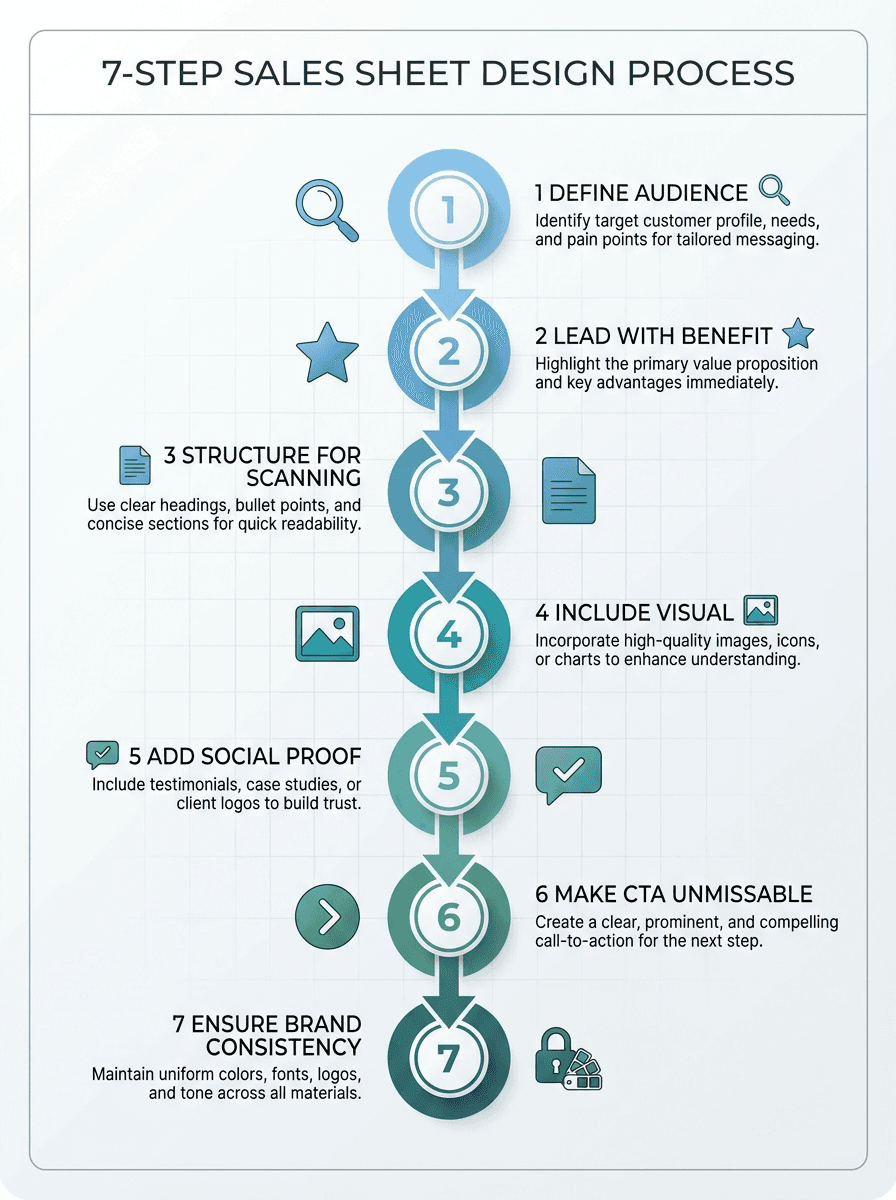
Step 1: Define Your Audience and Objective
Before designing anything, answer: who will read this sales sheet, and what do you want them to do after reading it? A sales sheet for C-suite executives looks different from one for technical evaluators.
The objective might be booking a demo, requesting a quote, or placing an order. That objective shapes every design decision.
Step 2: Lead with the Strongest Benefit
Your headline should state the primary benefit your product or service delivers, not its name or category. "Reduce manufacturing defects by 40%" is stronger than "Quality Control Software."
The headline earns the reader's attention for the next 30 seconds.
Step 3: Structure for Scanning
Most people scan sales sheets in an F-pattern or Z-pattern. Place your most important information in the top-left quadrant.
Use bullet points, not paragraphs. Break content into clear sections with visual hierarchy: headline, subheads, body text, callout boxes.
Step 4: Include One Compelling Visual
A product photo, mockup, infographic, or process diagram gives the reader a visual anchor. Avoid clip art or generic stock photos.
If your product is software, show a real screenshot. If it is a service, show a process infographic or results chart.
Step 5: Add Social Proof
Include at least one credibility element: a customer testimonial quote, a logo bar of recognizable clients, a key result metric ("helped 500+ companies"), or an industry award. Social proof reduces the perceived risk of engaging further.
Step 6: Make the CTA Unmissable
Your call to action should be visually prominent (button-style treatment or bold text), specific ("Schedule a 15-minute demo"), and easy to act on (include the booking link, phone number, or QR code right next to it). One CTA, not three.
Step 7: Ensure Brand Consistency
Every sales sheet should look like it belongs to your brand: consistent logo placement, brand colors, typography, and visual style. If your company produces multiple sales sheets for different products, they should share a common design system so prospects recognize your brand across materials.
Sales Sheet Formats Compared: Print vs. Digital vs. Presentation
Format | Best For | Advantages | Limitations |
Printed PDF | Trade shows, in-person meetings | Tangible, no tech needed | Cannot update once printed |
Digital PDF | Email attachments, download pages | Clickable links, easy to share | Static after export |
Presentation Deck | Video calls, live pitches | Dynamic, presenter-guided, auto-updates via live link | Requires presenting context |
Interactive Web Page | Website lead gen, social sharing | Trackable, always current | Needs web development |
Common Sales Sheet Mistakes to Avoid
1. Leading with Features Instead of Benefits
"10 GB storage" is a feature. "Never worry about running out of space" is a benefit.
Prospects care about outcomes, not specifications. Lead with what the product does for them, then support with feature details.
2. Cramming Too Much Information
A sales sheet is not a brochure. If you cannot read every word at arm's length in under 90 seconds, you have too much content.
Cut ruthlessly. Every element should earn its space.
3. Using Generic Stock Photography
Stock photos of handshaking businesspeople or smiling call center agents undermine credibility. Use real product photos, actual screenshots, genuine customer photos (with permission), or custom-designed infographics.
4. Multiple Competing Calls to Action
"Call us, email us, visit our website, follow us on social media, and download our whitepaper" is not a CTA strategy. Pick one primary action and make it prominent.
Secondary contact methods can appear in small type at the bottom.
5. Inconsistent Branding
Sales sheets created by individual reps in different programs with different fonts and colors erode brand trust. Establish a standardized design system that everyone uses.
6. No Clear Value Proposition
If a prospect cannot answer "what does this company do and why should I care?" within 5 seconds of looking at your sales sheet, the sheet has failed. The value proposition should be the first thing they read.
7. Forgetting the Mobile Experience
Many sales sheets are viewed on phones, either forwarded via email or accessed through a link. Design for readability at small screen sizes: large fonts, high contrast, and content that flows vertically.
How to Build Your Sales Sheets with Decktopus AI
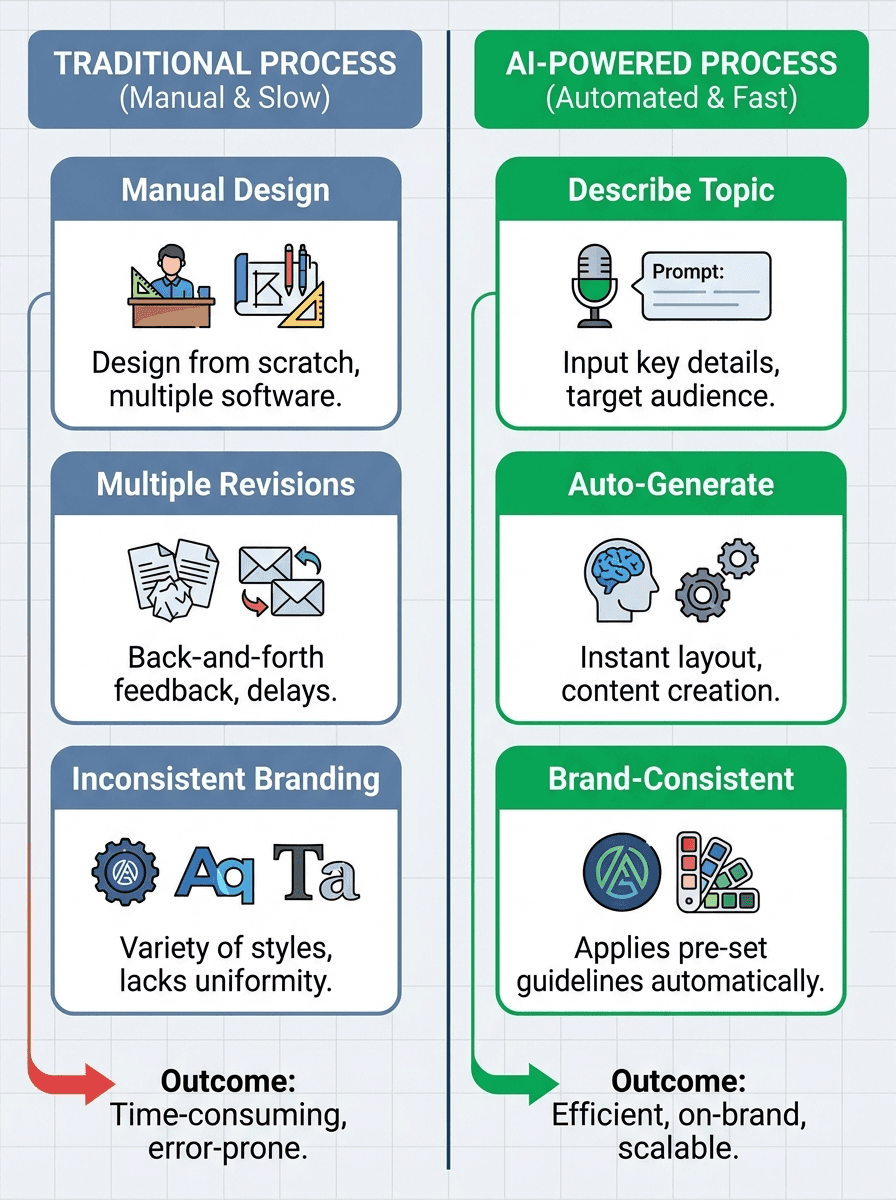
When your sales sheet needs to go beyond a static PDF and into a live, presentable, auto-updating format, Decktopus AI generates complete, presentation-ready sales materials from a topic description. Whether you are building a one-page sell sheet deck for a trade show or a multi-slide product overview for a client pitch, Decktopus handles the content structure and design so you can focus on the sales strategy.
Why Decktopus AI Is Built for Sales Teams
AI Presentation Generation: Describe your sales sheet ("enterprise SaaS product overview for CTO-level prospects") and Decktopus AI generates a complete deck with structure, content, and design. Review the AI-generated outline, adjust sections, then generate.
Brand Import via URL: Pull your company's colors, typography, and logos directly from your website URL. Every sales deck stays on-brand without manual formatting.
Edit with AI: Refine any slide with natural language. "Make this more data-focused" or "add a comparison table with competitor X." Preview before applying, undo available.
Beautify: Upload an existing sales sheet PDF and let Beautify transform it. Use as a Resource extracts key points and builds a new deck (prompt required). Redesign keeps the text and structure but applies a fresh visual design (prompt optional).
AI Image Generation: Generate custom product mockups, infographics, and comparison visuals from text descriptions, or use the Unsplash + Freepik stock library.
Loop AI Delivery Coach: Rehearse your sales pitch with real-time delivery feedback before the client meeting.
Live Link with Auto-Update: Share a live link that auto-updates when you make changes. No need to re-send PDFs every time pricing or features change.
Export: PDF, PPT, or PNG (Standard or Compressed, Pro and Business plans). Custom Domain available on Business plan.
Decktopus AI vs. Traditional Sales Sheet Tools
Capability | Decktopus AI | Canva / PowerPoint |
Generate complete sales deck from prompt | Yes | No, manual creation |
Auto brand import from URL | Yes | Manual setup |
AI editing with natural language | Yes, preview + undo | Limited or none |
Live link with auto-update | Yes | Re-export and re-send |
Delivery rehearsal | Loop AI Coach | None |
Design skills required | No | Yes |
Who Should Use Decktopus AI for Sales Sheets
Sales reps creating prospect-specific one-pagers: Decktopus for Sales
Account executives building tailored pitch decks: Decktopus for Account Executives
BDRs sending outbound sales collateral: Decktopus for Business Development Reps
Founders pitching to investors and partners: Decktopus for Founders
Step-by-Step: Creating a Sales Sheet with Decktopus AI
Describe your topic. Enter a description like "product sales sheet for enterprise HR software." Upload existing collateral (PDF, PPT) via the paperclip icon. Beautify can Use as a Resource (extract and rebuild) or Redesign (new visuals, same structure).
Choose your style. Import your brand from a URL, apply a saved style, or let AI generate one.
Review the AI-generated outline. Edit titles, reorder sections, add or remove slides.
Generate the full presentation. Complete deck with content, layout, and design.
Refine with Edit with AI or Edit Text. Natural language edits with preview and undo, or manual editing. Unlimited version history tracks all changes.
Add images. AI-generated visuals, uploads, or Unsplash/Freepik stock images.
Rehearse with Loop AI Delivery Coach. Practice your sales pitch with real-time feedback.
Export or share. PDF/PPT/PNG, live link (auto-updates), embed, Presentation Mode, Custom Domain (Business plan).
Frequently Asked Questions About Sales Sheets
What is a sales sheet?
A sales sheet (also called a sell sheet, product sheet, or one-pager) is a single-page marketing document that presents a product or service's key benefits, features, pricing, and call to action in a concise, visually compelling format designed to move prospects toward a purchasing decision.
What is the difference between a sales sheet and a brochure?
A sales sheet is typically one page (front only or front and back) focused on a single product or offer with one clear call to action. A brochure is multi-page and covers a broader range of products, services, or company information.
Sales sheets are faster to read and more targeted.
What should a sales sheet include?
An effective sales sheet includes: a benefit-driven headline, product image or visual, 3-5 key benefits, supporting features or specifications, social proof (testimonial or client logos), pricing information, one clear call to action, and contact information with brand identity elements.
How long should a sales sheet be?
One page. If you need the back side, use it sparingly for technical specifications or additional testimonials.
The front side should stand alone as a complete pitch. A reader should be able to absorb the key message in 60-90 seconds.
What is the best format for a digital sales sheet?
PDF is the most universal format for digital sales sheets since it preserves your design across devices. For a more dynamic approach, use a presentation tool like Decktopus AI to create a live link that auto-updates when you make changes, eliminating the need to re-export and re-send PDFs.
How do I make a sales sheet look professional without design skills?
Use an AI-powered tool that handles design automatically. Decktopus AI generates professionally designed sales decks from a text description of your product, importing your brand colors and typography from your website URL.
No design skills or manual formatting required.
Can I use a sales sheet for digital and print?
Yes. Design your sales sheet at high resolution with print-safe margins, then export as PDF for both digital distribution and print.
Tools like Decktopus AI export in Standard or Compressed quality depending on your use case.
What makes a good call to action on a sales sheet?
A good CTA is specific, prominent, and easy to act on. "Schedule a 15-minute demo" with a QR code or link is better than "Contact us."
Limit yourself to one primary CTA so the reader knows exactly what step to take.
How often should I update my sales sheets?
Update sales sheets whenever pricing, features, or positioning changes. At minimum, review quarterly.
Using a live link format (like Decktopus AI's auto-updating share links) eliminates the version control problem entirely.
What is the difference between a sales sheet and a pitch deck?
A sales sheet is a one-page static document designed for self-service reading. A pitch deck is a multi-slide presentation designed to be presented by a person.
Many sales teams use both: the sales sheet as leave-behind collateral and the pitch deck for live presentations.
How do I distribute sales sheets to my sales team?
Store sales sheets in a shared drive or sales enablement platform where reps can always access the latest version. With Decktopus AI, you can share a live link that automatically reflects your latest edits, so reps always send the current version without needing to re-download.
Should I include pricing on my sales sheet?
In most cases, yes. Including pricing reduces friction in the buying process and pre-qualifies prospects.
If your pricing is highly variable or custom, use "starting at" pricing or a pricing range. Only omit pricing if your sales strategy depends on a consultative pricing conversation.
Can I create industry-specific sales sheets?
Yes. The most effective approach is to create a master sales sheet with your core value proposition, then customize versions for each target industry by adjusting the examples, metrics, and use cases to match that industry's priorities.
Decktopus AI makes this efficient since you can generate industry-specific versions from different prompts while keeping your brand consistent.
What size should a sales sheet be?
Standard US letter (8.5" x 11") or A4 for international use. These sizes work for both print and digital viewing.
For trade show handouts, some companies use a smaller 5.5" x 8.5" half-sheet format that fits easily in a tote bag or pocket.
How do I measure whether my sales sheet is working?
Track how often it is used by your sales team (if nobody sends it, the content is not relevant). Track downstream conversions: does sending the sales sheet correlate with faster deal progression or higher close rates?
If using a digital format with a live link, track views and engagement time.
Conclusion: Sales Sheets That Actually Sell
A well-crafted sales sheet remains one of the most cost-effective pieces of sales collateral you can create. It works at every stage of the funnel: generating interest at trade shows, supporting email outreach, enabling internal champions, and serving as a reference during evaluation.
The key is disciplined simplicity. Lead with the benefit your prospect cares about most. Include one visual that makes your product tangible.
Add enough social proof to build credibility. End with one clear call to action. And make it look like it belongs to your brand.
Whether you are creating a single product sheet or a library of industry-specific sell sheets, Decktopus AI generates complete, brand-consistent sales decks from a topic description, letting you focus on strategy rather than slide design.
Stay Connected
Follow Decktopus for the latest updates, tips, and resources:
Related posts

Struggling to Find New Clients? 5 Proven Tips to Turn Prospecting Into Growth
Struggling to find new clients? Discover 5 proven tips, from proposals to paid ads, to build a steady pipeline of new business.
Sales & Proposals

Cracking the Code: Mastering B2B Sales Strategies & Techniques
Discover the essential guide to mastering B2B sales strategies and techniques, uncovering the secrets behind successful business-to-business selling. Explore the B2B sales process, optimize your team's performance, and elevate your approach to selling products for businesses.
Sales & Proposals
Mastering Proposals: Exploring the Best Business Proposal Tools and Software Solutions
Discover the best business proposal tools, including PandaDoc and Proposable, to streamline your proposal process and win more clients.
Sales & Proposals