Marketing
Decktopus vs Canva for Carousels (Which one you should prefer?)
Decktopus vs Canva for carousels: from-scratch AI generation vs. manual template design, compared honestly on speed, control, and cost.


İlayda Tunaboylu
Decktopus and Canva solve the same end problem, a finished carousel ready to post, from opposite starting points. Canva gives you a template and asks you to fill it in. Decktopus AI generates the entire visual design from a prompt or document, with no template to browse first. Neither approach is objectively better; they trade speed and originality for control and familiarity in opposite directions.
This comparison covers both tools specifically for carousel creation, not their broader feature sets, evaluated honestly on what each one actually does and doesn’t do. For the two tools compared beyond just carousels, see the broader Decktopus vs Canva comparison. And if you want the full competitive landscape rather than just these two, Best AI Carousel Makers in 2026 and Best LinkedIn Carousel Generators 2026 cover the wider field.
What This Comparison Covers
Both Decktopus AI and Canva can produce a finished carousel ready to post on LinkedIn or Instagram, but they represent two different starting points for getting there: generate the whole design from a prompt, or start from a template and fill it in by hand. This piece stays scoped to that one decision, carousel design specifically, rather than every feature either tool offers. If you haven’t built a carousel with either tool before, how to make a LinkedIn carousel covers what the actual process looks like regardless of which tool you pick.

Quick Answer
Decktopus AI generates a carousel’s entire visual design from a prompt or document, with no template library to browse. Canva starts from a template you customize by hand. Decktopus AI suits carousels that shouldn’t look template-built; Canva suits users who want full manual control and already know its editor.
The Core Difference
Canva is a template-first design platform. You pick a carousel template from its library, then customize the text, images, colors, and fonts by hand. AI features exist (Magic Design, text-to-image generation) but they assist the manual process rather than replacing it.
Decktopus AI generates the carousel’s visual design from scratch, meaning the layout, color palette, and typography aren’t pulled from a pre-built template at all. You give it a prompt or an uploaded document, review a card-by-card outline, and the tool builds the design around your content rather than fitting your content into someone else’s layout.
That distinction (template-first versus generated-from-scratch) is the one thing that shapes almost every other difference between the two tools.
How We’re Comparing Them
Both tools are evaluated on:
Starting point, template library versus generated design
Time to a finished carousel, from blank canvas or blank prompt to export-ready file
Editing model, manual drag-and-drop versus natural-language prompts
Platform export, what formats and platforms each tool is built to support
Pricing, what’s included at each tier
Decktopus AI for Carousels
What it is: An AI-powered platform that generates a complete, ready-to-post carousel from a prompt or an uploaded document, including whole documents, not just short prompts. Every design is generated from scratch, with no template library to browse.
Best for: Creators and marketers who want a carousel that doesn’t look built on the same template structure as everyone else’s, and who’d rather review and refine an AI-generated design than build one slide by slide.
How it works: Enter a prompt or upload a document, choose a visual direction (a previously used style, a Brand Import that pulls colors, typography, and your logo from your website URL, or a fully AI-generated look), review the card-by-card outline before the final design builds, then refine with Edit with AI (natural-language prompts with a preview and undo) or Edit Text (direct manual edits). Export as PDF, PPT, or PNG in standard or compressed quality.
Pricing: Free, Pro, and Business plans on a credit system. One carousel card costs 5 credits, and an Edit Text change costs 5 credits.
Pros:
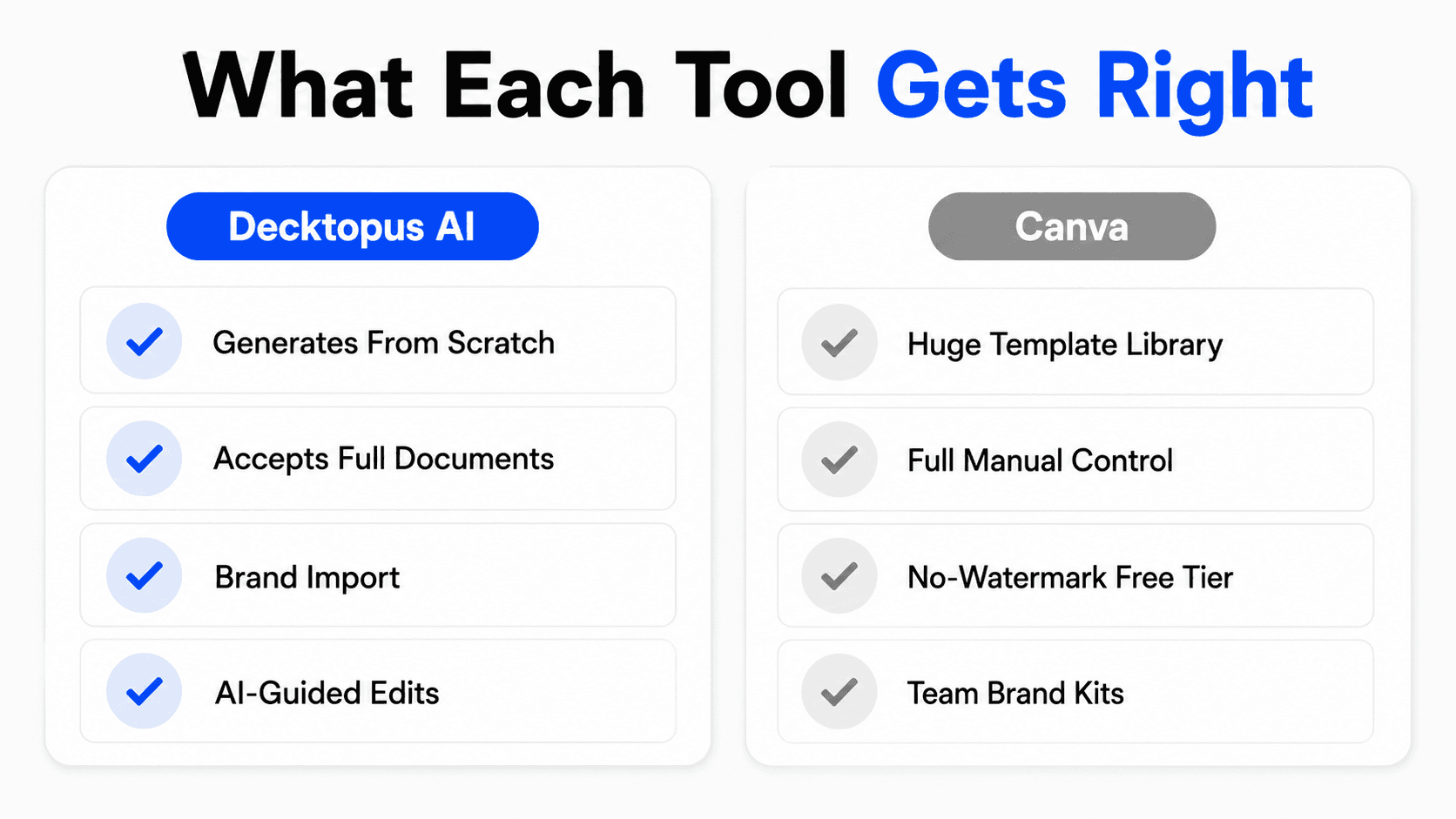
Generates the full visual design from scratch, so the carousel isn’t visibly built on a template
Accepts full source documents, not just short prompts
Brand Import automates pulling your visual identity from a URL
Natural-language editing with a preview step before changes apply
Cons:
No native scheduling or direct publishing; carousels are exported for manual posting
No built-in analytics or engagement tracking
No bulk or CSV-based generation for producing many carousels at once
Less hands-on visual control than a manual tool, since you’re guiding generation rather than placing every element yourself
Canva for Carousels
What it is: A general-purpose design platform with a large library of carousel templates and a manual drag-and-drop editor. AI features exist but assist rather than replace manual design.
Best for: Users who want full, direct control over every visual element and already have some design experience or are comfortable learning Canva’s editor.
How it works: Browse or search the template library for a carousel layout, then customize each slide by hand: text, images, colors, fonts, and layout. Export as PDF for LinkedIn or as individual images for Instagram.
Pricing: Free plan available with a large template library and no watermark on exports. Pro runs roughly $12-15/month for individuals, with team pricing on top.
Pros:
Massive template library covering nearly any topic or aesthetic
Full manual control over every slide, useful for precise brand requirements
Free tier has no watermark, unlike several competing carousel tools
Strong brand kit tools for teams on paid plans
Cons:
No content-to-carousel automation; every carousel starts from a template you customize by hand
Typically takes 30 to 60 minutes per carousel for a polished result
Canva’s Content Planner (a Pro feature) can schedule posts to Instagram and LinkedIn, but it doesn’t cover carousels specifically: it can only schedule single-image Instagram feed posts (not carousels or Stories), and LinkedIn scheduling only works for personal profiles, not company pages
Since many creators pull from the same popular templates, carousels can end up structurally similar to others using the same layout
Where Canva’s AI Features Fit In
It’s worth being precise about this, since “Canva has AI too” is a common pushback. Canva’s Magic Design and text-to-image tools generate suggestions, layout options, and imagery inside the existing template-and-editor workflow. You still pick a starting layout (or let Magic Design suggest one), then place, resize, and edit elements yourself in the canvas editor. The AI accelerates specific steps, generating a background image, suggesting a layout, but the fundamental model is still manual assembly with AI-assisted pieces.
That’s a meaningfully different architecture from Decktopus AI’s approach, where the entire carousel, structure, copy, layout, and visual design, comes out of one generation step from a prompt or document, with manual editing as the refinement layer afterward rather than the primary method. Neither model is “more AI” in a way that makes one obsolete; they’re AI applied at different points in the workflow. Canva’s AI helps you build faster inside a template. Decktopus AI’s replaces the template step entirely.
Comparison Table
Category | Decktopus AI | Canva |
|---|---|---|
Starting point | Generated from scratch | Template library |
Time to finished carousel | Minutes, with a review step | 30-60 minutes typical |
Editing model | Natural-language prompts (Edit with AI) or direct edits (Edit Text) | Manual drag-and-drop |
Document input | Accepts full documents as source material | Manual entry only |
Export formats | PDF, PPT, PNG | PDF, PNG (platform-dependent) |
Scheduling/publishing | No | Content Planner (Pro) schedules single-image posts, not carousels |
Free tier | Yes, credit-based | Yes, no watermark |
Starting paid price | Pro and Business plans (credit-based) | ~$12-15/month |
Three Real Scenarios
[[EMBED:PGRpdiBzdHlsZT0ib3ZlcmZsb3cteDphdXRvO21hcmdpbjoyMHB4IDAiPjxzdHlsZT4uZHRrLXRibCwuZHRrLXRibCAqe2JveC1zaXppbmc6Ym9yZGVyLWJveDttYXJnaW46MDtwYWRkaW5nOjB9LmR0ay10Ymx7Zm9udC1mYW1pbHk6J1BvcHBpbnMnLHN5c3RlbS11aSxzYW5zLXNlcmlmO2NvbG9yOiMyRDM0MzY7bWF4LXdpZHRoOjg2MHB4O21hcmdpbjowIGF1dG87Ym9yZGVyOjFweCBzb2xpZCAjRThFQUYwO2JvcmRlci1yYWRpdXM6MjBweDtvdmVyZmxvdzpoaWRkZW47YmFja2dyb3VuZDojZmZmfS5kdGstdGJsIC5oZWFke3BhZGRpbmc6MjZweCAyOHB4IDIwcHh9LmR0ay10YmwgLmhlYWQgaDJ7Zm9udC1zaXplOmNsYW1wKDIycHgsNXZ3LDMycHgpO2ZvbnQtd2VpZ2h0OjcwMDtsaW5lLWhlaWdodDoxLjF9LmR0ay10YmwgLmhlYWQgcHtjb2xvcjojNzg4MDhBO2ZvbnQtc2l6ZToxNXB4O21hcmdpbi10b3A6NHB4fS5kdGstdGJsIC5yb3d7ZGlzcGxheTpncmlkO2dyaWQtdGVtcGxhdGUtY29sdW1uczoxLjdmciAxZnIgMWZyO2JvcmRlci10b3A6MXB4IHNvbGlkICNFOEVBRjB9LmR0ay10YmwgLnJvdy5oZWFkZXJ7Ym9yZGVyLXRvcDowfS5kdGstdGJsIC5jZWxse3BhZGRpbmc6MTRweCAxNnB4O2Rpc3BsYXk6ZmxleDtmbGV4LWRpcmVjdGlvbjpjb2x1bW47anVzdGlmeS1jb250ZW50OmNlbnRlcjthbGlnbi1pdGVtczpjZW50ZXI7dGV4dC1hbGlnbjpjZW50ZXI7Z2FwOjZweDttaW4taGVpZ2h0OjYwcHh9LmR0ay10YmwgLmZlYXR7YWxpZ24taXRlbXM6ZmxleC1zdGFydDt0ZXh0LWFsaWduOmxlZnQ7Zm9udC13ZWlnaHQ6NTAwO2ZvbnQtc2l6ZToxNnB4O2xpbmUtaGVpZ2h0OjEuM30uZHRrLXRibCAuY29sLWR0a3tiYWNrZ3JvdW5kOiNFRUVCRkR9LmR0ay10YmwgLnJvdzpudGgtY2hpbGQoZXZlbikgLmZlYXR7YmFja2dyb3VuZDojRkFGQUZDfS5kdGstdGJsIC5yb3c6bnRoLWNoaWxkKGV2ZW4pIC5jb2wtY29tcHtiYWNrZ3JvdW5kOiNGQUZBRkN9LmR0ay10YmwgLmhlYWRlciAuY2VsbHtmb250LXdlaWdodDo2MDA7Zm9udC1zaXplOjE4cHg7bWluLWhlaWdodDphdXRvO3BhZGRpbmc6MTZweH0uZHRrLXRibCAuaGVhZGVyIC5jb2wtZHRre2JhY2tncm91bmQ6IzZDNUNFNztjb2xvcjojZmZmO2JvcmRlci1yYWRpdXM6MTBweCAxMHB4IDAgMH0uZHRrLXRibCAuYnt3aWR0aDoyOHB4O2hlaWdodDoyOHB4O2JvcmRlci1yYWRpdXM6NTAlO2Rpc3BsYXk6aW5saW5lLWZsZXg7YWxpZ24taXRlbXM6Y2VudGVyO2p1c3RpZnktY29udGVudDpjZW50ZXI7Y29sb3I6I2ZmZjtmb250LXNpemU6MTVweDtmb250LXdlaWdodDo3MDA7bGluZS1oZWlnaHQ6MTtmbGV4OjAgMCAyOHB4fS5kdGstdGJsIC55ZXN7YmFja2dyb3VuZDojMjJCMjZDfS5kdGstdGJsIC5ub3tiYWNrZ3JvdW5kOiNFODU0NUN9LmR0ay10YmwgLnBhcnR7YmFja2dyb3VuZDojRjBBQTI4fS5kdGstdGJsIC5ub3Rle2ZvbnQtc2l6ZToxMnB4O2NvbG9yOiM3ODgwOEE7bGluZS1oZWlnaHQ6MS4zO3dvcmQtd3JhcDpicmVhay13b3JkO21heC13aWR0aDoxMDAlfS5kdGstdGJsIC5sYmx7ZGlzcGxheTpub25lO2ZvbnQtc2l6ZToxM3B4O2NvbG9yOiM3ODgwOEE7Zm9udC13ZWlnaHQ6NTAwfS5kdGstdGJsIC52YWx7ZGlzcGxheTpmbGV4O2FsaWduLWl0ZW1zOmNlbnRlcjtnYXA6OHB4O2ZsZXgtd3JhcDpub3dyYXB9LmR0ay10YmwgLmZvb3R7ZGlzcGxheTpmbGV4O2ZsZXgtd3JhcDp3cmFwO2dhcDoxMHB4O2p1c3RpZnktY29udGVudDpzcGFjZS1iZXR3ZWVuO2FsaWduLWl0ZW1zOmNlbnRlcjtwYWRkaW5nOjE2cHggMjhweDtib3JkZXItdG9wOjFweCBzb2xpZCAjRThFQUYwO2NvbG9yOiM3ODgwOEE7Zm9udC1zaXplOjEzcHh9LmR0ay10YmwgLmxlZ2VuZHtkaXNwbGF5OmZsZXg7Z2FwOjE2cHh9LmR0ay10YmwgLmxlZ2VuZCBzcGFue2Rpc3BsYXk6aW5saW5lLWZsZXg7YWxpZ24taXRlbXM6Y2VudGVyO2dhcDo2cHh9LmR0ay10YmwgLmxlZ2VuZCAuYnt3aWR0aDoxOXB4O2hlaWdodDoxOXB4O2ZvbnQtc2l6ZToxMXB4O2ZsZXg6MCAwIDE5cHh9QG1lZGlhKG1heC13aWR0aDo1NjBweCl7LmR0ay10YmwgLmhlYWRlcntkaXNwbGF5Om5vbmV9LmR0ay10YmwgLnJvd3tncmlkLXRlbXBsYXRlLWNvbHVtbnM6MWZyO2JvcmRlci10b3A6MDtwYWRkaW5nOjZweCAwO2JvcmRlci1ib3R0b206MXB4IHNvbGlkICNFOEVBRjB9LmR0ay10YmwgLnJvdzpsYXN0LWNoaWxke2JvcmRlci1ib3R0b206MH0uZHRrLXRibCAuY2VsbHttaW4taGVpZ2h0OmF1dG87cGFkZGluZzo5cHggMThweDthbGlnbi1pdGVtczpmbGV4LXN0YXJ0O3RleHQtYWxpZ246bGVmdH0uZHRrLXRibCAuZmVhdHtmb250LXdlaWdodDo2MDA7Zm9udC1zaXplOjE2cHg7cGFkZGluZy1ib3R0b206MnB4O2JhY2tncm91bmQ6dHJhbnNwYXJlbnQhaW1wb3J0YW50fS5kdGstdGJsIC5jb2wtZHRrLC5kdGstdGJsIC5jb2wtY29tcHtiYWNrZ3JvdW5kOnRyYW5zcGFyZW50IWltcG9ydGFudDtmbGV4LWRpcmVjdGlvbjpyb3chaW1wb3J0YW50O2p1c3RpZnktY29udGVudDpzcGFjZS1iZXR3ZWVuO3dpZHRoOjEwMCU7Z2FwOjEycHg7cGFkZGluZzo2cHggMTRweDttYXJnaW46MnB4IDE0cHh9LmR0ay10YmwgLmNvbC1kdGt7Ym9yZGVyLWxlZnQ6M3B4IHNvbGlkICM2QzVDRTc7Ym9yZGVyLXJhZGl1czo0cHg7YmFja2dyb3VuZDojRUVFQkZEIWltcG9ydGFudH0uZHRrLXRibCAuY29sLWNvbXB7Ym9yZGVyLWxlZnQ6M3B4IHNvbGlkICNFOEVBRjB9LmR0ay10YmwgLmxibHtkaXNwbGF5OmlubGluZX0uZHRrLXRibCAuZm9vdHtwYWRkaW5nOjE2cHggMThweDtmbGV4LWRpcmVjdGlvbjpjb2x1bW47YWxpZ24taXRlbXM6ZmxleC1zdGFydH19PC9zdHlsZT48ZGl2IGNsYXNzPSJkdGstdGJsIj48ZGl2IGNsYXNzPSJoZWFkIj48aDI+RGVja3RvcHVzIHZzLiBDYW52YTwvaDI+PHA+QUkgcHJlc2VudGF0aW9uIGZlYXR1cmUgY29tcGFyaXNvbjwvcD48L2Rpdj48ZGl2IGNsYXNzPSJyb3cgaGVhZGVyIj48ZGl2IGNsYXNzPSJjZWxsIGZlYXQiPkZlYXR1cmU8L2Rpdj48ZGl2IGNsYXNzPSJjZWxsIGNvbC1kdGsiPkRlY2t0b3B1czwvZGl2PjxkaXYgY2xhc3M9ImNlbGwgY29sLWNvbXAiPkNhbnZhPC9kaXY+PC9kaXY+PGRpdiBjbGFzcz0icm93Ij48ZGl2IGNsYXNzPSJjZWxsIGZlYXQiPkFJIGNhcm91c2VsIGZyb20gYSBwcm9tcHQ8L2Rpdj48ZGl2IGNsYXNzPSJjZWxsIGNvbC1kdGsiPjxkaXYgY2xhc3M9InZhbCI+PHNwYW4gY2xhc3M9ImxibCI+RGVja3RvcHVzPC9zcGFuPjxzcGFuIGNsYXNzPSJiIHllcyI+4pyTPC9zcGFuPjwvZGl2PjwvZGl2PjxkaXYgY2xhc3M9ImNlbGwgY29sLWNvbXAiPjxkaXYgY2xhc3M9InZhbCI+PHNwYW4gY2xhc3M9ImxibCI+Q2FudmE8L3NwYW4+PHNwYW4gY2xhc3M9ImIgcGFydCI+4oCTPC9zcGFuPjwvZGl2PjxzcGFuIGNsYXNzPSJub3RlIj5UZW1wbGF0ZS1iYXNlZDwvc3Bhbj48L2Rpdj48L2Rpdj48ZGl2IGNsYXNzPSJyb3ciPjxkaXYgY2xhc3M9ImNlbGwgZmVhdCI+QXV0by1icmFuZCBmcm9tIHdlYnNpdGUgVVJMPC9kaXY+PGRpdiBjbGFzcz0iY2VsbCBjb2wtZHRrIj48ZGl2IGNsYXNzPSJ2YWwiPjxzcGFuIGNsYXNzPSJsYmwiPkRlY2t0b3B1czwvc3Bhbj48c3BhbiBjbGFzcz0iYiB5ZXMiPuKckzwvc3Bhbj48L2Rpdj48L2Rpdj48ZGl2IGNsYXNzPSJjZWxsIGNvbC1jb21wIj48ZGl2IGNsYXNzPSJ2YWwiPjxzcGFuIGNsYXNzPSJsYmwiPkNhbnZhPC9zcGFuPjxzcGFuIGNsYXNzPSJiIG5vIj7inJU8L3NwYW4+PC9kaXY+PHNwYW4gY2xhc3M9Im5vdGUiPk1hbnVhbCBCcmFuZCBLaXQ8L3NwYW4+PC9kaXY+PC9kaXY+PGRpdiBjbGFzcz0icm93Ij48ZGl2IGNsYXNzPSJjZWxsIGZlYXQiPkxpbmtlZEluIGNhcm91c2VsIGV4cG9ydDwvZGl2PjxkaXYgY2xhc3M9ImNlbGwgY29sLWR0ayI+PGRpdiBjbGFzcz0idmFsIj48c3BhbiBjbGFzcz0ibGJsIj5EZWNrdG9wdXM8L3NwYW4+PHNwYW4gY2xhc3M9ImIgeWVzIj7inJM8L3NwYW4+PC9kaXY+PC9kaXY+PGRpdiBjbGFzcz0iY2VsbCBjb2wtY29tcCI+PGRpdiBjbGFzcz0idmFsIj48c3BhbiBjbGFzcz0ibGJsIj5DYW52YTwvc3Bhbj48c3BhbiBjbGFzcz0iYiB5ZXMiPuKckzwvc3Bhbj48L2Rpdj48L2Rpdj48L2Rpdj48ZGl2IGNsYXNzPSJyb3ciPjxkaXYgY2xhc3M9ImNlbGwgZmVhdCI+SW5zdGFncmFtIGNhcm91c2VsIGV4cG9ydDwvZGl2PjxkaXYgY2xhc3M9ImNlbGwgY29sLWR0ayI+PGRpdiBjbGFzcz0idmFsIj48c3BhbiBjbGFzcz0ibGJsIj5EZWNrdG9wdXM8L3NwYW4+PHNwYW4gY2xhc3M9ImIgeWVzIj7inJM8L3NwYW4+PC9kaXY+PC9kaXY+PGRpdiBjbGFzcz0iY2VsbCBjb2wtY29tcCI+PGRpdiBjbGFzcz0idmFsIj48c3BhbiBjbGFzcz0ibGJsIj5DYW52YTwvc3Bhbj48c3BhbiBjbGFzcz0iYiB5ZXMiPuKckzwvc3Bhbj48L2Rpdj48L2Rpdj48L2Rpdj48ZGl2IGNsYXNzPSJyb3ciPjxkaXYgY2xhc3M9ImNlbGwgZmVhdCI+UERGIGV4cG9ydDwvZGl2PjxkaXYgY2xhc3M9ImNlbGwgY29sLWR0ayI+PGRpdiBjbGFzcz0idmFsIj48c3BhbiBjbGFzcz0ibGJsIj5EZWNrdG9wdXM8L3NwYW4+PHNwYW4gY2xhc3M9ImIgeWVzIj7inJM8L3NwYW4+PC9kaXY+PC9kaXY+PGRpdiBjbGFzcz0iY2VsbCBjb2wtY29tcCI+PGRpdiBjbGFzcz0idmFsIj48c3BhbiBjbGFzcz0ibGJsIj5DYW52YTwvc3Bhbj48c3BhbiBjbGFzcz0iYiB5ZXMiPuKckzwvc3Bhbj48L2Rpdj48L2Rpdj48L2Rpdj48ZGl2IGNsYXNzPSJyb3ciPjxkaXYgY2xhc3M9ImNlbGwgZmVhdCI+UE5HIGV4cG9ydDwvZGl2PjxkaXYgY2xhc3M9ImNlbGwgY29sLWR0ayI+PGRpdiBjbGFzcz0idmFsIj48c3BhbiBjbGFzcz0ibGJsIj5EZWNrdG9wdXM8L3NwYW4+PHNwYW4gY2xhc3M9ImIgeWVzIj7inJM8L3NwYW4+PC9kaXY+PC9kaXY+PGRpdiBjbGFzcz0iY2VsbCBjb2wtY29tcCI+PGRpdiBjbGFzcz0idmFsIj48c3BhbiBjbGFzcz0ibGJsIj5DYW52YTwvc3Bhbj48c3BhbiBjbGFzcz0iYiB5ZXMiPuKckzwvc3Bhbj48L2Rpdj48L2Rpdj48L2Rpdj48ZGl2IGNsYXNzPSJyb3ciPjxkaXYgY2xhc3M9ImNlbGwgZmVhdCI+UFBUIGV4cG9ydDwvZGl2PjxkaXYgY2xhc3M9ImNlbGwgY29sLWR0ayI+PGRpdiBjbGFzcz0idmFsIj48c3BhbiBjbGFzcz0ibGJsIj5EZWNrdG9wdXM8L3NwYW4+PHNwYW4gY2xhc3M9ImIgeWVzIj7inJM8L3NwYW4+PC9kaXY+PC9kaXY+PGRpdiBjbGFzcz0iY2VsbCBjb2wtY29tcCI+PGRpdiBjbGFzcz0idmFsIj48c3BhbiBjbGFzcz0ibGJsIj5DYW52YTwvc3Bhbj48c3BhbiBjbGFzcz0iYiB5ZXMiPuKckzwvc3Bhbj48L2Rpdj48L2Rpdj48L2Rpdj48ZGl2IGNsYXNzPSJyb3ciPjxkaXYgY2xhc3M9ImNlbGwgZmVhdCI+QUkgY29udGVudCBnZW5lcmF0aW9uPC9kaXY+PGRpdiBjbGFzcz0iY2VsbCBjb2wtZHRrIj48ZGl2IGNsYXNzPSJ2YWwiPjxzcGFuIGNsYXNzPSJsYmwiPkRlY2t0b3B1czwvc3Bhbj48c3BhbiBjbGFzcz0iYiB5ZXMiPuKckzwvc3Bhbj48L2Rpdj48L2Rpdj48ZGl2IGNsYXNzPSJjZWxsIGNvbC1jb21wIj48ZGl2IGNsYXNzPSJ2YWwiPjxzcGFuIGNsYXNzPSJsYmwiPkNhbnZhPC9zcGFuPjxzcGFuIGNsYXNzPSJiIHBhcnQiPuKAkzwvc3Bhbj48L2Rpdj48c3BhbiBjbGFzcz0ibm90ZSI+TWFnaWMgV3JpdGU8L3NwYW4+PC9kaXY+PC9kaXY+PGRpdiBjbGFzcz0icm93Ij48ZGl2IGNsYXNzPSJjZWxsIGZlYXQiPk5vIGRlc2lnbiBza2lsbHMgcmVxdWlyZWQ8L2Rpdj48ZGl2IGNsYXNzPSJjZWxsIGNvbC1kdGsiPjxkaXYgY2xhc3M9InZhbCI+PHNwYW4gY2xhc3M9ImxibCI+RGVja3RvcHVzPC9zcGFuPjxzcGFuIGNsYXNzPSJiIHllcyI+4pyTPC9zcGFuPjwvZGl2PjwvZGl2PjxkaXYgY2xhc3M9ImNlbGwgY29sLWNvbXAiPjxkaXYgY2xhc3M9InZhbCI+PHNwYW4gY2xhc3M9ImxibCI+Q2FudmE8L3NwYW4+PHNwYW4gY2xhc3M9ImIgcGFydCI+4oCTPC9zcGFuPjwvZGl2PjxzcGFuIGNsYXNzPSJub3RlIj5UZW1wbGF0ZSBjdXN0b21pemF0aW9uPC9zcGFuPjwvZGl2PjwvZGl2PjxkaXYgY2xhc3M9InJvdyI+PGRpdiBjbGFzcz0iY2VsbCBmZWF0Ij5FbnRyeSBwcmljZTwvZGl2PjxkaXYgY2xhc3M9ImNlbGwgY29sLWR0ayI+PGRpdiBjbGFzcz0idmFsIj48c3BhbiBjbGFzcz0ibGJsIj5EZWNrdG9wdXM8L3NwYW4+PHNwYW4gY2xhc3M9ImIgeWVzIj7inJM8L3NwYW4+PC9kaXY+PHNwYW4gY2xhc3M9Im5vdGUiPiQ5Ljk5L21vPC9zcGFuPjwvZGl2PjxkaXYgY2xhc3M9ImNlbGwgY29sLWNvbXAiPjxkaXYgY2xhc3M9InZhbCI+PHNwYW4gY2xhc3M9ImxibCI+Q2FudmE8L3NwYW4+PHNwYW4gY2xhc3M9ImIgeWVzIj7inJM8L3NwYW4+PC9kaXY+PHNwYW4gY2xhc3M9Im5vdGUiPkZyZWUgdGllciArICQxMy9tbzwvc3Bhbj48L2Rpdj48L2Rpdj48ZGl2IGNsYXNzPSJmb290Ij48ZGl2PlVwZGF0ZWQgSnVseSAyMDI2ICZuYnNwO8K3Jm5ic3A7IGRlY2t0b3B1cy5jb208L2Rpdj48ZGl2IGNsYXNzPSJsZWdlbmQiPjxzcGFuPjxzcGFuIGNsYXNzPSJiIHllcyI+4pyTPC9zcGFuPlllczwvc3Bhbj48c3Bhbj48c3BhbiBjbGFzcz0iYiBwYXJ0Ij7igJM8L3NwYW4+UGFydGlhbDwvc3Bhbj48c3Bhbj48c3BhbiBjbGFzcz0iYiBubyI+4pyVPC9zcGFuPk5vPC9zcGFuPjwvZGl2PjwvZGl2PjwvZGl2PjwvZGl2Pg==]]
A solo consultant posting one carousel a week, repurposing blog content. This favors Decktopus AI. Uploading the week’s blog post as a document and reviewing the generated outline takes far less time than manually rebuilding it slide by slide in Canva, and the weekly cadence means speed compounds into real time saved over a quarter.
A design-led brand team with strict visual guidelines and an in-house designer. This favors Canva, or a hybrid approach. If the brand’s visual system requires precise, pixel-level control that a designer already knows how to execute, Canva’s manual editor gives them that control directly. Decktopus’s Brand Import can get close to brand consistency automatically, but a team with an existing Canva-based design system may have more invested in that workflow already.
A marketer who needs to turn a 20-page report into 5 different carousels for a launch. This favors Decktopus AI, specifically because of document upload. Manually extracting content from a long report and rebuilding it slide by slide five separate times in Canva is a significant time investment; uploading the report and generating multiple angles from it is a meaningfully faster starting point, even accounting for the review and refinement step afterward.
Which One Should You Use
Pick Decktopus AI if you want a carousel generated from scratch rather than a template, especially if you’re producing carousels regularly and want each one to look distinct rather than recognizably built on a popular layout. It’s also the stronger choice if you’re starting from an existing document (a blog post, a set of notes) and want to skip manually re-typing content into a design tool.
Pick Canva if you want direct, hands-on control over every visual element, already have (or are willing to build) design skills, and don’t mind the extra time that manual design takes. It’s also a reasonable choice if your team already standardizes on Canva for other design work and wants carousels to live in the same workflow.
Neither tool schedules or publishes carousels directly. Canva’s Content Planner (Pro) does schedule other post types to Instagram and LinkedIn, but it stops short of carousels: only single-image Instagram feed posts, and LinkedIn personal profiles rather than company pages. So if scheduling is a priority, you’ll want to pair either tool with a separate scheduling tool or a platform built around LinkedIn or Instagram publishing specifically.
What Each Tool Costs in Practice
List pricing only tells part of the story, since the two tools charge for fundamentally different units of work.
Canva’s paid tier is a flat monthly subscription (roughly $12-15/month for individuals, per Canva’s own pricing page) that unlocks premium templates, brand kit tools, and background removal, but the free tier already includes the full template library and watermark-free exports, so many casual carousel users never need to upgrade at all.
Decktopus AI runs on a credit system: one carousel card costs 5 credits, and each Edit Text change costs another 5 credits. That means the real cost of a carousel scales with its length and how much manual text editing it needs after generation, an 8-slide carousel with a handful of text tweaks costs meaningfully more in credits than a 5-slide one you leave mostly as generated. For someone producing a high volume of long carousels with heavy manual editing, it’s worth checking current plan credit allotments against that usage pattern before committing to a tier.
The practical takeaway: Canva’s cost is predictable and flat regardless of how many carousels you make in a month. Decktopus’s cost scales with carousel length and edit volume, which can work out cheaper for light, infrequent use and differently for high-volume, heavily-edited workflows.
Building a Carousel in Decktopus AI
Here’s the actual workflow, so the from-scratch approach is concrete rather than abstract.
1. Enter a prompt or upload a document. Type your topic directly, or upload a full source document if you’re repurposing existing content.
2. Choose your visual direction. Pick a previously used style, a Brand Import from your website URL, or a fully AI-generated look.
3. Review the card-by-card outline. Check the slide-by-slide structure before the final design builds, catching any slide trying to cover too much before it’s a finished layout.
4. Generate the full design. Decktopus builds the complete visual carousel, layout, color, typography, generated from scratch.
5. Refine with Edit with AI or Edit Text. Describe a change in plain language and preview it before applying, or make direct manual text edits.
6. Export. PDF for LinkedIn, PNG for Instagram, or PPT if you need an editable slide format.
Try this workflow yourself on Decktopus AI and compare it directly against your usual Canva process.
How to Know Whether the Tool You Picked Was the Right Call
Choosing between Decktopus AI and Canva isn’t a one-time decision you get right or wrong on day one. The real test is whether the carousels you’re producing a few weeks in are actually performing, and whether the tool is still the bottleneck it wasn’t supposed to be.
Track time-to-published-carousel, not just time-to-designed-carousel. If you picked a tool for speed (the scenario Decktopus AI is built around) but you’re still spending as long editing or second-guessing the output as you would have spent in Canva, the speed advantage isn’t actually showing up in practice. Compare your actual time from idea to published post across a few carousels, not just the generation or design step in isolation.
Check whether your carousels are getting more distinctive or more repetitive. If you picked Canva specifically to avoid the “everyone’s using the same template” problem, and a peer or competitor has pointed out your posts look like a template they’ve seen elsewhere, that’s a direct signal the tool isn’t delivering on the reason you chose it. If you picked Decktopus AI for from-scratch generation, check whether your carousels are actually varying in structure and layout carousel to carousel, or converging on a similar look despite the lack of a template library.
Compare engagement on carousels made with your chosen tool against your own carousels from before the switch, using LinkedIn’s native post analytics. Saves and comments relative to impressions are the two numbers worth checking specifically; a tool switch that doesn’t move either number, after a few posts, means the design tool wasn’t actually the bottleneck limiting your carousel performance.
Watch your own cost pattern against the tier you’re on. Canva’s cost is flat regardless of volume; Decktopus’s credit cost scales with carousel length and edit volume. If you’re consistently paying more than expected relative to your posting frequency, or hitting a plan ceiling faster than anticipated, that’s worth checking against your actual usage pattern rather than assuming the pricing tier was a one-time decision.
FAQ
Is Decktopus AI or Canva better for carousels?
It depends on what you’re optimizing for. Decktopus AI is built for a fully AI-generated design with no template library and works from full documents, not just prompts. Canva is built for manual, hands-on design control with the largest template library of the two. Neither is objectively better; they serve different workflows.
Does Decktopus AI have a template library like Canva?
No. That’s the core structural difference between the two tools. Decktopus generates the visual design from scratch for each carousel rather than offering a library of pre-built layouts to choose from.
Which tool is faster for making a carousel?
Decktopus AI is generally faster to a first draft, since the AI generates the full design rather than requiring manual slide-by-slide assembly. Canva typically takes 30 to 60 minutes for a polished result, depending on design experience.
Can either tool schedule or publish carousels directly?
No, not for carousels specifically. Neither Decktopus AI nor Canva includes native carousel scheduling. Canva’s Content Planner (a Pro feature) does schedule other post types to Instagram and LinkedIn, but it only covers single-image Instagram feed posts, not carousels or Stories, and LinkedIn scheduling is limited to personal profiles rather than company pages. Both tools export a finished carousel file that you upload to LinkedIn or Instagram yourself, or through a separate scheduling tool.
Does Canva have a free plan?
Yes, and it includes a large template library with no watermark on exports. Decktopus AI also has a Free plan, running on a credit system rather than a flat monthly carousel allowance.
Can I upload an existing document to either tool to build a carousel from it?
Decktopus AI accepts a full document as source material, not just a short prompt. Canva’s workflow is manual entry into a template; there’s no equivalent document-to-carousel generation step.
Isn’t Canva’s AI just as capable as Decktopus’s?
They’re AI applied at different points in the process, not directly comparable in capability. Canva’s AI features (Magic Design, text-to-image) assist specific steps inside a manual, template-based workflow. Decktopus AI generates the entire carousel, structure and design together, from a prompt or document in one pass, with manual editing as a refinement step afterward rather than the primary method.
Which tool gives more consistent branding across multiple carousels?
Both can, through different mechanisms. Canva’s brand kit tools (available on paid plans) let you apply saved colors, fonts, and logos manually to each new design. Decktopus’s Brand Import pulls the same visual identity automatically from your website URL each time you start a new carousel, which removes the manual reapplication step.
How do I know if I picked the right tool a few weeks in?
Compare saves and comments on your carousels since the switch against your own carousels from before it, using LinkedIn’s native post analytics. If neither number moved and you’re still spending as much time per carousel as before, the tool wasn’t the actual bottleneck, and the fix is elsewhere in the process rather than a second tool switch.
Just need a free template rather than a Decktopus-versus-Canva decision? Free LinkedIn Carousel Templates for 2026 covers that directly.
Conclusion
Decktopus AI and Canva aren’t really competing for the same use case as much as they’re offering two different tradeoffs: generated originality with less manual control, or manual control with a much longer time investment per carousel. If you want a carousel that isn’t visibly built on a template and you’re willing to review an AI-generated first draft, Decktopus AI is built for that. If you want to place every element yourself and already have (or want) that level of design control, Canva’s library gives you the room to do it.
Ready to try generating a carousel from scratch? Start a carousel on Decktopus AI, or see the full feature set on the carousel maker landing page.
Related posts

How AI Voice Agents Help Sales Teams Prepare and Deliver Better Presentations
Learn how AI voice agents help sales teams turn call insights into focused slides, stronger delivery, and more confident customer presentations at every stage.
Marketing

Instagram Carousel Size & Dimensions Guide (2026)
Instagram carousel size in 2026: exact dimensions for square, portrait, and landscape, plus file limits and safe zones, verified across sources.
Marketing

LinkedIn Carousel Size, Dimensions & Format Guide 2026
LinkedIn carousel size in 2026: exact dimensions, file limits, aspect ratios, and formatting rules so your slides never get cropped.
Marketing