Presentations
Decktopus AI vs empower : Which AI presentation tool is better?
Decktopus AI vs empower — compare AI features, pricing, and presentation tools to find the best option for your team in 2026.


Alara Akçasız
Meta Description: Decktopus AI vs empower® — compare AI features, pricing, and presentation tools to find the best option for your team in 2026.
The presentation software market is on a steep upward curve — valued at approximately $8.6 billion in 2026 and projected to reach $16.6 billion by 2030 — as businesses worldwide move away from slow, manual slide-building toward smarter, AI-driven alternatives. Two tools that serve this space in very different ways are Decktopus AI and empower®. Decktopus is an AI-first presentation maker that creates full decks from a single prompt; empower® is a Microsoft 365 add-in suite focused on brand governance, slide management, and productivity tools inside PowerPoint, Word, and Outlook.
In this guide, we compare both tools on AI capability, features, pricing, target audience, and real-world use cases — so you can make the right call for your team.
What is Decktopus?
Decktopus AI is an AI-powered presentation platform that transforms a simple text prompt into a fully designed, on-brand slide deck in seconds. Instead of wrestling with layouts, formatting, and copy, users describe what they need and Decktopus handles the rest — content, structure, design, and visuals — all generated automatically. With more than 4 million users worldwide and over 402,000 presentations created per month, Decktopus has become the go-to AI presentation assistant for professionals, teams, and enterprises looking to save time without sacrificing quality.
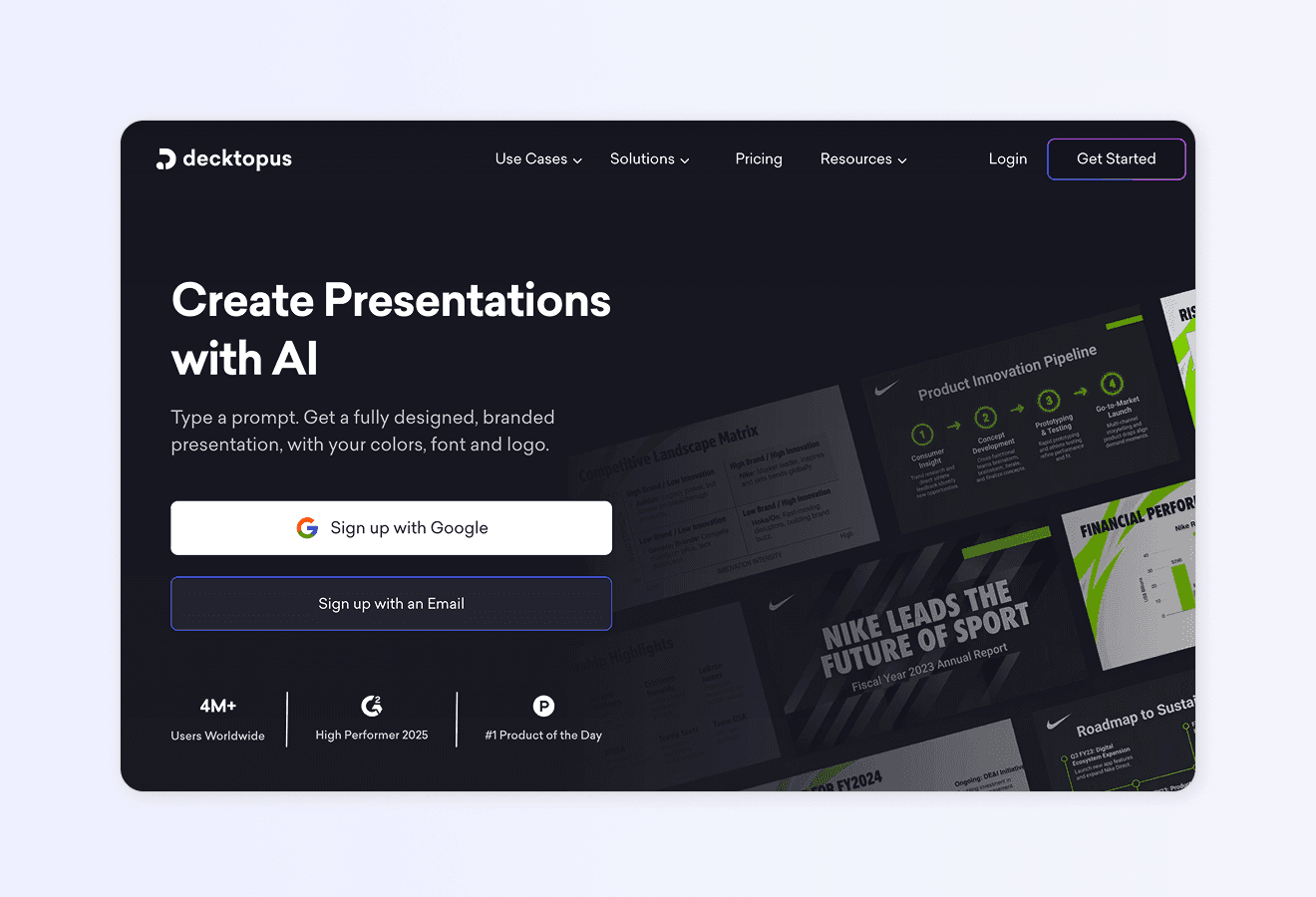
How Decktopus Works: Core Features
1. AI Slide Generation
Type a topic, set your audience and purpose, and Decktopus instantly produces a complete deck — slides, layouts, copy, and imagery all included. No blank-slide paralysis, no hours of formatting. A polished, presentation-ready deck in under a minute.
2. AI-Powered Automatic Branding
Upload your logo, brand colours, and fonts once, and every deck your team generates applies your visual identity automatically. Consistent, on-brand presentations without any manual effort — every time. Learn more about Decktopus branding and customisation.
3. AI Design Automation
Decktopus selects appropriate layouts, image placements, and typographic hierarchy based on your content — no design background needed. Every deck looks professionally crafted, even on the first attempt.
4. AI Content Assistance
Decktopus refines your message in real time — rewriting, expanding, or condensing text, suggesting sharper phrasing, and keeping your narrative clear and engaging. Think of it as a copywriter embedded directly in your presentation workflow.
5. Presentation Coaching & Feedback
Decktopus doesn’t just build the deck — it helps you deliver it. AI-driven feedback identifies weak spots in your narrative, suggests structural improvements, and prepares you to present with confidence.
6. Storytelling & Narrative Builder
Great presentations tell stories. Decktopus builds in compelling narrative structure from the start — hooks, transitions, and thematic cohesion — giving your audience a reason to stay engaged all the way through.
7. AI Visual & Image Generation
Unlike tools that rely on stock libraries, Decktopus generates custom visuals tailored to each slide’s specific content. Type a prompt, get unique imagery — no licensing headaches, no generic stock photos. See how Decktopus compares to other presentation tools.
8. Zapier Integration
Decktopus connects to thousands of tools via Zapier, enabling automated presentation workflows — a new deal in your CRM triggers a custom proposal deck, a new hire triggers an onboarding presentation. Explore Decktopus for sales professionals.
9. Import/Export Flexibility
Import existing PDFs and transform them into dynamic presentations instantly. Export finished decks to PowerPoint (.pptx) or PDF. Decktopus integrates into the formats your clients and colleagues already use. Learn about PDF to PPT conversion with Decktopus.
10. Guided Workflow
Decktopus is learnable in minutes, not weeks. Its intuitive, step-by-step experience makes it accessible for first-time presenters and seasoned professionals alike — no steep learning curve, no IT setup required.
AI Carousel Maker
Generate card-by-card LinkedIn and Instagram carousels from a topic or existing file — auto-branded from your website URL, exportable as PDF, PPT, or PNG. Empower has no carousel output.
12. AI Delivery Coach (Loop): Practice high-stakes presentations inside Decktopus with Loop — a four-stage AI coaching system. A Profiler agent gathers context about your audience and goals, an Architect builds your narrative arc and speaking notes, a Red Team simulates tough audience questions with real-time feedback, and a Mirror tracks rehearsal metrics (pacing, filler words, energy) to produce a Readiness Score. Sessions persist across rehearsals so each run is faster and more personalized. Empower has no delivery coaching features.
13. Beautify (Upload & Redesign): Upload an existing presentation file and choose between two paths — Redesign keeps your text and structure while applying a fresh visual design, or Use as a Resource extracts key points and builds an entirely new deck around them. Pick a visual style from a website URL, reuse a previous style, or let AI generate one, then fine-tune in the editor with all standard AI tools. Empower focuses on slide library management, not AI redesign of uploaded files.
Advantages of Using Decktopus
Speed from prompt to polished deck. What takes hours in PowerPoint takes seconds in Decktopus. Users save 10+ hours per week on presentation work — time that flows back into strategy, selling, and real work.
True AI generation, not just templates. Most tools offer templates you fill in. Decktopus uses AI to generate content, layouts, and visuals from your unique prompt. The output is never a recycled template.
Instant brand consistency at scale. Once your brand assets are uploaded, every team member produces on-brand decks automatically. No brand police needed, no post-hoc fixes. This is especially powerful for agencies and fast-growing teams.
Accessible pricing with a free tier. Unlike tools requiring a sales conversation or a minimum user count, Decktopus offers a free plan and paid plans from $9.99/month — open to individuals, startups, and teams of any size.
Embed forms directly inside presentations to capture leads, qualify prospects, or collect feedback. A static deck becomes an interactive sales asset. Learn more about Decktopus for lead generation.
Know exactly which slides your audience spent the most time on, how many people opened your deck, and where they dropped off — data that sharpens every follow-up.
Voice recording for async presentations. Record narration directly inside Decktopus and share via link — perfect for sales follow-ups, training materials, and team updates that work without a live presenter.
No design skills required. Decktopus handles aesthetics so business professionals can stay focused on substance. The AI takes care of the visual heavy lifting — completely.
Built for any use case. From pitch decks for founders to webinar slides, from internal team updates to client proposals, Decktopus adapts to virtually any presentation challenge.
Zapier-powered automation. Connect Decktopus to your existing tech stack and automate repetitive presentation tasks — a unique capability that’s particularly valuable for marketing managers and account executives managing high-volume output.
Considerations When Using Decktopus
Not a Microsoft 365 add-in. Decktopus is a web-based platform. Users working exclusively inside PowerPoint on Windows will need to switch context to create in Decktopus, then export back.
Advanced chart creation is basic. For teams that regularly build complex business charts (waterfall, Mekko, multi-layered bar) directly in PowerPoint, Decktopus’s charting is less comprehensive than specialised tools.
Slide library is team-level, not enterprise-library scale. Decktopus organises decks in folders across teams, but lacks the enterprise-grade full-text search and version-tracking of a dedicated slide library platform.
Deep customisation of animated transitions is limited. Users who need complex slide animations will find Decktopus more constrained than PowerPoint or Keynote.
Who’s Decktopus For?
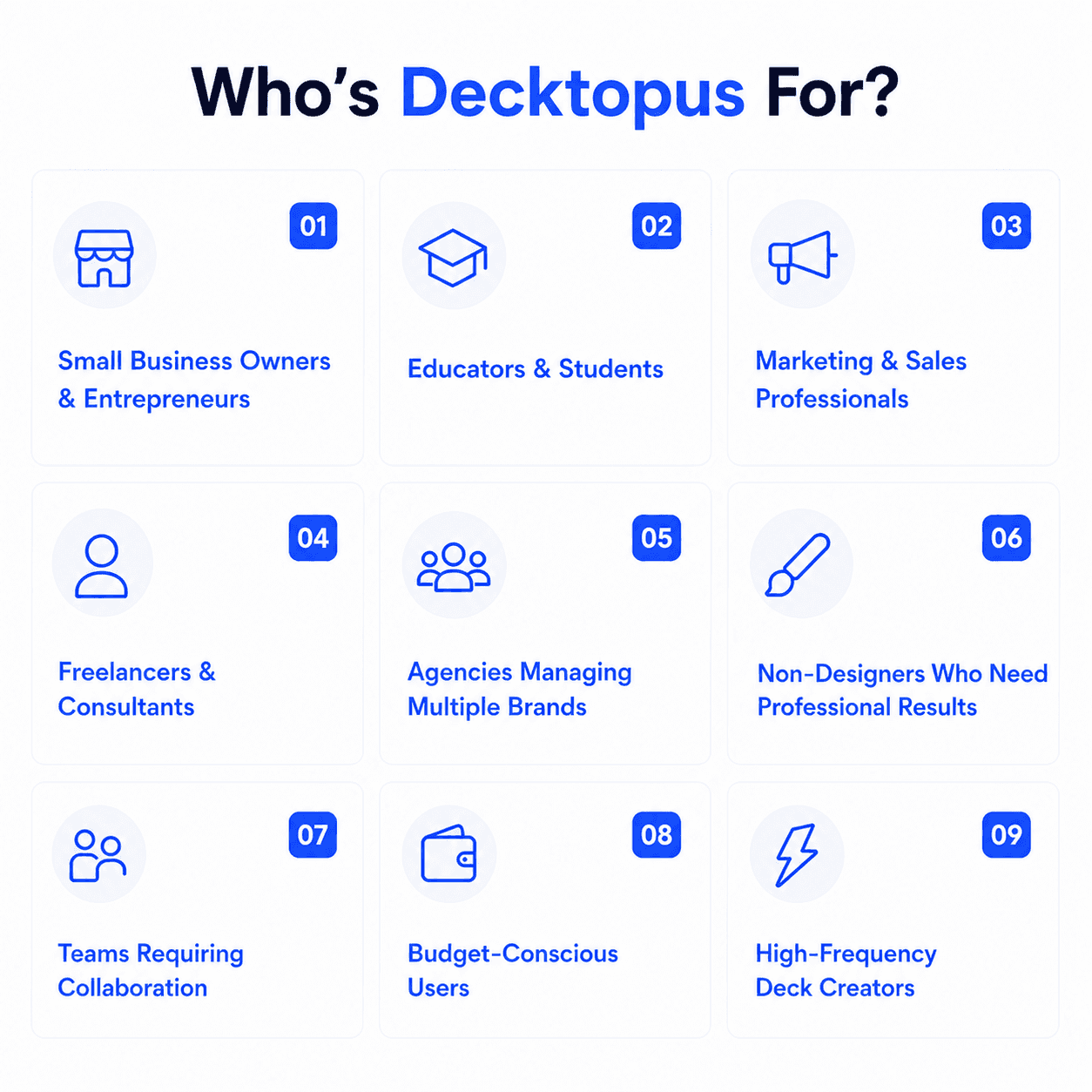
Sales teams and account executives producing polished proposals, pitch decks, and client presentations at speed — without formatting overhead. See Decktopus for account executives.
Marketing managers who need branded presentations at scale — campaigns, reports, and team decks that are always on-brand, regardless of who creates them.
Founders and entrepreneurs building investor pitches, product demos, and company overviews quickly, without a design team.
Agencies producing client-facing work who need consistent delivery without starting from scratch every time.
BDRs running high-volume outreach who want personalised, professional decks without manual rework on every one.
Educators and trainers creating engaging course materials and workshop slides that work both live and async.
Freelancers and consultants who need to present expertise convincingly without investing in a full design workflow.
HR and internal communications teams managing onboarding, training, and company-wide updates.
Customer success teams sharing product walkthroughs, renewal decks, and QBR presentations with clients.
Small and medium businesses that want enterprise-grade presentation quality at a budget-friendly price point.
When Decktopus Might Not Be the Right Fit
If your team works entirely inside PowerPoint on Windows and refuses to switch tools, empower®’s native add-in experience removes that context switch entirely.
If your organisation regularly produces complex, data-heavy business charts (waterfall, Gantt, Mekko) directly inside PowerPoint, empower®’s dedicated chart creation module is more capable for that specific task.
If you need an enterprise-grade slide library with full-text search, version history, and outdated-slide detection baked into a managed corporate content repository, empower®’s library is purpose-built for that governance challenge.
User Reviews and Real-World Feedback
Decktopus holds strong ratings on major review platforms. Read verified reviews on G2 and Capterra.
Here’s what real users say:
“I didn’t know that preparing a presentation with Decktopus would be so fast and fun. We are using it for almost everything: in-company meetings, demos, etc. It saves us a lot of trouble and saves time.” — Isa T., G2
“Very easy to use with clean templates that resonate with buyers. Was very easy to create a new deck that is converting at a much higher rate.” — Chris F., Capterra
“The templates are professional, and the ability to edit with AI is a game-changer.” — Reviewer, G2
“It’s super easy to customise templates compared to PowerPoint. Create classy presentations quickly.” — Vishal S., G2
“It saves so much time. Instead of playing with PPT design, you can focus on your materials.” — Petar G., Capterra
“I love the simplicity of creating lesson presentations quickly. The AI text editor is extremely helpful for generating content ideas.” — Educator review, Capterra
“It streamlines the process of creating stunning decks, making it easier to impress clients.” — Sales professional, G2
What is empower®?
empower® is a Microsoft 365 add-in suite designed to help organisations create professional, brand-consistent documents directly inside PowerPoint, Word, Outlook, and Excel. With more than 3 million users across large enterprises — clients include Microsoft, Deloitte, Siemens, Airbus, Bayer, S&P Global, and DHL — empower® positions itself as the all-in-one solution that replaces multiple standalone Office add-ins with a single integrated platform. Its core promise is saving the time employees waste on formatting (cited at 12 hours per week by empower®’s own 2025 Office Study) while ensuring every document is brand-compliant and professionally structured.
empower®’s 2026 Features
Slide Creation with AI — AI-assisted presentation creation inside PowerPoint, with a form-guided workflow that automates layout and content assembly; AI text generation and optimisation via a built-in AI assistant
Chart Creation — A dedicated module for creating all major chart types (bar, waterfall, Mekko, bubble, Gantt, and more) directly in PowerPoint with professional formatting
Template Management — Dynamic templates for Word, PowerPoint, and Outlook; centralised template distribution across the organisation; auto-updates for outdated templates
Brand Control — Automatic corporate design check that detects and corrects design violations (font colours, sizes, fill colours, bullet points, logo protection zones) with one click
Content Management / Slide Library — Enterprise-grade slide library with full-text search, version history, outdated-slide detection and update alerts, and DAM system integration
empower® AI Assistant — AI text creation and optimisation that steps through slides and shapes automatically, applying preset prompts to generate and improve copy at scale
One-Click Agenda Creation — Generate formatted agendas from a list of topics in seconds
50+ Layout Tools — Automated positioning, alignment, scaling, and sizing of slide elements beyond what standard PowerPoint toolbars offer
Consistency Check — Automated check and correction of punctuation, hyphenation, spelling, and brand terminology across presentations
DeepL Translation Integration — AI-powered translation of presentation content into any language, preserving tone and nuance
Microsoft Teams Integration — Browse the empower® slide library and chat with the empower® Bot directly inside Teams, without switching to PowerPoint
DAM Integration — Direct access to digital asset management libraries (images, icons, videos) from within the empower® add-in
Managed Service Option — empower® manages and updates the slide library on the customer’s behalf, reducing internal admin overhead
ISO 27001 Security — Data stored in a dedicated Microsoft Azure tenant per customer; tasks like design check run locally on the client device for maximum data privacy
Setup and Implementation Support — Dedicated onboarding team; full setup typically takes 3–4 months including design configuration and user training
Who’s empower® For?
Large enterprises (50+ users minimum) with meaningful PowerPoint, Word, and Outlook usage that needs governance at scale
Corporate marketing and brand teams responsible for ensuring consistency across thousands of employee-created documents
Consulting, finance, and professional services firms (Deloitte, S&P Global-level) where presentation quality directly affects client perception
IT and digital workplace teams trying to consolidate a sprawling Microsoft 365 add-in landscape into one manageable platform
Document-heavy industries (automotive, pharmaceuticals, aviation) where regulated, professional documents are a daily output
Organisations heavily standardised on Microsoft 365 that want productivity improvements without leaving the Office environment
What Are the Main Differences?
Purpose: AI Presentation Creator vs. Microsoft 365 Productivity Suite
This is the most fundamental distinction. Decktopus AI is purpose-built to create new presentations as fast as possible using generative AI — you provide a prompt, and it produces a complete, designed deck from scratch. The emphasis is on creative output and speed.
Decktopus treats each presentation as a creative challenge, generating fresh content, layouts, and custom visuals. Its AI does the heavy lifting so users can focus on delivery.
empower® treats each presentation as a formatting and governance challenge. It lives inside PowerPoint and ensures every document produced by every employee conforms to brand standards, is consistent, and is built from approved content. Its AI features enhance productivity within PowerPoint rather than replacing the creation process.
Target Audience: Any User vs. Microsoft 365-Locked Enterprises
Decktopus is open to everyone — individuals, startups, SMBs, agencies, and enterprise teams — with a free plan and paid tiers starting at $9.99/month. You can sign up and have a presentation ready in under five minutes, no IT required.
empower® has a minimum deployment of 50 users and requires a sales conversation for corporate pricing. For small teams (up to 50 users), there is an “empower® Express” self-serve path with a 30-day trial starting at roughly $16.87/user/month — still meaningfully more expensive than Decktopus, and limited compared to the full corporate product. Implementation for the full suite typically takes 3–4 months. It is not a tool you install on a Tuesday and use on Wednesday.
AI Capability: Generative Creation vs. In-PowerPoint Assistance
Both tools use AI, but very differently. Decktopus’s AI generates an entire presentation — structure, content, design, and custom visuals — from a single text prompt. The output is a complete, presentation-ready deck.
empower®’s AI assistant helps users create and improve text within shapes and slides inside PowerPoint. It’s a text optimisation tool with preset prompts that steps through shapes automatically. It also has form-guided automation for recurring presentations, but it is not a generative AI that builds decks from scratch — users still need to be inside PowerPoint with a structure already in mind.
Platform: Web-First vs. Windows-First
Decktopus is fully web-based — accessible on any device, in any browser, with no installation. This makes it immediately accessible for distributed teams, remote workers, and anyone who doesn’t want to manage enterprise software deployments.
empower® is primarily a Windows add-in. While some functionality is available on macOS and Microsoft 365 Online (web), charting features are Windows-only and the full feature set requires the Windows desktop application. It requires an IT deployment process, Entra ID / Okta integration, and ongoing update management. This is the right trade-off for an enterprise already managing a Microsoft 365 environment — but it’s a genuine barrier for everyone else.
Unique Features Comparison
Decktopus unique features:
Full AI generation of complete presentations from a text prompt
AI custom image generation tailored to each slide’s content
Voice recording and audio narration within decks
URL and content embedding (booking pages, videos, forms inside slides)
Presentation coaching and delivery feedback
Regenerate entire deck or individual slides with a single click
Zapier integration for workflow automation
Free plan + affordable self-serve pricing for teams of any size
Fully web-based — no installation, no IT setup
empower® unique features:
Native PowerPoint, Word, Outlook, and Excel add-in (no app switching)
Enterprise slide library with full-text search and version history
Outdated slide detection and one-click update alerts
Advanced chart creation module (waterfall, Mekko, Gantt, bubble charts)
Corporate design check with automatic violation detection and correction
One-click agenda creation
50+ layout and formatting tools
DeepL AI translation integration
Microsoft Teams integration (bot + library browser)
DAM system integration for images and brand assets
ISO 27001 certified; dedicated single-tenant Azure backend per customer
Managed service option (empower® maintains the library for you)
Consistency check for punctuation, hyphenation, and brand terminology
Pricing and Value
Decktopus pricing is transparent and accessible: a free plan for getting started, with paid plans at $9.99/month (Pro), $9.99/month (Pro AI), $32/month (Business), and $36/month (Business AI). Any individual, startup, or team can begin immediately with no sales process.
empower® pricing for the Slide Creation module is user-based and scales with organisation size. Example pricing: 50 users at $16.87/user/month ($10,122/year); 100 users at $9.89/user/month ($11,868/year); 250 users at $7.43/user/month ($22,290/year). One-time setup costs range from approximately $4,025 to $7,475. Corporate suite pricing across all modules requires a custom quote. This is an enterprise investment with significant setup cost, implementation time, and ongoing maintenance commitment — and it delivers meaningful ROI for large organisations, with empower® claiming 407% ROI driven by time savings. But for anyone outside a large enterprise, the value equation does not stack up.
Quick Comparison: Which One Fits You?
Choose Decktopus if you…
Need to create great presentations fast, from a simple text prompt
Are an individual, freelancer, startup, SMB, agency, or growing team
Want AI to generate content AND design AND visuals from a single input
Need to capture leads, track viewer engagement, or embed content in slides
Want transparent pricing, a free plan, and instant self-serve access
Work in a web-based, device-agnostic environment
Need Zapier-powered workflow automation
Create LinkedIn or Instagram carousels as a recurring content habit
Need AI-powered rehearsal coaching with audience simulation and delivery scoring
Want to transform existing presentations with AI-powered redesign or resource extraction
Choose empower® if you…
Have 50+ users standardised on Microsoft 365 (Windows)
Need a native add-in that works inside PowerPoint without any app switching
Must maintain an enterprise slide library with full-text search, version control, and outdated-slide detection
Regularly create complex business charts inside PowerPoint and need a dedicated charting tool
Need Word, Outlook, and Excel brand governance alongside PowerPoint
Have IT resources to manage a 3–4 month deployment and ongoing maintenance
Want DAM integration, DeepL translation, and Microsoft Teams bot access
Feature Comparison Table
[[EMBED:PGRpdiBzdHlsZT0ib3ZlcmZsb3cteDphdXRvO21hcmdpbjoyMHB4IDAiPjxzdHlsZT4uZHRrLXRibCwuZHRrLXRibCAqe2JveC1zaXppbmc6Ym9yZGVyLWJveDttYXJnaW46MDtwYWRkaW5nOjB9LmR0ay10Ymx7Zm9udC1mYW1pbHk6J1BvcHBpbnMnLHN5c3RlbS11aSxzYW5zLXNlcmlmO2NvbG9yOiMyRDM0MzY7bWF4LXdpZHRoOjg2MHB4O21hcmdpbjowIGF1dG87Ym9yZGVyOjFweCBzb2xpZCAjRThFQUYwO2JvcmRlci1yYWRpdXM6MjBweDtvdmVyZmxvdzpoaWRkZW47YmFja2dyb3VuZDojZmZmfS5kdGstdGJsIC5oZWFke3BhZGRpbmc6MjZweCAyOHB4IDIwcHh9LmR0ay10YmwgLmhlYWQgaDJ7Zm9udC1zaXplOmNsYW1wKDIycHgsNXZ3LDMycHgpO2ZvbnQtd2VpZ2h0OjcwMDtsaW5lLWhlaWdodDoxLjF9LmR0ay10YmwgLmhlYWQgcHtjb2xvcjojNzg4MDhBO2ZvbnQtc2l6ZToxNXB4O21hcmdpbi10b3A6NHB4fS5kdGstdGJsIC5yb3d7ZGlzcGxheTpncmlkO2dyaWQtdGVtcGxhdGUtY29sdW1uczoxLjdmciAxZnIgMWZyO2JvcmRlci10b3A6MXB4IHNvbGlkICNFOEVBRjB9LmR0ay10YmwgLnJvdy5oZWFkZXJ7Ym9yZGVyLXRvcDowfS5kdGstdGJsIC5jZWxse3BhZGRpbmc6MTRweCAxNnB4O2Rpc3BsYXk6ZmxleDtmbGV4LWRpcmVjdGlvbjpjb2x1bW47anVzdGlmeS1jb250ZW50OmNlbnRlcjthbGlnbi1pdGVtczpjZW50ZXI7dGV4dC1hbGlnbjpjZW50ZXI7Z2FwOjZweDttaW4taGVpZ2h0OjYwcHh9LmR0ay10YmwgLmZlYXR7YWxpZ24taXRlbXM6ZmxleC1zdGFydDt0ZXh0LWFsaWduOmxlZnQ7Zm9udC13ZWlnaHQ6NTAwO2ZvbnQtc2l6ZToxNnB4O2xpbmUtaGVpZ2h0OjEuM30uZHRrLXRibCAuY29sLWR0a3tiYWNrZ3JvdW5kOiNFRUVCRkR9LmR0ay10YmwgLnJvdzpudGgtY2hpbGQoZXZlbikgLmZlYXR7YmFja2dyb3VuZDojRkFGQUZDfS5kdGstdGJsIC5yb3c6bnRoLWNoaWxkKGV2ZW4pIC5jb2wtY29tcHtiYWNrZ3JvdW5kOiNGQUZBRkN9LmR0ay10YmwgLmhlYWRlciAuY2VsbHtmb250LXdlaWdodDo2MDA7Zm9udC1zaXplOjE4cHg7bWluLWhlaWdodDphdXRvO3BhZGRpbmc6MTZweH0uZHRrLXRibCAuaGVhZGVyIC5jb2wtZHRre2JhY2tncm91bmQ6IzZDNUNFNztjb2xvcjojZmZmO2JvcmRlci1yYWRpdXM6MTBweCAxMHB4IDAgMH0uZHRrLXRibCAuYnt3aWR0aDoyOHB4O2hlaWdodDoyOHB4O2JvcmRlci1yYWRpdXM6NTAlO2Rpc3BsYXk6aW5saW5lLWZsZXg7YWxpZ24taXRlbXM6Y2VudGVyO2p1c3RpZnktY29udGVudDpjZW50ZXI7Y29sb3I6I2ZmZjtmb250LXNpemU6MTVweDtmb250LXdlaWdodDo3MDA7bGluZS1oZWlnaHQ6MTtmbGV4OjAgMCAyOHB4fS5kdGstdGJsIC55ZXN7YmFja2dyb3VuZDojMjJCMjZDfS5kdGstdGJsIC5ub3tiYWNrZ3JvdW5kOiNFODU0NUN9LmR0ay10YmwgLnBhcnR7YmFja2dyb3VuZDojRjBBQTI4fS5kdGstdGJsIC5ub3Rle2ZvbnQtc2l6ZToxMnB4O2NvbG9yOiM3ODgwOEE7bGluZS1oZWlnaHQ6MS4zO3dvcmQtd3JhcDpicmVhay13b3JkO21heC13aWR0aDoxMDAlfS5kdGstdGJsIC5sYmx7ZGlzcGxheTpub25lO2ZvbnQtc2l6ZToxM3B4O2NvbG9yOiM3ODgwOEE7Zm9udC13ZWlnaHQ6NTAwfS5kdGstdGJsIC52YWx7ZGlzcGxheTpmbGV4O2FsaWduLWl0ZW1zOmNlbnRlcjtnYXA6OHB4O2ZsZXgtd3JhcDpub3dyYXB9LmR0ay10YmwgLmZvb3R7ZGlzcGxheTpmbGV4O2ZsZXgtd3JhcDp3cmFwO2dhcDoxMHB4O2p1c3RpZnktY29udGVudDpzcGFjZS1iZXR3ZWVuO2FsaWduLWl0ZW1zOmNlbnRlcjtwYWRkaW5nOjE2cHggMjhweDtib3JkZXItdG9wOjFweCBzb2xpZCAjRThFQUYwO2NvbG9yOiM3ODgwOEE7Zm9udC1zaXplOjEzcHh9LmR0ay10YmwgLmxlZ2VuZHtkaXNwbGF5OmZsZXg7Z2FwOjE2cHh9LmR0ay10YmwgLmxlZ2VuZCBzcGFue2Rpc3BsYXk6aW5saW5lLWZsZXg7YWxpZ24taXRlbXM6Y2VudGVyO2dhcDo2cHh9LmR0ay10YmwgLmxlZ2VuZCAuYnt3aWR0aDoxOXB4O2hlaWdodDoxOXB4O2ZvbnQtc2l6ZToxMXB4O2ZsZXg6MCAwIDE5cHh9QG1lZGlhKG1heC13aWR0aDo1NjBweCl7LmR0ay10YmwgLmhlYWRlcntkaXNwbGF5Om5vbmV9LmR0ay10YmwgLnJvd3tncmlkLXRlbXBsYXRlLWNvbHVtbnM6MWZyO2JvcmRlci10b3A6MDtwYWRkaW5nOjZweCAwO2JvcmRlci1ib3R0b206MXB4IHNvbGlkICNFOEVBRjB9LmR0ay10YmwgLnJvdzpsYXN0LWNoaWxke2JvcmRlci1ib3R0b206MH0uZHRrLXRibCAuY2VsbHttaW4taGVpZ2h0OmF1dG87cGFkZGluZzo5cHggMThweDthbGlnbi1pdGVtczpmbGV4LXN0YXJ0O3RleHQtYWxpZ246bGVmdH0uZHRrLXRibCAuZmVhdHtmb250LXdlaWdodDo2MDA7Zm9udC1zaXplOjE2cHg7cGFkZGluZy1ib3R0b206MnB4O2JhY2tncm91bmQ6dHJhbnNwYXJlbnQhaW1wb3J0YW50fS5kdGstdGJsIC5jb2wtZHRrLC5kdGstdGJsIC5jb2wtY29tcHtiYWNrZ3JvdW5kOnRyYW5zcGFyZW50IWltcG9ydGFudDtmbGV4LWRpcmVjdGlvbjpyb3chaW1wb3J0YW50O2p1c3RpZnktY29udGVudDpzcGFjZS1iZXR3ZWVuO3dpZHRoOjEwMCU7Z2FwOjEycHg7cGFkZGluZzo2cHggMTRweDttYXJnaW46MnB4IDE0cHh9LmR0ay10YmwgLmNvbC1kdGt7Ym9yZGVyLWxlZnQ6M3B4IHNvbGlkICM2QzVDRTc7Ym9yZGVyLXJhZGl1czo0cHg7YmFja2dyb3VuZDojRUVFQkZEIWltcG9ydGFudH0uZHRrLXRibCAuY29sLWNvbXB7Ym9yZGVyLWxlZnQ6M3B4IHNvbGlkICNFOEVBRjB9LmR0ay10YmwgLmxibHtkaXNwbGF5OmlubGluZX0uZHRrLXRibCAuZm9vdHtwYWRkaW5nOjE2cHggMThweDtmbGV4LWRpcmVjdGlvbjpjb2x1bW47YWxpZ24taXRlbXM6ZmxleC1zdGFydH19PC9zdHlsZT48ZGl2IGNsYXNzPSJkdGstdGJsIj48ZGl2IGNsYXNzPSJoZWFkIj48aDI+RGVja3RvcHVzIHZzLiBFbXBvd2VyPC9oMj48cD5BSSBwcmVzZW50YXRpb24gZmVhdHVyZSBjb21wYXJpc29uPC9wPjwvZGl2PjxkaXYgY2xhc3M9InJvdyBoZWFkZXIiPjxkaXYgY2xhc3M9ImNlbGwgZmVhdCI+RmVhdHVyZTwvZGl2PjxkaXYgY2xhc3M9ImNlbGwgY29sLWR0ayI+RGVja3RvcHVzPC9kaXY+PGRpdiBjbGFzcz0iY2VsbCBjb2wtY29tcCI+RW1wb3dlcjwvZGl2PjwvZGl2PjxkaXYgY2xhc3M9InJvdyI+PGRpdiBjbGFzcz0iY2VsbCBmZWF0Ij5BdXRvbWF0aWMgYnJhbmQgZXh0cmFjdGlvbiBmcm9tIGEgVVJMPC9kaXY+PGRpdiBjbGFzcz0iY2VsbCBjb2wtZHRrIj48ZGl2IGNsYXNzPSJ2YWwiPjxzcGFuIGNsYXNzPSJsYmwiPkRlY2t0b3B1czwvc3Bhbj48c3BhbiBjbGFzcz0iYiB5ZXMiPuKckzwvc3Bhbj48L2Rpdj48L2Rpdj48ZGl2IGNsYXNzPSJjZWxsIGNvbC1jb21wIj48ZGl2IGNsYXNzPSJ2YWwiPjxzcGFuIGNsYXNzPSJsYmwiPkVtcG93ZXI8L3NwYW4+PHNwYW4gY2xhc3M9ImIgbm8iPuKclTwvc3Bhbj48L2Rpdj48c3BhbiBjbGFzcz0ibm90ZSI+QWRtaW4tbWFuYWdlZCBzbGlkZXM8L3NwYW4+PC9kaXY+PC9kaXY+PGRpdiBjbGFzcz0icm93Ij48ZGl2IGNsYXNzPSJjZWxsIGZlYXQiPkVuZC10by1lbmQgQUkgZGVjayBmcm9tIGEgcHJvbXB0PC9kaXY+PGRpdiBjbGFzcz0iY2VsbCBjb2wtZHRrIj48ZGl2IGNsYXNzPSJ2YWwiPjxzcGFuIGNsYXNzPSJsYmwiPkRlY2t0b3B1czwvc3Bhbj48c3BhbiBjbGFzcz0iYiB5ZXMiPuKckzwvc3Bhbj48L2Rpdj48L2Rpdj48ZGl2IGNsYXNzPSJjZWxsIGNvbC1jb21wIj48ZGl2IGNsYXNzPSJ2YWwiPjxzcGFuIGNsYXNzPSJsYmwiPkVtcG93ZXI8L3NwYW4+PHNwYW4gY2xhc3M9ImIgbm8iPuKclTwvc3Bhbj48L2Rpdj48c3BhbiBjbGFzcz0ibm90ZSI+U2xpZGUgbGlicmFyeSB0b29sPC9zcGFuPjwvZGl2PjwvZGl2PjxkaXYgY2xhc3M9InJvdyI+PGRpdiBjbGFzcz0iY2VsbCBmZWF0Ij5BSSBkZWxpdmVyeSBjb2FjaGluZyAmYW1wOyBwcmFjdGljZSBtb2RlPC9kaXY+PGRpdiBjbGFzcz0iY2VsbCBjb2wtZHRrIj48ZGl2IGNsYXNzPSJ2YWwiPjxzcGFuIGNsYXNzPSJsYmwiPkRlY2t0b3B1czwvc3Bhbj48c3BhbiBjbGFzcz0iYiB5ZXMiPuKckzwvc3Bhbj48L2Rpdj48L2Rpdj48ZGl2IGNsYXNzPSJjZWxsIGNvbC1jb21wIj48ZGl2IGNsYXNzPSJ2YWwiPjxzcGFuIGNsYXNzPSJsYmwiPkVtcG93ZXI8L3NwYW4+PHNwYW4gY2xhc3M9ImIgbm8iPuKclTwvc3Bhbj48L2Rpdj48L2Rpdj48L2Rpdj48ZGl2IGNsYXNzPSJyb3ciPjxkaXYgY2xhc3M9ImNlbGwgZmVhdCI+QUkgQ2Fyb3VzZWwgTWFrZXIgKExpbmtlZEluIC8gSUcpPC9kaXY+PGRpdiBjbGFzcz0iY2VsbCBjb2wtZHRrIj48ZGl2IGNsYXNzPSJ2YWwiPjxzcGFuIGNsYXNzPSJsYmwiPkRlY2t0b3B1czwvc3Bhbj48c3BhbiBjbGFzcz0iYiB5ZXMiPuKckzwvc3Bhbj48L2Rpdj48L2Rpdj48ZGl2IGNsYXNzPSJjZWxsIGNvbC1jb21wIj48ZGl2IGNsYXNzPSJ2YWwiPjxzcGFuIGNsYXNzPSJsYmwiPkVtcG93ZXI8L3NwYW4+PHNwYW4gY2xhc3M9ImIgbm8iPuKclTwvc3Bhbj48L2Rpdj48L2Rpdj48L2Rpdj48ZGl2IGNsYXNzPSJyb3ciPjxkaXYgY2xhc3M9ImNlbGwgZmVhdCI+QUkgaW1hZ2UgZ2VuZXJhdGlvbjwvZGl2PjxkaXYgY2xhc3M9ImNlbGwgY29sLWR0ayI+PGRpdiBjbGFzcz0idmFsIj48c3BhbiBjbGFzcz0ibGJsIj5EZWNrdG9wdXM8L3NwYW4+PHNwYW4gY2xhc3M9ImIgeWVzIj7inJM8L3NwYW4+PC9kaXY+PC9kaXY+PGRpdiBjbGFzcz0iY2VsbCBjb2wtY29tcCI+PGRpdiBjbGFzcz0idmFsIj48c3BhbiBjbGFzcz0ibGJsIj5FbXBvd2VyPC9zcGFuPjxzcGFuIGNsYXNzPSJiIG5vIj7inJU8L3NwYW4+PC9kaXY+PC9kaXY+PC9kaXY+PGRpdiBjbGFzcz0icm93Ij48ZGl2IGNsYXNzPSJjZWxsIGZlYXQiPkRvY3VtZW50IC8gUERGIGltcG9ydCB0byBkZWNrPC9kaXY+PGRpdiBjbGFzcz0iY2VsbCBjb2wtZHRrIj48ZGl2IGNsYXNzPSJ2YWwiPjxzcGFuIGNsYXNzPSJsYmwiPkRlY2t0b3B1czwvc3Bhbj48c3BhbiBjbGFzcz0iYiB5ZXMiPuKckzwvc3Bhbj48L2Rpdj48L2Rpdj48ZGl2IGNsYXNzPSJjZWxsIGNvbC1jb21wIj48ZGl2IGNsYXNzPSJ2YWwiPjxzcGFuIGNsYXNzPSJsYmwiPkVtcG93ZXI8L3NwYW4+PHNwYW4gY2xhc3M9ImIgbm8iPuKclTwvc3Bhbj48L2Rpdj48L2Rpdj48L2Rpdj48ZGl2IGNsYXNzPSJyb3ciPjxkaXYgY2xhc3M9ImNlbGwgZmVhdCI+U3Rvcnl0ZWxsaW5nIHR1bmVkIHRvIHlvdXIgcHVycG9zZTwvZGl2PjxkaXYgY2xhc3M9ImNlbGwgY29sLWR0ayI+PGRpdiBjbGFzcz0idmFsIj48c3BhbiBjbGFzcz0ibGJsIj5EZWNrdG9wdXM8L3NwYW4+PHNwYW4gY2xhc3M9ImIgeWVzIj7inJM8L3NwYW4+PC9kaXY+PC9kaXY+PGRpdiBjbGFzcz0iY2VsbCBjb2wtY29tcCI+PGRpdiBjbGFzcz0idmFsIj48c3BhbiBjbGFzcz0ibGJsIj5FbXBvd2VyPC9zcGFuPjxzcGFuIGNsYXNzPSJiIG5vIj7inJU8L3NwYW4+PC9kaXY+PC9kaXY+PC9kaXY+PGRpdiBjbGFzcz0icm93Ij48ZGl2IGNsYXNzPSJjZWxsIGZlYXQiPkJyYW5kLWNvbnNpc3RlbnQgdGVhbSB0ZW1wbGF0ZXM8L2Rpdj48ZGl2IGNsYXNzPSJjZWxsIGNvbC1kdGsiPjxkaXYgY2xhc3M9InZhbCI+PHNwYW4gY2xhc3M9ImxibCI+RGVja3RvcHVzPC9zcGFuPjxzcGFuIGNsYXNzPSJiIHllcyI+4pyTPC9zcGFuPjwvZGl2PjwvZGl2PjxkaXYgY2xhc3M9ImNlbGwgY29sLWNvbXAiPjxkaXYgY2xhc3M9InZhbCI+PHNwYW4gY2xhc3M9ImxibCI+RW1wb3dlcjwvc3Bhbj48c3BhbiBjbGFzcz0iYiB5ZXMiPuKckzwvc3Bhbj48L2Rpdj48c3BhbiBjbGFzcz0ibm90ZSI+Q29yZSBzdHJlbmd0aDwvc3Bhbj48L2Rpdj48L2Rpdj48ZGl2IGNsYXNzPSJyb3ciPjxkaXYgY2xhc3M9ImNlbGwgZmVhdCI+Tm8gZGVzaWduIHNraWxscyByZXF1aXJlZDwvZGl2PjxkaXYgY2xhc3M9ImNlbGwgY29sLWR0ayI+PGRpdiBjbGFzcz0idmFsIj48c3BhbiBjbGFzcz0ibGJsIj5EZWNrdG9wdXM8L3NwYW4+PHNwYW4gY2xhc3M9ImIgeWVzIj7inJM8L3NwYW4+PC9kaXY+PC9kaXY+PGRpdiBjbGFzcz0iY2VsbCBjb2wtY29tcCI+PGRpdiBjbGFzcz0idmFsIj48c3BhbiBjbGFzcz0ibGJsIj5FbXBvd2VyPC9zcGFuPjxzcGFuIGNsYXNzPSJiIHllcyI+4pyTPC9zcGFuPjwvZGl2PjwvZGl2PjwvZGl2PjxkaXYgY2xhc3M9InJvdyI+PGRpdiBjbGFzcz0iY2VsbCBmZWF0Ij5DbGVhbiBQb3dlclBvaW50ICgucHB0eCkgZXhwb3J0PC9kaXY+PGRpdiBjbGFzcz0iY2VsbCBjb2wtZHRrIj48ZGl2IGNsYXNzPSJ2YWwiPjxzcGFuIGNsYXNzPSJsYmwiPkRlY2t0b3B1czwvc3Bhbj48c3BhbiBjbGFzcz0iYiB5ZXMiPuKckzwvc3Bhbj48L2Rpdj48L2Rpdj48ZGl2IGNsYXNzPSJjZWxsIGNvbC1jb21wIj48ZGl2IGNsYXNzPSJ2YWwiPjxzcGFuIGNsYXNzPSJsYmwiPkVtcG93ZXI8L3NwYW4+PHNwYW4gY2xhc3M9ImIgeWVzIj7inJM8L3NwYW4+PC9kaXY+PHNwYW4gY2xhc3M9Im5vdGUiPlBvd2VyUG9pbnQgYWRkLWluPC9zcGFuPjwvZGl2PjwvZGl2PjxkaXYgY2xhc3M9InJvdyI+PGRpdiBjbGFzcz0iY2VsbCBmZWF0Ij5QcmVzZW50IGZyb20gYW55IGJyb3dzZXI8L2Rpdj48ZGl2IGNsYXNzPSJjZWxsIGNvbC1kdGsiPjxkaXYgY2xhc3M9InZhbCI+PHNwYW4gY2xhc3M9ImxibCI+RGVja3RvcHVzPC9zcGFuPjxzcGFuIGNsYXNzPSJiIHllcyI+4pyTPC9zcGFuPjwvZGl2PjwvZGl2PjxkaXYgY2xhc3M9ImNlbGwgY29sLWNvbXAiPjxkaXYgY2xhc3M9InZhbCI+PHNwYW4gY2xhc3M9ImxibCI+RW1wb3dlcjwvc3Bhbj48c3BhbiBjbGFzcz0iYiBubyI+4pyVPC9zcGFuPjwvZGl2PjxzcGFuIGNsYXNzPSJub3RlIj5Qb3dlclBvaW50IG9ubHk8L3NwYW4+PC9kaXY+PC9kaXY+PGRpdiBjbGFzcz0icm93Ij48ZGl2IGNsYXNzPSJjZWxsIGZlYXQiPlphcGllciBpbnRlZ3JhdGlvbjwvZGl2PjxkaXYgY2xhc3M9ImNlbGwgY29sLWR0ayI+PGRpdiBjbGFzcz0idmFsIj48c3BhbiBjbGFzcz0ibGJsIj5EZWNrdG9wdXM8L3NwYW4+PHNwYW4gY2xhc3M9ImIgeWVzIj7inJM8L3NwYW4+PC9kaXY+PC9kaXY+PGRpdiBjbGFzcz0iY2VsbCBjb2wtY29tcCI+PGRpdiBjbGFzcz0idmFsIj48c3BhbiBjbGFzcz0ibGJsIj5FbXBvd2VyPC9zcGFuPjxzcGFuIGNsYXNzPSJiIG5vIj7inJU8L3NwYW4+PC9kaXY+PC9kaXY+PC9kaXY+PGRpdiBjbGFzcz0icm93Ij48ZGl2IGNsYXNzPSJjZWxsIGZlYXQiPlJlYWwtdGltZSBjby1lZGl0aW5nPC9kaXY+PGRpdiBjbGFzcz0iY2VsbCBjb2wtZHRrIj48ZGl2IGNsYXNzPSJ2YWwiPjxzcGFuIGNsYXNzPSJsYmwiPkRlY2t0b3B1czwvc3Bhbj48c3BhbiBjbGFzcz0iYiBubyI+4pyVPC9zcGFuPjwvZGl2PjxzcGFuIGNsYXNzPSJub3RlIj5TaGFyZWQgYWNjZXNzIChCdXNpbmVzcyk8L3NwYW4+PC9kaXY+PGRpdiBjbGFzcz0iY2VsbCBjb2wtY29tcCI+PGRpdiBjbGFzcz0idmFsIj48c3BhbiBjbGFzcz0ibGJsIj5FbXBvd2VyPC9zcGFuPjxzcGFuIGNsYXNzPSJiIHBhcnQiPuKAkzwvc3Bhbj48L2Rpdj48c3BhbiBjbGFzcz0ibm90ZSI+VmlhIFBvd2VyUG9pbnQ8L3NwYW4+PC9kaXY+PC9kaXY+PGRpdiBjbGFzcz0icm93Ij48ZGl2IGNsYXNzPSJjZWxsIGZlYXQiPkVudHJ5IHByaWNlPC9kaXY+PGRpdiBjbGFzcz0iY2VsbCBjb2wtZHRrIj48ZGl2IGNsYXNzPSJ2YWwiPjxzcGFuIGNsYXNzPSJsYmwiPkRlY2t0b3B1czwvc3Bhbj48c3BhbiBjbGFzcz0iYiB5ZXMiPuKckzwvc3Bhbj48L2Rpdj48c3BhbiBjbGFzcz0ibm90ZSI+JDkuOTkvbW88L3NwYW4+PC9kaXY+PGRpdiBjbGFzcz0iY2VsbCBjb2wtY29tcCI+PGRpdiBjbGFzcz0idmFsIj48c3BhbiBjbGFzcz0ibGJsIj5FbXBvd2VyPC9zcGFuPjxzcGFuIGNsYXNzPSJiIG5vIj7inJU8L3NwYW4+PC9kaXY+PHNwYW4gY2xhc3M9Im5vdGUiPkVudGVycHJpc2UgcHJpY2luZyBvbmx5PC9zcGFuPjwvZGl2PjwvZGl2PjxkaXYgY2xhc3M9ImZvb3QiPjxkaXY+VXBkYXRlZCBKdWx5IDIwMjYgJm5ic3A7wrcmbmJzcDsgZGVja3RvcHVzLmNvbTwvZGl2PjxkaXYgY2xhc3M9ImxlZ2VuZCI+PHNwYW4+PHNwYW4gY2xhc3M9ImIgeWVzIj7inJM8L3NwYW4+WWVzPC9zcGFuPjxzcGFuPjxzcGFuIGNsYXNzPSJiIHBhcnQiPuKAkzwvc3Bhbj5QYXJ0aWFsPC9zcGFuPjxzcGFuPjxzcGFuIGNsYXNzPSJiIG5vIj7inJU8L3NwYW4+Tm88L3NwYW4+PC9kaXY+PC9kaXY+PC9kaXY+PC9kaXY+]]
5 Ways Decktopus Beats empower®
1. Real AI Generation — empower® Assists, Decktopus Creates
The most important difference between these tools is what the AI actually does. Decktopus uses generative AI to build a complete, designed presentation from a single prompt. You type your topic, audience, and purpose, and within seconds you have a full deck — slides, copy, layout, and imagery — all generated fresh for your specific input.
empower®’s AI assistant is a text tool: it helps you write and improve text in shapes across existing slides. It’s useful for polishing copy you’re already working on, but it doesn’t create a presentation. A user still needs to open PowerPoint, have slides in mind, and manually work through each shape. That’s a fundamentally different category of AI assistance.
For the majority of professionals who need to go from idea to presentation as fast as possible — founders, BDRs, marketers — Decktopus’s generative approach eliminates the blank-slide problem entirely. empower® polishes the slide you’re already building. Decktopus builds it for you.
2. AI Image Generation Makes Every Slide Visually Unique
Decktopus generates custom images for each slide based on its specific content — there’s no need to hunt stock libraries, pay for licensing, or settle for generic visuals that make a presentation blend in rather than stand out. This is an exclusive Decktopus capability that empower® simply does not offer.
For account executives pitching to discerning clients, agencies delivering client-facing work, and marketing teams building campaigns, AI-generated imagery that genuinely matches the slide’s message is a meaningful competitive advantage. Stock photos signal generic; custom visuals signal care and quality.
empower® gives access to brand-approved images from a DAM library or the empower® content store — controlled and on-brand, but not generated fresh for each presentation. The library is consistent, but it isn’t creative.
3.
Decktopus presentations are not static files. They are interactive, data-producing assets. Built-in Voice narration lets you create async presentations that deliver your message even when you’re not in the room.
This set of features transforms a Decktopus presentation from a file into a sales tool — particularly valuable for customer success teams, webinar hosts, and any sales professional who wants data to sharpen their follow-up conversations.
empower® doesn’t offer It’s built to help you create a better document — not to help you understand how your audience interacted with it after you sent it.
4. Accessible Pricing That Works for Teams of Any Size
Decktopus’s pricing is built around inclusion. The free plan lets anyone get started immediately. Paid plans begin at $9.99/month and scale affordably for teams of any size. No sales call, no minimum user count, no 3–4 month implementation project — just sign up and start.
empower® requires a minimum of 50 users for its corporate product, carries one-time setup costs between $4,025 and $7,475, takes 3–4 months to implement, and requires ongoing IT maintenance. For large enterprises with the resources to manage that process, the ROI math works. For most of the teams reading this comparison — growing businesses, mid-market companies, agencies, and startups — empower®’s total cost of ownership is prohibitive.
Explore Decktopus pricing to see exactly what each tier includes and sign up for free today.
5. Zapier Integration Automates the Entire Presentation Workflow
Decktopus’s native Zapier integration connects your presentation workflow to thousands of other tools. A new lead enters your CRM — a proposal deck is automatically created. A new employee signs up — an onboarding presentation is generated. A client submits a brief — a custom deck appears without a single manual click.
This workflow automation positions Decktopus not just as a standalone creation tool but as an intelligent component in a broader business operation. For high-volume teams — sales professionals, marketing managers, and agencies — this is time savings that compounds daily.
empower® does not offer Zapier integration. Its workflow automation is internal to the Microsoft 365 ecosystem — powerful within that environment, but not extensible to the broader tool stacks that most modern businesses run on.
Frequently Asked Questions
1. Is empower® worth using in 2026?
empower® is worth using for large enterprises (50+ users, ideally 250+) that are deeply invested in Microsoft 365 on Windows and face real pain from brand inconsistency, slide library management, and productivity losses in PowerPoint. For those organisations, empower®’s slide library, design check, chart creation, and template management capabilities deliver genuine, measurable ROI — the 407% ROI figure it cites is credible at scale. However, for teams under 50 people, teams not fully committed to Windows PowerPoint, or anyone who needs to create presentations quickly from a prompt rather than manage existing content, empower® is over-engineered and over-priced for the job.
2. Is empower® better than Decktopus?
They are designed for different problems. empower® is better at governing, organising, and maintaining presentations inside Microsoft 365 for large enterprises. Decktopus is better at creating new presentations from scratch using generative AI, serving teams of any size, and providing engagement tools that turn slides into business assets. For the vast majority of professionals who need to make great presentations faster — rather than manage a corporate content library — Decktopus delivers more day-to-day value, more quickly, at a fraction of the cost.
3. Which is the best AI presentation maker in 2026?
For most users — individuals, freelancers, startups, SMBs, agencies, and growing enterprise teams — Decktopus AI is the stronger AI presentation maker in 2026. It delivers genuine generative AI (prompt → full deck), AI image creation, presentation coaching, audience engagement analytics, and affordable accessible pricing in one web-based platform. For large enterprises needing a managed Microsoft 365 productivity suite with a slide library and brand governance layer, empower® is the specialist choice. But for anyone whose primary need is creating impactful presentations, faster, Decktopus is the clear answer.
4. What are the disadvantages of empower®?
empower® has several significant limitations for many potential buyers. It requires a minimum of 50 users and a 3–4 month implementation timeline — not something you can trial and adopt quickly. Its AI does not generate presentations from prompts; it assists with text within existing slides. It is primarily Windows-only, with limited macOS and online support. There are no Pricing for corporate deployments requires a custom quote and carries meaningful one-time setup costs. And it does not integrate with Zapier, making it difficult to incorporate into broader automation workflows outside the Microsoft ecosystem.
5. What is the difference between Decktopus and empower®?
The clearest way to frame it: Decktopus creates presentations, and empower® manages them. Decktopus generates a complete, designed presentation from a text prompt in seconds — it’s the tool you reach for when you need to make something new. empower® helps large organisations maintain the presentations they already have — keeping slides on-brand, searchable, and up to date inside PowerPoint. Both address a real problem; they just address very different problems. The right choice depends entirely on whether your priority is speed of creation or governance of an existing content estate.
Conclusion
Decktopus AI and empower® both tackle genuine productivity challenges — but in different markets, at different price points, for different users. empower® has earned its place as a serious enterprise tool, particularly for large organisations with mature Microsoft 365 environments, significant PowerPoint usage, and IT resources to manage a proper deployment. Its slide library, brand governance, and chart creation capabilities are genuinely impressive at enterprise scale.
But for the overwhelming majority of professionals who need to make great presentations more often, more quickly, and with more impact — founders, sales teams, marketers, consultants, agencies, and growing companies — Decktopus AI is the more powerful choice in 2026. It starts where you are (a topic, a thought, a brief) and produces a complete, polished, branded presentation in seconds. It generates custom images, coaches your delivery, captures leads, tracks audience engagement, and plugs into your entire tool stack via Zapier. And it does all of this without an IT project, a sales call, or a 50-user minimum.
empower® excels at maintaining what already exists inside Microsoft 365. Decktopus excels at creating something new, better, and faster than you could ever produce manually. In a world where the median time a business professional spends building a presentation dropped from 4.2 hours in 2023 to 38 minutes in 2026, the tools that generate rather than merely govern are the ones winning the market — and the workday.
Ready to experience the difference? Get started with Decktopus AI today — free, no demo required, and your first presentation is ready in under a minute.
Related posts

Webinar Follow-Up Emails: The Sequence That Runs After the Deck Ends
Learn how to build a webinar follow-up email sequence with behavioral segmentation, timely emails, better deliverability, and personalized outreach.
Presentations

Best TED Talks to Improve Your Presentation Skills
Watch ten of the best TED talks for presentation skills and use a practical exercise from each to improve structure, voice, visuals, and confidence.
Presentations

Decktopus AI Best Practices: The Complete Guide, Tips and Tricks (2026)
A complete guide to using Decktopus AI effectively, from writing better prompts and reviewing outlines to rehearsing with Loop and building carousels.
Presentations