AI & Tools
Decktopus AI vs NotebookLM : Which AI presentation tool is better?
Decktopus AI vs Google NotebookLM — compare AI presentation features, pricing, and use cases to find the best tool for your team in 2026.


Alara Akçasız
The AI presentation generation market is projected to grow from $1.94 billion in 2025 to $4.79 billion by 2029 — a 25% compound annual growth rate — as professionals at every level replace hours of manual slide-building with AI that works from their ideas, documents, and data. Two tools increasingly appearing in that conversation are Decktopus AI and Google NotebookLM. Both can produce a slide deck. Both use Google’s AI infrastructure. But they were built for fundamentally different jobs, and choosing the wrong one for your workflow costs you either quality, time, or both.
In this guide we compare Decktopus AI and NotebookLM head to head — across AI capability, presentation output quality, branding, audience engagement, pricing, and the specific use cases each tool genuinely excels at — so you can make a clear, informed decision.
What is Decktopus?
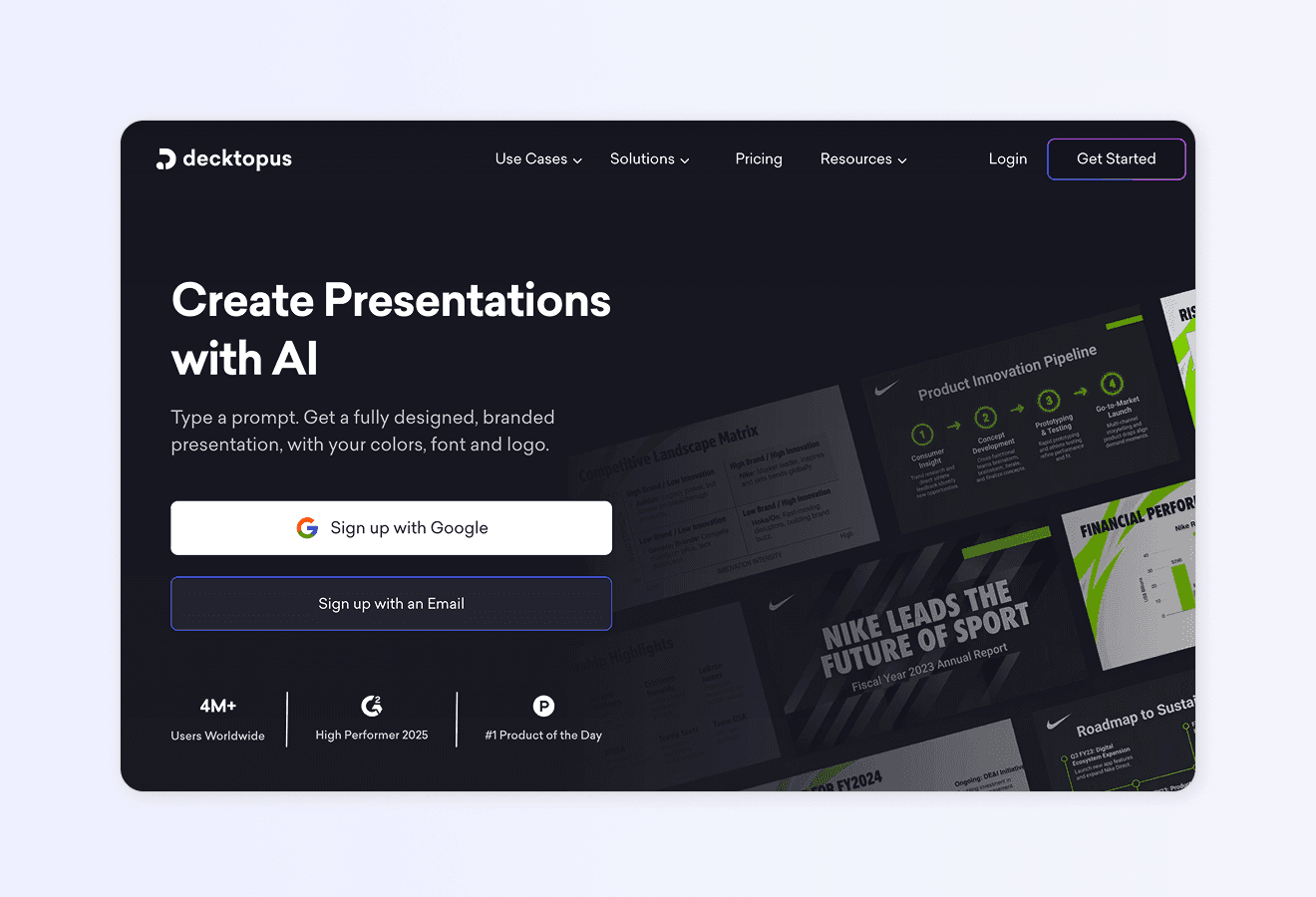
Decktopus AI is an AI-powered presentation platform built from the ground up to create professional, on-brand slide decks from a single text prompt. Describe your topic, audience, and purpose — and Decktopus generates the entire deck: structure, written content, layout, and custom visuals, all in a single pass. With over 4 million users worldwide and more than 402,000 presentations created every month, Decktopus has become the leading AI presentation assistant for professionals, teams, and enterprises who need quality output without the manual overhead.
How Decktopus Works: Core Features
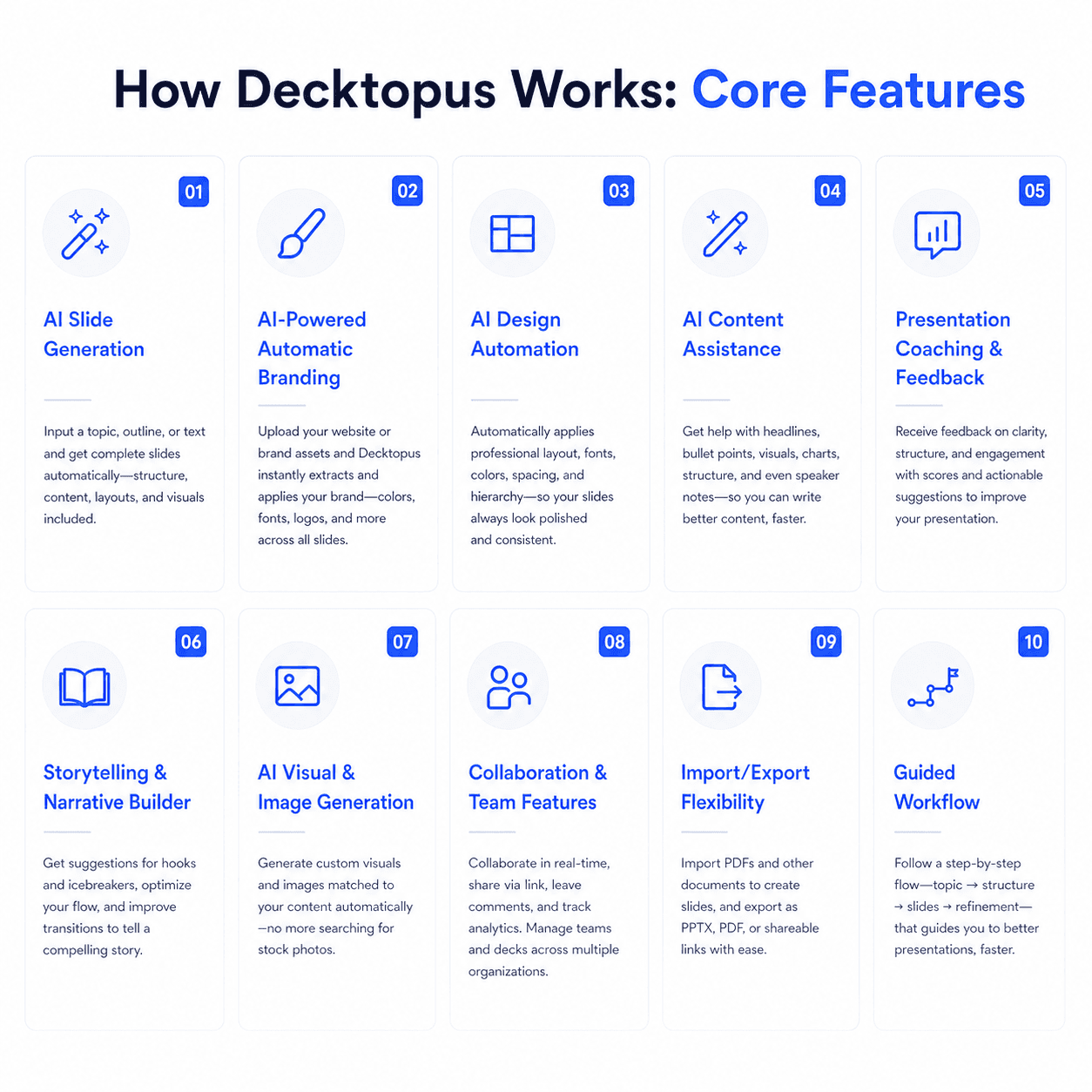
1. AI Slide Generation
Type a prompt, set your audience and purpose, and Decktopus instantly produces a complete, presentation-ready deck — slides, layouts, written content, and imagery all generated together in under a minute. No blank slides, no manual assembly, no formatting work.
2. AI-Powered Automatic Branding
Upload your logo, brand colours, and fonts once, and every presentation your team creates automatically inherits your visual identity. On-brand output from the first slide to the last — without anyone needing to apply a template. Learn more about Decktopus branding and customisation.
3. AI Design Automation
Decktopus selects appropriate layouts, visual hierarchy, and image placement based on your content automatically. Every deck looks professionally designed regardless of your design background.
4. AI Content Assistance
Decktopus refines your message in real time — rewriting, expanding, condensing, and sharpening copy across slides. It understands the difference between a title slide, a data slide, and a conclusion slide, and writes accordingly.
5. Presentation Coaching & Feedback
Decktopus coaches you on how to deliver the deck, not just how to build it. AI-driven feedback identifies narrative weaknesses, suggests structural improvements, and prepares you to handle audience questions. NotebookLM does not offer this.
6. Storytelling & Narrative Builder
Decktopus builds narrative coherence into every deck from the start — compelling hooks, logical transitions, and a clear arc from problem to solution to call to action. Your audience gets a story, not a collection of bullets.
7. AI Visual & Image Generation
Decktopus generates custom images tailored to each slide’s specific content. No stock libraries, no licensing, no generic visuals — unique imagery that matches your message, produced automatically for each slide. See how Decktopus compares to other AI tools.
8. Zapier Integration
Connect Decktopus to thousands of tools via Zapier and automate presentation creation entirely. A new deal in your CRM triggers a custom proposal deck. A new hire joins and an onboarding presentation is ready. Explore Decktopus for sales professionals.
9. Import/Export Flexibility
Import existing PDFs and transform them into dynamic presentations instantly. Export finished decks to clean, fully editable PowerPoint (.pptx) and PDF — no layout corruption, no conversion artefacts. Learn about PDF to PPT conversion with Decktopus.
10. Guided Workflow
Decktopus is usable in minutes with zero onboarding. Its presentation-first interface guides you from idea to finished deck with no cognitive overhead — no notebook management, no source curation, no research pipeline required.
AI Carousel Maker
Generate card-by-card LinkedIn and Instagram carousels from a topic or existing file — auto-branded from your website URL, exportable as PDF, PPT, or PNG. NotebookLM has no carousel output.
12. AI Delivery Coach (Loop): Practice high-stakes presentations inside Decktopus with Loop — a four-stage AI coaching system. A Profiler agent gathers context about your audience and goals, an Architect builds your narrative arc and speaking notes, a Red Team simulates tough audience questions with real-time feedback, and a Mirror tracks rehearsal metrics (pacing, filler words, energy) to produce a Readiness Score. Sessions persist across rehearsals so each run is faster and more personalized. NotebookLM has no delivery coaching. It generates audio overviews but not presentation rehearsal.
13. Beautify (Upload & Redesign): Upload an existing presentation file and choose between two paths — Redesign keeps your text and structure while applying a fresh visual design, or Use as a Resource extracts key points and builds an entirely new deck around them. Pick a visual style from a website URL, reuse a previous style, or let AI generate one, then fine-tune in the editor with all standard AI tools. NotebookLM has no presentation redesign capability.
Advantages of Using Decktopus
Purpose-built for presentations from day one. Every feature in Decktopus exists to make slide creation faster and better. It isn’t a research tool that added slides as an output — it is a presentation tool, end to end.
Generates a full deck without source documents. Decktopus creates complete, content-rich presentations directly from your text prompt. NotebookLM requires you to upload source documents before slides can be generated — adding a research-and-upload step that Decktopus eliminates.
Full branding automation — logo, fonts, and colours. Upload your brand once and every deck is fully branded automatically. NotebookLM has no brand controls whatsoever — the same generic Google visual style appears on every slide regardless of your organisation’s identity.
Decktopus tells you who opened your presentation, which slides captured the most attention, and where viewers dropped off. This slide-level intelligence makes every follow-up sharper. NotebookLM has no analytics. Explore Decktopus for account executives.
Embed forms directly in your presentation to capture leads, qualify prospects, and collect contact information without redirecting viewers. NotebookLM has no equivalent. Learn more about Decktopus for lead generation.
Voice recording and async presentation delivery. Record your narration inside Decktopus and share a link — your pitch delivers itself even when you can’t be in the room. This is particularly powerful for customer success teams and sales follow-ups.
Drag-and-drop editing. Decktopus lets you freely edit any element of any slide at any time. NotebookLM’s editing works through AI instruction prompts only — you can’t click a text box and type directly — and each revision regenerates the slide from scratch under a usage quota.
Generation speed under one minute. Decktopus produces a full deck in under 60 seconds. NotebookLM takes an average of 5–10 minutes per deck depending on source volume and complexity — fine for research workflows, frustrating when you need a deck fast.
Zapier-powered workflow automation. Connect Decktopus to your entire tool stack and automate presentation creation end to end. NotebookLM has no Zapier integration. This advantage compounds for agencies and marketing managers handling volume.
No source upload required — start from a prompt. With Decktopus you can create a deck about any topic in seconds, regardless of whether you have pre-written documents. NotebookLM is fundamentally dependent on uploaded sources and will not generate meaningful slides without them. Explore Decktopus pricing.
Considerations When Using Decktopus
No source-grounded RAG output. NotebookLM’s greatest strength is that every slide cites back to the exact passage in your uploaded documents — a zero-hallucination guarantee for document-based presentations. Decktopus generates from your prompt and produces accurate, relevant content, but doesn’t provide per-slide source citations the way NotebookLM does.
No audio or video overviews. NotebookLM’s Audio Overviews (podcast-style summaries of your documents) and Video Overviews are genuinely unique features that Decktopus doesn’t offer. If your workflow involves turning dense research into audio for commuting or async team consumption, that’s a meaningful gap.
No built-in deep research. If your presentation requires synthesising dozens of uploaded PDFs, journal articles, or website URLs into a coherent deck, NotebookLM’s research-to-slides pipeline is well-suited to that workflow. Decktopus works best when you already know what your presentation needs to say.
Template variety is curated, not massive. Decktopus’s templates are designed for professional business presentations. NotebookLM offers fewer template options but covers a broader range of output formats.
Who’s Decktopus For?
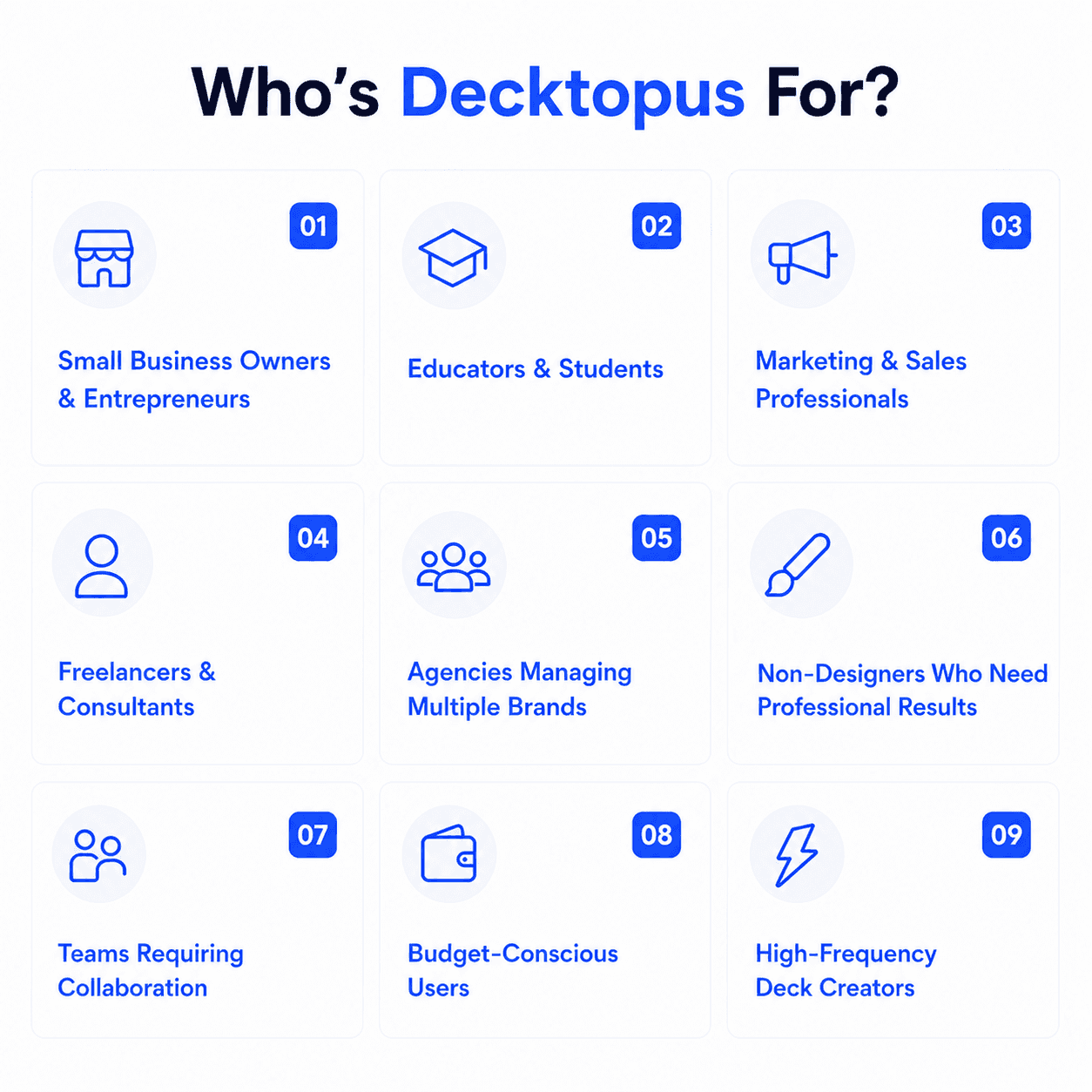
Sales teams and account executives who need polished, on-brand proposals and pitch decks without formatting overhead. Explore Decktopus for account executives.
Marketing managers producing consistent branded presentations across distributed teams — campaign decks, reports, and internal updates that always look professional.
Founders and entrepreneurs building investor pitches, product demos, and company overviews with speed and quality and no design team.
Agencies delivering professional client-facing decks at volume, reliably on-brand every time. Explore Decktopus for agencies.
BDRs running personalised outreach who need a unique, tailored deck for every prospect without starting from scratch. Explore Decktopus for BDRs.
Educators and trainers creating engaging course content and workshops that work both live and in async formats.
Freelancers and consultants who need to present expertise convincingly without a full design workflow or budget.
HR and internal communications teams managing onboarding decks, training materials, and company-wide updates efficiently.
Customer success teams sharing product walkthroughs, renewal presentations, and QBRs with clients on a regular cadence.
SMBs and growing companies that want enterprise-grade presentation quality at a price point that scales with them.
When Decktopus Might Not Be the Right Fit
If your presentations are built from large bodies of source documents — research papers, legal briefs, financial reports, meeting transcripts — and you need every slide to be directly cited back to a specific passage, NotebookLM’s source-grounded RAG approach is the stronger tool for that workflow.
If you need Audio Overviews or Video Overviews to share research summaries with colleagues who prefer to listen rather than read, NotebookLM’s podcast-style output is genuinely unique and has no equivalent in Decktopus.
If your primary need is a research and knowledge management system — querying large document sets, generating flashcards, building mind maps, and synthesising sources — NotebookLM is purpose-built for that job. Decktopus is a presentation creation tool, not a knowledge base.
User Reviews and Real-World Feedback
Decktopus earns strong ratings across major review platforms. Explore verified reviews on G2 and Capterra.
Here’s what real users say:
“I didn’t know that preparing a presentation with Decktopus would be so fast and fun. We are using it for almost everything: in-company meetings, demos, etc. It saves us a lot of trouble and saves time.” — Isa T., G2
“Very easy to use with clean templates that resonate with buyers. Was very easy to create a new deck that is converting at a much higher rate.” — Chris F., Capterra
“The templates are professional, and the ability to edit with AI is a game-changer.” — Reviewer, G2
“It’s super easy to customise templates compared to PowerPoint. Create classy presentations quickly.” — Vishal S., G2
“It saves so much time. Instead of playing with PPT design, you can focus on your materials.” — Petar G., Capterra
“I love the simplicity of creating lesson presentations quickly. The AI text editor is extremely helpful for generating content ideas.” — Educator review, Capterra
“It streamlines the process of creating stunning decks, making it easier to impress clients.” — Sales professional, G2
What is Google NotebookLM?
Google NotebookLM is an AI-powered research assistant and knowledge tool built on Gemini that transforms documents into interactive, queryable notebooks. Users upload sources — PDFs, Google Docs, websites, YouTube videos, audio files, and more — and NotebookLM becomes an expert on that material: answering questions with citations, generating summaries, and producing multiple output formats from the Studio panel. In November 2025, Google added a Slide Deck feature to NotebookLM’s Studio panel, allowing users to generate presentations directly from their uploaded source materials. Since February 2026, those slide decks can be exported as editable PPTX files.
NotebookLM’s 2026 Features
Slide Deck generation — Generate a visual presentation from uploaded sources, with options for “Detailed Deck” (text-heavy, designed to stand alone) or “Presenter Slides” (clean, talking-point-focused); export as PDF or PPTX (since February 2026)
Audio Overviews — Convert uploaded documents into a podcast-style conversation between two AI hosts, with interactive mode allowing users to join and ask questions in real time; available in multiple formats including deep dive, brief, critique, and debate styles
Video Overviews — Generate AI-narrated video summaries with visuals from your source content (2026 feature)
Infographics — Generate visual infographics from source material in 10 different styles (Sketch Note, Kawaii, Professional, Scientific, Anime, Clay, Editorial, Instructional, Bento Grid, Bricks) powered by Nano Banana Pro
Mind Maps — Automatically generate visual maps of key concepts and relationships in your sources
Deep Research — Automatically search the web and synthesise external sources alongside uploaded documents to produce comprehensive, cited research reports
Q&A with citations — Query your sources through a conversational interface; every answer links directly to the specific passage in the original document
Study Guides, Briefing Docs, FAQs — One-click generation of structured reference documents from uploaded sources
Flashcards and Quizzes — Generate exam-ready study tools from source material with progress tracking
Data Tables — Synthesise information from sources into structured tables
Source support — Accepts PDFs, Google Docs, Google Slides, plain text, web URLs, YouTube video transcripts, audio files, and EPUBs; up to 50 sources per notebook, each up to 500,000 words
Google Workspace integration — Included in all Google Workspace plans; Google Classroom integration for education
Multi-notebook queries via Gemini App — Mount multiple notebooks as Gemini data sources and ask cross-notebook questions (2026 feature)
Enterprise security (NotebookLM Plus/Enterprise) — VPC-SC controls, admin dashboard, shared notebooks, and compliance-grade data handling
Who’s NotebookLM For?
Researchers and academics who work with large bodies of literature, papers, or data and need to query, synthesise, and cite sources with precision
Students studying complex topics who need to create study guides, flashcards, audio summaries, and quizzes from course materials
Knowledge workers and analysts turning dense reports, meeting transcripts, or strategic documents into accessible, shareable summaries
Educators and instructors building interactive learning materials from course documents and research
Executive and leadership teams needing polished briefings from financial reports, market analyses, or board documentation without reading every page
Journalists and content creators synthesising multiple source documents into structured outputs for articles or presentations
Organisations onboarding new employees using NotebookLM as a queryable knowledge base for internal documentation
What Are the Main Differences?
Purpose: Presentation Creator vs. Research Assistant That Also Makes Slides
This distinction defines everything else in this comparison. Decktopus was engineered to create great presentations. NotebookLM was engineered to help people understand and synthesise large bodies of documents — and slides are one of several output formats it can produce from that research process.
Decktopus starts with your idea and produces a finished deck. You don’t need existing documents, a research pipeline, or a curated notebook. You describe what you want, and the AI creates it.
NotebookLM starts with your documents. Slides are a downstream output of a research workflow that begins with uploading and organising sources. If you don’t have documents to upload — or your presentation doesn’t come from dense source material — NotebookLM’s slide feature has nothing meaningful to work with.
Generation Requirements: Prompt vs. Source Upload
This is the most practical difference for day-to-day use. Decktopus creates a full, professional deck from a text prompt in under a minute. No preparation, no uploads, no notebooks. Ideal for founders who need a pitch deck today, sales reps building proposals, or marketers drafting a campaign report.
NotebookLM requires uploaded sources before slide generation begins. The resulting slides are then grounded in those sources — every point can be traced back to a specific document passage. This is a significant advantage for academic, research, and compliance-focused presentations where content accuracy must be verifiable. But it is a significant additional step for the majority of business presentation workflows where the goal is to communicate a message, not cite a bibliography.
Editing Experience: Free Edit vs. AI Instruction Only
Once a deck is generated, Decktopus lets you edit any element of any slide directly — click a text box, change the content, adjust the layout, swap an image. The experience is familiar, fast, and completely in your control.
NotebookLM editing works differently. You can’t click on a slide and change text directly. Editing happens through AI instructions — you tell the AI what to change on a specific slide, and it regenerates that slide. Each revision consumes from a daily usage quota, which means heavy iteration sessions on the same deck can run into limits. This “AI instruction-only” editing model is genuinely novel, but for professionals who need fast, precise, free-form control over slide content, it creates friction that Decktopus doesn’t.
Branding: Automatic vs. Absent
Decktopus applies your logo, fonts, and exact colour codes to every AI-generated deck automatically. Set your brand once, and every team member’s output is on-brand from the first slide without any additional steps.
NotebookLM has no branding controls at all. Every deck uses a generic Google visual style. There is no mechanism to inject your logo, your font stack, or your colour palette into NotebookLM slide output. For any professional context where brand consistency matters — client presentations, investor decks, agency deliverables — this is a hard limitation that Decktopus resolves completely and NotebookLM does not address.
Unique Features Comparison
Decktopus unique features:
Full deck generation from a text prompt — no source upload required
Complete branding automation (logo, fonts, exact colours, every slide)
Presenter voice recording and async audio narration
URL and interactive content embedding within slides
AI presentation coaching and delivery feedback
AI narrative and storytelling structure built into every deck
Drag-and-drop free-form slide editing
Zapier integration for automated presentation workflows
Generation speed under 60 seconds
Reliable, clean PPTX export with no layout corruption
NotebookLM unique features:
Audio Overviews — podcast-style AI conversations summarising your uploaded sources, with interactive mode
Video Overviews — AI-generated video summaries with narration and visuals
Source-grounded Q&A with direct citations to exact document passages (zero-hallucination on source content)
Deep Research — automated web + source synthesis with full citation trail
Infographics in 10 visual styles
Flashcards and quizzes from source material
Mind maps of source content
Data tables synthesised from sources
Multi-source support (PDFs, URLs, YouTube, audio, Google Docs, up to 50 sources per notebook)
Cross-notebook querying via the Gemini App (2026)
Google Workspace and Google Classroom native integration
Pricing and Value
Decktopus offers transparent, self-serve pricing: a free plan for getting started, Pro at $9.99/month, Pro AI at $9.99/month, Business at $32/month, and Business AI at $36/month. Watermark-free output is available from the free plan. No source upload required, no daily generation quota to manage for core usage. The value is straightforward — full AI presentation creation capability accessible to any individual, team, or enterprise. Explore Decktopus pricing.
NotebookLM offers a genuinely generous free tier — users can access core features including slide deck generation (with limited daily quotas and watermarks on visual outputs). NotebookLM Plus costs approximately $9.99/month or $99/year, unlocking expanded limits, watermark removal, and faster processing. Pro and Enterprise tiers offer higher limits and compliance-grade features at custom pricing. For Workspace users, NotebookLM is included in all Google Workspace plans at no incremental cost — making it effectively free for organisations already paying for Workspace.
Quick Comparison: Which One Fits You?
Choose Decktopus if you…
Need to create a complete, professional presentation from a topic or brief — without uploading source documents
Want fully branded slides with your logo, fonts, and colours applied automatically every time
Need
Want to edit slides freely with drag-and-drop, not through AI instruction prompts
Need reliable, clean PPTX export for Microsoft 365 clients and colleagues
Need Zapier-powered automation to connect presentation creation to your broader workflow
Are an individual, agency, sales team, marketing team, or enterprise creating business presentations regularly
Create LinkedIn or Instagram carousels as a recurring content habit
Need AI-powered rehearsal coaching with audience simulation and delivery scoring
Want to transform existing presentations with AI-powered redesign or resource extraction
Choose NotebookLM if you…
Work with large bodies of uploaded source material (research papers, reports, transcripts) and need every slide to cite back to a specific document passage
Need Audio Overviews or Video Overviews to share research summaries with colleagues who prefer to listen rather than read
Are a student, researcher, or educator whose primary need is a knowledge and study tool that also produces presentations as a secondary output
Already pay for Google Workspace and want a no-additional-cost research and briefing tool bundled in
Need deep research, flashcards, mind maps, or quizzes alongside occasional slide generation
Feature Comparison Table
[[EMBED:PGRpdiBzdHlsZT0ib3ZlcmZsb3cteDphdXRvO21hcmdpbjoyMHB4IDAiPjxzdHlsZT4uZHRrLXRibCwuZHRrLXRibCAqe2JveC1zaXppbmc6Ym9yZGVyLWJveDttYXJnaW46MDtwYWRkaW5nOjB9LmR0ay10Ymx7Zm9udC1mYW1pbHk6J1BvcHBpbnMnLHN5c3RlbS11aSxzYW5zLXNlcmlmO2NvbG9yOiMyRDM0MzY7bWF4LXdpZHRoOjg2MHB4O21hcmdpbjowIGF1dG87Ym9yZGVyOjFweCBzb2xpZCAjRThFQUYwO2JvcmRlci1yYWRpdXM6MjBweDtvdmVyZmxvdzpoaWRkZW47YmFja2dyb3VuZDojZmZmfS5kdGstdGJsIC5oZWFke3BhZGRpbmc6MjZweCAyOHB4IDIwcHh9LmR0ay10YmwgLmhlYWQgaDJ7Zm9udC1zaXplOmNsYW1wKDIycHgsNXZ3LDMycHgpO2ZvbnQtd2VpZ2h0OjcwMDtsaW5lLWhlaWdodDoxLjF9LmR0ay10YmwgLmhlYWQgcHtjb2xvcjojNzg4MDhBO2ZvbnQtc2l6ZToxNXB4O21hcmdpbi10b3A6NHB4fS5kdGstdGJsIC5yb3d7ZGlzcGxheTpncmlkO2dyaWQtdGVtcGxhdGUtY29sdW1uczoxLjdmciAxZnIgMWZyO2JvcmRlci10b3A6MXB4IHNvbGlkICNFOEVBRjB9LmR0ay10YmwgLnJvdy5oZWFkZXJ7Ym9yZGVyLXRvcDowfS5kdGstdGJsIC5jZWxse3BhZGRpbmc6MTRweCAxNnB4O2Rpc3BsYXk6ZmxleDtmbGV4LWRpcmVjdGlvbjpjb2x1bW47anVzdGlmeS1jb250ZW50OmNlbnRlcjthbGlnbi1pdGVtczpjZW50ZXI7dGV4dC1hbGlnbjpjZW50ZXI7Z2FwOjZweDttaW4taGVpZ2h0OjYwcHh9LmR0ay10YmwgLmZlYXR7YWxpZ24taXRlbXM6ZmxleC1zdGFydDt0ZXh0LWFsaWduOmxlZnQ7Zm9udC13ZWlnaHQ6NTAwO2ZvbnQtc2l6ZToxNnB4O2xpbmUtaGVpZ2h0OjEuM30uZHRrLXRibCAuY29sLWR0a3tiYWNrZ3JvdW5kOiNFRUVCRkR9LmR0ay10YmwgLnJvdzpudGgtY2hpbGQoZXZlbikgLmZlYXR7YmFja2dyb3VuZDojRkFGQUZDfS5kdGstdGJsIC5yb3c6bnRoLWNoaWxkKGV2ZW4pIC5jb2wtY29tcHtiYWNrZ3JvdW5kOiNGQUZBRkN9LmR0ay10YmwgLmhlYWRlciAuY2VsbHtmb250LXdlaWdodDo2MDA7Zm9udC1zaXplOjE4cHg7bWluLWhlaWdodDphdXRvO3BhZGRpbmc6MTZweH0uZHRrLXRibCAuaGVhZGVyIC5jb2wtZHRre2JhY2tncm91bmQ6IzZDNUNFNztjb2xvcjojZmZmO2JvcmRlci1yYWRpdXM6MTBweCAxMHB4IDAgMH0uZHRrLXRibCAuYnt3aWR0aDoyOHB4O2hlaWdodDoyOHB4O2JvcmRlci1yYWRpdXM6NTAlO2Rpc3BsYXk6aW5saW5lLWZsZXg7YWxpZ24taXRlbXM6Y2VudGVyO2p1c3RpZnktY29udGVudDpjZW50ZXI7Y29sb3I6I2ZmZjtmb250LXNpemU6MTVweDtmb250LXdlaWdodDo3MDA7bGluZS1oZWlnaHQ6MTtmbGV4OjAgMCAyOHB4fS5kdGstdGJsIC55ZXN7YmFja2dyb3VuZDojMjJCMjZDfS5kdGstdGJsIC5ub3tiYWNrZ3JvdW5kOiNFODU0NUN9LmR0ay10YmwgLnBhcnR7YmFja2dyb3VuZDojRjBBQTI4fS5kdGstdGJsIC5ub3Rle2ZvbnQtc2l6ZToxMnB4O2NvbG9yOiM3ODgwOEE7bGluZS1oZWlnaHQ6MS4zO3dvcmQtd3JhcDpicmVhay13b3JkO21heC13aWR0aDoxMDAlfS5kdGstdGJsIC5sYmx7ZGlzcGxheTpub25lO2ZvbnQtc2l6ZToxM3B4O2NvbG9yOiM3ODgwOEE7Zm9udC13ZWlnaHQ6NTAwfS5kdGstdGJsIC52YWx7ZGlzcGxheTpmbGV4O2FsaWduLWl0ZW1zOmNlbnRlcjtnYXA6OHB4O2ZsZXgtd3JhcDpub3dyYXB9LmR0ay10YmwgLmZvb3R7ZGlzcGxheTpmbGV4O2ZsZXgtd3JhcDp3cmFwO2dhcDoxMHB4O2p1c3RpZnktY29udGVudDpzcGFjZS1iZXR3ZWVuO2FsaWduLWl0ZW1zOmNlbnRlcjtwYWRkaW5nOjE2cHggMjhweDtib3JkZXItdG9wOjFweCBzb2xpZCAjRThFQUYwO2NvbG9yOiM3ODgwOEE7Zm9udC1zaXplOjEzcHh9LmR0ay10YmwgLmxlZ2VuZHtkaXNwbGF5OmZsZXg7Z2FwOjE2cHh9LmR0ay10YmwgLmxlZ2VuZCBzcGFue2Rpc3BsYXk6aW5saW5lLWZsZXg7YWxpZ24taXRlbXM6Y2VudGVyO2dhcDo2cHh9LmR0ay10YmwgLmxlZ2VuZCAuYnt3aWR0aDoxOXB4O2hlaWdodDoxOXB4O2ZvbnQtc2l6ZToxMXB4O2ZsZXg6MCAwIDE5cHh9QG1lZGlhKG1heC13aWR0aDo1NjBweCl7LmR0ay10YmwgLmhlYWRlcntkaXNwbGF5Om5vbmV9LmR0ay10YmwgLnJvd3tncmlkLXRlbXBsYXRlLWNvbHVtbnM6MWZyO2JvcmRlci10b3A6MDtwYWRkaW5nOjZweCAwO2JvcmRlci1ib3R0b206MXB4IHNvbGlkICNFOEVBRjB9LmR0ay10YmwgLnJvdzpsYXN0LWNoaWxke2JvcmRlci1ib3R0b206MH0uZHRrLXRibCAuY2VsbHttaW4taGVpZ2h0OmF1dG87cGFkZGluZzo5cHggMThweDthbGlnbi1pdGVtczpmbGV4LXN0YXJ0O3RleHQtYWxpZ246bGVmdH0uZHRrLXRibCAuZmVhdHtmb250LXdlaWdodDo2MDA7Zm9udC1zaXplOjE2cHg7cGFkZGluZy1ib3R0b206MnB4O2JhY2tncm91bmQ6dHJhbnNwYXJlbnQhaW1wb3J0YW50fS5kdGstdGJsIC5jb2wtZHRrLC5kdGstdGJsIC5jb2wtY29tcHtiYWNrZ3JvdW5kOnRyYW5zcGFyZW50IWltcG9ydGFudDtmbGV4LWRpcmVjdGlvbjpyb3chaW1wb3J0YW50O2p1c3RpZnktY29udGVudDpzcGFjZS1iZXR3ZWVuO3dpZHRoOjEwMCU7Z2FwOjEycHg7cGFkZGluZzo2cHggMTRweDttYXJnaW46MnB4IDE0cHh9LmR0ay10YmwgLmNvbC1kdGt7Ym9yZGVyLWxlZnQ6M3B4IHNvbGlkICM2QzVDRTc7Ym9yZGVyLXJhZGl1czo0cHg7YmFja2dyb3VuZDojRUVFQkZEIWltcG9ydGFudH0uZHRrLXRibCAuY29sLWNvbXB7Ym9yZGVyLWxlZnQ6M3B4IHNvbGlkICNFOEVBRjB9LmR0ay10YmwgLmxibHtkaXNwbGF5OmlubGluZX0uZHRrLXRibCAuZm9vdHtwYWRkaW5nOjE2cHggMThweDtmbGV4LWRpcmVjdGlvbjpjb2x1bW47YWxpZ24taXRlbXM6ZmxleC1zdGFydH19PC9zdHlsZT48ZGl2IGNsYXNzPSJkdGstdGJsIj48ZGl2IGNsYXNzPSJoZWFkIj48aDI+RGVja3RvcHVzIHZzLiBOb3RlYm9va0xNPC9oMj48cD5BSSBwcmVzZW50YXRpb24gZmVhdHVyZSBjb21wYXJpc29uPC9wPjwvZGl2PjxkaXYgY2xhc3M9InJvdyBoZWFkZXIiPjxkaXYgY2xhc3M9ImNlbGwgZmVhdCI+RmVhdHVyZTwvZGl2PjxkaXYgY2xhc3M9ImNlbGwgY29sLWR0ayI+RGVja3RvcHVzPC9kaXY+PGRpdiBjbGFzcz0iY2VsbCBjb2wtY29tcCI+Tm90ZWJvb2tMTTwvZGl2PjwvZGl2PjxkaXYgY2xhc3M9InJvdyI+PGRpdiBjbGFzcz0iY2VsbCBmZWF0Ij5BdXRvbWF0aWMgYnJhbmQgZXh0cmFjdGlvbiBmcm9tIGEgVVJMPC9kaXY+PGRpdiBjbGFzcz0iY2VsbCBjb2wtZHRrIj48ZGl2IGNsYXNzPSJ2YWwiPjxzcGFuIGNsYXNzPSJsYmwiPkRlY2t0b3B1czwvc3Bhbj48c3BhbiBjbGFzcz0iYiB5ZXMiPuKckzwvc3Bhbj48L2Rpdj48L2Rpdj48ZGl2IGNsYXNzPSJjZWxsIGNvbC1jb21wIj48ZGl2IGNsYXNzPSJ2YWwiPjxzcGFuIGNsYXNzPSJsYmwiPk5vdGVib29rTE08L3NwYW4+PHNwYW4gY2xhc3M9ImIgbm8iPuKclTwvc3Bhbj48L2Rpdj48L2Rpdj48L2Rpdj48ZGl2IGNsYXNzPSJyb3ciPjxkaXYgY2xhc3M9ImNlbGwgZmVhdCI+RW5kLXRvLWVuZCBBSSBkZWNrIGZyb20gYSBwcm9tcHQ8L2Rpdj48ZGl2IGNsYXNzPSJjZWxsIGNvbC1kdGsiPjxkaXYgY2xhc3M9InZhbCI+PHNwYW4gY2xhc3M9ImxibCI+RGVja3RvcHVzPC9zcGFuPjxzcGFuIGNsYXNzPSJiIHllcyI+4pyTPC9zcGFuPjwvZGl2PjwvZGl2PjxkaXYgY2xhc3M9ImNlbGwgY29sLWNvbXAiPjxkaXYgY2xhc3M9InZhbCI+PHNwYW4gY2xhc3M9ImxibCI+Tm90ZWJvb2tMTTwvc3Bhbj48c3BhbiBjbGFzcz0iYiBubyI+4pyVPC9zcGFuPjwvZGl2PjxzcGFuIGNsYXNzPSJub3RlIj5SZXNlYXJjaCB0b29sLCBub3QgYSBkZWNrIG1ha2VyPC9zcGFuPjwvZGl2PjwvZGl2PjxkaXYgY2xhc3M9InJvdyI+PGRpdiBjbGFzcz0iY2VsbCBmZWF0Ij5BSSBkZWxpdmVyeSBjb2FjaGluZyAmYW1wOyBwcmFjdGljZSBtb2RlPC9kaXY+PGRpdiBjbGFzcz0iY2VsbCBjb2wtZHRrIj48ZGl2IGNsYXNzPSJ2YWwiPjxzcGFuIGNsYXNzPSJsYmwiPkRlY2t0b3B1czwvc3Bhbj48c3BhbiBjbGFzcz0iYiB5ZXMiPuKckzwvc3Bhbj48L2Rpdj48L2Rpdj48ZGl2IGNsYXNzPSJjZWxsIGNvbC1jb21wIj48ZGl2IGNsYXNzPSJ2YWwiPjxzcGFuIGNsYXNzPSJsYmwiPk5vdGVib29rTE08L3NwYW4+PHNwYW4gY2xhc3M9ImIgbm8iPuKclTwvc3Bhbj48L2Rpdj48L2Rpdj48L2Rpdj48ZGl2IGNsYXNzPSJyb3ciPjxkaXYgY2xhc3M9ImNlbGwgZmVhdCI+QUkgQ2Fyb3VzZWwgTWFrZXIgKExpbmtlZEluIC8gSUcpPC9kaXY+PGRpdiBjbGFzcz0iY2VsbCBjb2wtZHRrIj48ZGl2IGNsYXNzPSJ2YWwiPjxzcGFuIGNsYXNzPSJsYmwiPkRlY2t0b3B1czwvc3Bhbj48c3BhbiBjbGFzcz0iYiB5ZXMiPuKckzwvc3Bhbj48L2Rpdj48L2Rpdj48ZGl2IGNsYXNzPSJjZWxsIGNvbC1jb21wIj48ZGl2IGNsYXNzPSJ2YWwiPjxzcGFuIGNsYXNzPSJsYmwiPk5vdGVib29rTE08L3NwYW4+PHNwYW4gY2xhc3M9ImIgbm8iPuKclTwvc3Bhbj48L2Rpdj48L2Rpdj48L2Rpdj48ZGl2IGNsYXNzPSJyb3ciPjxkaXYgY2xhc3M9ImNlbGwgZmVhdCI+QUkgaW1hZ2UgZ2VuZXJhdGlvbjwvZGl2PjxkaXYgY2xhc3M9ImNlbGwgY29sLWR0ayI+PGRpdiBjbGFzcz0idmFsIj48c3BhbiBjbGFzcz0ibGJsIj5EZWNrdG9wdXM8L3NwYW4+PHNwYW4gY2xhc3M9ImIgeWVzIj7inJM8L3NwYW4+PC9kaXY+PC9kaXY+PGRpdiBjbGFzcz0iY2VsbCBjb2wtY29tcCI+PGRpdiBjbGFzcz0idmFsIj48c3BhbiBjbGFzcz0ibGJsIj5Ob3RlYm9va0xNPC9zcGFuPjxzcGFuIGNsYXNzPSJiIG5vIj7inJU8L3NwYW4+PC9kaXY+PC9kaXY+PC9kaXY+PGRpdiBjbGFzcz0icm93Ij48ZGl2IGNsYXNzPSJjZWxsIGZlYXQiPkRvY3VtZW50IC8gUERGIGltcG9ydCB0byBkZWNrPC9kaXY+PGRpdiBjbGFzcz0iY2VsbCBjb2wtZHRrIj48ZGl2IGNsYXNzPSJ2YWwiPjxzcGFuIGNsYXNzPSJsYmwiPkRlY2t0b3B1czwvc3Bhbj48c3BhbiBjbGFzcz0iYiB5ZXMiPuKckzwvc3Bhbj48L2Rpdj48L2Rpdj48ZGl2IGNsYXNzPSJjZWxsIGNvbC1jb21wIj48ZGl2IGNsYXNzPSJ2YWwiPjxzcGFuIGNsYXNzPSJsYmwiPk5vdGVib29rTE08L3NwYW4+PHNwYW4gY2xhc3M9ImIgeWVzIj7inJM8L3NwYW4+PC9kaXY+PHNwYW4gY2xhc3M9Im5vdGUiPlNvdXJjZSB1cGxvYWRzIGZvciByZXNlYXJjaDwvc3Bhbj48L2Rpdj48L2Rpdj48ZGl2IGNsYXNzPSJyb3ciPjxkaXYgY2xhc3M9ImNlbGwgZmVhdCI+U3Rvcnl0ZWxsaW5nIHR1bmVkIHRvIHlvdXIgcHVycG9zZTwvZGl2PjxkaXYgY2xhc3M9ImNlbGwgY29sLWR0ayI+PGRpdiBjbGFzcz0idmFsIj48c3BhbiBjbGFzcz0ibGJsIj5EZWNrdG9wdXM8L3NwYW4+PHNwYW4gY2xhc3M9ImIgeWVzIj7inJM8L3NwYW4+PC9kaXY+PC9kaXY+PGRpdiBjbGFzcz0iY2VsbCBjb2wtY29tcCI+PGRpdiBjbGFzcz0idmFsIj48c3BhbiBjbGFzcz0ibGJsIj5Ob3RlYm9va0xNPC9zcGFuPjxzcGFuIGNsYXNzPSJiIHBhcnQiPuKAkzwvc3Bhbj48L2Rpdj48c3BhbiBjbGFzcz0ibm90ZSI+QUkgYXVkaW8gb3ZlcnZpZXdzPC9zcGFuPjwvZGl2PjwvZGl2PjxkaXYgY2xhc3M9InJvdyI+PGRpdiBjbGFzcz0iY2VsbCBmZWF0Ij5CcmFuZC1jb25zaXN0ZW50IHRlYW0gdGVtcGxhdGVzPC9kaXY+PGRpdiBjbGFzcz0iY2VsbCBjb2wtZHRrIj48ZGl2IGNsYXNzPSJ2YWwiPjxzcGFuIGNsYXNzPSJsYmwiPkRlY2t0b3B1czwvc3Bhbj48c3BhbiBjbGFzcz0iYiB5ZXMiPuKckzwvc3Bhbj48L2Rpdj48L2Rpdj48ZGl2IGNsYXNzPSJjZWxsIGNvbC1jb21wIj48ZGl2IGNsYXNzPSJ2YWwiPjxzcGFuIGNsYXNzPSJsYmwiPk5vdGVib29rTE08L3NwYW4+PHNwYW4gY2xhc3M9ImIgbm8iPuKclTwvc3Bhbj48L2Rpdj48L2Rpdj48L2Rpdj48ZGl2IGNsYXNzPSJyb3ciPjxkaXYgY2xhc3M9ImNlbGwgZmVhdCI+Tm8gZGVzaWduIHNraWxscyByZXF1aXJlZDwvZGl2PjxkaXYgY2xhc3M9ImNlbGwgY29sLWR0ayI+PGRpdiBjbGFzcz0idmFsIj48c3BhbiBjbGFzcz0ibGJsIj5EZWNrdG9wdXM8L3NwYW4+PHNwYW4gY2xhc3M9ImIgeWVzIj7inJM8L3NwYW4+PC9kaXY+PC9kaXY+PGRpdiBjbGFzcz0iY2VsbCBjb2wtY29tcCI+PGRpdiBjbGFzcz0idmFsIj48c3BhbiBjbGFzcz0ibGJsIj5Ob3RlYm9va0xNPC9zcGFuPjxzcGFuIGNsYXNzPSJiIHllcyI+4pyTPC9zcGFuPjwvZGl2PjwvZGl2PjwvZGl2PjxkaXYgY2xhc3M9InJvdyI+PGRpdiBjbGFzcz0iY2VsbCBmZWF0Ij5DbGVhbiBQb3dlclBvaW50ICgucHB0eCkgZXhwb3J0PC9kaXY+PGRpdiBjbGFzcz0iY2VsbCBjb2wtZHRrIj48ZGl2IGNsYXNzPSJ2YWwiPjxzcGFuIGNsYXNzPSJsYmwiPkRlY2t0b3B1czwvc3Bhbj48c3BhbiBjbGFzcz0iYiB5ZXMiPuKckzwvc3Bhbj48L2Rpdj48L2Rpdj48ZGl2IGNsYXNzPSJjZWxsIGNvbC1jb21wIj48ZGl2IGNsYXNzPSJ2YWwiPjxzcGFuIGNsYXNzPSJsYmwiPk5vdGVib29rTE08L3NwYW4+PHNwYW4gY2xhc3M9ImIgbm8iPuKclTwvc3Bhbj48L2Rpdj48L2Rpdj48L2Rpdj48ZGl2IGNsYXNzPSJyb3ciPjxkaXYgY2xhc3M9ImNlbGwgZmVhdCI+UHJlc2VudCBmcm9tIGFueSBicm93c2VyPC9kaXY+PGRpdiBjbGFzcz0iY2VsbCBjb2wtZHRrIj48ZGl2IGNsYXNzPSJ2YWwiPjxzcGFuIGNsYXNzPSJsYmwiPkRlY2t0b3B1czwvc3Bhbj48c3BhbiBjbGFzcz0iYiB5ZXMiPuKckzwvc3Bhbj48L2Rpdj48L2Rpdj48ZGl2IGNsYXNzPSJjZWxsIGNvbC1jb21wIj48ZGl2IGNsYXNzPSJ2YWwiPjxzcGFuIGNsYXNzPSJsYmwiPk5vdGVib29rTE08L3NwYW4+PHNwYW4gY2xhc3M9ImIgbm8iPuKclTwvc3Bhbj48L2Rpdj48L2Rpdj48L2Rpdj48ZGl2IGNsYXNzPSJyb3ciPjxkaXYgY2xhc3M9ImNlbGwgZmVhdCI+WmFwaWVyIGludGVncmF0aW9uPC9kaXY+PGRpdiBjbGFzcz0iY2VsbCBjb2wtZHRrIj48ZGl2IGNsYXNzPSJ2YWwiPjxzcGFuIGNsYXNzPSJsYmwiPkRlY2t0b3B1czwvc3Bhbj48c3BhbiBjbGFzcz0iYiB5ZXMiPuKckzwvc3Bhbj48L2Rpdj48L2Rpdj48ZGl2IGNsYXNzPSJjZWxsIGNvbC1jb21wIj48ZGl2IGNsYXNzPSJ2YWwiPjxzcGFuIGNsYXNzPSJsYmwiPk5vdGVib29rTE08L3NwYW4+PHNwYW4gY2xhc3M9ImIgbm8iPuKclTwvc3Bhbj48L2Rpdj48L2Rpdj48L2Rpdj48ZGl2IGNsYXNzPSJyb3ciPjxkaXYgY2xhc3M9ImNlbGwgZmVhdCI+UmVhbC10aW1lIGNvLWVkaXRpbmc8L2Rpdj48ZGl2IGNsYXNzPSJjZWxsIGNvbC1kdGsiPjxkaXYgY2xhc3M9InZhbCI+PHNwYW4gY2xhc3M9ImxibCI+RGVja3RvcHVzPC9zcGFuPjxzcGFuIGNsYXNzPSJiIG5vIj7inJU8L3NwYW4+PC9kaXY+PHNwYW4gY2xhc3M9Im5vdGUiPlNoYXJlZCBhY2Nlc3MgKEJ1c2luZXNzKTwvc3Bhbj48L2Rpdj48ZGl2IGNsYXNzPSJjZWxsIGNvbC1jb21wIj48ZGl2IGNsYXNzPSJ2YWwiPjxzcGFuIGNsYXNzPSJsYmwiPk5vdGVib29rTE08L3NwYW4+PHNwYW4gY2xhc3M9ImIgeWVzIj7inJM8L3NwYW4+PC9kaXY+PHNwYW4gY2xhc3M9Im5vdGUiPlNoYXJlZCBub3RlYm9va3M8L3NwYW4+PC9kaXY+PC9kaXY+PGRpdiBjbGFzcz0icm93Ij48ZGl2IGNsYXNzPSJjZWxsIGZlYXQiPkVudHJ5IHByaWNlPC9kaXY+PGRpdiBjbGFzcz0iY2VsbCBjb2wtZHRrIj48ZGl2IGNsYXNzPSJ2YWwiPjxzcGFuIGNsYXNzPSJsYmwiPkRlY2t0b3B1czwvc3Bhbj48c3BhbiBjbGFzcz0iYiB5ZXMiPuKckzwvc3Bhbj48L2Rpdj48c3BhbiBjbGFzcz0ibm90ZSI+JDkuOTkvbW88L3NwYW4+PC9kaXY+PGRpdiBjbGFzcz0iY2VsbCBjb2wtY29tcCI+PGRpdiBjbGFzcz0idmFsIj48c3BhbiBjbGFzcz0ibGJsIj5Ob3RlYm9va0xNPC9zcGFuPjxzcGFuIGNsYXNzPSJiIHllcyI+4pyTPC9zcGFuPjwvZGl2PjxzcGFuIGNsYXNzPSJub3RlIj5GcmVlIChHb29nbGUpPC9zcGFuPjwvZGl2PjwvZGl2PjxkaXYgY2xhc3M9ImZvb3QiPjxkaXY+VXBkYXRlZCBKdWx5IDIwMjYgJm5ic3A7wrcmbmJzcDsgZGVja3RvcHVzLmNvbTwvZGl2PjxkaXYgY2xhc3M9ImxlZ2VuZCI+PHNwYW4+PHNwYW4gY2xhc3M9ImIgeWVzIj7inJM8L3NwYW4+WWVzPC9zcGFuPjxzcGFuPjxzcGFuIGNsYXNzPSJiIHBhcnQiPuKAkzwvc3Bhbj5QYXJ0aWFsPC9zcGFuPjxzcGFuPjxzcGFuIGNsYXNzPSJiIG5vIj7inJU8L3NwYW4+Tm88L3NwYW4+PC9kaXY+PC9kaXY+PC9kaXY+PC9kaXY+]]
5 Ways Decktopus Beats NotebookLM
1. Create Any Presentation Instantly — No Source Upload Required
This is the most significant practical difference between the two tools. Decktopus creates a complete, professionally designed deck from a text prompt in under 60 seconds. There is no preparation step — no documents to gather, no notebook to populate, no sources to curate. You have an idea, you type it, you have a deck.
NotebookLM requires uploaded source material before slides can be generated. If you want a pitch deck for a product launch, you need to write out that content in a document, upload it, and then ask NotebookLM to build slides from it. For a sales rep who needs a proposal in the next hour, a founder preparing for an investor call, or a marketer drafting an internal campaign report, that extra step is a meaningful friction. Decktopus eliminates it entirely.
NotebookLM’s source-grounded approach is genuinely powerful for research-intensive workflows — knowing exactly which document passage backs each slide is valuable in academic and compliance contexts. But for the broad majority of business presentation needs, you don’t have a library of pre-written documents to upload. You have a topic, a deadline, and an audience. Decktopus is built for that reality.
2. Full Branding Automation — Not Generic Google Slides Themes
Decktopus applies your logo, font stack, and exact brand colour values automatically to every AI-generated deck. No manual adjustment, no risk of a team member presenting in the wrong shade of blue. Set your brand once, and every single deck is brand-ready before you’ve changed a single word.
NotebookLM’s slides use Google’s default visual themes — the same generic styles that ship with Google Slides. There is no mechanism to upload your logo, specify your brand typography, or enter your hex colour codes. Every deck looks the same regardless of which organisation created it. For a company where every external-facing deck is a brand touchpoint, this isn’t a minor inconvenience — it’s a disqualifying limitation for professional deployment.
For agencies managing multiple client brands, sales teams building proposal credibility, and marketing managers enforcing brand standards across a distributed workforce, Decktopus’s automatic brand enforcement solves a problem that NotebookLM doesn’t acknowledge as existing.
3.
Decktopus treats a finished presentation as the beginning of a business interaction, not the end of a content creation task. Its built-in Its Its voice narration lets your pitch work asynchronously — delivered with your voice even when you’re not available to present.
These features collectively transform a Decktopus deck into a pipeline-generating, data-producing business asset. For BDRs managing high-volume outreach, account executives running consultative sales processes, and customer success teams tracking engagement with renewal presentations, this data loop makes every subsequent interaction more targeted and more effective.
NotebookLM offers none of these features. Once a NotebookLM deck leaves the platform as a PDF or PPTX, all visibility ends. There is no tracking, no engagement data, no lead collection — nothing. The deck is a file, not a tool.
4. Free-Form Drag-and-Drop Editing vs. AI Instruction-Only Revision
When you finish generating a deck in Decktopus, you can edit it the way you’d edit any presentation — click on a text box, change the content, drag elements, swap layouts, add or remove slides, adjust images. The experience is fast, intuitive, and completely freeform. Account executives fine-tuning a proposal, founders polishing an investor deck, and marketing managers adjusting a campaign brief can all iterate quickly and precisely.
NotebookLM editing works through AI instruction prompts. To change the content on a slide, you navigate to that slide, write an instruction (“add the Q3 revenue figures,” “simplify this to three bullet points”), and wait for the AI to regenerate that slide. You can’t directly type into a text box or drag elements around. Each revision consumes from a daily usage quota, which limits how many iterations you can run before hitting a cap. And because each edit regenerates the entire slide rather than targeting a specific element, the results can be unpredictable when you need surgical precision.
For professionals who know exactly what they want to change and need to make that change in 10 seconds rather than 3 minutes of AI conversation, Decktopus’s direct editing capability is a decisive practical advantage.
5. Speed, Automation, and Workflow Integration
Decktopus generates a complete, polished deck in under 60 seconds. NotebookLM takes an average of 5–10 minutes per deck depending on the volume and complexity of uploaded sources. For a single presentation, that difference is manageable. For teams creating multiple decks per week, it compounds into hours of waiting.
Beyond speed, Decktopus’s Zapier integration connects presentation creation to your entire business workflow. A prospect reaches a specific deal stage in your CRM — a custom proposal deck is created and sent automatically. A new client signs a contract — an onboarding presentation is generated and delivered. A new employee joins — a personalised training deck is ready before they log in on day one. NotebookLM has no Zapier integration and no mechanism for automated presentation creation outside manual interaction.
For agencies handling multiple simultaneous client deliverables, sales organisations running personalised outreach at volume, and marketing teams producing regular reports and campaign updates, Decktopus’s speed and automation capability creates compounding time savings that NotebookLM’s research-first architecture simply cannot match for presentation-specific workflows.
Frequently Asked Questions
1. Is NotebookLM worth using for presentations in 2026?
NotebookLM is worth using for presentations in specific, well-defined situations: when your slides need to be built directly from a large body of uploaded source material and every claim must be citeable to a specific document passage. If you’re turning a 50-page research report into a board briefing, a series of academic papers into a conference presentation, or dense internal documentation into an accessible overview, NotebookLM’s source-grounded approach is genuinely valuable. For most business presentations — pitches, proposals, marketing decks, training materials — that workflow doesn’t apply, and Decktopus delivers faster, more polished, and more brand-consistent results.
2. Is NotebookLM better than Decktopus for presentations?
For research-to-slides workflows involving dense, citeable source material, NotebookLM has specific strengths. For the broad range of professional business presentations — sales pitches, investor decks, client proposals, marketing reports, onboarding materials — Decktopus is the stronger tool in 2026. It generates complete, branded decks from a prompt in under a minute, offers free-form editing, delivers
3. Which is the best AI presentation maker in 2026?
For most business professionals — founders, sales teams, marketing managers, consultants, agencies, and SMBs — Decktopus AI is the leading AI presentation maker in 2026. It delivers genuine whole-deck generation from a prompt, full branding automation, custom AI imagery For researchers, academics, and knowledge workers whose presentations emerge naturally from a deep document synthesis workflow, NotebookLM’s source-grounded approach is a strong match for that specific use case. For everyone else, Decktopus is the clear answer.
4. What are the disadvantages of NotebookLM for presentations?
NotebookLM’s presentation limitations are significant for business use cases. It requires uploaded source documents before slides can be generated — you cannot create a presentation from a topic prompt alone. It has no branding controls, so every deck uses generic Google visual themes regardless of your organisation’s identity. Editing works through AI instruction prompts only, not free-form drag-and-drop, and is constrained by daily usage quotas. Generation takes 5–10 minutes rather than under a minute. There are no The watermark on free-plan slides must be removed by upgrading. And the tool’s primary design purpose is research and knowledge management — presentations are a secondary output, not the core product experience.
5. What is the difference between Decktopus and NotebookLM?
The clearest framing: Decktopus is a presentation tool that uses AI; NotebookLM is a research tool that can produce presentations. Decktopus creates complete, branded, business-ready decks from a prompt in under a minute, adds NotebookLM transforms large collections of uploaded source documents into multiple output formats — one of which is a slide deck — with the distinctive advantage that every claim in the output cites directly to a specific source passage. Use Decktopus when you need to create a professional presentation. Use NotebookLM when you need to understand, synthesise, and communicate large bodies of research — and a presentation is one useful way to share what you found.
Conclusion
NotebookLM is a genuinely impressive research tool — and its 2026 updates have made it more capable than ever. The Audio Overviews feature that turned research documents into podcast-style discussions went viral for good reason: it solves a real problem for people who consume more information than they have time to read. The Slide Deck feature, improved PPTX export, and Deep Research capability all extend its value further into professional workflows. For researchers, academics, educators, and analysts whose presentations grow directly from dense source material, NotebookLM is worth serious consideration.
But for the working professionals who make up the majority of the presentation-creation market — sales teams building proposals, marketers producing reports, founders pitching investors, agencies delivering client decks — NotebookLM’s research-first architecture creates friction that simply doesn’t exist in a purpose-built presentation tool. You need to upload documents before you can generate slides. You can’t brand your output. You can’t edit slides directly. You can’t track whether anyone opened the deck. And you’re waiting up to ten minutes for something Decktopus delivers in under sixty seconds.
The AI presentation generation market is growing at 25% compounded annually because professionals are discovering that AI can handle the mechanical work of slide creation — and they’re choosing the tools that do that job best, fastest, and most completely. Decktopus was built for exactly that outcome: start with an idea, end with a polished, branded, analytics-ready presentation — with no source upload, no manual formatting, and no brand cleanup required.
Ready to experience the difference? Get started with Decktopus AI today — free, no document upload required, and your first presentation is ready in under a minute.
Related posts

8 AI Startups That Nailed Their Branding with a .AI Domain
Artificial intelligence continues to reshape the way we live and work. As an essential tool now powering a great number of industries, it’s no surprise that AI is driving a new era of search, too.
AI & Tools

5 Best AI Audio Enhancement Tools in 2026
AI Audio Enhancement Tools: Elevating Your Sound Experience
AI & Tools

AI Checker 2026: Unveiling the Latest in AI Detection Technology - ChatGPT, GPT-3, and Beyond
Explore the power of AI content checkers with our comprehensive guide. Discover how these intelligent tools enhance accuracy and efficiency in various applications. Stay ahead in 2026 with insights on the latest advancements and practical tips for leveraging AI checkers and chatgpt detectors effectively.
AI & Tools