Presentations
How to Create Branded Presentation from Your Website in Minutes
Create a branded presentation instantly using your website link. Decktopus imports your logo, fonts, and colors automatically for professional slides.


Decktopus Content Team
Creating a branded presentation should be simple.
But for most people, it turns into an hour of unnecessary design work. You search for your logo file, try to remember brand colors, test fonts that almost match your website, then adjust every slide one by one.
By the time the deck looks decent, you’ve already wasted valuable time.
There is a faster way.
If you already have a website, you already have your brand identity. Your colors, logo, typography, and visual style are already built. Instead of recreating them manually inside PowerPoint or Canva, you can use Decktopus to turn your website into a fully branded slide deck automatically.
Just paste your URL.
What Is a Branded Presentation?
A branded presentation is a slide deck that visually matches your company identity.
That usually includes:
Brand colors
Logo placement
Fonts
Design style
Consistent layouts
Messaging tone
When your presentation matches your website, emails, and marketing materials, it creates trust instantly.
This matters for investor presentations, pitch decks, client proposals, sales presentations, company reports, and internal team decks.
An off-brand presentation can make even strong ideas feel less credible.
Why Presentation Branding Matters
People judge professionalism quickly.
Before they evaluate your numbers, proposal, or strategy, they notice whether your presentation feels polished and consistent.
When your branding matches everywhere, audiences subconsciously think:
This company is established
They are detail-oriented
They take quality seriously
They can be trusted
That’s why startups use polished pitch decks to raise funding, agencies use branded proposals to win clients, and sales teams rely on consistent decks to close deals.
Your slides are part of your brand experience.
The Old Way vs the Smart Way
Old Way
To create a branded deck manually, most people:
Open PowerPoint or Google Slides
Search for logo files
Copy website colors manually
Guess the font family
Rebuild layouts from scratch
Fix inconsistencies slide by slide
That process is slow and frustrating.
Smart Way
With Decktopus, you can create a branded presentation by simply pasting your website link.
The AI automatically imports your visual identity and applies it across the presentation. That means less designing and more presenting.
How to Create a Branded Presentation Using Your Website
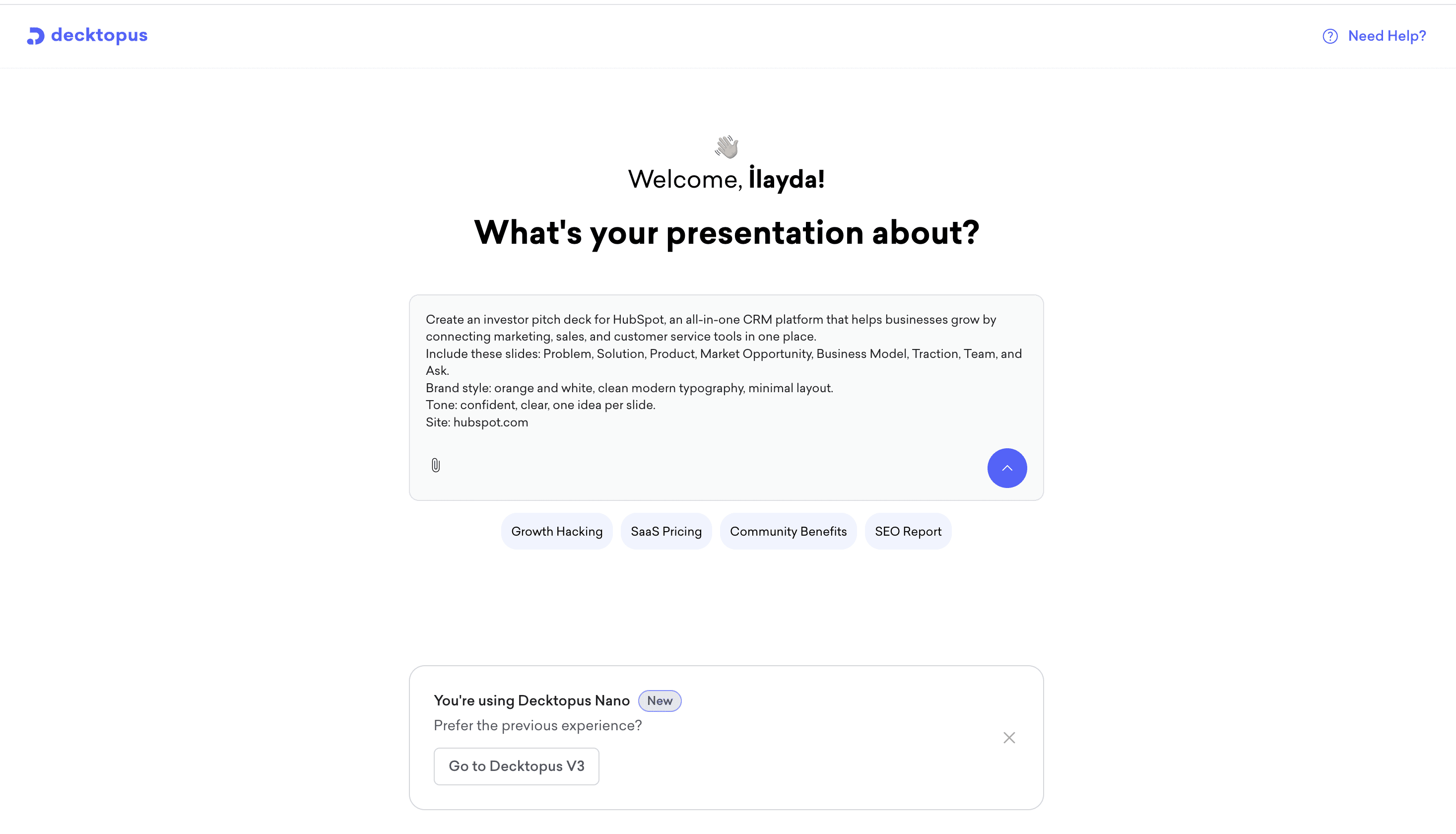
Step 1: Enter Your Topic
Tell Decktopus what your presentation is about.
Examples:
Investor pitch deck
Sales proposal
Marketing strategy
Quarterly business review
Client onboarding presentation
The AI uses this prompt to build the structure.
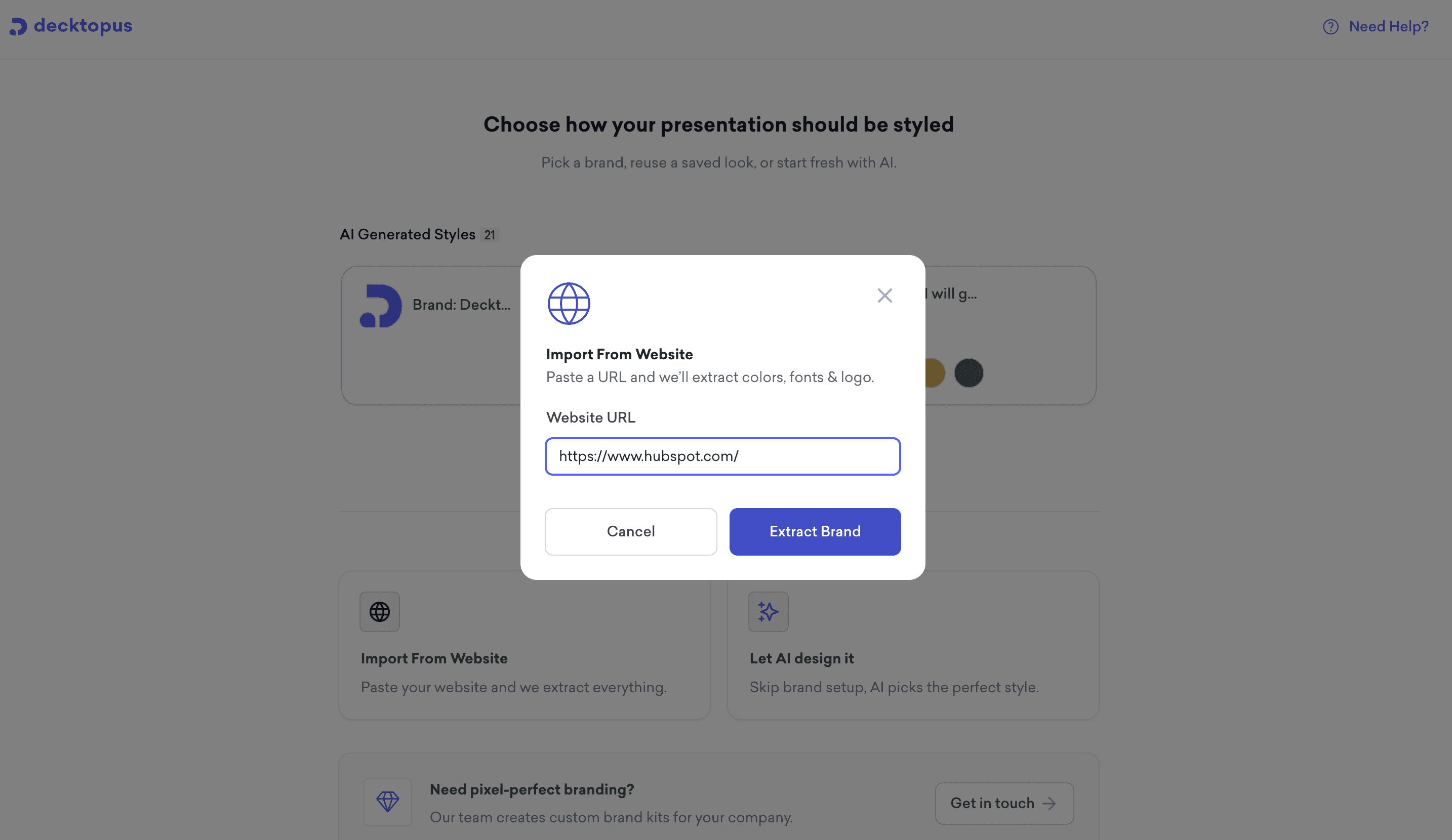
Step 2: Paste Your Website URL as Style
Add your homepage link.
Decktopus scans the page and pulls brand assets like:
Logo
Colors
Fonts
Design style
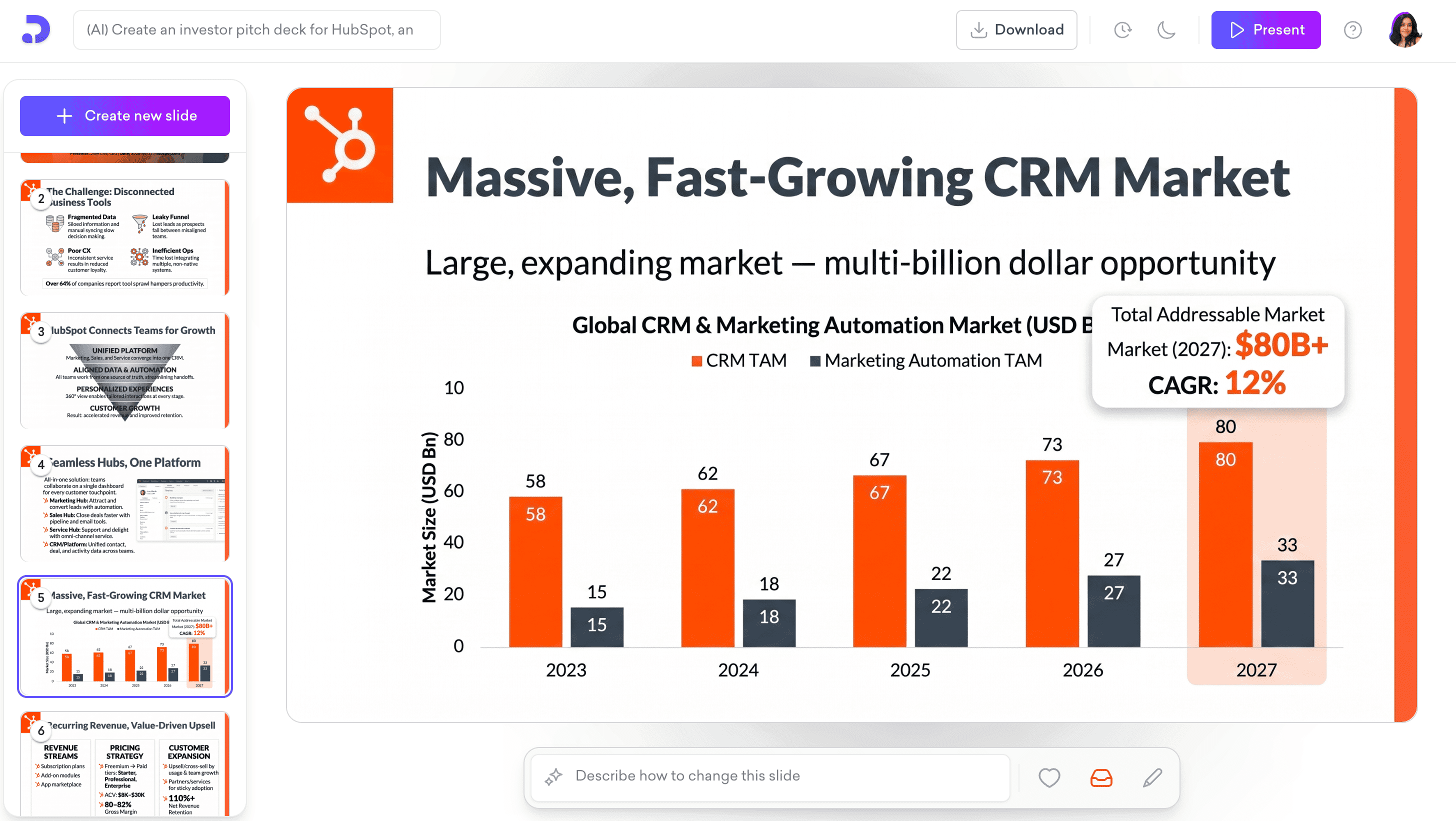
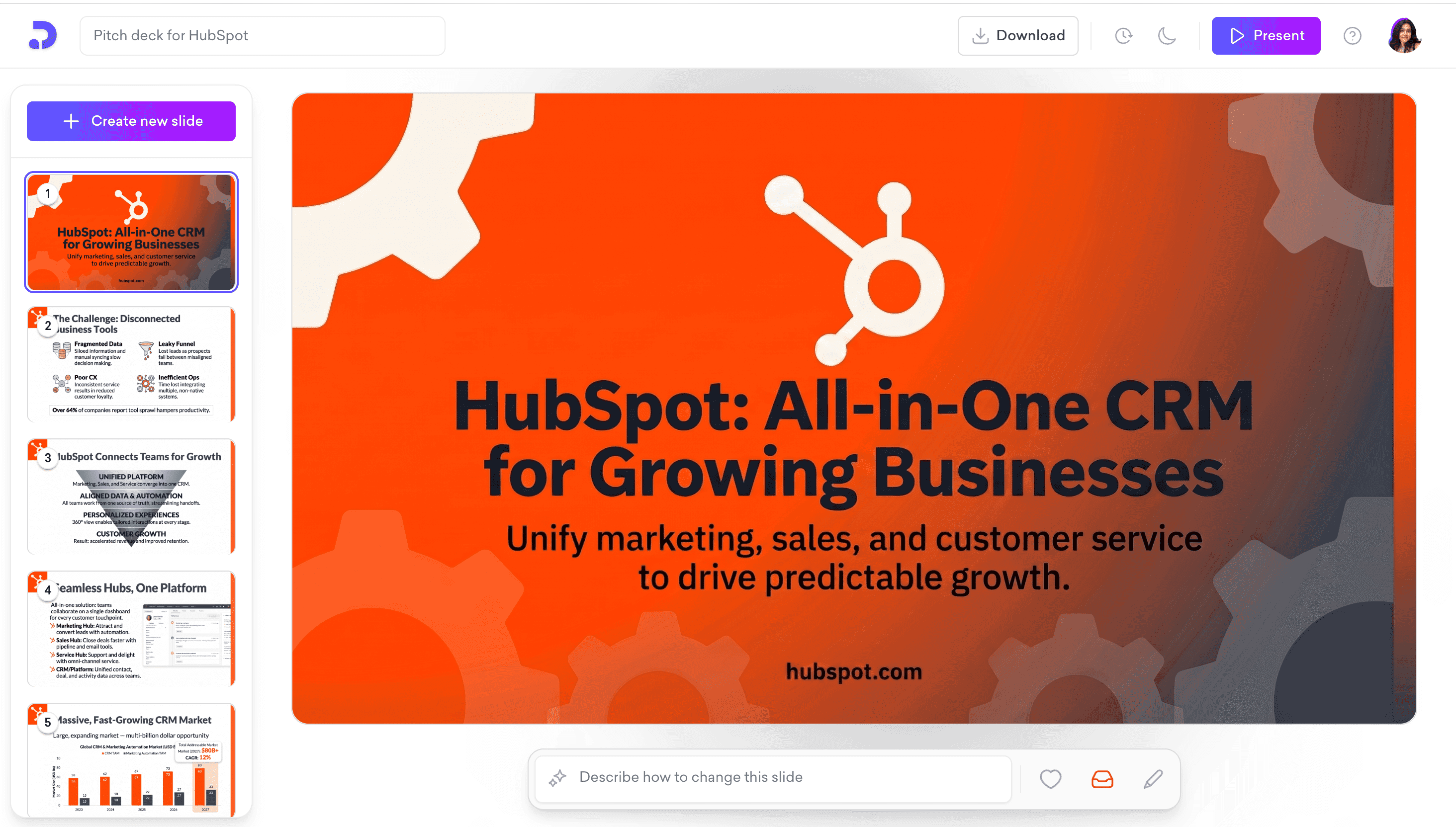
Step 3: AI Builds Your Slides
Decktopus creates a presentation flow with professionally structured slides.
Step 4: Your Branding Is Applied Automatically
Every slide uses your visual identity for a polished and consistent result.
Step 5: Customize and Present
Edit text, add slides, rearrange sections, and when you’re ready:
Share via link — send a live link anyone can open instantly, no download needed
Download as PDF — great for email attachments and print-ready proposals
Export as PowerPoint (PPT) — for teams that still work in traditional slide tools
Why Your Website Is the Smartest Branding Shortcut
Your website is already your most complete brand asset.
It likely already contains:
Correct logo files
Official brand colors
Font styles
Layout hierarchy
Tone and messaging
Product visuals
Trust signals
Instead of rebuilding that identity inside presentation software, using your website as the source keeps branding accurate and consistent.
This is especially useful when your brand evolves. If your website is updated, your presentation system reflects the same direction faster.
Why Decktopus Beats Manual Tools
Traditional tools like PowerPoint and Canva are flexible, but branding still takes manual effort.
You still need to:
Upload logos
Set brand kits
Choose fonts
Apply colors
Format slides manually
Decktopus removes that friction by turning your website into your presentation theme instantly. That makes it ideal for busy founders, freelancers, consultants, and sales teams.
Want to go deeper on keeping slides on-brand across your whole team? Read how Decktopus handles brand guidelines automatically.
Who Benefits Most from a Branded Presentation Maker
Not every business has an in-house designer. That’s why tools like Decktopus matter.
Founders and Startups
Founders need to move fast. Whether you’re pitching investors, applying to accelerators, or meeting potential partners, a polished investor presentation shapes first impressions. Instead of spending hours formatting slides, founders can focus on the story and numbers.
Freelancers and Consultants
Winning proposals often come down to trust. A clean branded presentation makes your service feel premium and established. It shows professionalism before you even speak.
Sales Teams
Sales reps need speed and consistency. Instead of each rep building their own version of a deck, teams can create approved branded presentations quickly and keep messaging aligned. See how Decktopus compares for sales decks with branding.
Marketing Teams
Campaign reports, quarterly recaps, client strategy decks, launch plans, webinars, internal updates. Marketing teams constantly build presentations. Automation saves hours every month.
Common Problems Decktopus Solves
Problem 1: Slides Look Generic
Many templates feel overused or disconnected from your company identity. Decktopus generates a custom branded slide deck instead of another generic template.
Problem 2: Design Takes Too Long
Manual formatting steals time from actual business work. AI removes repetitive setup tasks.
Problem 3: Team Inconsistency
Without standards, every employee creates different-looking decks. A saved brand system keeps presentations aligned.
Problem 4: Non-Designers Feel Stuck
Many smart professionals avoid presentations because design feels intimidating. With automatic branding, anyone can create polished decks confidently.
Best Use Cases for Branded Presentations
Startup Pitch Decks
Raise funding with a professional deck that matches your company website. Learn more about what makes a great pitch deck.
Client Proposals
Send polished proposals that reinforce your brand authority.
Sales Presentations
Keep every sales rep using consistent branded slides. Check out the full sales proposal guide for best practices.
Internal Team Updates
Make leadership decks cleaner and more professional.
Tips to Get the Best Results
Use Your Main Homepage URL. Your homepage usually contains the strongest and cleanest brand signals.
Keep Website Branding Updated. If your site uses outdated colors or logos, fix that first.
Use High-Quality Logos. SVG logos are ideal. PNG files also work well.
Review Final Slides Quickly. AI saves time, but always do a quick brand check before sending externally.
Reuse Your Saved Brand. Once your style is saved in Decktopus, future presentations become even faster.
Decktopus vs Canva vs PowerPoint
Canva
Great for templates and drag-and-drop design, but still requires manual branding setup.
PowerPoint
Powerful and familiar, but time-consuming when starting from scratch.
Decktopus
Built for speed, automation, and presentation creation using AI. If your goal is fast, professional, consistent branding, Decktopus has a clear advantage.
Why This Matters for Agencies
Agencies often create decks for multiple clients.
Imagine importing each client website and instantly generating a custom-branded presentation for proposals, reports, and campaigns. That can dramatically reduce production time while improving client experience.
For agencies, this is not just convenience. It is margin improvement.
Build Better First Impressions
Most presentations are judged before slide two.
The visual quality tells people whether to trust the information inside. That means branding is not decoration. It is persuasion.
A strong business presentation says:
We are credible
We are organized
We care about quality
We are ready to work with you
That matters in every meeting.
FAQ: Branded Presentations
How do I create a branded presentation quickly?
The fastest way is to use an AI presentation maker like Decktopus. Paste your website URL, and it automatically pulls your logo, fonts, and brand colors to create a polished deck in minutes.
Can I turn my website into a presentation?
Yes. If your website already reflects your branding, tools like Decktopus can use it as the source for your presentation theme and design.
What is the best tool for branded presentations?
If speed and brand consistency matter, Decktopus is one of the best options because it automates the branding process instead of requiring manual setup. See the full breakdown of AI presentation tools for business.
Why does presentation branding matter?
A consistent presentation builds trust, improves professionalism, and helps your business look more credible during pitches, proposals, and client meetings.
Can startups use branded presentations for fundraising?
Absolutely. A polished pitch deck can improve first impressions and make your startup appear more prepared and credible.
Most people think presentation quality comes from design skills. Usually, it comes from systems.
If your branding already exists on your website, there is no reason to rebuild it from scratch every time you need slides.
That means no hunting for logos. No guessing fonts. No manually matching colors. No wasting hours formatting decks.
With Decktopus, your website becomes the shortcut to a polished branded presentation.
Ready to Create Your First Branded Presentation?
Use Decktopus to turn your website into a presentation instantly.
Paste your URL, let AI import your branding, and build professional slides in minutes.
Whether you need investor pitch decks, sales presentations, client proposals, team reports, or marketing decks — Decktopus helps you create them faster and better.
Start for free at Decktopus.com →
Related posts

Webinar Follow-Up Emails: The Sequence That Runs After the Deck Ends
Learn how to build a webinar follow-up email sequence with behavioral segmentation, timely emails, better deliverability, and personalized outreach.
Presentations

Best TED Talks to Improve Your Presentation Skills
Watch ten of the best TED talks for presentation skills and use a practical exercise from each to improve structure, voice, visuals, and confidence.
Presentations

Decktopus AI Best Practices: The Complete Guide, Tips and Tricks (2026)
A complete guide to using Decktopus AI effectively, from writing better prompts and reviewing outlines to rehearsing with Loop and building carousels.
Presentations