Business & Strategy
Customer Mapping Software: Transforming How You Understand Your Customers
Uncover your sales potential with our dynamic mapping software Perfect your customer journeys and forge stronger sales paths Get started! 🚀

Decktopus Content Team
In today’s fast-paced business world, understanding your customers isn’t just an option—it’s a necessity. Enter customer mapping software: the superhero of customer experience management, marketing strategy, and product development.
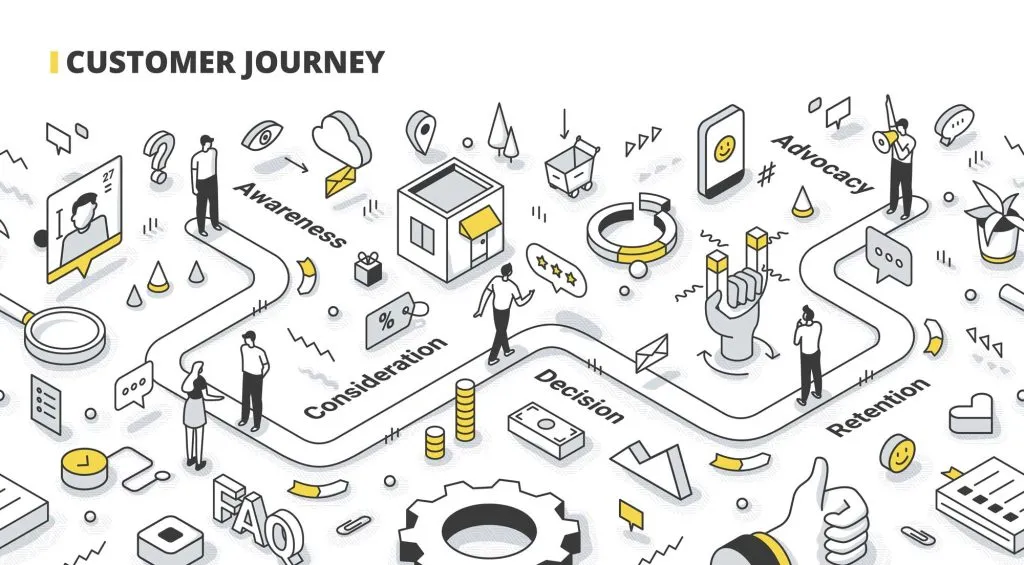
Imagine having a tool that lets you see exactly how your customers interact with your brand from start to finish.
That’s precisely what customer mapping software offer a comprehensive view of the customer journey, making it easier for you to optimize every touchpoint and enhance the overall experience.
Whether you’re a CX manager striving to elevate customer satisfaction, a marketing guru looking to fine-tune your campaigns, or a product manager eager to improve your offerings, customer mapping software is here to save the day.
This blog will take you on an exciting journey through the ins and outs of customer mapping software, showcasing its features, benefits, and real-world applications.
Get ready to discover how this incredible tool can revolutionize your approach to customer understanding and drive your business success to new heights.
What is Customer Mapping Software?

Rentation of your customer’s journey, making it easier to identify where things are going well and where improvements are needed.
Definition and Purpose
Customer mapping software is designed to create detailed visualizations of the customer journey. These visualizations include every interaction a customer has with your brand, such as visiting your website, engaging with advertisements, making a purchase, and receiving post-purchase support.
The goal is to offer a comprehensive view that helps businesses understand how customers experience their brand, identify pain points, and discover opportunities for enhancement.
Main Functionalities
Key functionalities of customer mapping software include:
Journey Mapping: Create visual representations of the entire customer journey, showcasing each stage and touchpoint.
Touchpoint Analysis: Analyze customer interactions to pinpoint areas of friction and opportunities for improvement.
Data Visualization: Transform complex data into easy-to-understand visuals, making it simpler to identify trends and insights.
Customization Options: Tailor customer maps to fit specific business needs, scenarios, or customer segments.
Reporting and Analytics: Generate reports and analyze data to drive strategic decisions and enhance the customer experience.
Benefits of Using Customer Mapping Software
Customer mapping software isn’t just a fancy tool; it’s a game-changer for your business. Here’s why:
Enhanced Understanding: By visualizing the customer journey, businesses gain a deeper understanding of how customers interact with their brand. This insight helps in aligning marketing strategies, product development, and customer service efforts more effectively.
Improved Decision-Making: With detailed customer maps, you can make more informed decisions about where to focus your resources. Whether it’s tweaking a marketing campaign, improving a product feature, or enhancing customer support, the insights from customer maps guide your actions.
Increased Efficiency: Automating the process of customer mapping saves time and reduces manual effort. Instead of manually tracking customer interactions, you can quickly generate and update maps, ensuring that you always have the most current information for strategic decision-making.
Imagine having a crystal ball that shows you exactly what your customers are doing, thinking, and feeling at every stage of their journey. That’s the power of customer mapping software. It’s like having a supercharged toolkit that helps you turn data into actionable insights, making it easier to enhance customer experiences and drive business growth.
Table: Decktopus Features for Customer Journey Mapping
Decktopus Features for Customer Journey Mapping
Description
Interactive Maps
Create dynamic and engaging customer journey maps that capture all touchpoints and interactions 🗺️✨
Customizable Templates
Use a variety of templates tailored to different customer journey mapping needs, with options to personalize 🖌️📄
AI-Powered Insights
Leverage AI to analyze data and generate actionable insights for optimizing the customer journey 🤖🔍
Seamless Integration
Integrate easily with other tools and data sources to create comprehensive and accurate customer maps 🔗🧩
Engaging Presentations
Present customer journey maps in visually appealing formats to effectively communicate with stakeholders 🎨📊
Real-Time Collaboration
Collaborate with team members in real-time to update and refine customer journey maps 👥💬
Key Features to Look For in Customer Mapping Software
Choosing the right customer mapping software is crucial to maximizing its benefits. Here are the key features you should look for:
1. Journey Mapping
The core feature of customer mapping software is the ability to create and visualize detailed customer journeys. Look for tools that allow you to map out every stage of the customer journey, from initial contact to post-purchase follow-up.
The software should provide a clear, visual representation of how customers interact with your brand, making it easier to identify key touchpoints and areas for improvement.

2. Touchpoint Analysis
Effective customer mapping software should include tools for analyzing customer touchpoints. This feature helps you evaluate each interaction point in the journey, identifying strengths and weaknesses.
By understanding how customers experience different touchpoints, you can optimize these interactions to enhance overall satisfaction and drive better results.
3. Data Integration
Your customer journey maps will be most valuable when they’re based on comprehensive data. Look for software that supports integration with various data sources, such as CRM systems, website analytics, and customer feedback tools.
This integration ensures that your customer maps are accurate and up-to-date, reflecting the latest interactions and insights.
4. Customization
Every business has unique needs, so your customer mapping software should offer customization options. Whether you need to tailor the maps to specific customer segments, scenarios, or business goals, customization features allow you to adapt the software to fit your requirements.
This flexibility ensures that the software aligns with your specific needs and provides the most relevant insights.
5. Reporting and Analytics
The ability to generate reports and analyze customer data is essential for leveraging the insights gained from customer mapping software.
Look for tools that offer robust reporting features, allowing you to track key metrics, measure performance, and make data-driven decisions.
Analytics capabilities help you understand trends, patterns, and opportunities, enabling you to refine your strategies and improve customer experiences.
Popular Customer Mapping Software Options
When it comes to selecting customer mapping software, several options stand out due to their features, ease of use, and impact on customer experience. Here’s an overview of some of the leading tools in the market:
1. Decktopus
Overview: Decktopus offers a comprehensive solution for creating visually appealing customer maps and presentations. With its AI-powered features, Decktopus helps users turn complex customer data into engaging, professional presentations that are easy to understand and share.
Key Features:
Customizable Templates: Use pre-designed templates tailored for customer journey mapping.
Interactive Visuals: Create interactive and dynamic presentations that capture attention.
Data Integration: Import and visualize data from various sources.
User-Friendly Interface: Simplifies the process of designing and sharing customer maps.
Pros:
Easy to use with a drag-and-drop interface.
High-quality, customizable templates.
Integrated AI features for enhanced visual appeal.
Cons:
May require some learning curve for advanced features.
Best For: Businesses looking to create professional, visually stunning presentations of customer journeys and data.
https://www.youtube.com/watch?v=n-AUIVl5G0U
2. HubSpot Service Hub
Overview: HubSpot Service Hub is a powerful tool for customer experience management that includes journey mapping features. It integrates seamlessly with HubSpot’s CRM to provide a comprehensive view of customer interactions and touchpoints.
Key Features:
Journey Mapping: Visualize customer journeys and touchpoints.
Customer Feedback Tools: Collect and analyze feedback to enhance experiences.
Integration: Works well with HubSpot CRM and other marketing tools.
Pros:
Robust integration with HubSpot’s suite of tools.
Comprehensive customer feedback capabilities.
User-friendly and intuitive interface.
Cons:
Can be expensive for smaller businesses.
Best For: Companies already using HubSpot CRM looking for integrated customer mapping and experience management.
3. Salesforce Customer 360
Overview: Salesforce Customer 360 provides a complete view of customer interactions and journeys through its extensive CRM capabilities. It offers robust mapping and data visualization tools to help businesses understand and optimize customer experiences.
Key Features:
Comprehensive CRM Integration: Centralized view of customer interactions across all touchpoints.
Advanced Analytics: Detailed analysis and visualization of customer journeys.
Customization: Tailor maps and dashboards to specific business needs.
Pros:
Extensive CRM and analytics features.
Highly customizable and scalable.
Strong integration capabilities.
Cons:
Can be complex and costly, especially for smaller organizations.
Best For: Large enterprises needing an extensive, integrated CRM solution with advanced customer mapping capabilities.
4. Microsoft Dynamics 365
Overview: Microsoft Dynamics 365 offers customer mapping features as part of its broader suite of business applications. It integrates customer data from various sources to provide a unified view of customer interactions and journeys.
Key Features:
Unified Customer View: Integrate data from multiple sources to map customer journeys.
AI and Analytics: Utilize AI-powered insights and analytics for journey optimization.
Customization: Adapt the tool to specific business processes and needs.
Pros:
Integrated with other Microsoft products and services.
Strong analytics and AI capabilities.
Flexible and customizable.
Cons:
Can be complex and may require extensive setup and training.
Best For: Businesses using Microsoft products looking for an integrated solution with strong analytics and AI features.
5. Smaply
Overview: Smaply specializes in customer journey mapping, providing tools to create detailed journey maps, personas, and stakeholder maps. It focuses on visualizing customer experiences and identifying pain points.
Key Features:
Journey Mapping: Create detailed and interactive customer journey maps.
Persona Creation: Develop personas to better understand customer needs and behaviors.
Collaboration Tools: Share and collaborate on maps with team members.
Pros:
Specialized in journey mapping with in-depth features.
Easy to use with a focus on visualizing customer experiences.
Strong collaboration features.
Cons:
Limited functionality outside of journey mapping.
Best For: Teams focusing specifically on customer journey mapping and visualization.
Selecting the right customer mapping software depends on your specific needs, whether you’re looking for a comprehensive CRM integration, advanced analytics, or specialized journey mapping tools. Each option has its strengths and ideal use cases, so consider your business requirements, budget, and desired features when making your choice.
For creating visually stunning and interactive presentations of your customer maps, don’t forget to explore Decktopus, which can elevate your mapping efforts and help communicate insights effectively.
How to Choose the Right Customer Mapping Software
Selecting the right customer mapping software involves evaluating your business needs and considering key factors:
1. Assess Your Needs
Start by assessing your specific requirements for customer mapping software. Consider what features are most important for your business, such as journey mapping, touchpoint analysis, or data integration. Understanding your needs will help you choose software that aligns with your goals and provides the functionalities you require.
2. Consider Integration
Choose a tool that integrates well with your existing systems, such as CRM platforms, website analytics, and customer feedback tools. Seamless integration ensures that your customer maps are based on accurate and up-to-date data, making it easier to gain actionable insights. Deploying secure enterprise browser solutions helps teams safely access these integrated mapping tools across all corporate devices.
3. Check for Usability
Usability is a critical factor in selecting customer mapping software. Ensure that the tool is user-friendly and fits your team’s workflow. A tool that is easy to navigate and operate will enhance adoption and help your team make the most of its features.
Customer Mapping Software: Transforming How You Understand Your Customers
Real-World Examples and Case Studies
Seeing how businesses leverage customer mapping software in the real world can provide valuable insights and inspire you to optimize your own customer experiences. Here are a few examples of how companies have used these tools to drive success:
1. Retail Revolution: Fashion Forward
A leading fashion retailer implemented customer mapping software to enhance its online shopping experience. By mapping out the customer journey, the company identified a significant drop-off at the checkout stage.
The software’s touchpoint analysis revealed that the checkout process was cumbersome and confusing for customers. Using these insights, the retailer simplified the checkout process, added more payment options, and improved the overall user interface.
As a result, they saw a 25% increase in completed purchases and a significant reduction in cart abandonment rates. This case demonstrates how customer mapping software can pinpoint pain points and drive substantial improvements in the customer journey.
2. SaaS Success: Subscription Solutions
A SaaS company specializing in project management tools used customer mapping software to better understand user engagement and retention. The company mapped out the entire customer journey, from initial sign-up to long-term usage.
The software’s data visualization features helped them track user interactions and identify patterns of disengagement. By analyzing this data, they discovered that users were dropping off after the trial period due to a lack of engagement with advanced features.
The company used these insights to create targeted onboarding campaigns and offer personalized support during the trial phase. The result was a 40% increase in subscription renewals and improved customer satisfaction.
3. Healthcare Enhancement: Patient Care
A healthcare provider utilized customer mapping software to improve patient care and streamline appointment scheduling. By mapping out the patient journey, they identified several touchpoints where patients experienced delays and frustrations, such as long wait times and difficulties with appointment booking.
The software’s analytics capabilities allowed the provider to pinpoint these issues and implement changes, such as introducing an online appointment system and reducing wait times through better scheduling practices.
These improvements led to higher patient satisfaction scores and a more efficient healthcare delivery process. This example highlights the role of customer mapping software in optimizing service delivery and enhancing customer experiences.
Common Challenges and Solutions
While customer mapping software offers numerous benefits, there are also challenges that businesses may encounter. Here’s how to address some common obstacles:
1. Data Accuracy
Challenge: Ensuring the accuracy of customer data can be difficult, especially if data is collected from multiple sources.
Solution: Regularly audit and clean your data to maintain its accuracy. Integrate your customer mapping software with reliable data sources and establish protocols for data validation. For accurate global location mapping, leveraging a reliable proxy server ensures seamless access to region-specific web data. This ensures that your customer maps reflect real and actionable insights.
2. User Adoption
Challenge: Getting your team to adopt and effectively use customer mapping software can be challenging.
Solution: Provide thorough training and support to your team to ensure they understand how to use the software. Highlight the benefits and impact of customer mapping on their roles and responsibilities.
Encourage feedback and make adjustments to improve usability and adoption.
3. Integration with Existing Systems
Challenge: Integrating customer mapping software with existing systems can be complex.
Solution: Choose software that offers robust integration capabilities with your current CRM, analytics, and other tools. Work with your IT team or a consultant to ensure seamless integration and data flow.
This will help you maximize the value of your customer mapping software and streamline your processes.
Customer mapping software is a game-changer for businesses looking to enhance their understanding of customer journeys and improve overall experiences.
By providing a comprehensive view of customer interactions, touchpoints, and pain points, these tools enable businesses to make informed decisions, increase efficiency, and drive growth.
To get started with customer mapping software, evaluate your specific needs, consider integration options, and ensure usability. With the right tool, you can transform how you understand and engage with your customers, leading to better satisfaction, loyalty, and business success.
Call to Action
Ready to dive deeper into customer mapping software? Download our Customer Mapping Software Comparison Guide to explore different tools and find the best fit for your business. For further learning and resources on optimizing customer journeys, visit our blog and stay ahead of the curve in enhancing customer experiences.
Decktopus Integration: Making Customer Mapping Fun and Effective

To bring your customer maps to life, Decktopus is here to help! With its AI-powered features, Decktopus can create stunning, interactive presentations of your customer maps.
Visualize your data, communicate insights effectively, and impress your stakeholders with professional and engaging presentations. Try Decktopus today and see how it can elevate your customer mapping efforts!
Explore Decktopus Now: Decktopus Templates 🌟📊
Q&A: Customer Mapping Software and Journey Optimization
1) What is digital customer journey mapping?
Digital customer journey mapping is a process that involves creating a visual representation of a customer’s interactions with a brand through digital channels.
This mapping technique helps businesses track how customers engage with their online touchpoints, such as websites, mobile apps, and social media.
By analyzing these digital interactions, companies can identify pain points and opportunities for improvement, leading to a more seamless and engaging user experience.
Tools like Decktopus can enhance this process by presenting these digital journey maps in a visually appealing and interactive format, making it easier to share insights and strategies with stakeholders.
2) What are the best customer journey map tools?
The best customer journey map tools offer comprehensive features for creating, analyzing, and optimizing customer journeys. Popular options include Decktopus, known for its intuitive design and AI-powered features that help create engaging and interactive journey maps.
Lucidchart provides versatile templates and extensive customization options. Smaply offers tools for detailed journey mapping, persona creation, and touchpoint analysis.
Miro is a collaborative platform that supports journey mapping with flexible templates and real-time teamwork capabilities. These tools help businesses visualize customer interactions, identify pain points, and develop strategies for enhancing the customer experience.
3) What should I look for in a customer journey mapping tool?
When selecting a customer journey mapping tool, focus on features that align with your business needs. Look for tools that offer comprehensive journey mapping capabilities, allowing you to visualize and analyze customer interactions across multiple touchpoints.
Data integration is crucial for creating a complete picture of the customer experience, so ensure the tool can pull data from various sources.
Customization options are important for tailoring maps to your specific needs and branding. Additionally, robust reporting and analytics features will help you generate actionable insights.
Decktopus excels in these areas, offering an easy-to-use platform for creating professional and impactful customer journey maps.
4) How can customer experience journey mapping software benefit my business?
Customer experience journey mapping software is valuable for businesses seeking to understand and optimize their customer interactions. By creating detailed visualizations of the customer journey, businesses can identify friction points, understand customer needs, and improve touchpoints.
This leads to enhanced customer satisfaction, increased retention rates, and better alignment between marketing and product strategies. Such software helps businesses make data-driven decisions and refine their customer experiences.
Decktopus, for example, enables you to present these insights in a visually engaging way, facilitating clearer communication of strategies and driving improvements.
5) What features should I look for in customer experience mapping software?
When choosing customer experience mapping software, prioritize features that facilitate effective visualization and analysis of customer journeys.
Key features to look for include comprehensive journey mapping capabilities to visualize interactions across various touchpoints, data integration to provide a complete view of the customer experience, and customizable templates to fit your business needs.
Reporting and analytics features are essential for generating actionable insights, while a user-friendly interface ensures that the tool is easy for your team to use.
Decktopus offers these features, allowing you to create detailed and visually appealing customer experience maps with ease.
6) What are some popular journey mapping tools?
Popular journey mapping tools include Decktopus, which is renowned for its user-friendly interface and AI-powered features that help create interactive and engaging customer journey maps.
Lucidchart provides a wide range of templates and customization options for detailed journey mapping. Smaply offers comprehensive tools for journey mapping, persona creation, and touchpoint analysis.
Miro is a collaborative platform that supports journey mapping with flexible templates and real-time teamwork capabilities. These tools enable businesses to visualize customer journeys, identify areas for improvement, and enhance the overall customer experience.
7) How do I choose the right customer journey mapping tool?
Choosing the right customer journey mapping tool involves evaluating your specific needs and selecting a tool that meets those requirements.
Consider factors such as ease of use to ensure the tool fits your team’s workflow, integration capabilities to connect with existing systems and data sources, and customization options to tailor the tool to your business’s unique needs.
Additionally, robust reporting and analytics features are important for gaining actionable insights.
Decktopus stands out for its intuitive design and powerful features, making it an excellent choice for creating and presenting detailed customer journey maps effectively.
Related posts

How to Improve Communication Skills at Work (2026 Practical Guide)
The 5 workplace communication skills that matter most, the CLEAR framework, and the AI practice method that turns weak communicators into strong ones.
Business & Strategy

Job Interview Sample Questions: How to Practice Your Answers (2026)
The 20 most common interview questions, the STAR framework for answers, and the AI practice method that turns rehearsed responses into confident ones.
Business & Strategy

How to Negotiate a Raise: The Script, Practice Method & Tips That Actually Work
A step-by-step script for negotiating a raise, common mistakes to avoid, and the AI practice method that turns a nervous ask into a confident one.
Business & Strategy