AI & Tools
Can Claude Create PowerPoints? Here's What You Need to Know
Can Claude create PowerPoints? Here's what Claude can and can't do for presentations, plus the fastest way to turn AI text into a ready-to-present deck.


Decktopus Content Team
No, Claude cannot generate a fully designed PowerPoint presentation in a standard chat conversation.
Claude can help you write slide content, structure your narrative, brainstorm ideas, and refine messaging. But it does not create ready-to-present .pptx files with layouts, branding, visuals, charts, and formatting included.
That’s where AI presentation tools like Decktopus come in. If you’re specifically building investor decks, sales presentations, or startup pitches, Decktopus also offers dedicated resources for creating AI-powered pitch decks.
If your goal is to create a polished PowerPoint presentation with AI instead of manually designing slides yourself, using Claude alongside a dedicated AI presentation maker is usually the fastest workflow.
Note: This article focuses on Claude.ai, the standard web chat. Claude, inside developer tools like Claude Code or certain desktop apps with file-creation capabilities can produce real .pptx files. For most users searching this question, the answer below applies.
What Can Claude Actually Do for Presentations?

Claude is extremely good at the thinking and writing side of presentation creation.
If you’re starting from scratch, Claude can help you move from a rough idea to a structured narrative very quickly.
Claude Can Generate Presentation Outlines
Give Claude your topic and audience, and it can organize your presentation into logical sections.
For example, you can ask:
“Create a pitch deck outline for a SaaS startup”
“Structure a sales presentation for enterprise buyers”
“Build a webinar presentation flow for marketers”
Claude is especially useful when you’re staring at a blank slide deck and don’t know where to begin.
Claude Can Write Slide Content
Claude can generate:
Slide headlines
Bullet points
Speaker notes
Presentation summaries
Supporting explanations
It also handles rewrites well.
For example:
“Make this more concise”
“Rewrite for investors”
“Simplify this technical explanation”
“Turn this into executive-level messaging”
This makes Claude a strong AI writing assistant for presentations.
Claude Can Brainstorm Angles and Messaging
One of Claude’s biggest strengths is strategic thinking.
It can help you:
Position a business idea
Anticipate objections
Refine value propositions
Improve storytelling
Strengthen persuasive arguments
This is particularly useful for:
Sales presentations
Investor presentations
Startup fundraising decks
Conference talks
If you’re building an investor presentation, this guide on what makes a winning pitch deck breaks down the essential slides investors expect to see.
Claude Can Summarize Research Into Slides
You can paste in:
Research documents
Meeting transcripts
Strategy docs
Slack conversations
Product notes
Claude can turn those materials into concise, presentation-ready talking points.
This saves a huge amount of manual summarization work.
Claude Can Suggest Visual Ideas
Claude can recommend:
Chart types
Diagram ideas
Slide layouts
Infographic concepts
Visual storytelling approaches
For example, it may suggest:
A timeline graphic
A funnel visualization
A comparison chart
A customer journey slide
However, Claude only suggests visuals. It does not generate or place them inside presentation slides.
Why Can’t Claude Generate Real PowerPoint Files?
Claude helps with presentation thinking. It does not handle presentation production.
That distinction matters.
Can Claude Export PPTX Files?
In a standard Claude.ai chat conversation, no.
Claude outputs text. It does not generate editable .pptx files you can immediately present or send.
You still need another tool to:
Build slides
Format layouts
Add branding
Insert visuals
Export PowerPoint files
Can Claude Design Slides Automatically?
No.
Claude can describe what a slide should look like, but it does not:
Apply layouts
Choose typography
Maintain brand consistency
Align visual elements
Design presentation aesthetics
You’ll still spend time manually formatting slides in:
Microsoft PowerPoint
Google Slides
Keynote
Claude Cannot Automatically Apply Branding
Claude does not know your:
Brand colors
Fonts
Logo usage
Design system
Slide style preferences
That means every slide still requires manual visual adjustments.
For companies creating recurring presentations, this becomes a major time cost.
Claude Cannot Generate Presentation Charts
If your presentation needs:
Bar charts
Pie charts
Line graphs
Data visualizations
You’ll still need to create those separately and insert them manually.
Claude Cannot Create a Finished Presentation Experience
Even with excellent writing, presentations still require:
Visual hierarchy
Consistent formatting
Slide pacing
Visual storytelling
Design polish
That production layer is missing from Claude alone.
Can You Still Create a PowerPoint Using Claude?
Yes. But there are workarounds.
Here are the most common approaches.
1. Copy Claude Output Into PowerPoint Manually
This is the simplest method.
Workflow:
Generate content with Claude
Open PowerPoint
Paste content slide by slide
Design everything manually
This works, but it removes most of the speed advantage AI is supposed to provide.
2. Use Claude With Python and PPTX Libraries
Developers can use:
Claude API
Claude Code
python-pptx
To programmatically generate presentation files.
However:
It requires coding
Output is usually visually basic
Branding still needs work
This is not practical for most non-technical users.
3. Use Claude Inside Specialized Apps
Some desktop apps and developer tools integrate Claude with presentation-generation workflows.
These setups can sometimes generate real slide decks.
But they often require:
Technical setup
API access
Developer environments
Third-party integrations
4. Use Claude With an AI Presentation Maker
This is the fastest workflow for most users.
Use Claude for:
Brainstorming
Outlining
Messaging
Rewriting
Then use an AI PowerPoint generator to:
Build slides
Generate visuals
Apply branding
Export the final presentation
This is where tools like Decktopus become useful.
If you’re comparing platforms, this roundup of the best AI pitch deck generators explains how different AI presentation tools handle design, branding, and storytelling.
What’s the Fastest Way to Turn Claude Output Into a Presentation?
For most users, the fastest workflow is:
Use Claude to develop ideas
Paste the content into Decktopus
Let Decktopus generate the full presentation automatically
Instead of spending hours designing slides manually, you get a complete deck in minutes.
How Decktopus AI Works
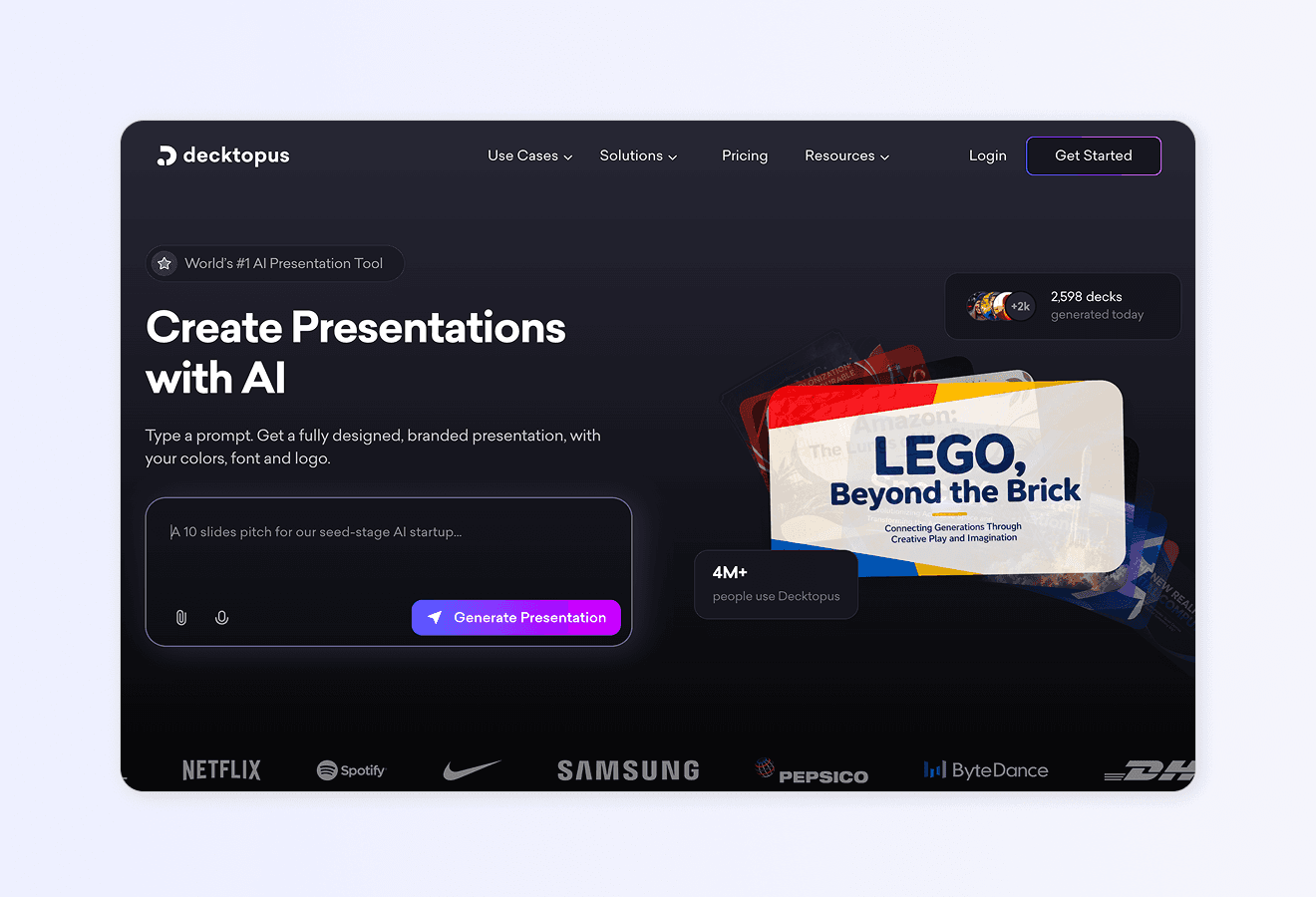
1. Describe Your Presentation
Type your topic or upload materials like:
Notes
Research
Briefs
Claude-generated content
Decktopus analyzes the information and creates a structured presentation draft.
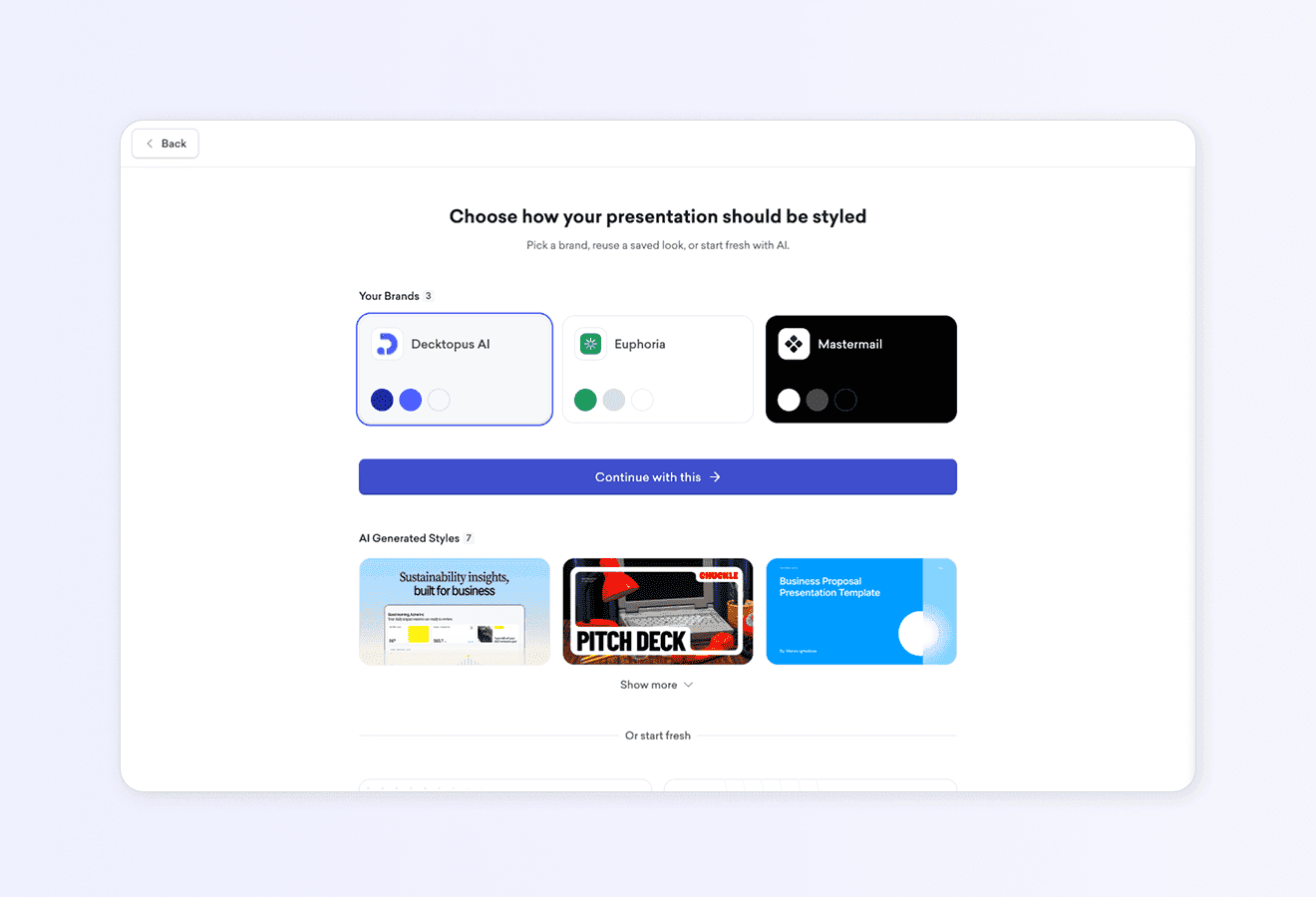
2. Apply Your Brand Automatically
You can:
Paste your website URL
Upload branding assets
Use a saved Brand Kit
Decktopus automatically applies:
Logos
Colors
Fonts
Branding consistency
This removes one of the biggest manual tasks in presentation design.
3. Review the AI-Generated Outline
Before the full deck is built, Decktopus generates a proposed slide structure.
You can:
Reorder sections
Adjust focus
Remove slides
Refine the narrative
4. Edit Slides Using Prompts
Instead of manually editing each element, you can type instructions like:
“Make this slide shorter”
“Generate a better visual”
“Turn this into a timeline”
“Use a stacked bar chart”
“Rewrite for investors”
This creates a much faster editing workflow.
5. Export or Share
Once finished, you can:
Export as PPT
Download as PDF
Share via link
Present directly
That’s the major difference. Claude writes. Decktopus builds.

Claude vs Decktopus Comparison
[[EMBED:PGRpdiBzdHlsZT0ib3ZlcmZsb3cteDphdXRvO21hcmdpbjoyMHB4IDAiPjx0YWJsZSBzdHlsZT0id2lkdGg6MTAwJTtib3JkZXItY29sbGFwc2U6Y29sbGFwc2U7Zm9udC1zaXplOjE1cHg7bWFyZ2luOjhweCAwIj48dGggc3R5bGU9ImJvcmRlcjoxcHggc29saWQgI2UzZTZlYTtwYWRkaW5nOjEwcHggMTRweDt0ZXh0LWFsaWduOmxlZnQ7YmFja2dyb3VuZDojZjRmNmY4O2ZvbnQtd2VpZ2h0OjYwMCI+PHRyPjx0aCBzdHlsZT0iYm9yZGVyOjFweCBzb2xpZCAjZTNlNmVhO3BhZGRpbmc6MTBweCAxNHB4O3RleHQtYWxpZ246bGVmdDtiYWNrZ3JvdW5kOiNmNGY2Zjg7Zm9udC13ZWlnaHQ6NjAwIj5DYXBhYmlsaXR5PC90aD48dGggc3R5bGU9ImJvcmRlcjoxcHggc29saWQgI2UzZTZlYTtwYWRkaW5nOjEwcHggMTRweDt0ZXh0LWFsaWduOmxlZnQ7YmFja2dyb3VuZDojZjRmNmY4O2ZvbnQtd2VpZ2h0OjYwMCI+Q2xhdWRlLmFpPC90aD48dGggc3R5bGU9ImJvcmRlcjoxcHggc29saWQgI2UzZTZlYTtwYWRkaW5nOjEwcHggMTRweDt0ZXh0LWFsaWduOmxlZnQ7YmFja2dyb3VuZDojZjRmNmY4O2ZvbnQtd2VpZ2h0OjYwMCI+RGVja3RvcHVzPC90aD48L3RyPjwvdGhlYWQ+PHRib2R5Pjx0ciBzdHlsZT0iYmFja2dyb3VuZDojRkZGRkZGOyI+PHRkIHN0eWxlPSJib3JkZXI6MXB4IHNvbGlkICNlM2U2ZWE7cGFkZGluZzoxMHB4IDE0cHg7dGV4dC1hbGlnbjpsZWZ0O3ZlcnRpY2FsLWFsaWduOnRvcCI+R2VuZXJhdGUgb3V0bGluZXM8L3RkPjx0ZCBzdHlsZT0iYm9yZGVyOjFweCBzb2xpZCAjZTNlNmVhO3BhZGRpbmc6MTBweCAxNHB4O3RleHQtYWxpZ246bGVmdDt2ZXJ0aWNhbC1hbGlnbjp0b3AiPjxzcGFuIHN0eWxlPSJkaXNwbGF5OmlubGluZS1ibG9jazt3aWR0aDoyOHB4O2hlaWdodDoyOHB4O2xpbmUtaGVpZ2h0OjI4cHg7Ym9yZGVyLXJhZGl1czo1MCU7YmFja2dyb3VuZDojRThGNUU5O2NvbG9yOiMyRTdEMzI7Zm9udC13ZWlnaHQ6NzAwOyI+4pyTPC9zcGFuPjwvdGQ+PHRkIHN0eWxlPSJib3JkZXI6MXB4IHNvbGlkICNlM2U2ZWE7cGFkZGluZzoxMHB4IDE0cHg7dGV4dC1hbGlnbjpsZWZ0O3ZlcnRpY2FsLWFsaWduOnRvcCI+PHNwYW4gc3R5bGU9ImRpc3BsYXk6aW5saW5lLWJsb2NrO3dpZHRoOjI4cHg7aGVpZ2h0OjI4cHg7bGluZS1oZWlnaHQ6MjhweDtib3JkZXItcmFkaXVzOjUwJTtiYWNrZ3JvdW5kOiNFOEY1RTk7Y29sb3I6IzJFN0QzMjtmb250LXdlaWdodDo3MDA7Ij7inJM8L3NwYW4+PC90ZD48L3RyPjx0ciBzdHlsZT0iYmFja2dyb3VuZDojRkJGQkY4OyI+PHRkIHN0eWxlPSJib3JkZXI6MXB4IHNvbGlkICNlM2U2ZWE7cGFkZGluZzoxMHB4IDE0cHg7dGV4dC1hbGlnbjpsZWZ0O3ZlcnRpY2FsLWFsaWduOnRvcCI+V3JpdGUgc2xpZGUgY29weTwvdGQ+PHRkIHN0eWxlPSJib3JkZXI6MXB4IHNvbGlkICNlM2U2ZWE7cGFkZGluZzoxMHB4IDE0cHg7dGV4dC1hbGlnbjpsZWZ0O3ZlcnRpY2FsLWFsaWduOnRvcCI+PHNwYW4gc3R5bGU9ImRpc3BsYXk6aW5saW5lLWJsb2NrO3dpZHRoOjI4cHg7aGVpZ2h0OjI4cHg7bGluZS1oZWlnaHQ6MjhweDtib3JkZXItcmFkaXVzOjUwJTtiYWNrZ3JvdW5kOiNFOEY1RTk7Y29sb3I6IzJFN0QzMjtmb250LXdlaWdodDo3MDA7Ij7inJM8L3NwYW4+PC90ZD48dGQgc3R5bGU9ImJvcmRlcjoxcHggc29saWQgI2UzZTZlYTtwYWRkaW5nOjEwcHggMTRweDt0ZXh0LWFsaWduOmxlZnQ7dmVydGljYWwtYWxpZ246dG9wIj48c3BhbiBzdHlsZT0iZGlzcGxheTppbmxpbmUtYmxvY2s7d2lkdGg6MjhweDtoZWlnaHQ6MjhweDtsaW5lLWhlaWdodDoyOHB4O2JvcmRlci1yYWRpdXM6NTAlO2JhY2tncm91bmQ6I0U4RjVFOTtjb2xvcjojMkU3RDMyO2ZvbnQtd2VpZ2h0OjcwMDsiPuKckzwvc3Bhbj48L3RkPjwvdHI+PHRyIHN0eWxlPSJiYWNrZ3JvdW5kOiNGRkZGRkY7Ij48dGQgc3R5bGU9ImJvcmRlcjoxcHggc29saWQgI2UzZTZlYTtwYWRkaW5nOjEwcHggMTRweDt0ZXh0LWFsaWduOmxlZnQ7dmVydGljYWwtYWxpZ246dG9wIj5FeHBvcnQgLnBwdHggZmlsZXM8L3RkPjx0ZCBzdHlsZT0iYm9yZGVyOjFweCBzb2xpZCAjZTNlNmVhO3BhZGRpbmc6MTBweCAxNHB4O3RleHQtYWxpZ246bGVmdDt2ZXJ0aWNhbC1hbGlnbjp0b3AiPjxzcGFuIHN0eWxlPSJkaXNwbGF5OmlubGluZS1ibG9jazt3aWR0aDoyOHB4O2hlaWdodDoyOHB4O2xpbmUtaGVpZ2h0OjI4cHg7Ym9yZGVyLXJhZGl1czo1MCU7YmFja2dyb3VuZDojRkZFQkVFO2NvbG9yOiNDNjI4Mjg7Zm9udC13ZWlnaHQ6NzAwOyI+4pyXPC9zcGFuPjwvdGQ+PHRkIHN0eWxlPSJib3JkZXI6MXB4IHNvbGlkICNlM2U2ZWE7cGFkZGluZzoxMHB4IDE0cHg7dGV4dC1hbGlnbjpsZWZ0O3ZlcnRpY2FsLWFsaWduOnRvcCI+PHNwYW4gc3R5bGU9ImRpc3BsYXk6aW5saW5lLWJsb2NrO3dpZHRoOjI4cHg7aGVpZ2h0OjI4cHg7bGluZS1oZWlnaHQ6MjhweDtib3JkZXItcmFkaXVzOjUwJTtiYWNrZ3JvdW5kOiNFOEY1RTk7Y29sb3I6IzJFN0QzMjtmb250LXdlaWdodDo3MDA7Ij7inJM8L3NwYW4+PC90ZD48L3RyPjx0ciBzdHlsZT0iYmFja2dyb3VuZDojRkJGQkY4OyI+PHRkIHN0eWxlPSJib3JkZXI6MXB4IHNvbGlkICNlM2U2ZWE7cGFkZGluZzoxMHB4IDE0cHg7dGV4dC1hbGlnbjpsZWZ0O3ZlcnRpY2FsLWFsaWduOnRvcCI+QXV0by1kZXNpZ24gc2xpZGVzPC90ZD48dGQgc3R5bGU9ImJvcmRlcjoxcHggc29saWQgI2UzZTZlYTtwYWRkaW5nOjEwcHggMTRweDt0ZXh0LWFsaWduOmxlZnQ7dmVydGljYWwtYWxpZ246dG9wIj48c3BhbiBzdHlsZT0iZGlzcGxheTppbmxpbmUtYmxvY2s7d2lkdGg6MjhweDtoZWlnaHQ6MjhweDtsaW5lLWhlaWdodDoyOHB4O2JvcmRlci1yYWRpdXM6NTAlO2JhY2tncm91bmQ6I0ZGRUJFRTtjb2xvcjojQzYyODI4O2ZvbnQtd2VpZ2h0OjcwMDsiPuKclzwvc3Bhbj48L3RkPjx0ZCBzdHlsZT0iYm9yZGVyOjFweCBzb2xpZCAjZTNlNmVhO3BhZGRpbmc6MTBweCAxNHB4O3RleHQtYWxpZ246bGVmdDt2ZXJ0aWNhbC1hbGlnbjp0b3AiPjxzcGFuIHN0eWxlPSJkaXNwbGF5OmlubGluZS1ibG9jazt3aWR0aDoyOHB4O2hlaWdodDoyOHB4O2xpbmUtaGVpZ2h0OjI4cHg7Ym9yZGVyLXJhZGl1czo1MCU7YmFja2dyb3VuZDojRThGNUU5O2NvbG9yOiMyRTdEMzI7Zm9udC13ZWlnaHQ6NzAwOyI+4pyTPC9zcGFuPjwvdGQ+PC90cj48dHIgc3R5bGU9ImJhY2tncm91bmQ6I0ZGRkZGRjsiPjx0ZCBzdHlsZT0iYm9yZGVyOjFweCBzb2xpZCAjZTNlNmVhO3BhZGRpbmc6MTBweCAxNHB4O3RleHQtYWxpZ246bGVmdDt2ZXJ0aWNhbC1hbGlnbjp0b3AiPkFwcGx5IGJyYW5kaW5nIGF1dG9tYXRpY2FsbHk8L3RkPjx0ZCBzdHlsZT0iYm9yZGVyOjFweCBzb2xpZCAjZTNlNmVhO3BhZGRpbmc6MTBweCAxNHB4O3RleHQtYWxpZ246bGVmdDt2ZXJ0aWNhbC1hbGlnbjp0b3AiPjxzcGFuIHN0eWxlPSJkaXNwbGF5OmlubGluZS1ibG9jazt3aWR0aDoyOHB4O2hlaWdodDoyOHB4O2xpbmUtaGVpZ2h0OjI4cHg7Ym9yZGVyLXJhZGl1czo1MCU7YmFja2dyb3VuZDojRkZFQkVFO2NvbG9yOiNDNjI4Mjg7Zm9udC13ZWlnaHQ6NzAwOyI+4pyXPC9zcGFuPjwvdGQ+PHRkIHN0eWxlPSJib3JkZXI6MXB4IHNvbGlkICNlM2U2ZWE7cGFkZGluZzoxMHB4IDE0cHg7dGV4dC1hbGlnbjpsZWZ0O3ZlcnRpY2FsLWFsaWduOnRvcCI+PHNwYW4gc3R5bGU9ImRpc3BsYXk6aW5saW5lLWJsb2NrO3dpZHRoOjI4cHg7aGVpZ2h0OjI4cHg7bGluZS1oZWlnaHQ6MjhweDtib3JkZXItcmFkaXVzOjUwJTtiYWNrZ3JvdW5kOiNFOEY1RTk7Y29sb3I6IzJFN0QzMjtmb250LXdlaWdodDo3MDA7Ij7inJM8L3NwYW4+PC90ZD48L3RyPjx0ciBzdHlsZT0iYmFja2dyb3VuZDojRkJGQkY4OyI+PHRkIHN0eWxlPSJib3JkZXI6MXB4IHNvbGlkICNlM2U2ZWE7cGFkZGluZzoxMHB4IDE0cHg7dGV4dC1hbGlnbjpsZWZ0O3ZlcnRpY2FsLWFsaWduOnRvcCI+R2VuZXJhdGUgdmlzdWFsczwvdGQ+PHRkIHN0eWxlPSJib3JkZXI6MXB4IHNvbGlkICNlM2U2ZWE7cGFkZGluZzoxMHB4IDE0cHg7dGV4dC1hbGlnbjpsZWZ0O3ZlcnRpY2FsLWFsaWduOnRvcCI+PHNwYW4gc3R5bGU9ImRpc3BsYXk6aW5saW5lLWJsb2NrO3dpZHRoOjI4cHg7aGVpZ2h0OjI4cHg7bGluZS1oZWlnaHQ6MjhweDtib3JkZXItcmFkaXVzOjUwJTtiYWNrZ3JvdW5kOiNGRkVCRUU7Y29sb3I6I0M2MjgyODtmb250LXdlaWdodDo3MDA7Ij7inJc8L3NwYW4+PC90ZD48dGQgc3R5bGU9ImJvcmRlcjoxcHggc29saWQgI2UzZTZlYTtwYWRkaW5nOjEwcHggMTRweDt0ZXh0LWFsaWduOmxlZnQ7dmVydGljYWwtYWxpZ246dG9wIj48c3BhbiBzdHlsZT0iZGlzcGxheTppbmxpbmUtYmxvY2s7d2lkdGg6MjhweDtoZWlnaHQ6MjhweDtsaW5lLWhlaWdodDoyOHB4O2JvcmRlci1yYWRpdXM6NTAlO2JhY2tncm91bmQ6I0U4RjVFOTtjb2xvcjojMkU3RDMyO2ZvbnQtd2VpZ2h0OjcwMDsiPuKckzwvc3Bhbj48L3RkPjwvdHI+PHRyIHN0eWxlPSJiYWNrZ3JvdW5kOiNGRkZGRkY7Ij48dGQgc3R5bGU9ImJvcmRlcjoxcHggc29saWQgI2UzZTZlYTtwYWRkaW5nOjEwcHggMTRweDt0ZXh0LWFsaWduOmxlZnQ7dmVydGljYWwtYWxpZ246dG9wIj5DcmVhdGUgY2hhcnRzPC90ZD48dGQgc3R5bGU9ImJvcmRlcjoxcHggc29saWQgI2UzZTZlYTtwYWRkaW5nOjEwcHggMTRweDt0ZXh0LWFsaWduOmxlZnQ7dmVydGljYWwtYWxpZ246dG9wIj48c3BhbiBzdHlsZT0iZGlzcGxheTppbmxpbmUtYmxvY2s7d2lkdGg6MjhweDtoZWlnaHQ6MjhweDtsaW5lLWhlaWdodDoyOHB4O2JvcmRlci1yYWRpdXM6NTAlO2JhY2tncm91bmQ6I0ZGRUJFRTtjb2xvcjojQzYyODI4O2ZvbnQtd2VpZ2h0OjcwMDsiPuKclzwvc3Bhbj48L3RkPjx0ZCBzdHlsZT0iYm9yZGVyOjFweCBzb2xpZCAjZTNlNmVhO3BhZGRpbmc6MTBweCAxNHB4O3RleHQtYWxpZ246bGVmdDt2ZXJ0aWNhbC1hbGlnbjp0b3AiPjxzcGFuIHN0eWxlPSJkaXNwbGF5OmlubGluZS1ibG9jazt3aWR0aDoyOHB4O2hlaWdodDoyOHB4O2xpbmUtaGVpZ2h0OjI4cHg7Ym9yZGVyLXJhZGl1czo1MCU7YmFja2dyb3VuZDojRThGNUU5O2NvbG9yOiMyRTdEMzI7Zm9udC13ZWlnaHQ6NzAwOyI+4pyTPC9zcGFuPjwvdGQ+PC90cj48dHIgc3R5bGU9ImJhY2tncm91bmQ6I0ZCRkJGODsiPjx0ZCBzdHlsZT0iYm9yZGVyOjFweCBzb2xpZCAjZTNlNmVhO3BhZGRpbmc6MTBweCAxNHB4O3RleHQtYWxpZ246bGVmdDt2ZXJ0aWNhbC1hbGlnbjp0b3AiPlNoYXJlIHByZXNlbnRhdGlvbnM8L3RkPjx0ZCBzdHlsZT0iYm9yZGVyOjFweCBzb2xpZCAjZTNlNmVhO3BhZGRpbmc6MTBweCAxNHB4O3RleHQtYWxpZ246bGVmdDt2ZXJ0aWNhbC1hbGlnbjp0b3AiPjxzcGFuIHN0eWxlPSJkaXNwbGF5OmlubGluZS1ibG9jazt3aWR0aDoyOHB4O2hlaWdodDoyOHB4O2xpbmUtaGVpZ2h0OjI4cHg7Ym9yZGVyLXJhZGl1czo1MCU7YmFja2dyb3VuZDojRkZFQkVFO2NvbG9yOiNDNjI4Mjg7Zm9udC13ZWlnaHQ6NzAwOyI+4pyXPC9zcGFuPjwvdGQ+PHRkIHN0eWxlPSJib3JkZXI6MXB4IHNvbGlkICNlM2U2ZWE7cGFkZGluZzoxMHB4IDE0cHg7dGV4dC1hbGlnbjpsZWZ0O3ZlcnRpY2FsLWFsaWduOnRvcCI+PHNwYW4gc3R5bGU9ImRpc3BsYXk6aW5saW5lLWJsb2NrO3dpZHRoOjI4cHg7aGVpZ2h0OjI4cHg7bGluZS1oZWlnaHQ6MjhweDtib3JkZXItcmFkaXVzOjUwJTtiYWNrZ3JvdW5kOiNFOEY1RTk7Y29sb3I6IzJFN0QzMjtmb250LXdlaWdodDo3MDA7Ij7inJM8L3NwYW4+PC90ZD48L3RyPjx0ciBzdHlsZT0iYmFja2dyb3VuZDojRkZGRkZGOyI+PHRkIHN0eWxlPSJib3JkZXI6MXB4IHNvbGlkICNlM2U2ZWE7cGFkZGluZzoxMHB4IDE0cHg7dGV4dC1hbGlnbjpsZWZ0O3ZlcnRpY2FsLWFsaWduOnRvcCI+UHJvbXB0LWJhc2VkIGVkaXRpbmc8L3RkPjx0ZCBzdHlsZT0iYm9yZGVyOjFweCBzb2xpZCAjZTNlNmVhO3BhZGRpbmc6MTBweCAxNHB4O3RleHQtYWxpZ246bGVmdDt2ZXJ0aWNhbC1hbGlnbjp0b3AiPlRleHQgb25seTwvdGQ+PHRkIHN0eWxlPSJib3JkZXI6MXB4IHNvbGlkICNlM2U2ZWE7cGFkZGluZzoxMHB4IDE0cHg7dGV4dC1hbGlnbjpsZWZ0O3ZlcnRpY2FsLWFsaWduOnRvcCI+PHNwYW4gc3R5bGU9ImRpc3BsYXk6aW5saW5lLWJsb2NrO3dpZHRoOjI4cHg7aGVpZ2h0OjI4cHg7bGluZS1oZWlnaHQ6MjhweDtib3JkZXItcmFkaXVzOjUwJTtiYWNrZ3JvdW5kOiNFOEY1RTk7Y29sb3I6IzJFN0QzMjtmb250LXdlaWdodDo3MDA7Ij7inJM8L3NwYW4+PC90ZD48L3RyPjx0ciBzdHlsZT0iYmFja2dyb3VuZDojRkJGQkY4OyI+PHRkIHN0eWxlPSJib3JkZXI6MXB4IHNvbGlkICNlM2U2ZWE7cGFkZGluZzoxMHB4IDE0cHg7dGV4dC1hbGlnbjpsZWZ0O3ZlcnRpY2FsLWFsaWduOnRvcCI+QnJhbmQgY29uc2lzdGVuY3kgY2hlY2tzPC90ZD48dGQgc3R5bGU9ImJvcmRlcjoxcHggc29saWQgI2UzZTZlYTtwYWRkaW5nOjEwcHggMTRweDt0ZXh0LWFsaWduOmxlZnQ7dmVydGljYWwtYWxpZ246dG9wIj48c3BhbiBzdHlsZT0iZGlzcGxheTppbmxpbmUtYmxvY2s7d2lkdGg6MjhweDtoZWlnaHQ6MjhweDtsaW5lLWhlaWdodDoyOHB4O2JvcmRlci1yYWRpdXM6NTAlO2JhY2tncm91bmQ6I0ZGRUJFRTtjb2xvcjojQzYyODI4O2ZvbnQtd2VpZ2h0OjcwMDsiPuKclzwvc3Bhbj48L3RkPjx0ZCBzdHlsZT0iYm9yZGVyOjFweCBzb2xpZCAjZTNlNmVhO3BhZGRpbmc6MTBweCAxNHB4O3RleHQtYWxpZ246bGVmdDt2ZXJ0aWNhbC1hbGlnbjp0b3AiPjxzcGFuIHN0eWxlPSJkaXNwbGF5OmlubGluZS1ibG9jazt3aWR0aDoyOHB4O2hlaWdodDoyOHB4O2xpbmUtaGVpZ2h0OjI4cHg7Ym9yZGVyLXJhZGl1czo1MCU7YmFja2dyb3VuZDojRThGNUU5O2NvbG9yOiMyRTdEMzI7Zm9udC13ZWlnaHQ6NzAwOyI+4pyTPC9zcGFuPjwvdGQ+PC90cj48L3Rib2R5PjwvdGFibGU+PC9kaXY+]]
When Should You Use Claude?
Claude is best when you need help with:
Brainstorming ideas
Structuring a narrative
Writing presentation copy
Simplifying complex topics
Refining messaging
Creating speaker notes
Summarizing research
Think of Claude as the strategy and writing layer.
When Should You Use Decktopus?
Decktopus is best when you need:
A real PowerPoint file
AI-generated slide design
Automated branding
Visual generation
Faster presentation production
Share-ready decks
Presentation editing without manual formatting
Think of Decktopus as the production layer.
The Best Workflow: Using Claude and Decktopus Together
For many teams, the best setup is combining both tools.
Example: Startup Founder Workflow
A startup founder preparing an investor pitch might use Claude to:
Refine the story
Clarify positioning
Simplify technical explanations
Draft investor messaging
Then use Decktopus to:
Generate the actual deck
Apply branding
Create visuals
Build charts
Export a polished presentation
This can reduce presentation creation time from several hours to under 30 minutes.
That’s why many users combine:
AI writing tools
AI slide makers
AI presentation software
Instead of relying on one tool for everything.
Founders often use Claude to refine investor messaging before turning it into a presentation. This guide on how to sell an idea effectively is especially useful for startup teams preparing investor or partnership presentations.
If you’re fundraising, Decktopus also offers AI-powered pitch deck generation built specifically for founders and fundraising teams, with brand import and prompt-based editing.
Frequently Asked Questions
Can Claude create a PowerPoint file directly?
No. In a standard Claude.ai chat, Claude cannot export editable .pptx files directly.
It can generate presentation text and structure, but another tool is still needed to build the actual slides.
Is Claude better for writing or designing presentations?
Claude is much stronger at writing.
It excels at:
Outlining
Messaging
Rewriting
Summarization
For visual design and slide generation, dedicated AI presentation tools are much faster.
Can I use Claude content inside Decktopus?
Yes.
Many users draft content with Claude first, then paste it into Decktopus to generate the final presentation automatically.
What’s the fastest way to create a PowerPoint with AI?
The fastest workflow is usually:
Generate ideas and messaging with Claude
Use Decktopus to build and design the presentation automatically
This dramatically reduces manual formatting work.
Does Decktopus use AI?
Yes.
Decktopus uses AI to:
Structure presentations
Generate slide content
Create visuals
Apply branding
Build presentation layouts
The focus is on producing finished, ready-to-present decks.
Can Claude help with pitch decks?
Yes.
Claude is excellent for:
Pitch storytelling
Investor messaging
Simplifying technical concepts
Refining startup narratives
Many founders use Claude for messaging and Decktopus for final presentation production.
If you’re building a fundraising deck, our guide on the best AI pitch deck generators can help improve investor readiness.
Ready to Turn Claude Output Into a Real Presentation?
Use Claude to brainstorm your ideas, then use Decktopus AI to generate a polished presentation complete with branding, visuals, layouts, and charts.
If you’re preparing:
An investor deck: explore our AI pitch deck guide
A startup fundraising presentation: see how to build a winning pitch deck for founders
A sales presentation: read the guide on how to sell an idea
Instead of manually formatting slides for hours, you can go from idea to finished presentation in minutes.
Related posts

8 AI Startups That Nailed Their Branding with a .AI Domain
Artificial intelligence continues to reshape the way we live and work. As an essential tool now powering a great number of industries, it’s no surprise that AI is driving a new era of search, too.
AI & Tools

5 Best AI Audio Enhancement Tools in 2026
AI Audio Enhancement Tools: Elevating Your Sound Experience
AI & Tools

AI Checker 2026: Unveiling the Latest in AI Detection Technology - ChatGPT, GPT-3, and Beyond
Explore the power of AI content checkers with our comprehensive guide. Discover how these intelligent tools enhance accuracy and efficiency in various applications. Stay ahead in 2026 with insights on the latest advancements and practical tips for leveraging AI checkers and chatgpt detectors effectively.
AI & Tools